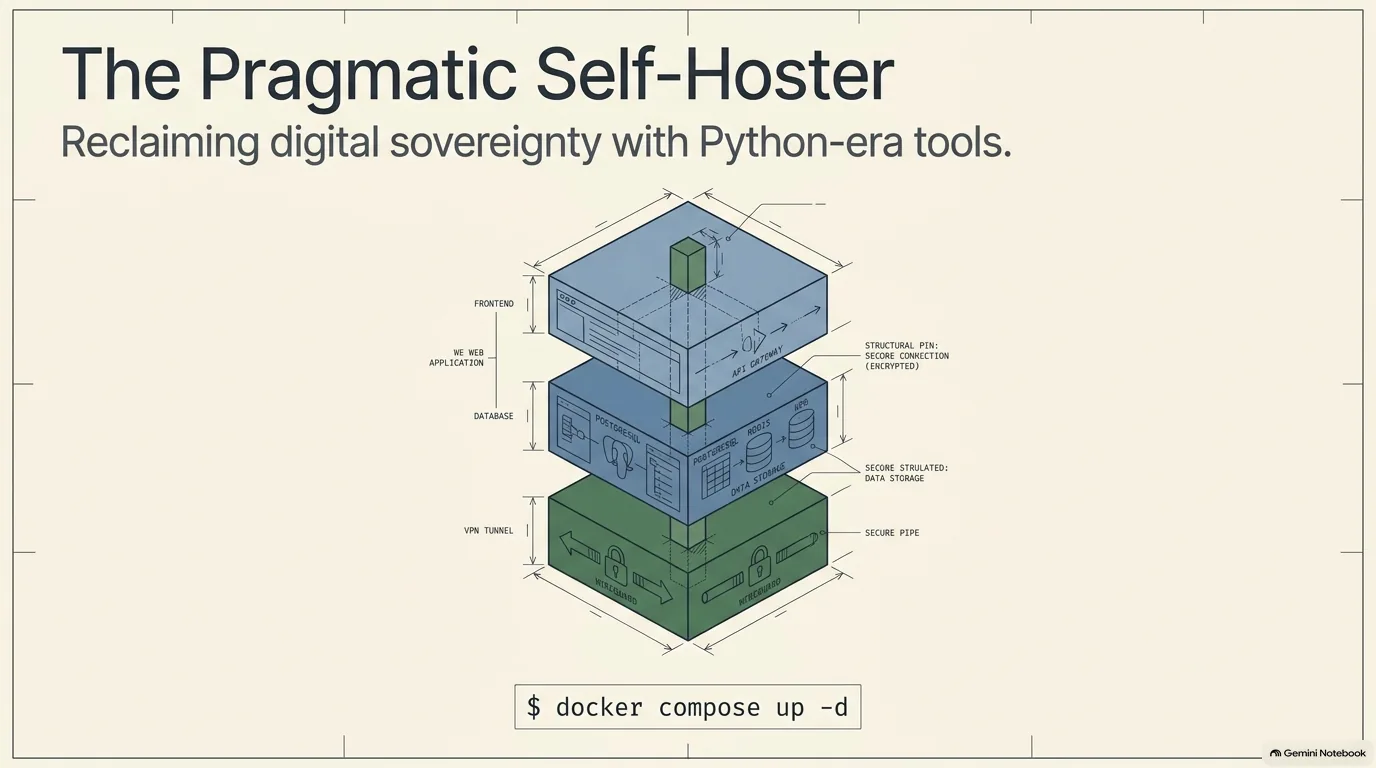
Self-Hosting Apps for Python People, a Visual Guide
TL;DR: Self-hosting doesn't mean running your whole digital life on a Raspberry Pi in the basement. It means deciding who controls the services your life runs on. Start with one real problem, like your photos or your smart-home lights, run it with Docker Compose, protect it with ZFS snapshots, and reach it from anywhere through Tailscale without opening a single port.
"The cloud is convenient, until it isn't," as host Michael Kennedy put it at the top of the episode. You upload your photos, sync your contacts and click through the cookie banners. Then prices go up, or you read about a family that lost their entire Google account over a medical photo sent to their doctor. In his words, "At some point, the question shifts from, why would I run this myself, to why aren't I?"
Self-hosting means running the software behind a service on a machine where you hold root, instead of renting it as someone else's product. The machine can be a rented VPS, a one-liter mini PC from an office or a Mac. What matters is who controls the service and what happens to the data.
Python developers already have most of the pieces. If you've shipped a Flask or FastAPI app in a container, you know Docker. If you've fought a dependency problem, you know why a standard packaging format matters. Self-hosting points those same skills at your photos, your DNS, your thermostats and the analytics on your own sites.
The practical thread through this guide comes from Alex Kretzschmar of Tailscale, who has been running this stuff for over a decade.
The guide goes topic by topic: why control matters more than purity, the apps that pull people in, Docker Compose and container isolation, the firewall trap that catches Docker users, reaching home without open ports, ZFS snapshots and backups, cheap hardware, AI agents as part-time sysadmins, and how to get started without losing your weekends.
Why self-host? What you risk when Big Tech holds your photos and email
A cloud account is more than a login. For most people it's the one place where mail, photos, music, video, taxi rides and invoices all live, and the company that runs it can close the door. One story, reportedly from the New York Times a couple of years back, shows how fast it can happen. A mother photographed a medical issue on her child and sent the picture to the doctor through telehealth. She also sent it to her husband through a messaging app, which backed it up to the cloud. The photo was flagged as CSAM, and the family was locked out of their accounts and lost most of their digital life. The service was probably Google Photos, though it might have been Amazon.
Now count what sits behind your own account. Michael has had his Gmail for 15 years, and there are over a quarter million emails in it. Extend that from email to photos, music and video, and one company's decision about one account reaches most of a life.
What does the company do with all that data? It has two uses. It can train the next round of AI models, or it can feed an advertiser's bottom line by building a profile of who you are, what you do and who you spend time with.
Photos make the mechanism easy to see. When a picture is uploaded, the service builds a map of every face in it, including the stranger in the background. If that stranger also uses the service, which is likely, the service can recognize them without anyone tagging anything. Stack up enough photos and the service knows who stood next to whom on a given date.
Is that a problem? It's a personal call. If a profile that detailed doesn't bother you, self-hosting is probably not for you. If it does, the unease usually comes from how quietly the privacy goes: you hand it over without really appreciating that you're doing so, and the exchange is not "a fair exchange of value for value." The trade is asymmetric.
“When your photo gets uploaded to Google Photos, they are making a map of all the faces in that photo. Whether you know the person in the background or not, Google will know them because they probably have Google Photos too.”
Alex Kretzschmar
What is self-hosting? Control, not purity
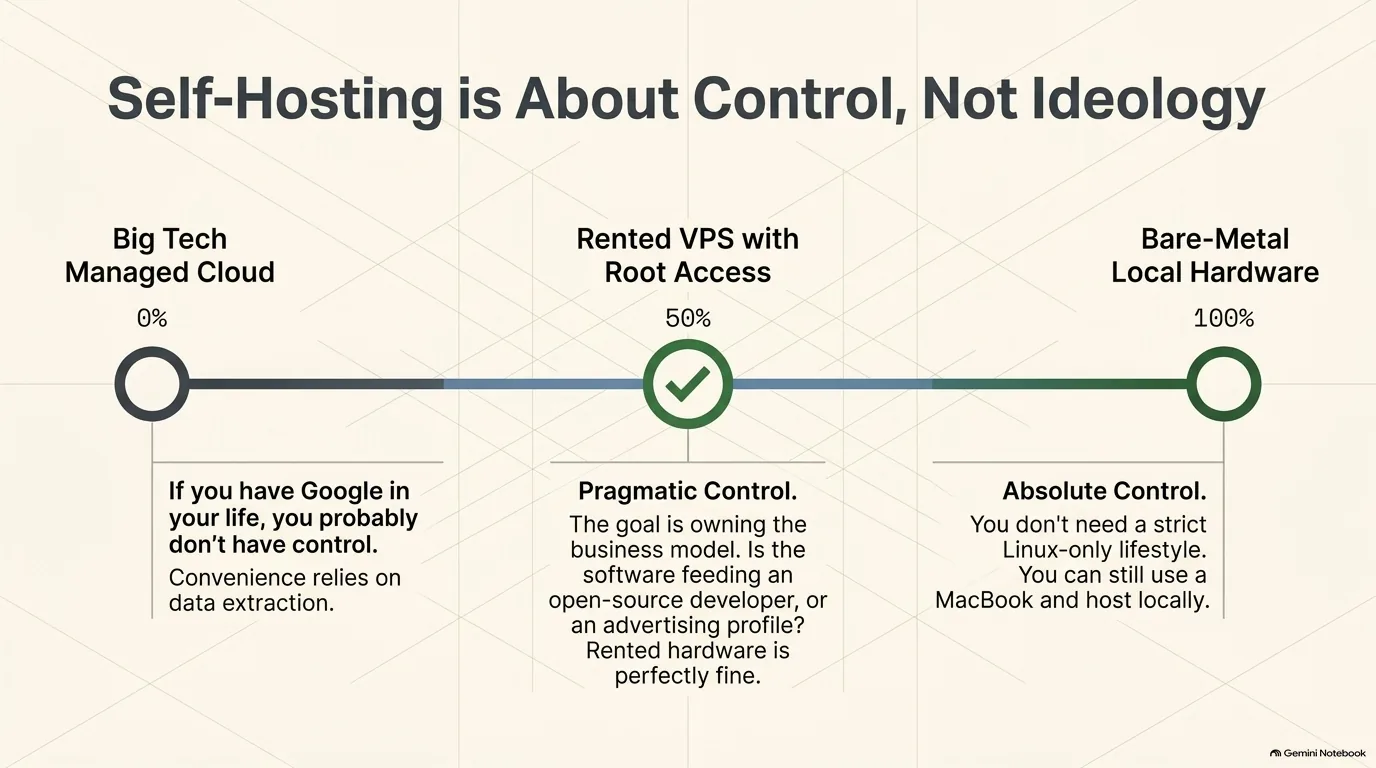
Self-hosting means running the software behind a service yourself, on hardware and software you control, instead of consuming it from someone else's cloud. That definition has a wide range. At one end is a managed cloud product, where the company holds everything. At the other is a machine in your own house. In the middle is a VPS from a provider such as DigitalOcean or Hetzner: the hardware is rented, but you have root on it and you host your own websites there, so those sites are self-hosted. Parts of the community, the Self-Hosted subreddit in particular, hold a stricter line, where anything short of doing it all yourself on a Raspberry Pi in the basement doesn't count. This guide takes the pragmatic definition.
Home hardware has real limits that a data center mostly doesn't. Move house and your site is offline for two weeks. A storm hits or a water pipe bursts. The data center probably sits in an internet exchange building with the connectivity that brings, and your house definitely doesn't. The same pragmatism applies to tools: a Mac can be a reasonable compromise for media work because it's bulletproof reliable. Everyone makes small compromises.
If the location of the server isn't the test, what is? The first test is the business model: is the money feeding the open source developer or small team that built the software? The opposite pattern has a name. Cory Doctorow calls it enshittification. A company takes venture money and gives the product away at a loss-leading price to win market share, drives the competition out, then slowly raises prices once nobody has another place to go. Uber and Walmart fit that shape, and streaming services are doing it now by lifting prices and pulling shows without your say.
The business model is only one piece. The deeper test is control: do you have it over the services running your life? A VPS with root passes that test. A big platform account usually doesn't, even when it feels like it does.
“If you have Google in your life, you probably don't. If you have Apple in your life, you probably don't. You feel like you do, but there are countless examples.”
Alex Kretzschmar
Immich and Home Assistant: the self-hosted apps that hook people
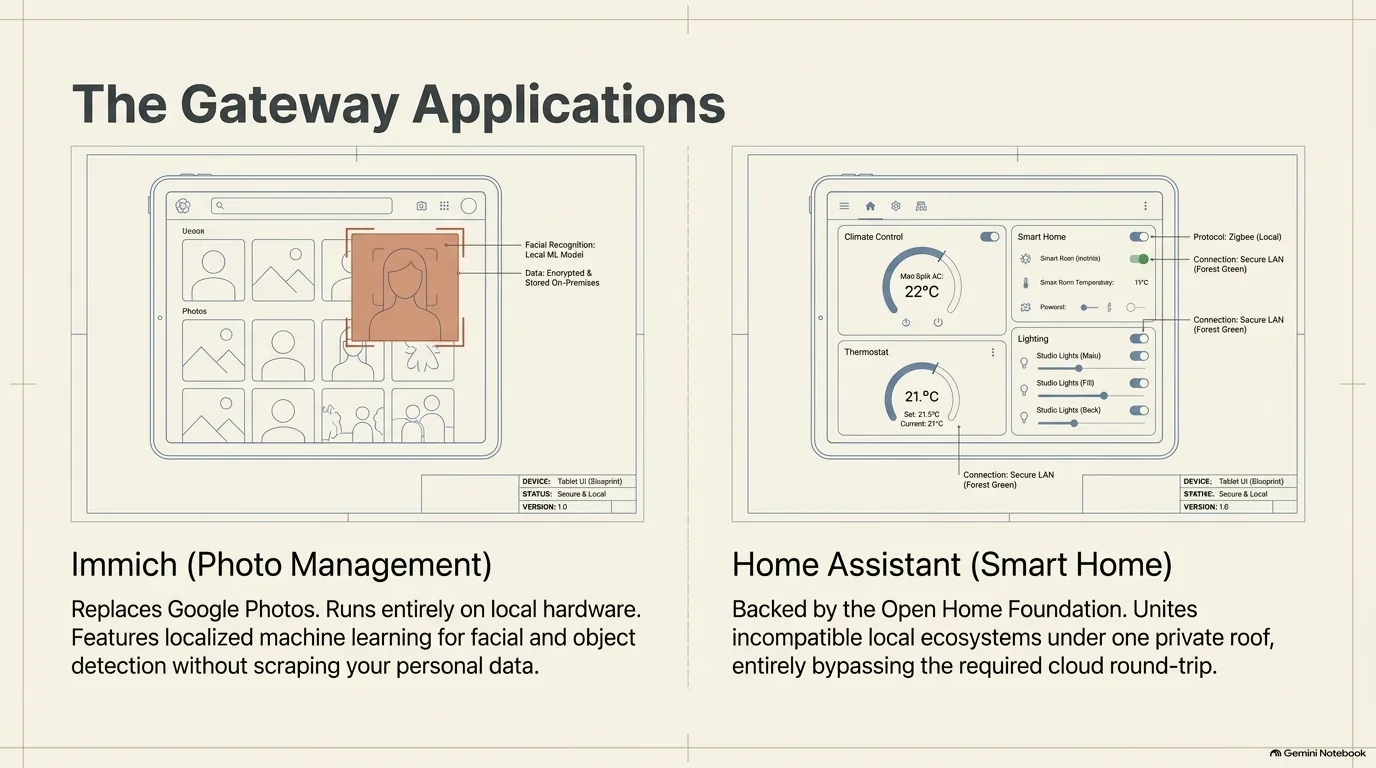
The best first project solves a problem you already have, and photos are the universal one because everybody takes them. Immich is a self-hosted photo and video management app. Its docs describe it as a way to back up, organize and search your photos on your own server. It's a self-hosted Google Photos clone: machine learning learns faces and detects objects, and it does basically what Google Photos does, "except it lives on your hardware using your files and your compute until the end of time." The catch: owning the data means that when there's an outage or a hardware failure, you're on the hook for it. Backups and snapshots, covered later in this guide, are the answer.
Home Assistant is the second app that pulls people in. Its project site calls it open source home automation that puts local control and privacy first, and says it runs on a Raspberry Pi or a local server. The Open Home Foundation supports it, along with ESPHome. The problem it solves is fragmentation. Every manufacturer ships its own app for its own ecosystem, so a house ends up with five apps for five ecosystems. Home Assistant pulls them behind one interface on your own network and makes everything talk to everything else.
Why do those devices lean on the cloud at all? Mostly because a manufacturer can't know your Wi-Fi, your network or your phone. The one thing it can guarantee is that its own cloud server exists. So the phone talks to the cloud, and the cloud talks to the device, even when the device is on your desk. Home Assistant changes that assumption by keeping the conversation behind your firewall.
A single house shows how quickly the ecosystems add up. One studio has lights from three different ecosystems. Upstairs, a mini split is controlled through an ESP32 microcontroller over a serial connection. Downstairs, an Ecobee thermostat makes a second ecosystem for the climate, and the garage doors are a third. All of it lands in Home Assistant. The payoff is partly sleeping better with the devices behind the firewall and partly plain convenience. The failure mode is also easy to live with: when Home Assistant is down, the fix is walking around and switching off three sets of lights by hand.
Both apps run on hardware you own, and both make you the administrator.
“Even though I can reach out and touch the light that's up here, it has to go to the cloud first to talk to it just because it guarantees that user experience.”
Alex Kretzschmar
Self-hosted alternatives to Google Analytics: Plausible and Umami
Self-hosting isn't only for individuals. Developers face the same choice with their own software: do you really need to put all your data into an AWS or Azure managed service, or send all your users' information through Google Analytics? It almost feels inevitable. Everyone else does it, so you add the cookie banner and move on, and visitors are used to clicking through one everywhere they go. But the pattern isn't a requirement. There are serviceable alternatives to almost every proprietary service, and web analytics is a good place to start.
A web analytics tool does two jobs: a small script on your pages records visits, and a dashboard turns those visits into reports. With Google Analytics, the recording goes to Google. A self-hosted tool keeps both jobs in your own world.
Plausible is an open source analytics app. Its site describes it as a lightweight, open source Google Analytics alternative where your website data is yours and visitors' privacy is respected. It does almost everything Google Analytics does, and the analytics stay with you instead of being fed into the Google machine. What about feature parity? Google is more invasive, so there's an argument that it has more data, but that isn't obviously a plus.
Umami is a peer to Plausible. Its site describes it as an open source web and product analytics platform that works without cookies and can be self-hosted or run as Umami Cloud. Michael runs Umami after looking at both: Umami seemed oriented toward self-hosting first, while Plausible felt like a cloud service you can pay for that you technically could self-host as well.
One wrinkle: a DNS-level ad blocker such as NextDNS can block both Plausible's and Umami's sites until you allow them. That's the blocking covered in the section on DNS ad blocking below.
Analytics is one entry in a long list. The Awesome Self-Hosted project catalogs alternatives for nearly everything, from wikis to Jira. It's covered in the getting started section, because the list is less useful than the advice that goes with it.
“But there are entirely serviceable alternatives to almost every single proprietary service that you have.”
Alex Kretzschmar
Why Docker Compose is the packaging format for self-hosted apps
Docker Compose is a tool for defining and running multi-container applications from a single YAML file. For self-hosting, that file is the front door. When a project looks worth running, the first thing to check is whether it ships a Compose file. If it doesn't, you're probably in for a long evening of hand-typed install steps.
Why such a hard line? Python developers already know the answer. pip, and these days uv, round off the rough edges of getting code from the author's keyboard onto your machine. Docker did the same for server applications. It didn't invent the hard parts - control groups and namespaces had lived in the Linux kernel for years. What it added was a standard packaging format (really just a tarball), a standard recipe for building that tarball (the Dockerfile), and a little plumbing and networking. That closed the last 10% of usability. A Dockerfile is basically a bash script with bells on, so everything in it is what you would have typed into a Linux box anyway.
The gap was real. When Docker was still pre-1.0, READMEs were all over the place, there were no standard base images, and nobody was thinking about supply chains.
So what does the file look like? Here's a complete one for Uptime Kuma, a self-hosted monitoring tool:
services:
  status:
    image: louislam/uptime-kuma:1.23.16
    restart: unless-stopped
    ports:
      - "127.0.0.1:3001:3001"
    volumes:
      - status-data:/app/data

volumes:
  status-data:
Here's what those lines decide. The image tag is pinned, so a pull next month can't quietly swap in a different version. The port is published on 127.0.0.1 only, for reasons the firewall section spells out. The data lives in a named volume, declared at the bottom, so it survives the container being replaced. And restart: unless-stopped brings the app back after a reboot.
Then you run docker compose pull and docker compose up -d. That's the universal-language part: a developer can ship a Compose file next to their app, and you don't need to know anything about them or how they built it. It's like an operator in Kubernetes or an installer on Windows: the knowledge of how to run the app lives in one artifact. It also answers the question of why not just install the app on Linux directly: repeatability. A short file like this gives you the same result on any machine.
A Compose file is fine to keep in Git as long as secrets stay out of it. OpenBao, a fork of HashiCorp Vault, is one way to keep them elsewhere: its docs describe an identity-based secrets and encryption management system. The Bitwarden CLI and 1Password work too.
“But essentially, they just closed that last 10% of usability, and suddenly, me, as a computer science student, could run any application in the world without having to dive into Systemd and init scripts and database migrations.”
Alex Kretzschmar
Containers as process isolation: shrinking the blast radius
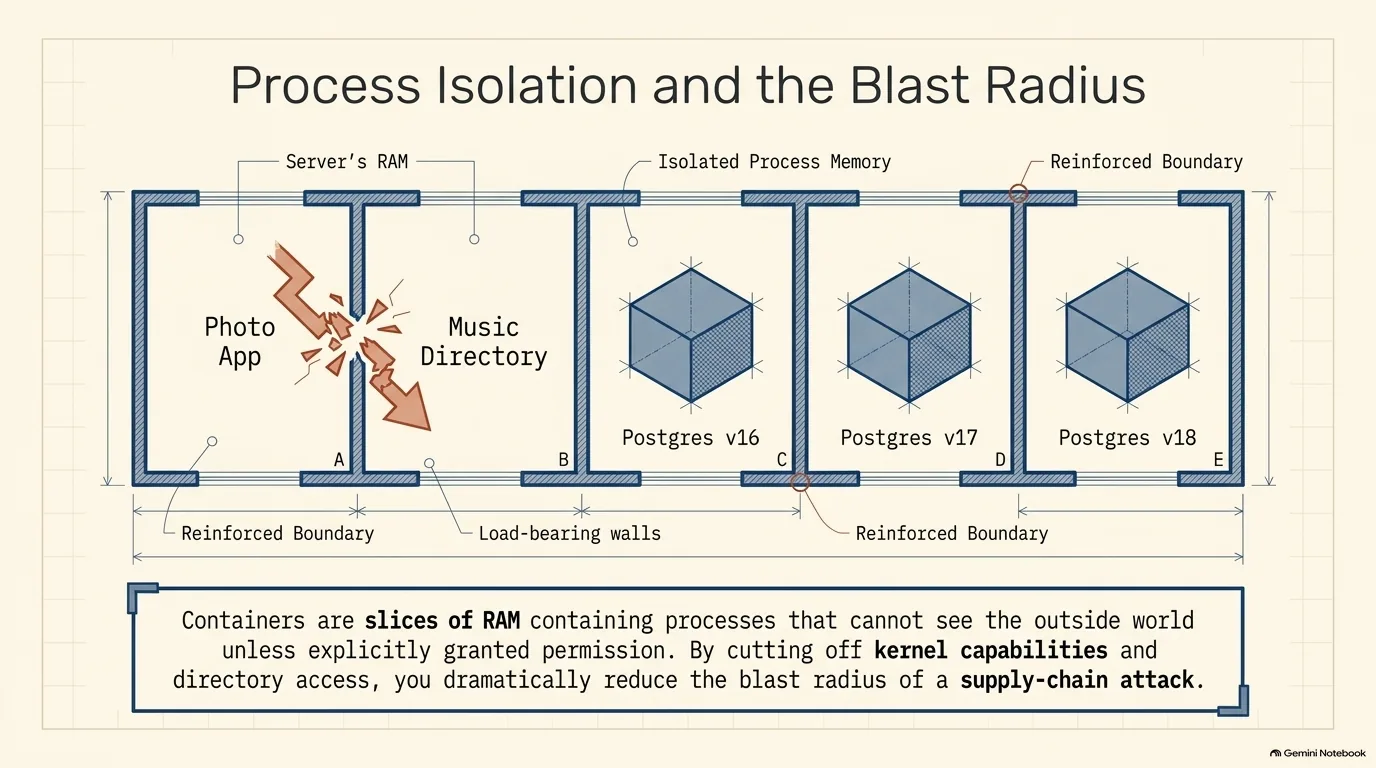
What is a container, really? Here's a mental model that skips the kernel lecture: a container is process isolation in memory. Take your RAM, slice it into tiny boxes, and put one process in each. A process can't see anything outside its box unless you give it specific, explicit permission.
Under the hood, that's Linux kernel features at work. Docker's security docs say namespaces keep a container's processes from seeing, let alone affecting, processes in other containers or on the host, and each container gets its own network stack. Control groups handle a different job, which is resource limits: memory, CPU and disk I/O.
That's a security win you control from the Compose file. You list the exact directories an application may touch, so a photos app that has no business in your music library never gets the music directory. You list the ports it may use. And if you want to go deeper, you can trim its kernel capabilities, the finer-grained slices of root's privileges. Docker's docs note that it already drops most of them by default and keeps only an allowlist, so a photos app probably doesn't need much more than that. Turn off what it doesn't need.
Why bother? Think of the bad day. If there's a supply chain attack or a vulnerability in that app, the app is a much smaller attack vector, because it literally has no access to certain bits of the kernel. That's the blast radius shrinking: the damage is far more likely to stay in the room where the fire started.
The same walls solve an everyday problem. Say three apps on one server each want their own Postgres, one on version 16 and another on 18. Installed side by side on a single Linux box, that's a hassle. In containers, each database lives in its own little network, so they can all listen on the same port without conflicting, and none of them knows the others exist. You could run 20 copies of Postgres 16 on one machine.
“All you're doing is taking your RAM and slicing it up into tiny little boxes and then placing that process inside that box.”
Alex Kretzschmar
Don't open ports on your home router: the LastPass lesson
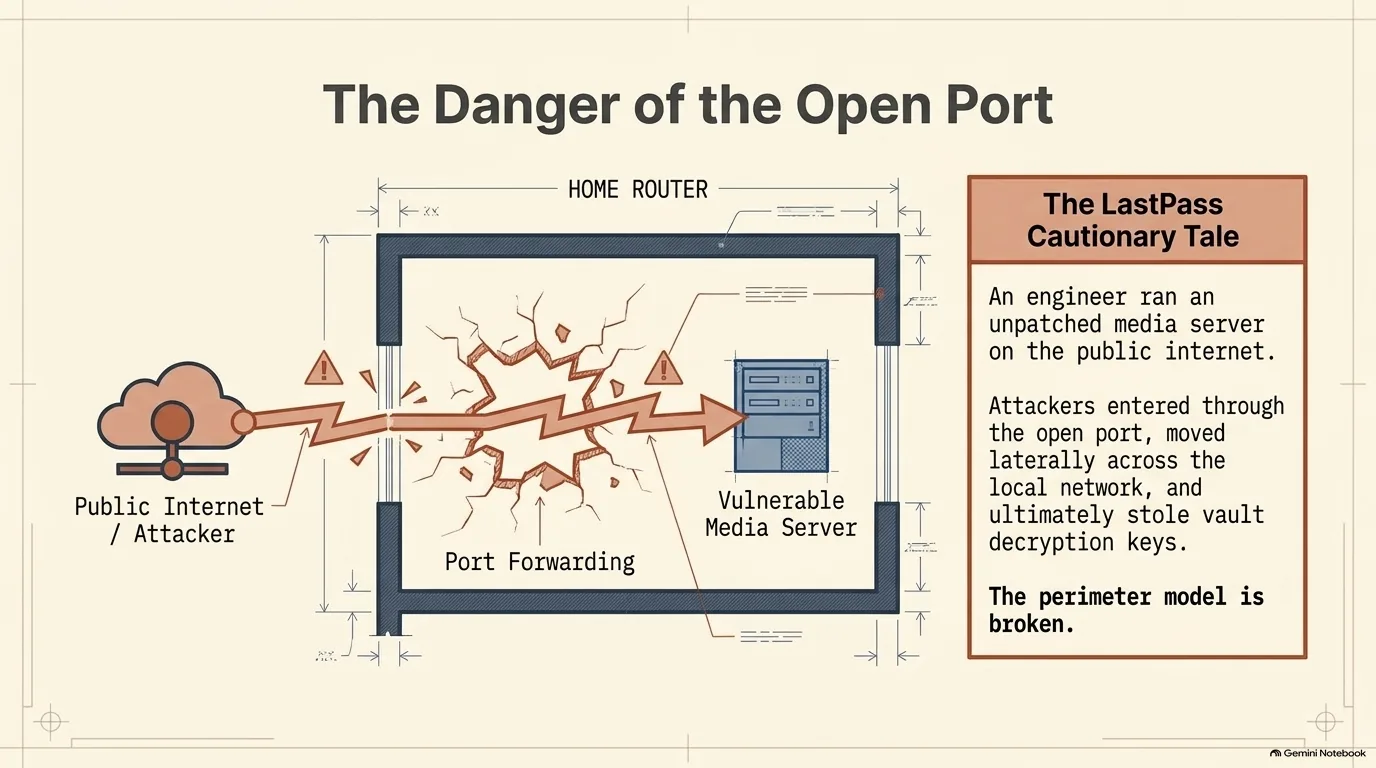
Some things have to be on the public internet. A website or an API exists to be hit remotely and send back a response, so there's no way around exposing it. Self-hosted infrastructure is different. The only customer is you, maybe your family and a few friends. So why would it ever need to face the whole internet?
Start with how people usually get at a home server while traveling. The app runs on a spare computer, a Mac Mini or a NUC or whatever you have. To reach it from outside, you open a port on your router and forward it to that box. That's port forwarding. It also means the box now answers to anyone on the internet, not just to you.
The LastPass breach a few years ago is the cautionary tale. One of the company's developers was running a Plex server on the open internet and didn't patch it. That server was taken over. From there the attackers moved laterally inside the network and got the access keys to LastPass. A home media server is about as low-stakes as self-hosting gets, and it became the way into a password manager company.
What's the better way? Open no ports whatsoever. Tailscale builds a private network, a tailnet, out of your own devices. Its docs describe a tailnet as a network of users, devices and resources that stays shielded from the open internet, where only invited participants can join and each device gets its own private address. When your phone is on the tailnet, you can see into your home network, or into your server infrastructure, even though zero ports are open. That sounds like magic.
The next section gets into how a connection can be made without a single inbound rule.
“But when we're talking about self-hosted infrastructure, the only customer is you, maybe your family, maybe a few friends.”
Alex Kretzschmar
How Tailscale works: NAT traversal and WireGuard without open ports
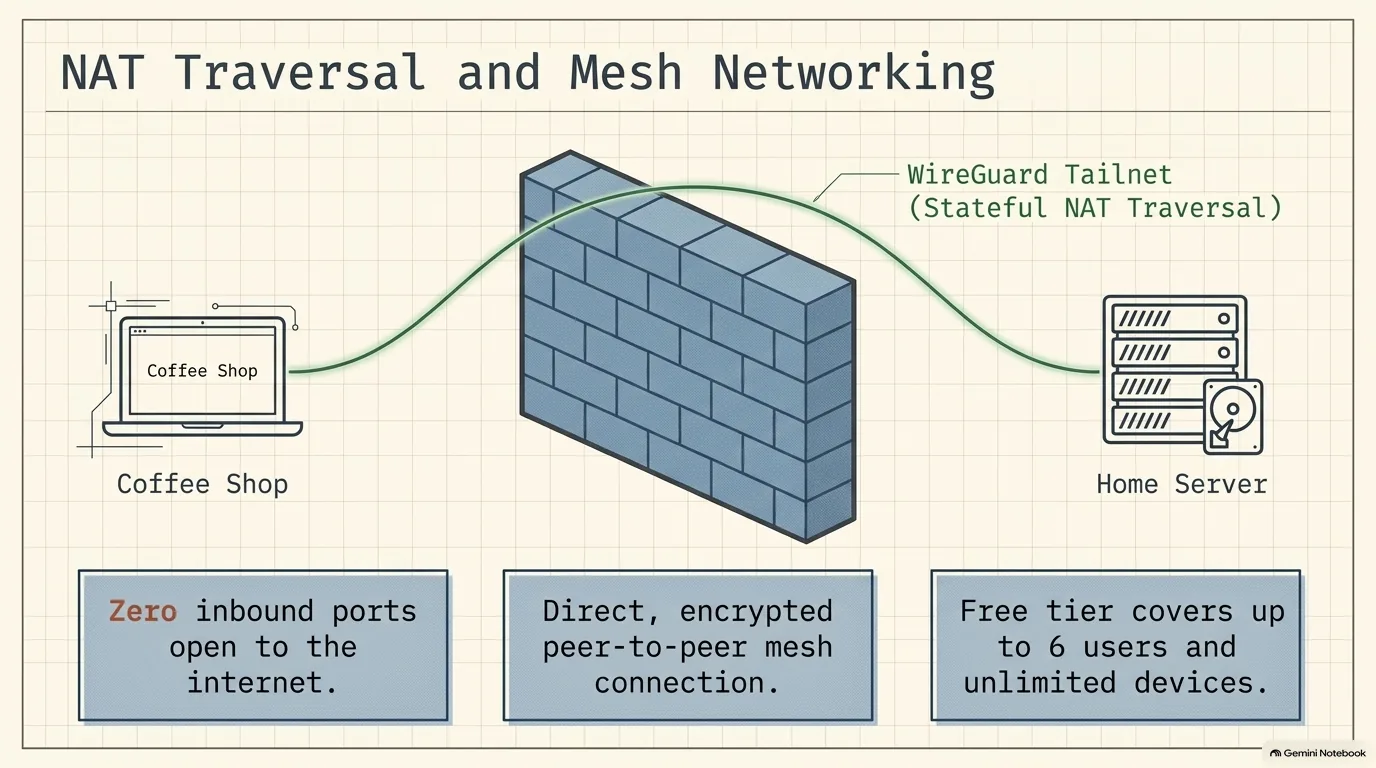
How does your phone reach a server under your stairs when nothing is listening on the internet? Start with the obstacle, which is NAT. There weren't enough IPv4 addresses for every device in the world to get its own spot on the public internet, so Network Address Translation was created. Each device sits behind a firewall and gets a local address, the 192.168-something numbers you've probably seen. A site like whatsmyip.com shows a completely different address, the one your router presents to the world. Something has to translate between the two, and that's NAT. It's also why a device at home can't simply be dialed from outside.
Tailscale gets around this with NAT traversal. Stateful firewalls remember outbound connections and let the matching replies back in, and Tailscale leans on that behavior. Its How Tailscale Works post describes the pieces. Each device registers its public key with a coordination server, which works like a shared drop box for public keys and carries almost no traffic. The devices then use STUN and ICE techniques to find a path to each other through their firewalls. If a network blocks that direct path, for example by blocking UDP, traffic falls back to relay servers that forward packets they can't read.
The connection itself is a WireGuard tunnel. WireGuard describes itself as a simple, fast, modern VPN built on up-to-date cryptography, first released for the Linux kernel and now on Windows, macOS, BSD, iOS and Android. The tunnel is encrypted end to end, and in the usual case Tailscale makes a direct connection between the two devices with no middleman.
In practice, you install Tailscale on the server in your basement and on your phone, and both join your tailnet, with no router changes and no port forwarding. At the time of recording, the free tier allowed six users and unlimited devices, so a whole household can live in one tailnet.
It also suits a very 2026 job. Run a local LLM on a Mac at home, join the tailnet from a coffee shop, and apps that expect an OpenAI-style API keep talking to the self-hosted model as if it were running on the laptop. AI is one more thing you can self-host, whether that's a Mac Mini or the NVIDIA GPU in a gaming rig.
One disclosure: Alex Kretzschmar works at Tailscale, and Tailscale didn't sponsor the episode.
“Then Tailscale punches through that NAT and makes a direct connection from your phone at the coffee shop over 5G through your residential firewall with no ports open to your server running under the stairs.”
Alex Kretzschmar
DNS ad blocking for the whole house: AdGuard Home, Pi-hole and NextDNS
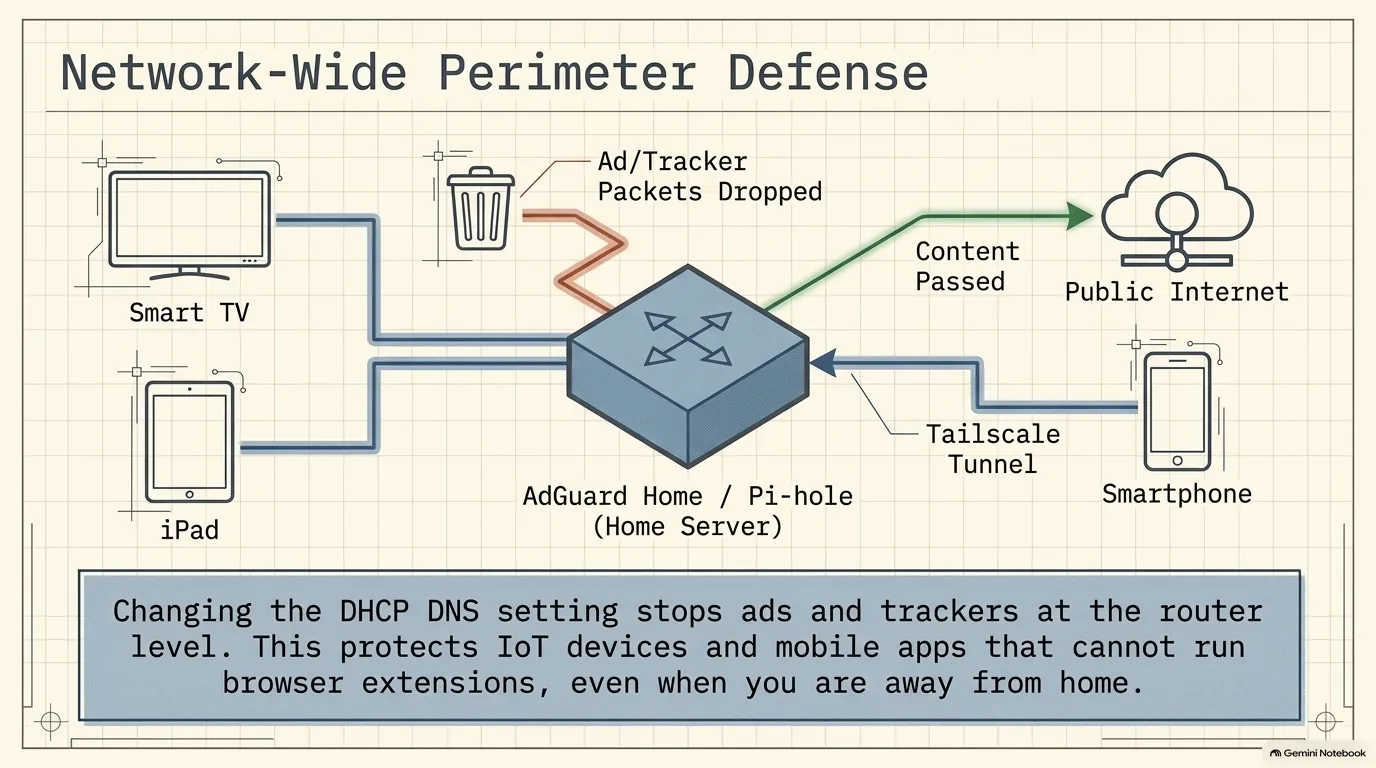
The modern internet basically requires an ad blocker, and a browser extension only covers the browser. Blocking at the DNS level covers everything else on the network.
Every time a device loads a site or an app, it first asks a DNS server to turn a name into an IP address. Whoever runs that server decides what answers come back. AdGuard Home is a free, open source, network-wide DNS server that blocks ads and trackers for every device at home with no client software, by sending tracking domains to a black hole. Pi-hole describes itself as a DNS sinkhole that does the same job, running on your own Linux hardware.
How do the devices end up using it? When a device asks your router for an IP address, the router's DHCP server also hands out a DNS server. Point that setting at AdGuard Home or Pi-hole, which can live on something as small as a Raspberry Pi, and the whole house is covered. The blocker keeps a list of domains it thinks serve ads. You load a page, certain components can't load, and those components happen to be the adverts.
It isn't perfect coverage, but it's a lot better than nothing. Adverts use bandwidth and shove a ton of JavaScript into the browser, so pages load slower and burn more processing power, which matters on mobile. Because it works at the network level, ads inside mobile apps get blocked too, and so does smart TV tracking that goes through a blocked domain.
What about when you leave the house? There are two options.
- A hosted service. NextDNS does the same thing as a Pi-hole or AdGuard Home, but as a managed service. It cost a dollar or two a month at the time of recording.
- Tunnel home. Use Tailscale to reach back through your own firewall and set your AdGuard Home as the tailnet's DNS server. Your phone then uses the blocker you already run, with all your lists configured. Mobile games stuffed with ads suddenly aren't.
There's a privacy angle beyond ads. Your DNS server sees every name you look up, and the default is whatever the router got from your ISP. That means your ISP sees every name you look up, so your DNS setting decides who gets that list.
Blocking isn't free of side effects. A DNS blocker will refuse some sites you wanted until you tell it they're okay. And Talk Python's own site still shows ads, because they aren't delivered through a shady ad network.
“It's not 100% coverage but I'd say it's sort of in the 80 to 90% range which is still a heck of a lot better than having no ad blocking whatsoever.”
Alex Kretzschmar
UFW does not block Docker ports: the self-hosting firewall trap
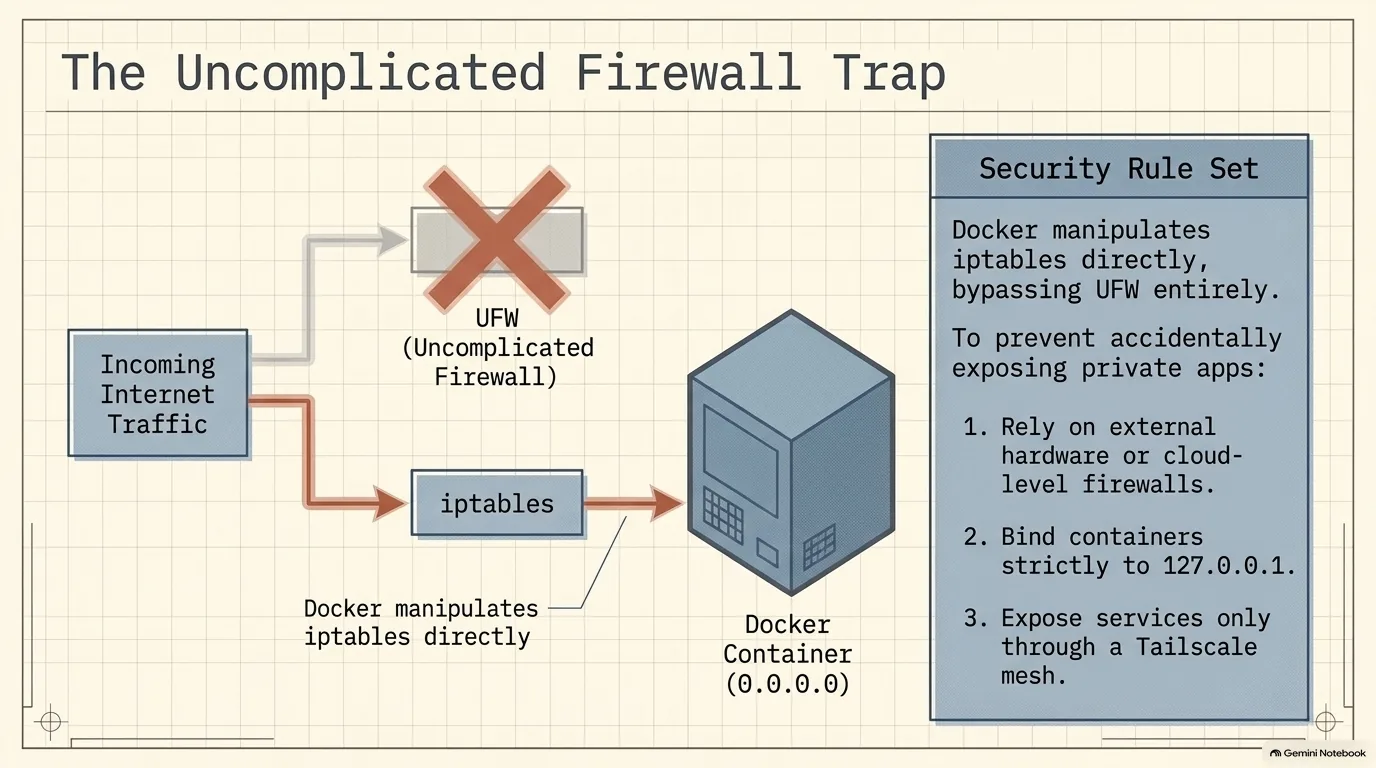
UFW, the Uncomplicated Firewall, is Ubuntu's built-in front end for managing firewall rules, and it exists to make iptables less painful to work with. Docker also writes firewall rules, and that's where a "private" service quietly stops being private.
The trigger is an ordinary port mapping. When a Compose file or docker run publishes a port as host:container with no address in front, Docker publishes it on all host addresses, 0.0.0.0 and [::]. It does that by adding its own rules to the host's firewall. Docker's documentation says plainly that Docker and ufw use firewall rules in ways that make them incompatible: traffic to a published container port is diverted before it reaches the ufw rules. So a ufw deny for that port can look right and do nothing.
So what do you do? The first fix lives in the mapping itself. Put an address in front of the host port:
# Published on every host address - the default
docker run -p 8080:80 nginx

# Published on the host's loopback only
docker run -p 127.0.0.1:8080:80 -p '[::1]:8080:80' nginx
The second form is straight from Docker's port-publishing docs, and it means only the Docker host itself can reach the port. That's what you want when a reverse proxy on the same machine is the only thing that should talk to the container. One caveat from the same page: on Docker releases older than 28.0.0, hosts on the same local network segment could still reach a port bound this way. A Compose ports: entry such as 8080:80 is the same host-to-container mapping, so the same care applies there.
The second fix is a firewall that lives outside the machine, a cloud provider's or a hardware one, so traffic is filtered before it reaches the host and Docker's rules never see it. On Michael's servers, the cloud-level firewall lets nothing in except ports 80 and 443, plus limited SSH. Without that layer, relying on UFW alone is not ideal.
The third is to skip public exposure entirely and reach your services over Tailscale, with no router or cloud port open at all, as described in the previous two sections. Nothing about a normal day of using the service reveals the problem, so it's easy to miss.
“That is like, things like UFW don't block access to your Docker stuff so something else, something stronger like a cloud firewall or things like that, right?”
Michael Kennedy
ZFS snapshots and offsite backups for self-hosted apps
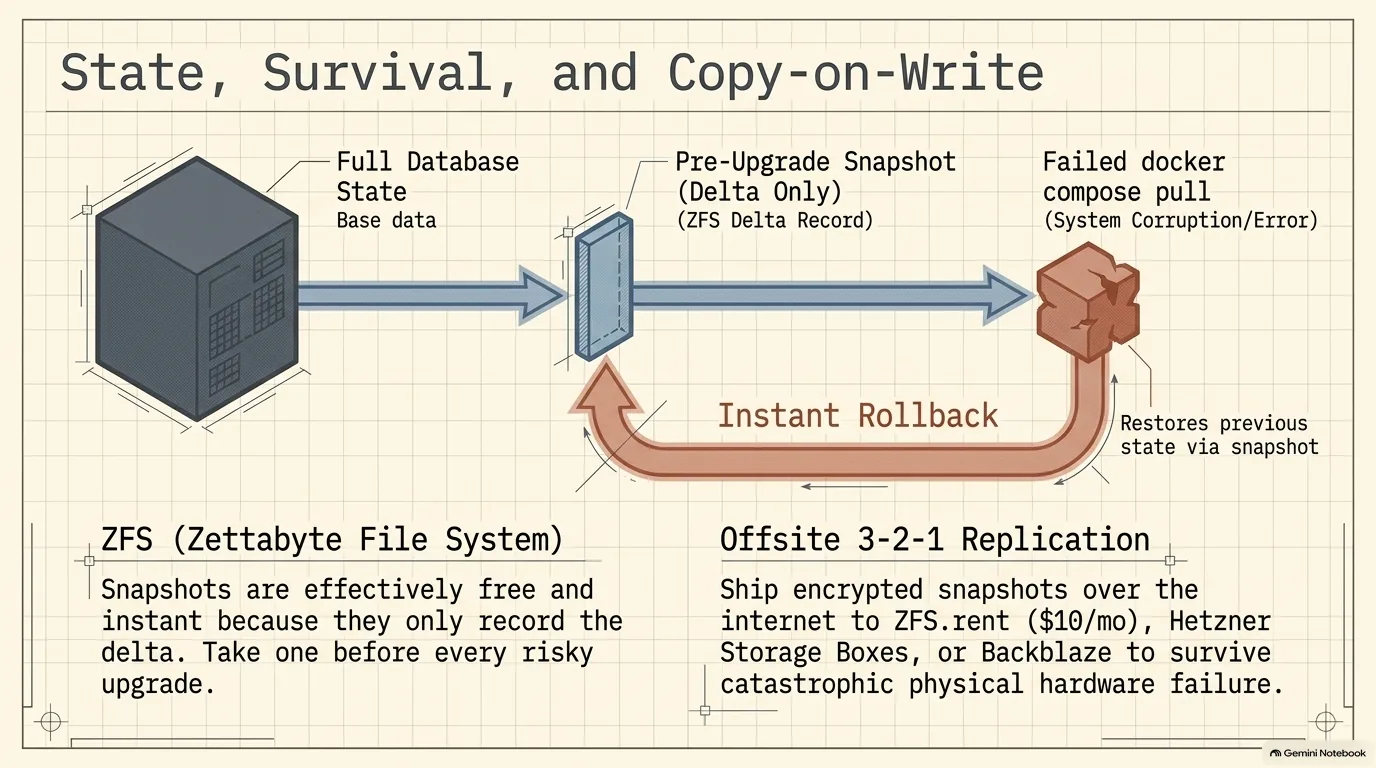
The scariest part of self-hosting isn't an outage, it's an upgrade that goes wrong. You run docker compose pull and docker compose up, and the new version won't start because it needs an incompatible migration. The docs say you can't jump from 1.6 to 1.8, you have to go through 1.7 first. Worse is the half-finished database migration, where neither the old version nor the new one will run. Michael learned this one through a few paper cuts. What you want is a way back to the moment before you touched anything.
ZFS, the Zettabyte File System, has that built in. It's a copy-on-write file system, and OpenZFS is the project that carries it forward. Licensing quirks keep it out of some distributions by default, but Proxmox and Ubuntu include it. A snapshot is a point-in-time view of a dataset. Because of copy-on-write, the file system records only the delta from the previous snapshot, so taking one is fast and starts out nearly free, and you can mount an old one as a real file system to pull files back out.
Taking one and getting back to it takes three commands:
zfs snapshot pool/dataset@pre-upgrade
zfs list -t snapshot
zfs rollback pool/dataset@pre-upgrade
zfs snapshot takes the name dataset@snapname, zfs list -t snapshot shows only snapshots, and zfs rollback discards every change made since the one you name. By default it refuses to go back past the most recent snapshot, and -r lets it do so by destroying the newer ones. Snapshots also mount on demand under .zfs/snapshot at the root of the file system, which is how you copy a single file out of an old one.
Taking the snapshot first is the whole discipline, and it's easy to forget, so script it: an alias or wrapper that snapshots before every Compose operation.
A snapshot on the same disk isn't a backup, though. For offsite copies, ZFS can stream a snapshot to another machine, and incremental sends carry only what changed since the last one. Here are three destinations:
- ZFS.rent: you send them a hard drive, they put it in a server, and you pay about $10 a month for the slot. Your photos replicate to it encrypted over the internet.
- Backblaze: it's been around a long time and is a decent option, though it was in the news recently for silently no longer backing up OneDrive folders.
- Hetzner Storage Box: the fully self-managed route, roughly 30 to 50 euros a month, so check the current pricing.
Why does offsite storage cost real money? When the business model is just storage, not mining your data for advertising, storage turns out to be expensive. One way to soften it is to split a big box with a few friends, each with their own ZFS dataset.
“So let's say your upgrade scenario, you could restore the database from just before you did the upgrade because as a good sysadmin, you are doing the hygiene of taking a snapshot before you do the risky thing, right?”
Alex Kretzschmar
The best cheap home server: a used mini PC running Proxmox
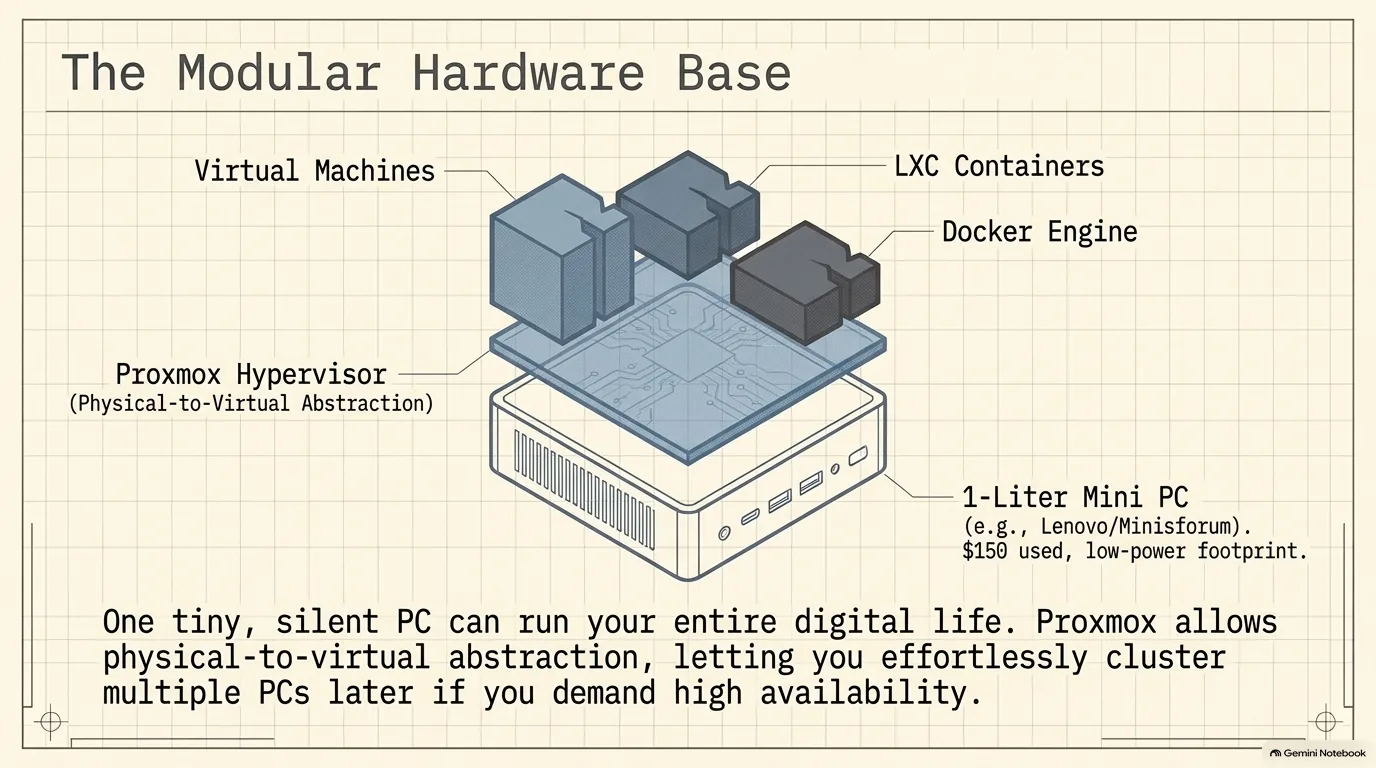
What hardware do you actually need to start? Much less than you'd think. The sweet spot is the little one-liter office PC, the kind usually bolted onto the back of a monitor, and Lenovo makes plenty of them. Used, they go for about $150, "even in the hardware apocalypse that we're going through." For individual use, one of those will run most self-hosted apps the average person is likely to want.
On top of the hardware sits Proxmox Virtual Environment, an open source server virtualization platform built on QEMU/KVM and LXC. A hypervisor like this slices one physical machine into several isolated workloads, and it gives you three kinds side by side. Full virtual machines each run their own operating system. LXC containers are lighter-weight Linux containers that predate Docker. And you can run Docker itself, either inside a VM or a container. So a VM, a few LXCs and a Compose stack can all share one small box, managed through Proxmox's web interface.
The trade-off is that one box is one point of failure. Alex found that out when a Minisforum MS-01 caught fire overnight and took Home Assistant down with it. His fix is to put about five of those Lenovo mini PCs into a cluster.
Proxmox can join several hosts into a highly available cluster, and Ceph handles the storage side. Ceph is a storage system that delivers object, block and file storage in one unified system, and it keeps multiple copies of your data across machines. That's the point of pooling the disks of several machines: no single one holds the only copy.
Is it overkill for a home network? Probably, for a first server. High availability at home is still a work in progress even for someone who makes videos about it: "I'm working on it." Clustering is the later step.
“And you can pick those up for about $150 and they will run every self-hosted app you could possibly throw at them.”
Alex Kretzschmar
Using AI agents like Codex and Claude Code as your sysadmin
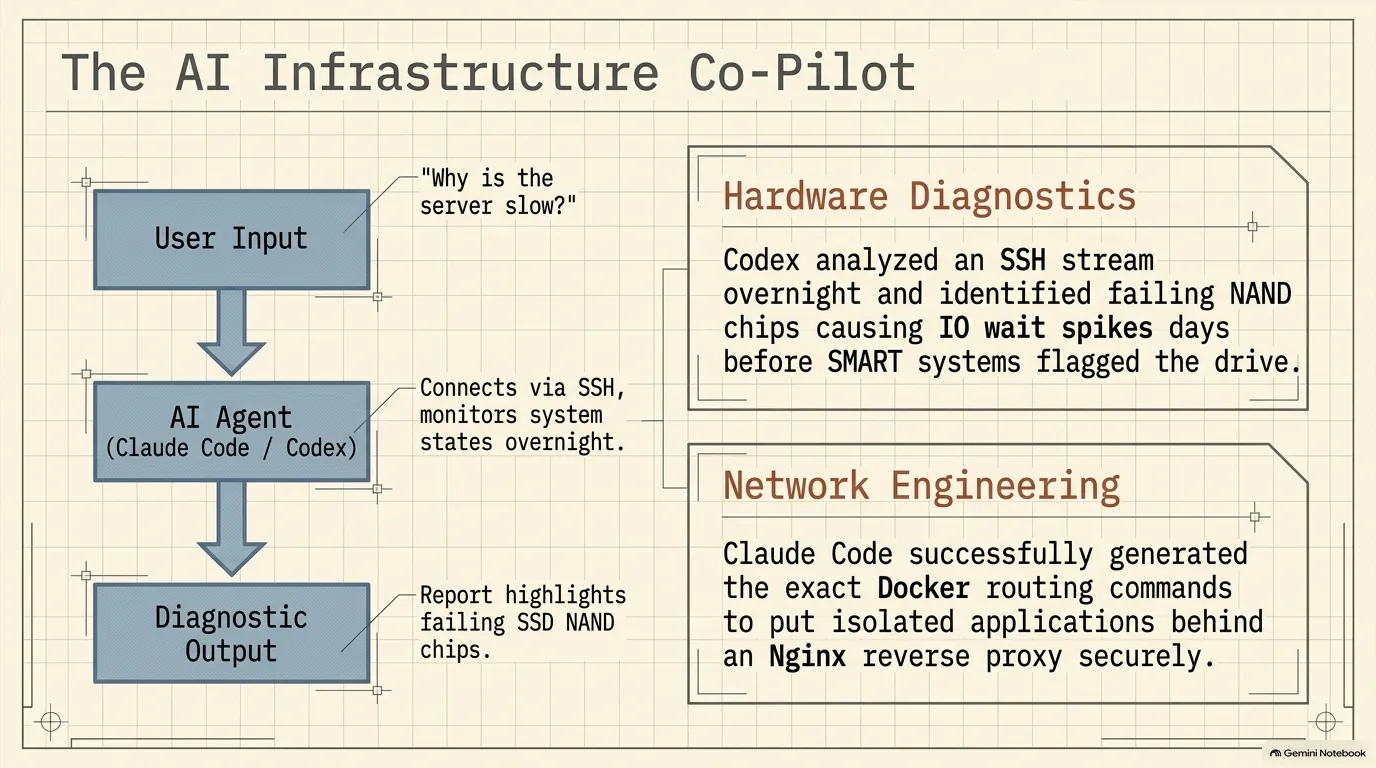
Self-hosting has always carried a real cognitive load. You become a DevOps person whether you meant to or not: Docker, Linux, backups, restores, and a server you reach over SSH. Coding agents such as Codex and Claude Code change that math. They're command-line tools that read files, edit them, run commands and, if you grant it, SSH into a server on your behalf.
The easy wins are configuration. Point an agent at a fresh Arch Linux install with a list of requirements, a particular look, a Wayland compositor, a seamless login, fonts and fan curves, and about half an hour later the machine is configured. It's the same with backup scripts. Describe what you want backed up and when, and it writes the script for you.
The more interesting case is diagnosis. A slow server is a hard problem when the CPU isn't busy, the RAM isn't full and disk pressure looks normal. After checking everything a sysadmin with 15 years of experience knows to check, Alex gave Codex SSH access from his laptop with a short instruction: "Go look at this server. Tell me what's wrong." It ran overnight. It found spikes on certain NAND chips of the SSD when writing to certain sectors, causing heavy I/O wait. The boot SSD was on the verge of failing and hadn't yet marked itself as failing in SMART, the self-monitoring system built into HDDs and SSDs to predict failures. Hours of sustained checking caught what a single look at the right moment couldn't, because the bad writes weren't happening while he was looking. The report came with the diagnostics it had run, and the result was time to research the right replacement instead of a dead server and rush shipping.
Networking is another good fit. Say you're adding a new app to a server that already hosts others. You don't want the apps to see each other, but the Nginx front end has to reach all of them. Ask Claude Code how to create a second network that one container can join and the others can't, without breaking anything, and it returns the commands to create the external network, the settings for each Compose file and the order to restart things in.
Does this replace people? Probably not for the foreseeable future. Whoever is driving still needs to know just enough to be dangerous to guide the agent through its hallucinations. Hand over the boring, menial work and keep the judgment.
“When it comes to, like, boring, menial tasks, like figuring out why my server's slow, have at it.”
Alex Kretzschmar
How to start self-hosting: one real problem at a time
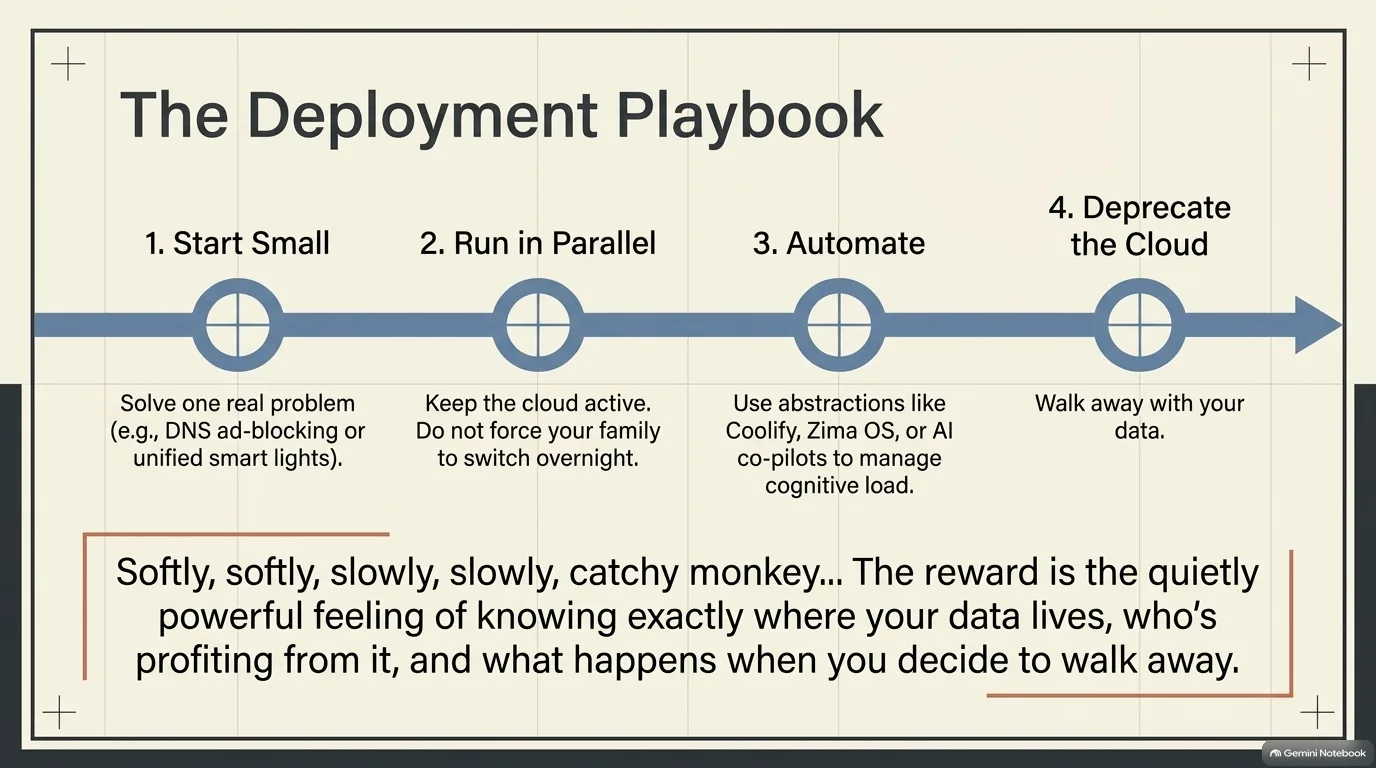
Where do you begin when the options are endless? The Awesome Self-Hosted list is a Git repository and website that catalogs open source software you can run yourself, updated daily, with categories that run for a couple of pages: e-commerce, DNS, analytics. Want to replace Jira? It's in there. A wiki? Also in there. It's honestly kind of overwhelming, so the best filter is to find a real problem in your life and solve it. Don't just contrive one for the sake of it.
Self-hosting is still a technical hobby, but some tools lower the on-ramp.
Zima OS is an operating system for personal clouds and home servers that runs on ZimaBoard hardware. It has an app store, much like the one on your phone, and supports third-party Docker apps. Install apps in one click, plug in a USB hard drive, and in maybe 20 to 30 minutes you have a fairly functional setup. Is it the most buttoned-up, secure, bulletproof thing in the world? "No, almost certainly not. But it gets you started."
Coolify is an open source, self-hostable platform for deploying and managing applications. It connects to each server over SSH and prepares it to run Docker workloads. Rent a server at Hetzner or DigitalOcean, add it, and manage several servers from one interface. The catch is that you end up juggling UI settings where a Docker Compose file would let you define the setup and replace it. Michael wanted to love it and found that trade-off tiring, though he still sees it as a good way to get comfortable and then work your way down.
That's the life of any abstraction: you trade certain complexities for decisions someone else makes, as with macOS, or Docker.
Then take it slow. Run the new thing in parallel with the old one until you trust it. Imagine the streaming service in your basement is down at 7am and the kids can't watch cartoons before school: do you want to SSH in and fix it? Alex has had to, more than once, thanks to unrotated logs, a full disk or failed hardware. Part of the cost of owning your services is your time. Still, these are basic skills for the modern world, not quite in the same bracket as plumbing or electrical work, but worth a few weekends.
Perfect Media Server walks through building a Linux server with storage. Then weigh the problem you're solving against your budget and your risk tolerance. If you want to build the habits underneath all this, Talk Python Training's Modern Python Projects covers deployment, Just Enough Python for Data Scientists covers Docker and git for reproducibility, and Up and Running with Git will help keep your Compose files under version control.
“Don't try and switch from Spotify, for example, and convert your wife and your kids and everyone in your life to your self-hosted music streaming service overnight. Softly, softly, slowly, slowly, catchy monkey.”
Alex Kretzschmar