DiskCache, Your Secret Python Performance Weapon, a Visual Guide
TL;DR: DiskCache is a Python library that works like a dictionary but stores everything in SQLite on disk, so cached values survive restarts and can be shared by every process on the machine. It's a fit for web apps and for data work alike, from avoiding repeated expensive LLM calls to surviving long notebook runs. Disk is cheap and fast now, so for a lot of caching jobs you don't need Redis or more RAM. You need a decorator.
"Your cloud SSD is sitting there, bored, and it would like a job." That's how Michael Kennedy, host of Talk Python, opened this episode, and it's a pretty good summary of the idea. For years the advice was to keep hot data in memory because disk is slow. On a modern cloud VM, though, the disk is an NVMe drive that's both fast and cheap, and memory is the expensive line on the bill.
DiskCache puts that cheap disk to work. It's a small, pure Python library that gives you a dictionary-like object backed by SQLite. Put a value in with square brackets, and it lands in a file. Restart the process, ship a new Docker image, start a second worker, and the value is still there. It's thread safe and process safe, it can expire entries, and it has a memoize decorator that caches a function's results with one line.
Vincent Warmerdam, who works at Marimo and maintains calmcode.io, joined Michael to dig into it. The two got so excited about DiskCache on Vincent's previous visit that they had to cut themselves off, so this episode is the sequel.
Here's the plan for this guide: why caching on disk makes sense now, what DiskCache is and how to use it, the real use cases from a web app and from data science notebooks, and the deeper features: sharding with FanoutCache, custom serialization, eviction policies, a persistent queue, and a Django backend. It ends with the question anyone should ask before adopting a library that hasn't shipped a release in a while.
Three ways to cache in Python, and what each one costs
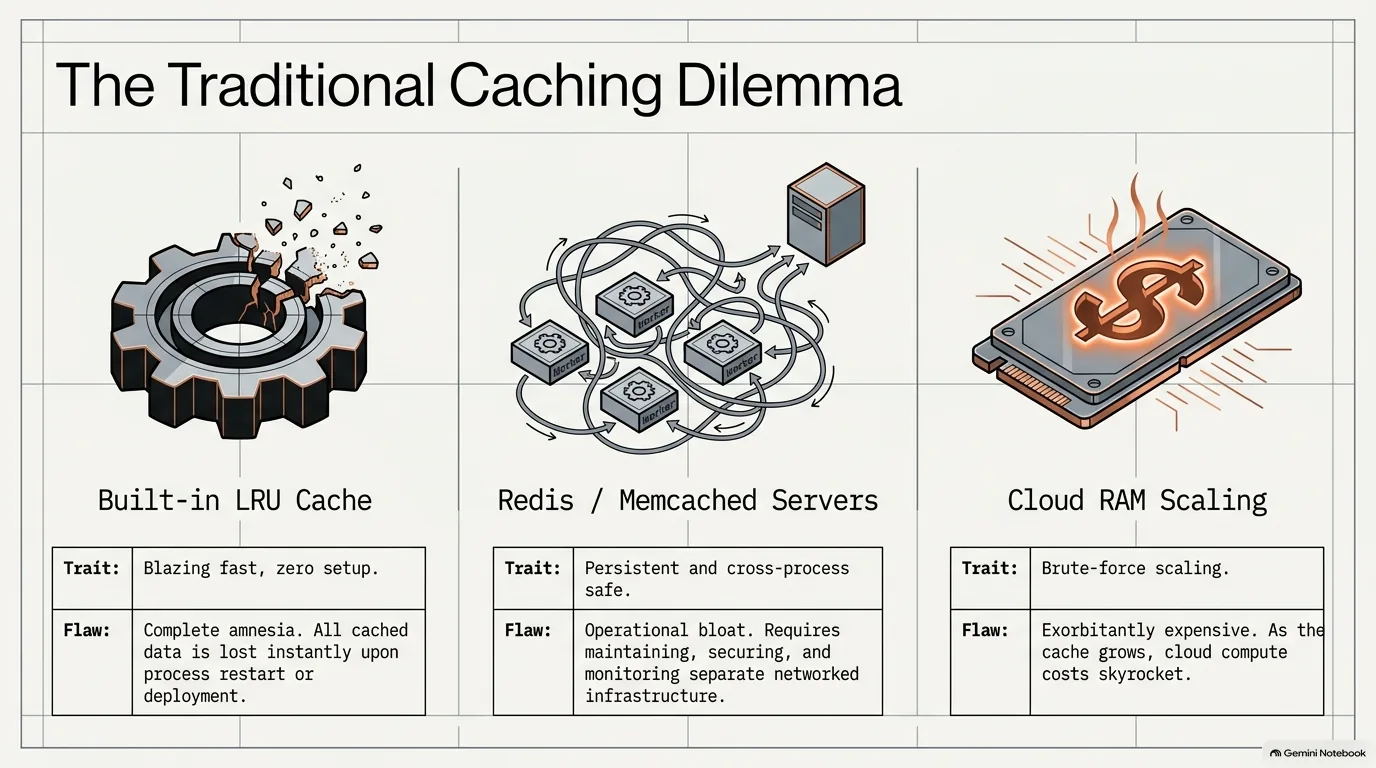
Caching is easy to describe. Something is expensive to compute, the same input shows up again, and you'd rather hand back the answer you already have. So where does that answer live? Each of the usual places has a catch.
- In memory, with
functools.lru_cache. It's built in and as fast as it gets, since there's no serialization at all. But it lives inside one Python process. Restart the process and the cache is gone, and a web app running four worker processes builds four separate copies. - In a cache server, like Redis or Memcached. Every process can share it, but now you're running, securing and connecting another server.
- In more RAM. Either way, holding a big cache in memory means paying for that memory on your cloud VM.
DiskCache is the fourth option, and the rest of this guide is about why it fits so many jobs. The cost of disk versus RAM comes first, then what DiskCache is and how it lets many processes share one cache.
Disk vs RAM for caching: why cheap SSDs change the math
Why would you cache on disk at all? Because the old advice was written for old disks.
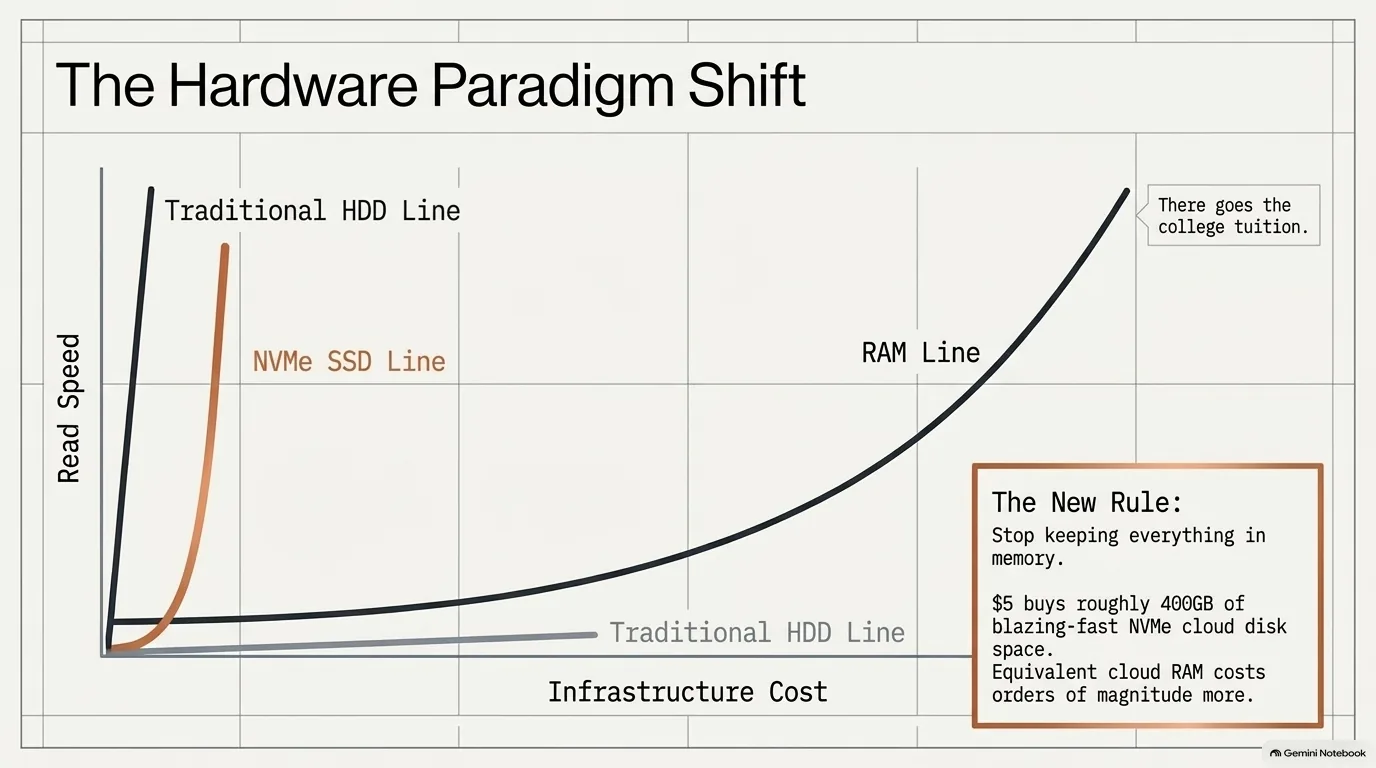
Keep it in memory, because memory is way faster than disk. That was the standard line for years, and it was true when disk meant spinning platters. Today the drive on a cloud VM is often an NVMe SSD. Those are fast enough that it's fair to ask how big the gap still is, and they're not memory, which is the part that's expensive these days.
Put a number on it. Michael Kennedy pays something like $5 for 400 GB of disk on his cloud VMs. How much would 400 GB of RAM cost on the cloud? The only answer on air was a joke about college tuition.
That changes how you think about a deployment. An LRU cache in each process, or a separate container holding a cache in memory, all takes RAM on your VM. Put the same data on the 160 GB NVMe drive the VM already has, and you could really thin your deployment down. The other win comes from caching at all. If you avoid recomputing something, you might be able to dramatically lower how much compute you need in the first place.
Is disk as fast as memory? No, and nobody claimed it is. An in-memory cache like lru_cache should be quicker, and if what you cache is small, it may be the right choice. DiskCache becomes interesting when you're limited by memory and want to spill to disk, or when the cache needs to outlive the process. A proper benchmark against Redis would settle the speed question, and Vincent Warmerdam would love to run one. Until then, his question is a fair one: how much faster is Redis really going to be, and how much are you willing to spend on it?
“I vividly remember when I started college, people were always saying oh keep it in memory because it's way faster than disc but I think we got to let a lot of that stuff just go.”
Vincent Warmerdam
What is DiskCache? A Python dictionary backed by SQLite
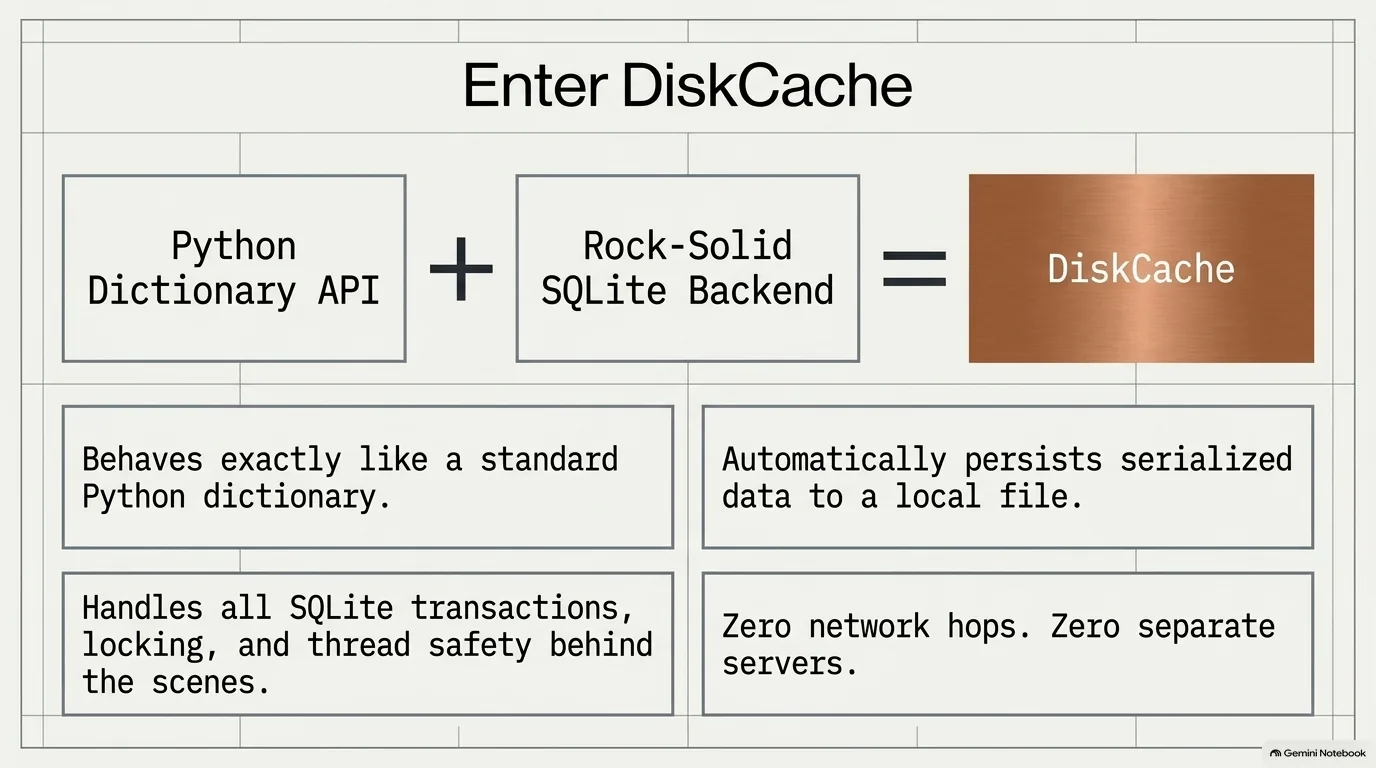
The short version: it behaves like a dictionary, except it's persisted to disk, and under the hood it's using SQLite. That doesn't cover everything, but it gets you most of the way there.
You make a cache, then use it the way you'd use a dict. Assign with square brackets and a key, read it back the same way, del a key to remove it, and call .get() with a default for keys that might be missing. In theory, any Python object can go in, because DiskCache serializes values with pickle. It's a little clever about it, too: an integer gets stored as an integer, in one of SQLite's native types, rather than going through pickle.
Pickle does come with one warning. It's close to an in-memory snapshot of the object, so if you fill a cache with objects from NumPy 1 on Python 3.6, don't expect them to load nicely on Python 3.12 with NumPy 2. The same goes for your own classes if they change. For most of what Vincent Warmerdam caches, that's a non-issue, but it's a danger zone to know about.
So why SQLite and not a database server like Postgres? The difference is that SQLite isn't a server at all. Postgres runs in its own process, often on its own machine, and your app connects to it over the network. SQLite runs inside your program's process and stores everything in a file. That matters operationally. A database server has to be secured, it has passwords and firewalls, and it can go down. SQLite is a file.
There are two halves to what makes DiskCache work. One is that it's on disk, so it survives process restarts, unlike lru_cache, where you have to redo everything every time. The other half of the magic is the comparison table in the docs: is it persistent, is it thread safe, is it process safe? Yes, yes and yes. That's the subject of the next section.
“It really behaves like a dictionary, except you persist a disk and under the hood is using SQLite. It doesn't cover everything, but you get quite close.”
Vincent Warmerdam
Sharing one cache across processes and containers without Redis
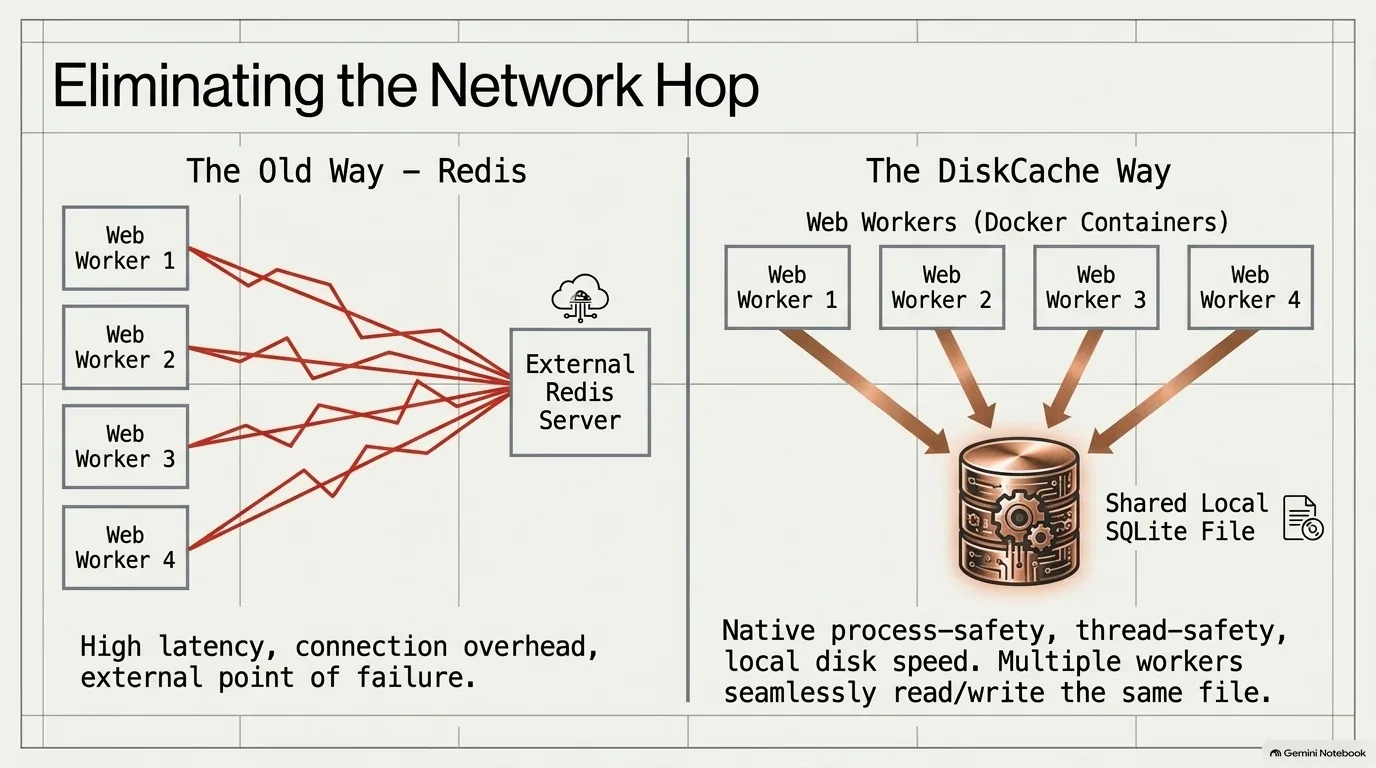
A production Python site rarely runs as one process, and that's where DiskCache earns its keep in web apps. It's common to run a web garden, two or four worker processes that a server hands requests to in round robin. An in-memory cache lives in one of them. Unless the cache is somewhere outside the process, whether that's Redis, a database or SQLite, every worker computes and stores the same things on its own.
DiskCache is thread safe and process safe, so all of those workers can open the same cache and share it. talkpython.fm runs this way. Several Docker containers run on one big VM, and the Docker Compose file maps an external folder on a big drive where all the caches go, with a subdirectory for each app. Because the cache lives outside the container, a completely rebuilt Docker image keeps its cache from version to version. And you can go look at the folder and see how big each cache is.
Does it matter that SQLite isn't known for concurrent writes? SQLite has a reputation for being great at reading and slower when several processes write at once, though that may have improved. But a cache is read-heavy by nature. As Michael Kennedy puts it, if you write it more than you read it, you probably shouldn't have a cache.
It's not all unicorns and rainbows, however. Platforms like Fly.io, which scale Docker containers out horizontally, probably can't share one volume between them, so each instance would get its own cache. That still works, just not as well. And the file has to be on a disk the processes can reach directly. The docs say not to put it on a network drive because of performance and locking problems.
What about speed? The DiskCache docs include benchmarks against Memcached and Redis, where DiskCache comes out ahead on reads and writes. The network hop to the server probably explains a lot of that, and running Redis on the same machine would likely give different numbers. The project started in 2016, and the benchmarks may be just as old. As Vincent Warmerdam put it, you'd have to rerun benchmarks like that every six months or so for them to stay relevant.
“I think this is a really nice way to add multi-process, super fast caching to your app without involving more servers and more stuff that's got to get connected and keep running.”
Michael Kennedy
Recap: lru_cache vs Redis vs DiskCache
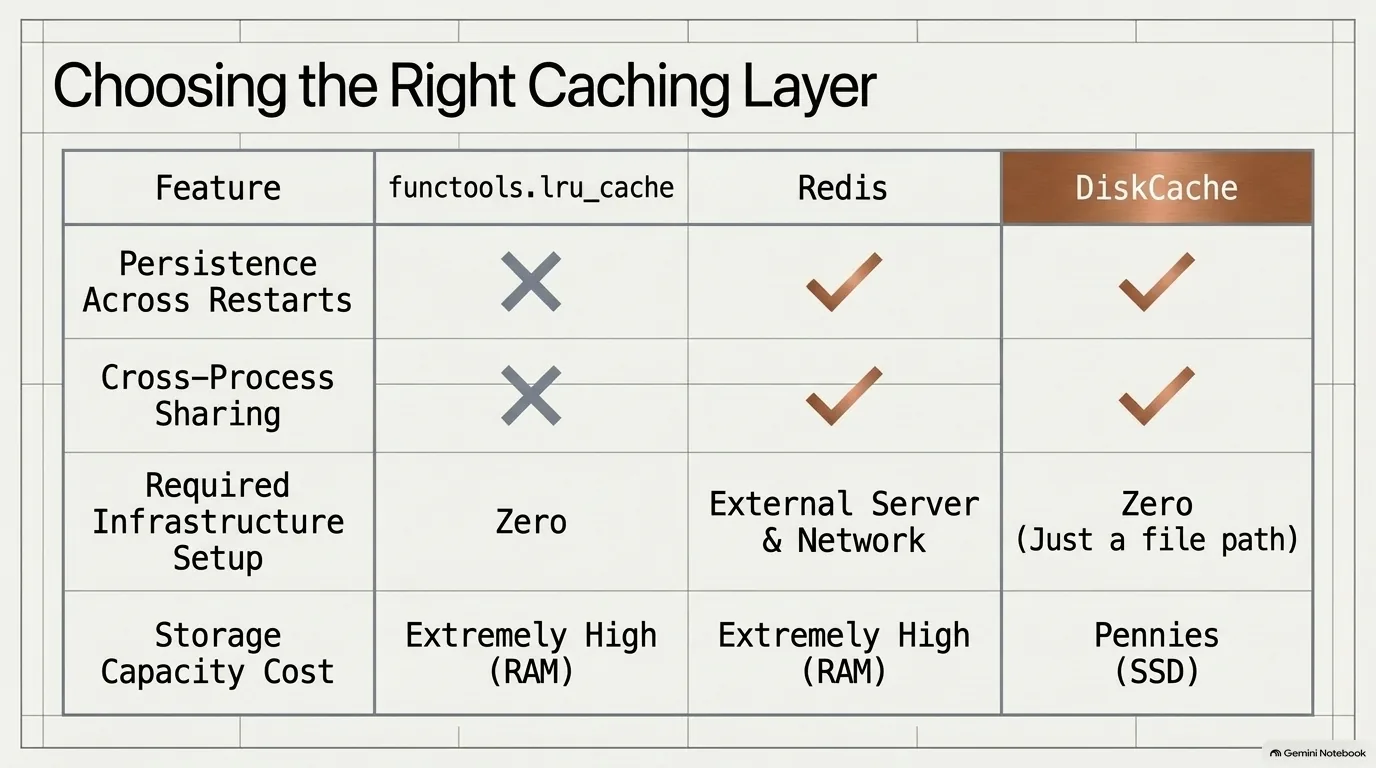
Put the three usual ways to cache next to DiskCache and the trade-off is easy to see, because each one gives up something different:
functools.lru_cachegives up persistence and sharing. It's the fastest, but it dies with the process and stays inside it.- A cache server like Redis gives up simplicity. Every process can reach it, but it's one more server to run, secure and connect to, and it holds its data in memory you pay for.
- DiskCache gives up a little raw speed. In return it survives restarts, shares one file across processes and stores its data on cheap disk rather than RAM, with nothing to set up but a folder.
That doesn't make Redis or lru_cache wrong. An in-memory cache should still be quicker when the data is small. But for the very common case of an expensive result you'd like to remember for a while, DiskCache gets you most of what a cache server gives you for the cost of a file path.
Getting started with DiskCache: dictionary access and the memoize decorator
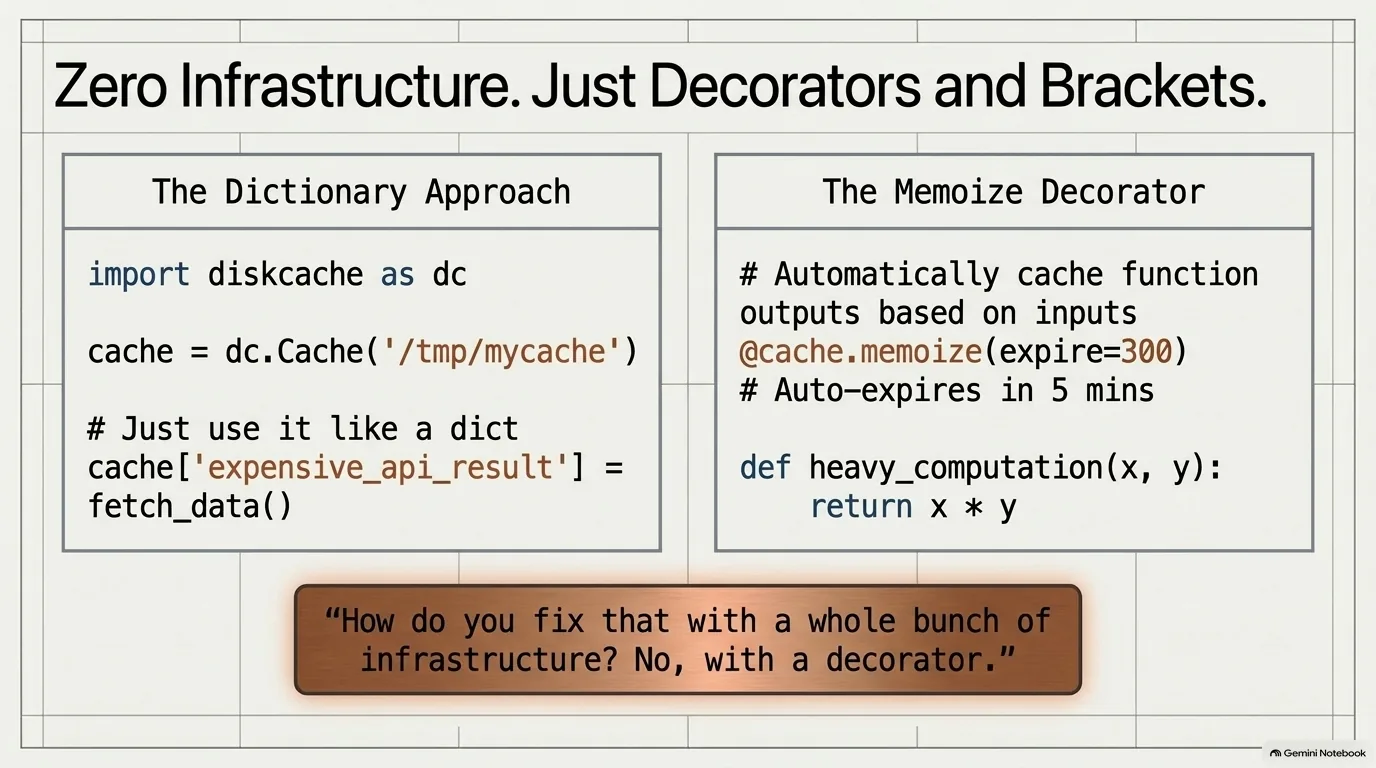
You can use DiskCache two ways, and both feel like plain Python. The first is the dictionary: square brackets to set and read, .get() with a default, del to remove. The second is the decorator.
Like lru_cache, a DiskCache cache has a decorator that caches a function's results, @cache.memoize. Memoize is the design-pattern word for "just remember this." It builds the cache key from the function's name and the arguments you pass, so the same inputs come straight back from disk. Whether changing the body of the function also changes the key wasn't settled on air, so keep it in mind when you edit a memoized function during development.
The decorator also takes an expiry. That makes it a natural fit for something like the Reddit front page, which updates, but not every second. Cache it for five minutes, and after that it recomputes on the next request.
Take the Talk Python RSS feed. It has to go through more than 500 episodes to build, the response is over a megabyte, it probably gets more than one request a second, and it adds up to about a terabyte of RSS a month. Put memoize with a one-minute expiry on the function that generates it, and every request in that minute gets the stored answer, with the refresh happening on its own. How would you fix a load problem like that? Vincent Warmerdam's joke was the line in the image above: not with a whole bunch of infrastructure, with a decorator.
What about a race condition, where two requests sneak in at the moment the entry expires? Then you've done a little extra work and thrown it away. That's the whole cost.
To make this concrete, here's a minimal example that runs as written:
from diskcache import Cache

cache = Cache('/tmp/mycache')

cache['answer'] = {'status': 'ok', 'items': [1, 2, 3]}
print(cache['answer'])
print(cache.get('missing', 'default'))
del cache['answer']

@cache.memoize(expire=300)  # keep each result for five minutes
def build_feed(show_count: int) -> str:
    return f'<rss>{show_count} episodes</rss>'

build_feed(535)  # computed and stored
build_feed(535)  # read back from disk
“So it still feels like you're writing Python. It's just Python with one concern less. And that is the magic.”
Vincent Warmerdam
DiskCache use cases: web apps, LLM benchmarks and notebooks
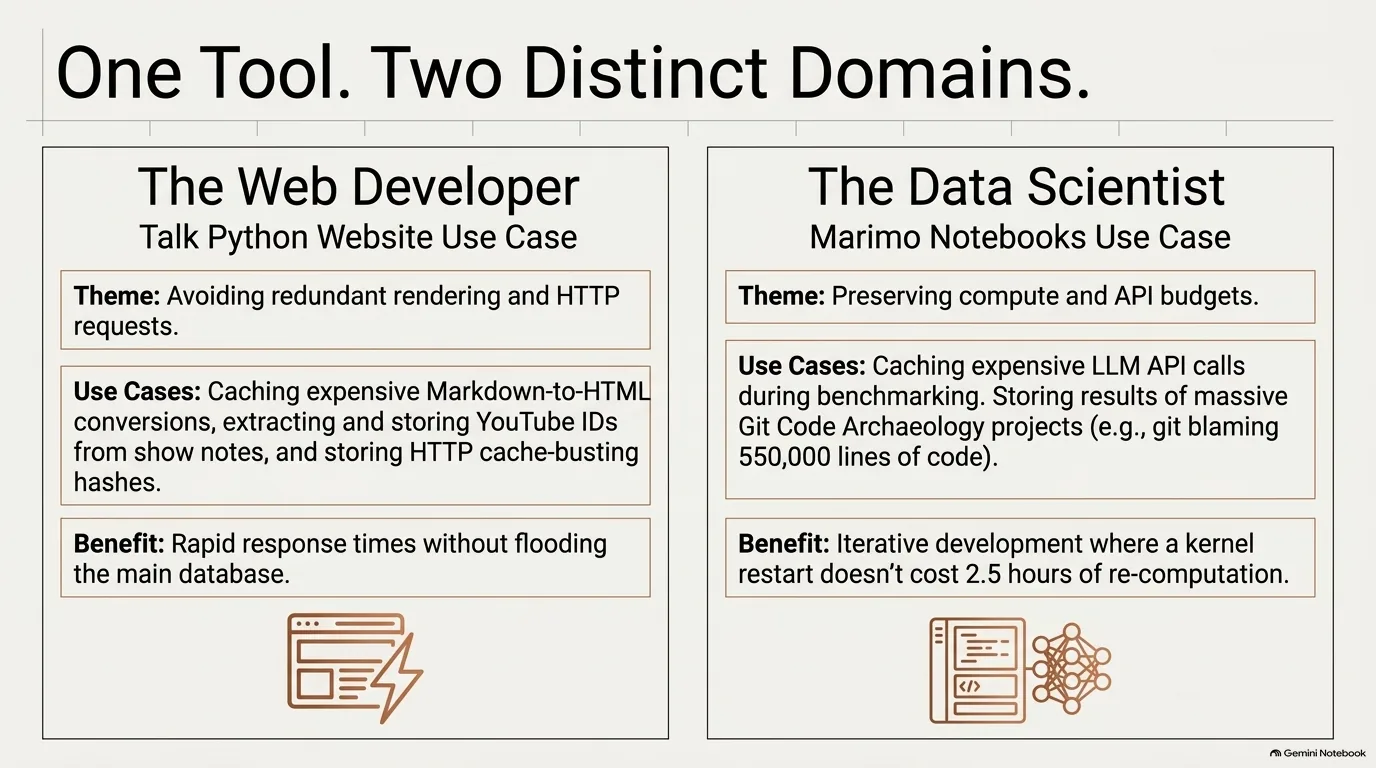
DiskCache is just as at home in a data science notebook as in a web app, and the use cases on each side look nothing alike. That alone tells you how general it is.
Start with LLMs. Say you're using an LLM to classify text: some text goes in, and you want to know whether it's about a certain topic. When you benchmark that, you loop over your whole dataset trying different approaches. Run a new approach and of course it should hit the model. But if you accidentally rerun an old one, why pay again for the same text? The same goes for machine learning in general. If the same image file goes into a cloud image classifier, you don't want the expensive compute to happen twice. And if you run open-weight models at home, you quickly learn how slow they are. Michael Kennedy has a couple of small utilities that talk to a 20 billion parameter open-weight model running on his Mac Mini. With DiskCache in front of it, asking the same question again comes back instantly instead of after 10 seconds.
On the web side, talkpython.fm is a good example. It doesn't actually cache many database queries, since they're quick. What it caches are the small jobs that pile up when a page does them hundreds of times:
- Markdown to HTML. Show notes are written in Markdown. Instead of converting a fragment on every request, the site looks up the stored HTML by a hash of the content.
- YouTube IDs. The site parses the video ID out of the show notes once and caches it.
- Cache-busting hashes. Every static file URL gets a hash of its content, so the CDN never serves a stale file. Working those out takes almost 700 web requests, some to S3, so they get their own cache.
Separate jobs get separate caches, so one can be cleared without losing the expensive ones. The one holding YouTube IDs and Markdown had 8,970 items in about 9 MB.
The hash trick is the key to avoiding stale data. The YouTube ID's cache key includes something like a hash of the show notes, so if the notes change, the key changes, and there's no way to get the old answer back. Keys don't have to be strings, either. Tuples work well, say, when you want five different LLM responses for the same text.
One more tip: cache as far down the work as you can. If you pull 20 rows from the database and then build an object out of them, cache the finished object, not the rows.
The biggest data science example from the episode, a project that ran for hours, gets its own section.
“There's just tons of these little edge cases you're like, oh, got to do that thing. And it's not a big deal, but we've got to do it 500 times in a request. Then it is kind of a thing.”
Michael Kennedy
Ignoring an argument in cache.memoize: the progress bar bug
What does DiskCache look like on a job that runs for hours? Vincent Warmerdam built one as homework for this episode, a project he calls code archaeology.
It works like this. Take a Git repository, pick about 100 points in time between the first commit and the last, and at each point run git blame on every line in every file. Plot it, and you get something like layers of sediment: code written early on starts as a thick band and thins out as lines get replaced. In Marimo's repository, most lines stick around for a long time. Django shows big shifts around its releases. scikit-lego shows a sharp break when a new maintainer arrived and moved the docs from Sphinx to MkDocs, and sentence-transformers shows the move from an academic lab to Hugging Face.
That's a lot of git blame. Django, at about 550,000 lines, took two hours and 15 minutes on an M4 Mac. The work ran in parallel with threads, and the result for every file at every point in time was cached, so if the notebook had to restart, nothing finished would run twice. The charts themselves are Altair charts saved to disk and served from GitHub Pages. Along the way Vincent also found a bug in Marimo's own caching layer, so he switched back to DiskCache.
Then the cache stopped working, and every run missed. The culprit was a progress bar. A Marimo progress bar was passed into the memoized function so it could update from inside, and every rerun of the notebook created a new progress bar object. A different argument means a different cache key, so the cache never hit. The fix was already in the library: memoize can ignore some of a function's arguments when it builds the key. Imagine the relief, after writing the whole notebook, of finding that in the docs.
One detail is worth knowing before you copy that fix. In DiskCache 5.6, ignore matches strings against keyword arguments and integers against positional ones. Ignore 'progress_bar' and then call analyze_repo(path, bar) positionally, and the progress bar is still part of the key, so the cache keeps missing without any error. Making the argument keyword-only rules that out:
from diskcache import Cache

cache = Cache('repo-cache')

class ProgressBar:
    def update(self):
        pass

@cache.memoize(ignore={'progress_bar'})
def analyze_repo(repo_path, *, progress_bar):
    # progress_bar is keyword-only, so it is always left out of the cache key
    progress_bar.update()
    return {'repo': repo_path}

analyze_repo('django', progress_bar=ProgressBar())  # computed
analyze_repo('django', progress_bar=ProgressBar())  # cache hit
The lesson: caching is hard to get right, on par with naming things. Or, as the old joke goes, the two hard things in computer science are naming things, cache invalidation and off-by-one errors.
“So, oh my god, I'm never hitting the cache. This is horrible.”
Vincent Warmerdam
FanoutCache: sharding SQLite to cut write contention
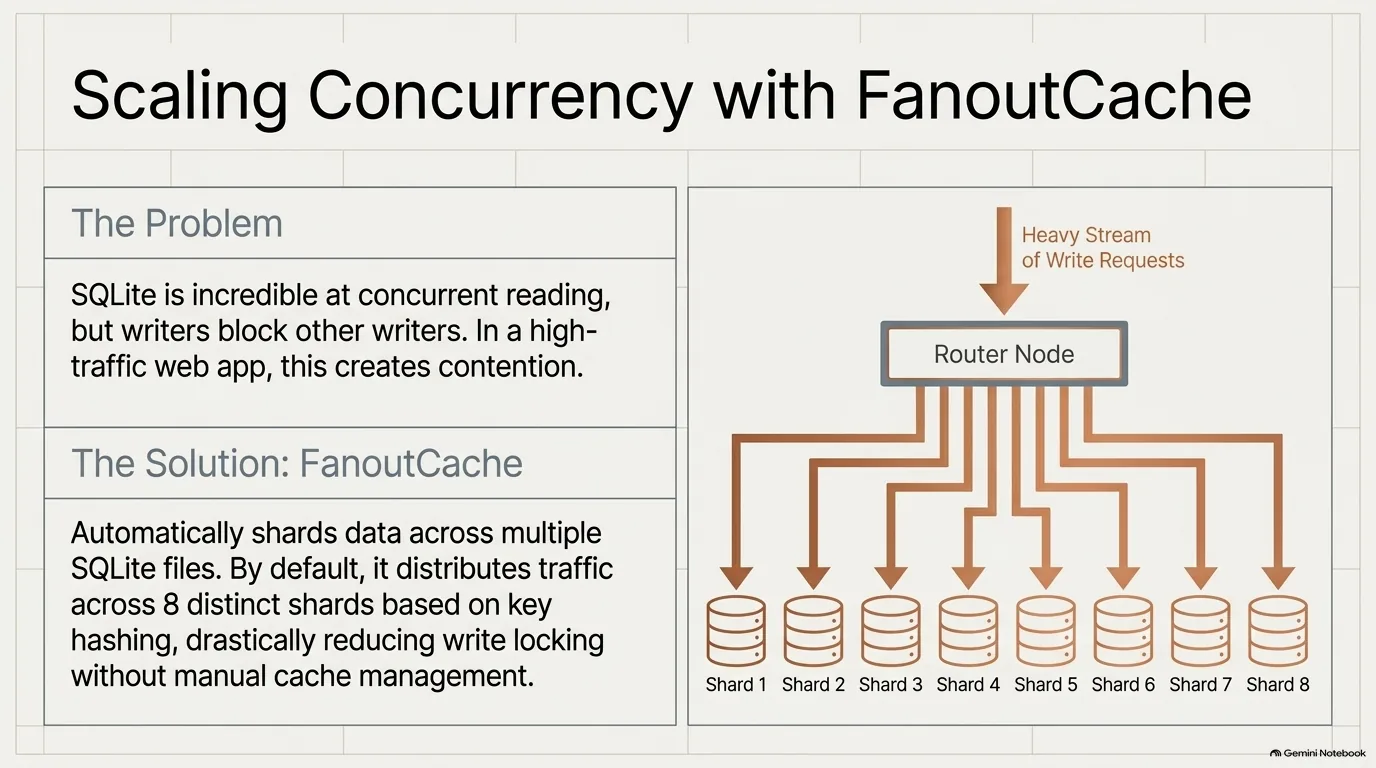
What happens when a single SQLite file isn't enough? DiskCache's answer is FanoutCache, and it uses an old database trick: sharding.
Here's sharding in one paragraph. Say you have a billion user records and they don't fit comfortably in one database. You could run 10 servers and decide where each record goes by its ID, so a user whose ID starts with 1 goes to the first database, one starting with 2 goes to the second, and so on. FanoutCache does the same thing with SQLite files on one disk. It's built on top of the regular Cache, hashes each key, and sends it to one of several shards.
Why bother? It comes down to how SQLite handles concurrency. The docs put it this way: readers and writers don't block each other, but writers block other writers. Spread the writes over several files and two writers are much less likely to need the same one. The docs suggest a shard for every concurrent writer, depending on your scenario, and the default is eight.
It's a lot like keeping separate caches by job, one for YouTube IDs and another for Markdown, a comparison Vincent Warmerdam drew. Sharding does the same split, but by key rather than by use case, so even one long list of users can benefit from several SQLite files.
Do you need it? Plenty of apps don't. talkpython.fm doesn't use it, for a practical reason: Michael Kennedy wants to clear caches by category, dropping all the YouTube IDs but keeping the hashes that took almost 700 web requests to build. Separate caches give him that for free. Tags could probably do it too, he admits, but he's not that advanced.
Still, it's good to know it's there. If you ever outgrow a single cache, the next step isn't a rewrite around Redis or Valkey. It's a different class:
from diskcache import FanoutCache

cache = FanoutCache('/tmp/fanout-cache', shards=8)  # 8 SQLite files; 8 is also the default
cache['user:2005'] = {'name': 'example'}
print(cache['user:2005'])
DiskCache's Django backend is built on FanoutCache too, which comes up in the Django section.
“Okay, the core feature is great, but if I outgrow it, what is my next step? Do I have to completely switch to something really different like Redis or Valkey? Or do I just change the class I'm using?”
Michael Kennedy
Custom serialization in DiskCache: compressed JSON and smaller NumPy embeddings
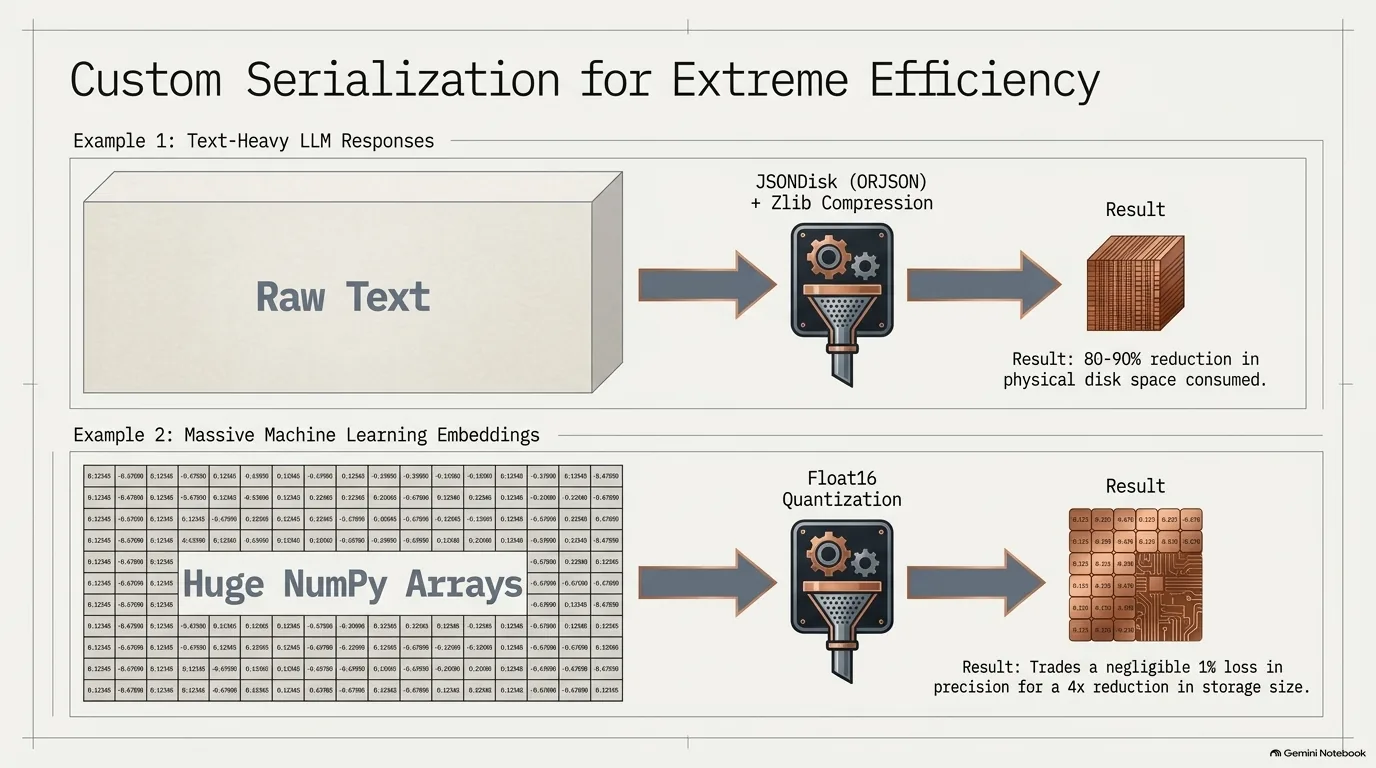
By default DiskCache pickles anything that isn't a native SQLite type. Not everyone loves that; Michael Kennedy, for one, isn't a fan of pickling custom classes and lists of odd things. Good news: you don't have to accept the default. You can write your own disk class, which controls how values are written and read, and hand it to the cache.
The docs include an example that stores values as JSON and compresses them with zlib. Why does that help? JSON is text with a lot of structure, and repeated structure compresses well. Think of a list of users where every entry repeats the same keys. Vincent Warmerdam measured it, with notebooks an LLM wrote for him and results he checked himself. For a short, ordinary dictionary, the difference is negligible and the trick isn't worth it. For text-heavy data with a lot of repetition, savings of 80% to 90% on disk aren't unheard of, at the cost of a little compression and decompression time. Caching LLM output looks like a natural candidate, too.
The same idea works outside of caching. Michael had database records holding about 100K of text he never queries, so he compressed them with Python's XZ implementation and stores the bytes. They're about a tenth the size, and it was way fast. For the JSON version, Michael would reach for a high-performance JSON library. Vincent uses orjson, as much for its types as its speed: it accepts NumPy arrays and has somewhat better support for dates.
Embeddings are the other example. They aren't hugely expensive to compute, but they're expensive enough. Storing a NumPy array as raw bytes turned out to be about the same size as pickling it, so there's very little to gain there. Dropping to float16 before saving is one option. Vincent went further and wrote his own quantization: compute 256 buckets from the quantiles of the values, store the scale and the mean, then store which bucket each number fell in. He got about a 4x saving on disk space and gave up about 1% of similarity score. Your mileage will vary, of course. But that's the kind of experiment a custom disk class opens up.
When is a cache the wrong tool? Parquet came up as an alternative for storing the arrays. Parquet shines as one huge columnar table, partitioned on something like a date, which Polars can scan for just the rows you need. For a big table, Vincent would expect that to beat anything you could do with a cache. DuckDB, Postgres and plain SQLite each solve a different problem again. You'd never use a cache to do a group by and then a mean.
“It is not unheard of to get like 80%, 90% savings on your disk space, basically.”
Vincent Warmerdam
DiskCache eviction policies, size limits and expiry
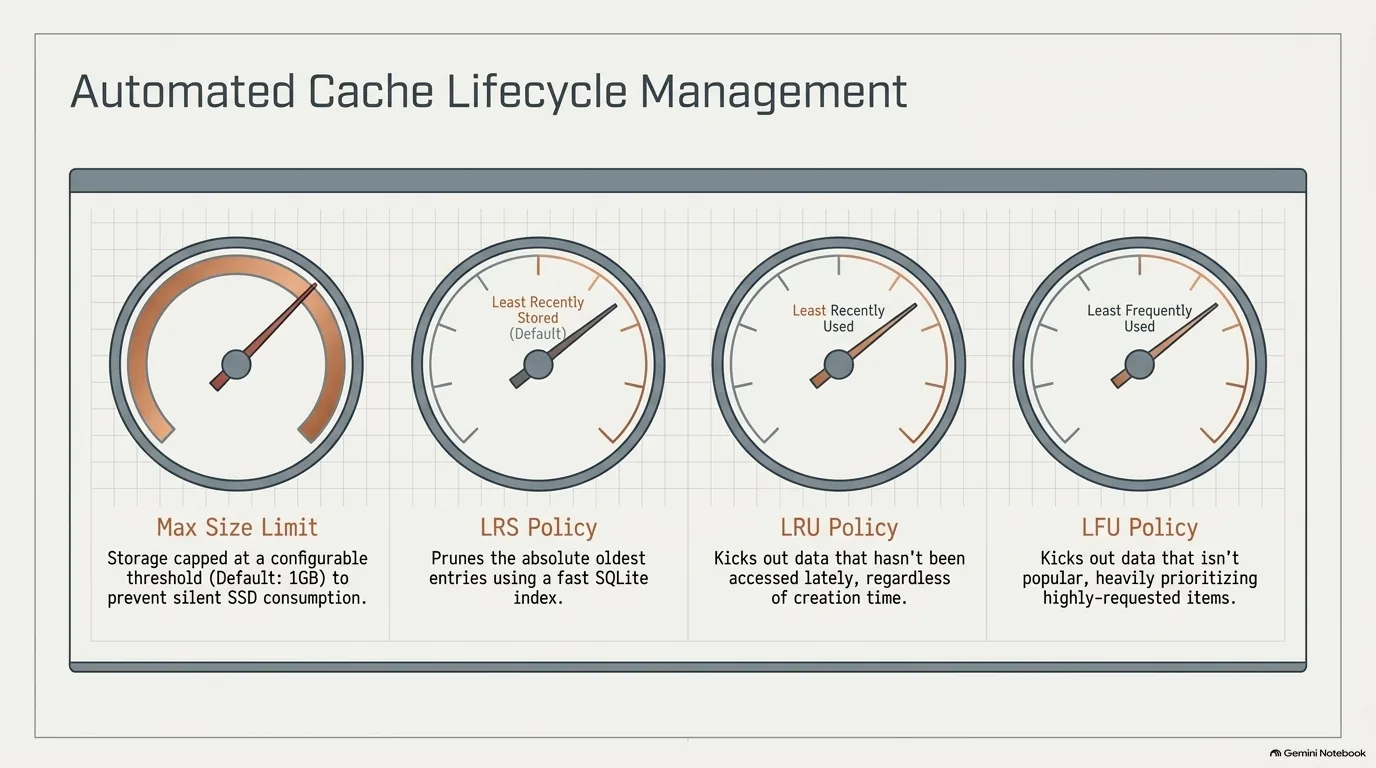
An in-memory cache cleans itself up whether you like it or not. Sooner or later the process restarts, even if it's only because you shipped a new version. A cache on disk doesn't get that reset. It piles up, and it can blow up if you're not careful. That's why the talkpython.fm admin backend has a page showing how big each cache is, with a button to clear it.
DiskCache has three ways to keep that in check.
- Expiry. Any entry can have an expiry time. It's useful for data that should refresh, like the front page example earlier, but it also works as a plain safeguard. Recompute this once a month, say, and don't let it linger forever.
- A size limit. Every cache has one, and the default is 1 GB. That's a sensible default rather than letting a cache grow to infinity, but it might catch people off guard. The limit is measured in bytes on disk, not a number of keys.
- An eviction policy, which decides what goes when the cache is over its limit.
The policies, from the DiskCache docs:
least-recently-storedis the default. Every item records the time it was stored, and that field is indexed, so finding the oldest entries is fast.least-recently-usedevicts whatever hasn't been read in the longest time, no matter how old it is.least-frequently-usedcounts accesses and evicts the least popular items. An item read twice goes before one read a hundred times, even if the first was read a moment ago.noneturns eviction off.
Most people will rarely touch these, and that's sort of the point: they're there for the day you need them. Here's what setting them looks like:
from diskcache import Cache

cache = Cache(
    '/tmp/html-cache',
    size_limit=2**30,  # bytes; 1 GB is also the default
    eviction_policy='least-recently-used',
)
cache.set('episode:534:html', '<p>...</p>', expire=60 * 60 * 24 * 30)  # about a month
“I've never had to fiddle around with them too much, but it's one of those things where even if I don't need it right now, it is just a relief to see that the feature is there in case you might need it later.”
Vincent Warmerdam
DiskCache Deque and Index: a cross-process queue and transactions
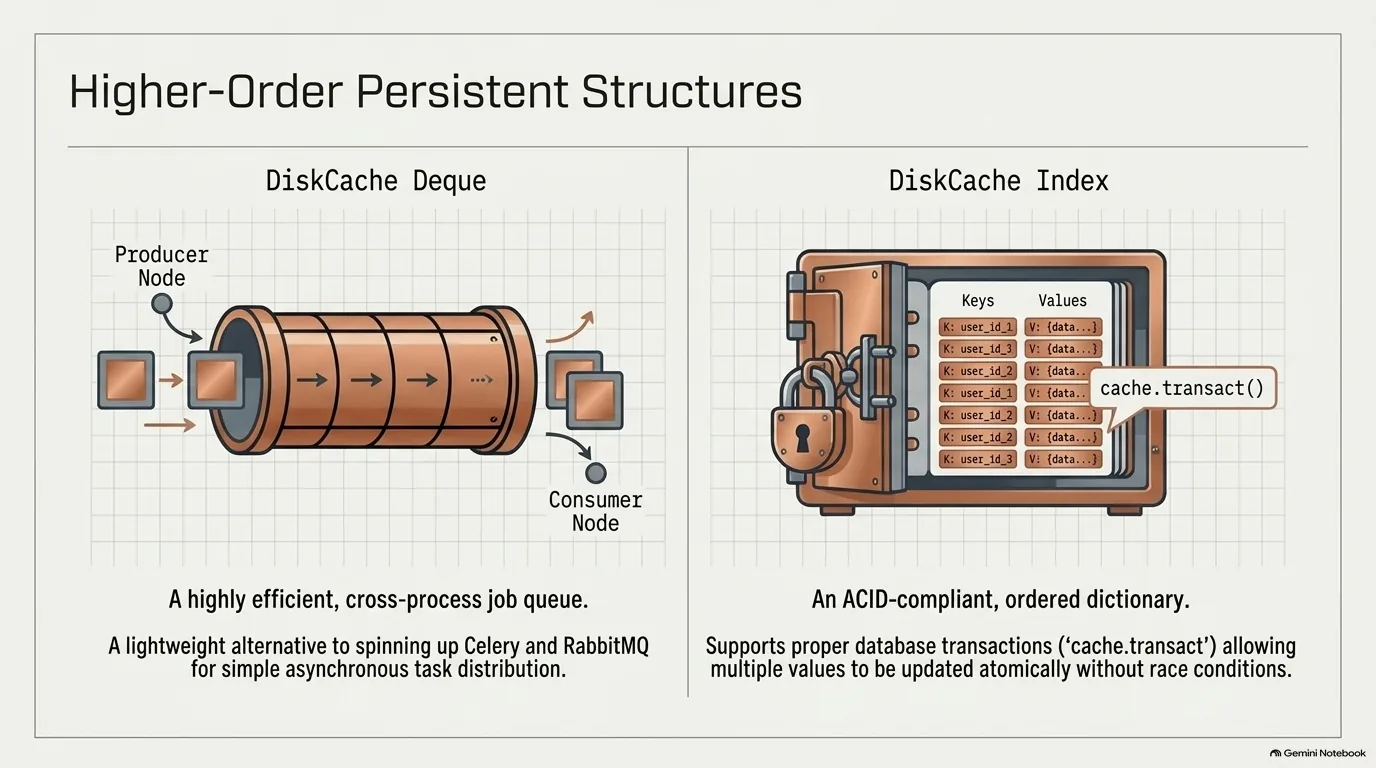
So far DiskCache has been a dictionary. It also ships a couple of higher-level data structures on the same storage, and they go further than you'd expect from a cache.
The first is Deque. It's spelled d-e-q-u-e, and a lot of computer science people pronounce it "deck," which Michael Kennedy has to rage against. Either way, it's a double-ended queue that lives on disk. You append items and pop them off the other end, over and over. Normally you think of a cache as somewhere you put things. A deque is about taking them out, which makes it a neat way to fan out work across processes. The docs describe it as an efficient and safe means of cross-thread and cross-process communication. You'd never think you'd get that out of a cache.
That puts it in the territory of task queues like Celery, which keeps its list of pending jobs in a broker such as Redis or RabbitMQ. If you don't want Celery, you can roll your own with DiskCache. Values go in the same way as everything else, and if a process breaks, the jobs that still need doing are still there. The usual limit applies: every process has to reach the same file on the same machine.
The second is Index, a mutable mapping that's also an ordered dictionary, with transactions. Why would a cache need those? Say you need two values and they have to be consistent with each other. Inside a transaction, nothing can change in between, so both values existed together in the cache at the moment you read them. It's a niche feature, but easy to picture paying off wherever consistency really matters.
To make it concrete, here's a small example of both:
from diskcache import Deque, Index

jobs = Deque(directory='/tmp/jobs')
jobs.append('render episode 534')
jobs.append('render episode 535')
print(jobs.popleft())  # 'render episode 534', from any process using that folder

totals = Index('/tmp/totals')
with totals.transact():  # both values are read together, with no write in between
    downloads, plays = totals.get('downloads', 0), totals.get('plays', 0)
The docs go further, with recipes for things like barriers and throttling. None of it is needed on day one. That's the pattern with most of these extras: you may not need them now, but you can see how they'd be useful later.
“It's just that in this particular case, if you don't want to use Celery, you can still kind of roll your own by using this cache as well.”
Vincent Warmerdam
DiskCache as a Django cache backend, and SQLite tools like Litestream and Plash
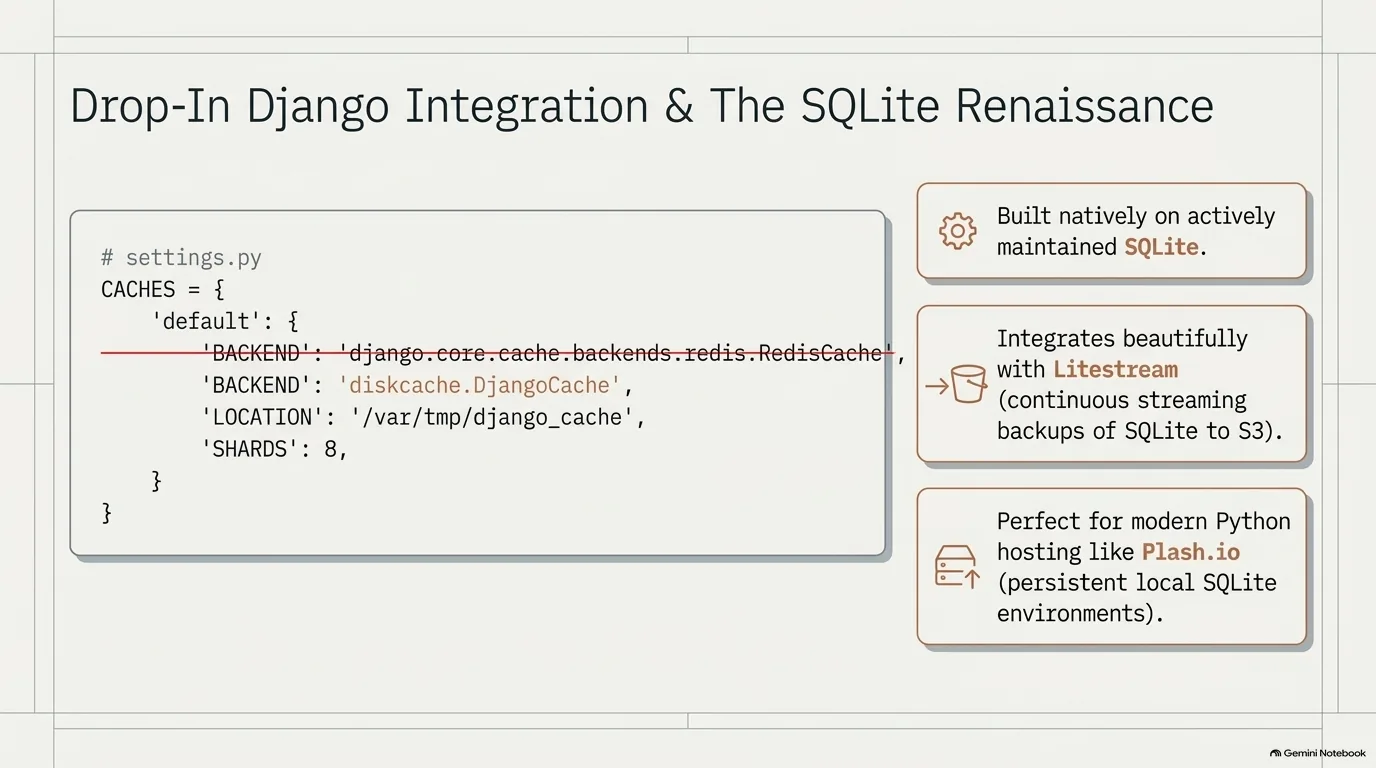
DiskCache seems to have a big Django following, and it's easy to see why. It ships a real Django cache backend. In fact, that's how DiskCache first reached Michael Kennedy: someone sent it to him as a cool thing to drop into Django. He wasn't using Django, so he admired it and moved on, until he saw it used outside of Django.
Django has a built-in cache framework, and diskcache.DjangoCache plugs straight into it. You set the backend and a location in your settings file, and Django's caching sends everything there instead of to Redis. Under the hood it uses the sharded FanoutCache, and you can set the number of shards, a timeout for when reads or writes run into contention, and a size limit. Here's a settings block that runs:
CACHES = {
    'default': {
        'BACKEND': 'diskcache.DjangoCache',
        'LOCATION': '/var/tmp/django_cache',
        'TIMEOUT': 300,
        'SHARDS': 8,
    },
}
Why does that matter? Django is mature and really nice, but it goes deep, and doing everything by hand inside it can be very time-consuming. Vincent Warmerdam admits to a love-hate relationship with it for exactly that reason. So it's good to know someone made a proper plugin the way Django wants it.
Two more tools came up from the wider world of running SQLite in production.
Plash is a new, very Python-focused host from Answer AI, Jeremy Howard and friends. It gives you a persistent SQLite database and a process attached to it, and that's the whole opinionated idea. How production ready it is remains an open question. Migrations are the tricky part, since, as Vincent recalls it, you have to download the whole dataset and upload it again. Postgres deserves its due here: Calmcode has moved between cloud providers several times just by moving the Docker containers, because Postgres stayed where it was. With SQLite, that takes more care.
Litestream answers the obvious question about SQLite in production: how do you back it up? It streams updates to S3. Pushing data into S3 is cheap, and getting it out is the expensive part, so continuous backup costs pennies on the dollar. You can send it to more than one provider, too. These days S3 is really a synonym for blob storage, and DigitalOcean and others speak the same API.
“So it's definitely nice to know that someone took the effort to make a proper Django plugin in the way that Django wants it.”
Vincent Warmerdam
Is DiskCache still maintained? Why it's still worth a try
Before you rush off to adopt DiskCache, one thing belongs on the record. The project hasn't had much attention lately. Its last release on PyPI was in 2023, and there are open conversations in the issues.
Is that a reason to stay away? Probably not. It's OK for software to be done, as Michael Kennedy puts it. And what does a library like this really need to stay healthy? Mostly, as Vincent sees it, someone has to confirm support for each new Python version. The hard parts are covered by SQLite, and SQLite is very much maintained. The only doom scenario anyone could come up with is a breaking change in SQLite, and the odds of that seem very low. If it ever came to it, the code is on GitHub, and you can fork it. Vincent Warmerdam counts it among his top five favorite Python libraries outside the standard library, and as he says below, it would have to break in front of him before he'd stop using it.
What could come next? Imagine a notebook where every cell caches its results, so when the kernel dies halfway through, you restart and pick up where you left off. A whole team could share that cache, too. It's Vincent's dream, and he's clear it doesn't work today and is hard to get right. Some objects, like that progress bar, don't belong in a key, and caching whole cells could make the cache huge. Marimo's dependency graph, Michael Kennedy pointed out, gives it a better shot than Jupyter. In the meantime, a cache on a shared VM or a shared Jupyter server can already be shared with colleagues, which helps with things like big grid searches.
So who needs a cache? It's easy to think of caching as a web thing, like the front page of Reddit, but people doing data science and LLM work need it just as much. Even if you mostly do data work, give DiskCache a try. Or, shorter: add a decorator and see what you get.
If you want to go deeper, Vincent's LLM Building Blocks for Python course is where the two of them first got excited about DiskCache, including caching LLM calls during benchmarks. Agentic AI Programming for Python covers working with AI coding tools, Python for Absolute Beginners covers the dictionaries and decorators DiskCache builds on, and HTMX + Flask: Modern Python Web Apps is a good place to put these caching techniques to work.
“This cache needs to break vividly in front of my face for me to consider not using it. Because it does feel like it's done in a really good way.”
Vincent Warmerdam