Rewriting Django's Async Story, a Visual Guide
TL;DR: For years Django's own documentation told people its async support was unfinished and slow. Carlton Gibson rewrote that topic guide, because the async API now covers the ORM, cache, authentication, sessions and signals, and the old overhead has shrunk from milliseconds to microseconds. What's still hard about async is shared by every Python framework. Meanwhile Django 6.0 added a Tasks framework, Django 6.1 brings fetch modes and database-level cascades, and free-threaded Python looks set to reward Django's long bet on threads.
"For years, Django and Async came with an asterisk." That's how Michael Kennedy, host of Talk Python, opened this episode. The docs themselves warned you off it, with scary performance notes and a story that felt half finished.
So is Django's async story ready or not? Carlton Gibson is a good person to ask. He was a Django Fellow for five years, spent eight years on the security team, sits on the Django steering council, and maintains a whole load of packages in the ecosystem. He also builds web applications with Django to pay the bills. He's the one who rewrote the asynchronous support topic guide, and his answer is yes: the async API is complete.
That doesn't mean async is free. Carlton is just as clear that it's an order of magnitude harder to get right than plain synchronous code, and that the limits people keep hitting (the GIL, CPU-bound work, the size of the database connection pool) aren't Django problems at all. You'd meet the same ones in FastAPI or Flask.
The sections below take it in order: why the docs changed, what the async API covers and how it works underneath, where the real ceilings are, and how to run async code without letting it spread through your whole codebase. Then come the new features: Django Tasks for background work, fetch modes for the N+1 query problem, database-level cascades, and Carlton's typed serialization project, Django Mantle. Last comes deployment: when to switch from WSGI to ASGI, a hybrid setup that keeps the boring parts boring, and why free threading might be the biggest change of all.
Is Django async ready? Why the async docs were rewritten
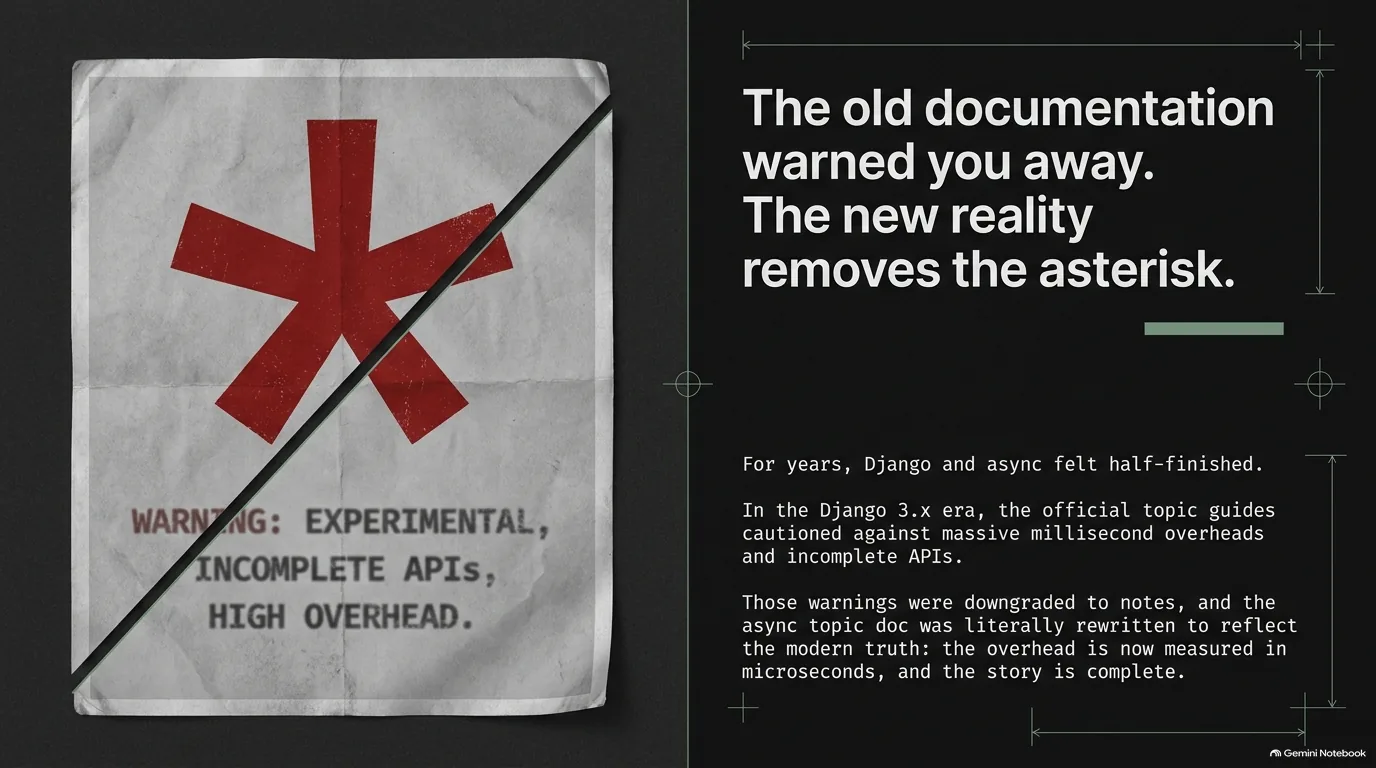
Django's asynchronous support topic guide was first written when async support landed in Django, back around Django 3 and Python 3.6. Carlton can't remember the exact version, but he does remember the tone. It was very negative: we still haven't finished this, it's still in development, it's not ready, and the performance implications are terrible unless you do everything perfectly.
To be fair, that was a reasonable read at the time. Michael pointed out that in the Python 3.5 and 3.6 days, async and await had a kind of Python 2 to 3 problem. Even if you wanted to write async code, the library you needed to call, the one talking to the internet or the database, wasn't async. So what was the point?
Async has come an awful long way since then, and the guide hadn't kept up. The overhead warnings are a good example. Django leans on running synchronous code in a thread and awaiting the result (more on how in the next section). That hop used to cost on the order of milliseconds to set up. With the latest Pythons, Carlton says, it's tens of microseconds. Tens of microseconds against requests measured in milliseconds isn't a significant thing, yet the documentation still said this was going to slow your requests down.
So Carlton rewrote it. The idea that the story somehow wasn't finished wasn't quite right, and the warnings about performance were "a bit overplayed in this latter day," so they were downgraded to notes. Looking back, he agrees the old guide was scaring people off something that works.
Does that mean async in Django is now problem free? No. Carlton is careful about this. You will run into problems as you scale up. But they're problems with async in Python, not with Django, and the docs should say so instead of pinning them on the framework. Those shared limits get their own section below: the GIL, CPU work and database connections.
“And that's why we made the effort to update the topic, because we realized we were giving users bad advice.”
Carlton Gibson
What Django's async API covers, and how sync_to_async works underneath
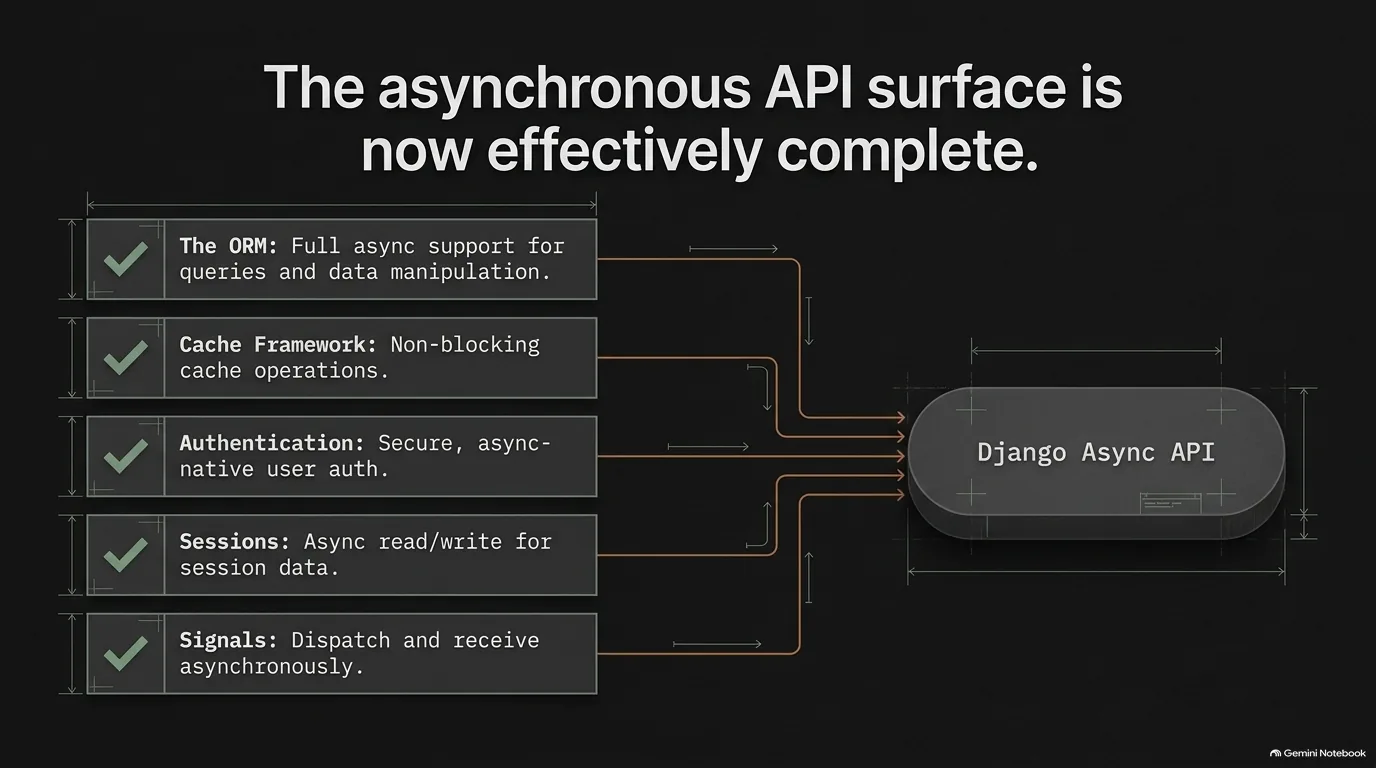
What does "complete" actually mean here? Carlton's list is the one in the image above: the ORM, the cache framework, authentication, sessions and signals all have an async API now. As Michael summed it up, from a user's perspective it really is all there. You can write an async view and await your way through a request without falling back to synchronous calls for the everyday parts of Django.
How Django gets there is worth understanding, because it explains both the old fears and the remaining limits. Much of it relies on a helper from the asgiref library called sync_to_async. You take a synchronous function, wrap it so you get a coroutine you can await, and the work runs in a thread. Python's own asyncio.to_thread does essentially the same thing.
So why not just use that? Because sync_to_async adds a few niceties Django needs, and the important one is that it keeps track of which thread a call came from. Django's database connections are tied to a thread, and so is the transaction state that lives on each connection. Queries have to run on the same thread as the connection they belong to, or you're going to have problems. sync_to_async makes sure they do.
That thread hop is exactly the overhead the old docs warned about, and as the previous section showed, on a modern Python it's small enough to stop worrying about.
None of this means the work is done, and Carlton doesn't claim it is. Async in Django is an ongoing project: they keep developing it, keep fixing things and keep adding things. And the thread-bound connection has one lasting consequence for transactions, covered in the next section on the real limits of async.
“It doesn't mean there's no work to be done. It's an ongoing project. We keep developing it. We keep fixing new things. We keep adding new things.”
Carlton Gibson
The real limits of async Python: the GIL, CPU work and database connections
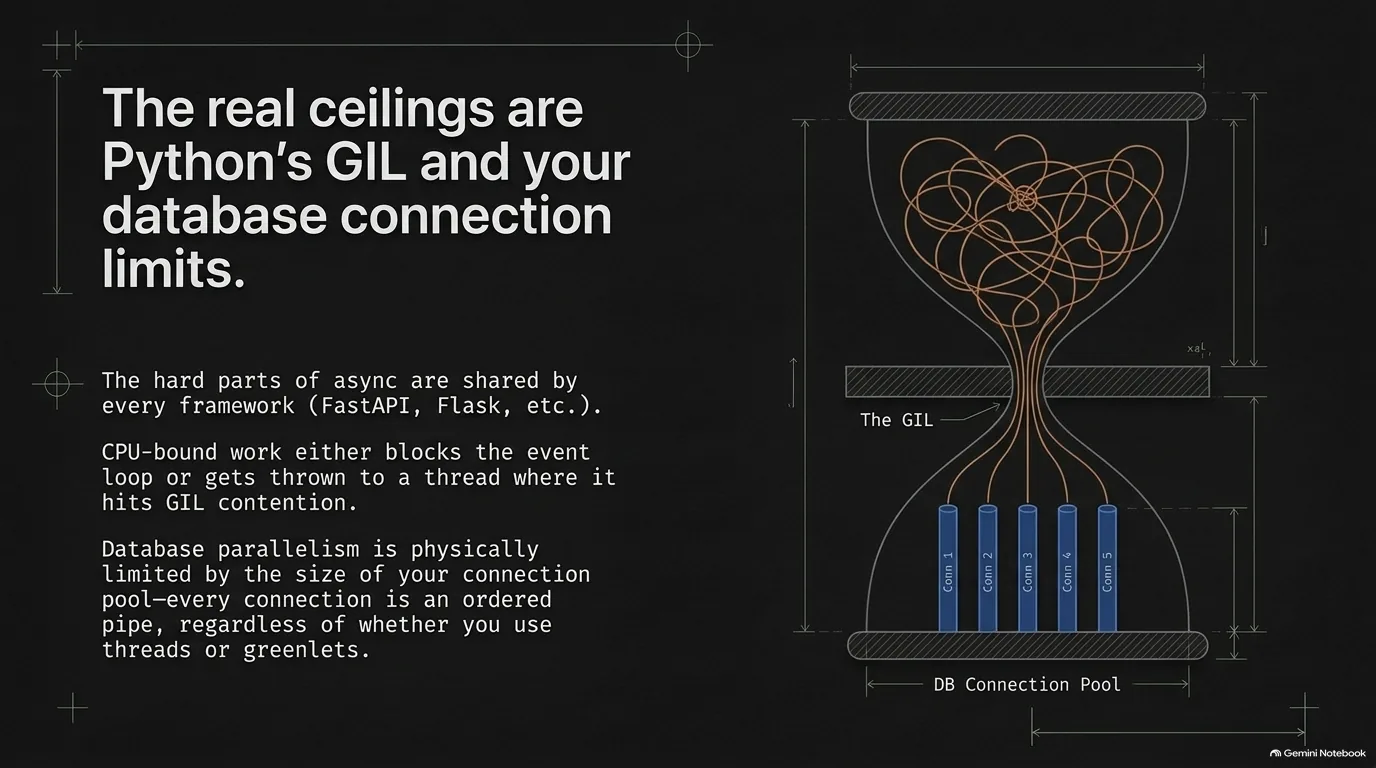
If Django's async API is complete, what's left? According to Carlton, three things, and none of them are specific to Django.
The database connection pool. Each database connection is an ordered pipe: it takes a query and gives back a response. Whether you do that from threads, the way Django does, or from greenlets, the way some other ORMs do, you're limited by the size of your connection pool. That's true on WSGI and on ASGI. It always has been. To scale up, you need a bigger pool or a more efficient way of using it.
Transactions. Because Django's connections are tied to a thread local, Carlton says Django is never going to have async transactions in the sense of calling await inside an atomic block. Why not? The code after an await may not run on the same thread as the connection, and the transaction state lives on that connection. That doesn't mean no transactions in async code. You wrap the whole transaction in a single function and call it through sync_to_async:
from asgiref.sync import sync_to_async
from django.contrib.auth.models import User
from django.db import transaction

@sync_to_async
def deactivate_user(user_id: int) -> None:
    # One function, one thread, one connection: the whole transaction runs here.
    with transaction.atomic():
        user = User.objects.select_for_update().get(pk=user_id)
        user.is_active = False
        user.save(update_fields=['is_active'])

async def deactivate(request, user_id: int):
    await deactivate_user(user_id)
    ...
Try transaction.atomic() directly inside an async function and Django stops you with a SynchronousOnlyOperation error.
CPU-bound work. An event loop is single threaded. It switches tasks at each await, but plain Python crunching numbers never yields. So CPU work either blocks the loop, or it goes to a thread, where it runs into contention for the GIL. Carlton calls the workaround people reach for, sprinkling asyncio.sleep(0) into a CPU-heavy loop, horrible. On the loop or across threads, you end up with about one thread's worth of CPU time no matter which way you cut it. A separate process gets around that, but it's crazily heavy: you have to bootstrap the process and marshal the data back and forth. That's Python's real problem, and you'd hit exactly the same one in FastAPI or Flask.
Before you reach for any of this, though, check the boring thing first. Michael's public-service announcement: if requests feel slow, take an hour and look at your database indexes and query plans, and make sure every hot path uses an index. "Database indexes are magic." Carlton backed that up from the inside. A Django query spends a little CPU compiling the SQL, then waits on I/O, then spends CPU turning rows into ORM objects. psycopg already releases the GIL during that I/O wait, so you're getting that concurrency today, async or not.
“It was your database all along that was the thing that was taking the time.”
Carlton Gibson
Is async viral? Capping the function coloring problem in Django
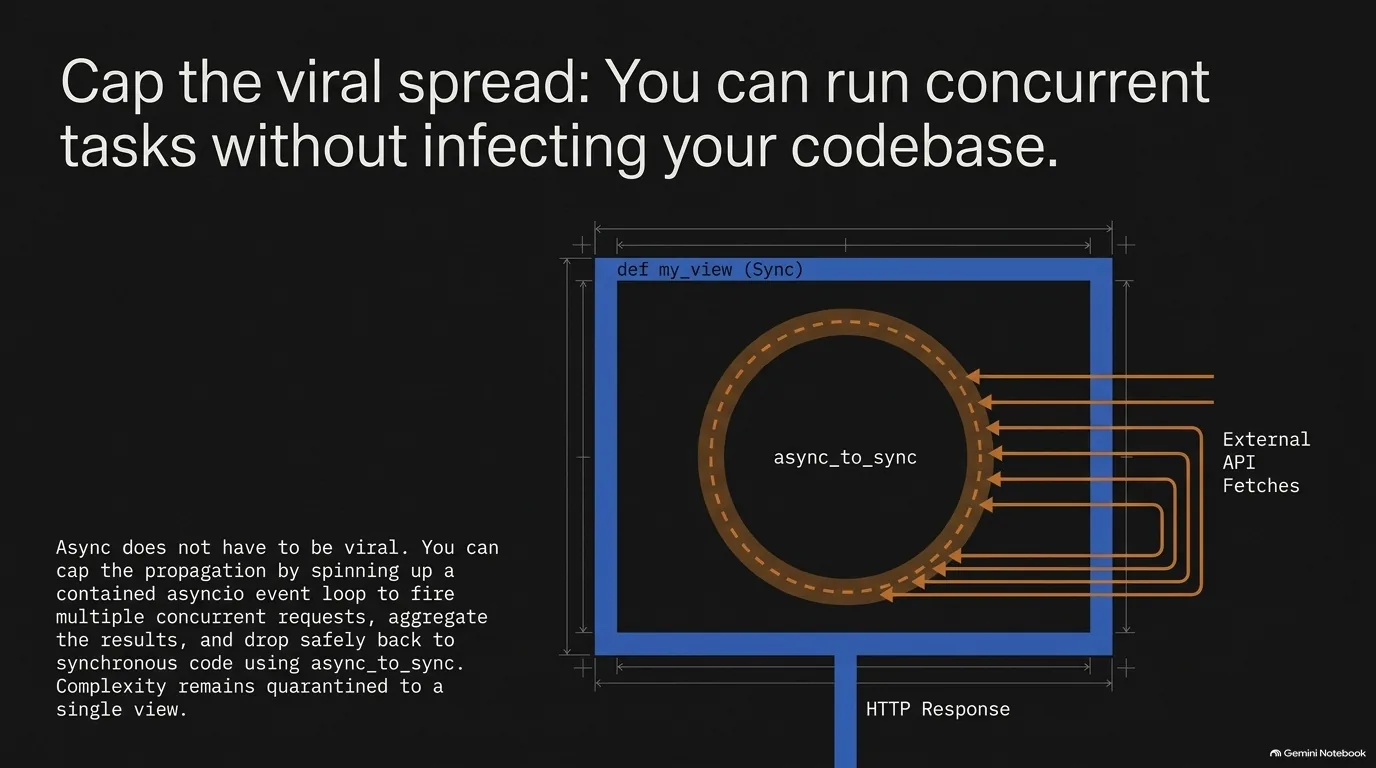
One of the most common reasons people give for avoiding async is that it's viral. Michael described the complaint like this: you've got some low-level function that's async, so the function calling it has to be async, and so does the one above that, until it cascades through the rest of your app. Viral in the GPL sense, as he put it. Carlton gave it its usual name, the function coloring problem: once you've got a red function or a blue one, every function that calls it has to be the same color.
Is that really a trap? Michael's point is that it doesn't have to be. Nothing stops you from writing a synchronous function that calls async_to_sync and stops the propagation right there. Or you can create your own asyncio event loop and run just that one bit. The async part stays inside one function, and nothing above it changes color.
To make this concrete, here's the example Michael gave: a synchronous function that has to call five external endpoints. Called one after another, the waits add up. Fired concurrently, they overlap. Here's a plain sync Django view doing exactly that:
import asyncio

import httpx
from asgiref.sync import async_to_sync
from django.http import JsonResponse

URLS = [
    'https://www.djangoproject.com/',
    'https://www.python.org/',
    'https://pypi.org/',
    'https://docs.python.org/3/',
    'https://talkpython.fm/',
]

async def fetch_all(urls: list[str]) -> list[int]:
    async with httpx.AsyncClient(timeout=10) as client:
        responses = await asyncio.gather(*(client.get(url) for url in urls))
    return [r.status_code for r in responses]

def status_board(request):
    # A plain sync view. The async code starts and stops on the next line.
    statuses = async_to_sync(fetch_all)(URLS)
    return JsonResponse({'statuses': statuses})
Carlton picked up that example. In his view, calling several external services concurrently is one of the easiest ways into async with Django. Picture an ordinary WSGI app on Gunicorn with four workers, each a single-threaded process doing its thing. You want to make some API requests, so you define a single async view. Django's handlers run that view in an event loop for you, it fires off the five HTTP requests, aggregates the results and returns one response. The rest of the app never knows.
Michael called it "so clearly a win," and the complexity stays fenced into a single view.
“And that can just be done in a fraction of the time of calling one and then the other.”
Carlton Gibson
Django 6.0 Tasks: background jobs without standing up Celery
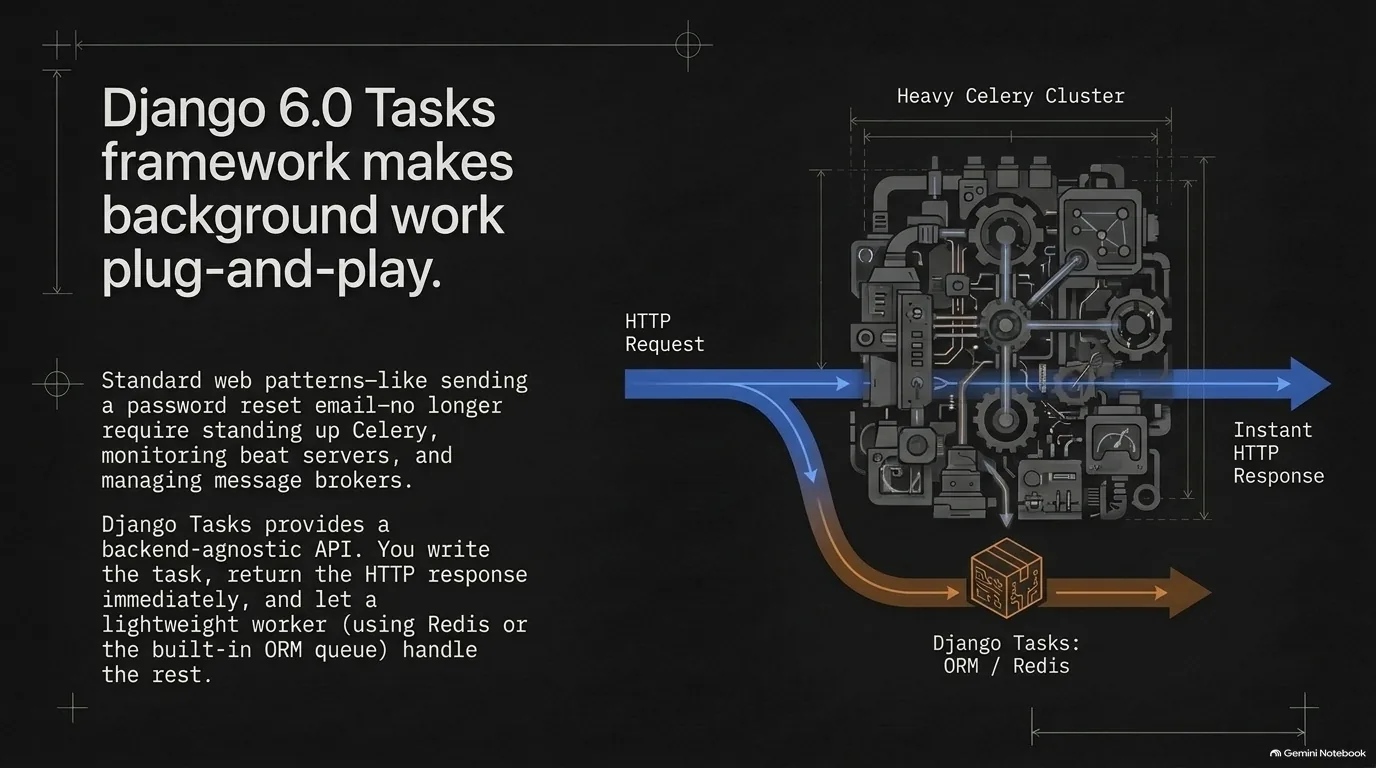
When async first arrived in Django, a lot of people assumed it was about background tasks. Carlton's answer was no, no, no: async is about I/O, many connections and long-lived requests. A task queue solves a different problem: getting slow work out of the request so the user doesn't wait for it. Django 6.0 added a built-in Tasks framework for that second problem.
Carlton's example is the password reset email. Historically, you'd take the request, send the email, wait for it to go out (which can take almost any amount of time), and only then return the HTTP response. That's a bad user experience. The better pattern is to accept the request, quickly write a task (to the database, say), and respond right away: it's on its way, give it a few seconds. A separate worker process picks up the task and sends the email.
People have done this for years with Celery, RQ, Django Q, Django Q2 or Huey. In Carlton's words, there's a billion of these task queues out there. So what's new? None of them could be relied on by Django itself, or by any third-party package. A package author who picked Django Q2 would leave out everyone running Celery, RQ or Huey.
Django Tasks fixes that with a common API. Any package can use it to enqueue a task and check its result, and the user picks the backend in their settings. Backends that implement a Django Tasks adapter just work. When the episode was recorded, there were backends for Redis and for the ORM, which stores tasks in your own database. Celery hadn't done its adapter yet, but there's an open issue for it. As a third-party package maintainer, Carlton finds this fantastic: he can add tasks to his packages without knowing anything about which backend his users run.
Is Celery bad, then? Not at all. Carlton calls it a truly wonderful piece of software. But it's built for a level of sophistication most applications don't need, and running it means a monitor, a beat server and the workers. Before adding it, he says, look honestly at your ops capacity. Do you have someone on call when the workers break down at two in the morning? Michael described what that step up looks like: a private network, poison messages, and downtime because the Celery version had to change.
Carlton's advice for getting started is simple. Use Django Tasks with the database backend. The Redis one works perfectly too, if Redis is already in your stack, but most people don't need it. And don't hand background work to an executor from asyncio instead: you get no queue controls, no result, no way to tell whether it failed or retry it, and no clean way to recover if it crashes.
“It really is a truly wonderful piece of software. But it's literally overkill for 99% of projects. And it's operationally difficult to keep going.”
Carlton Gibson
Django 6.1 fetch modes and the N+1 query problem
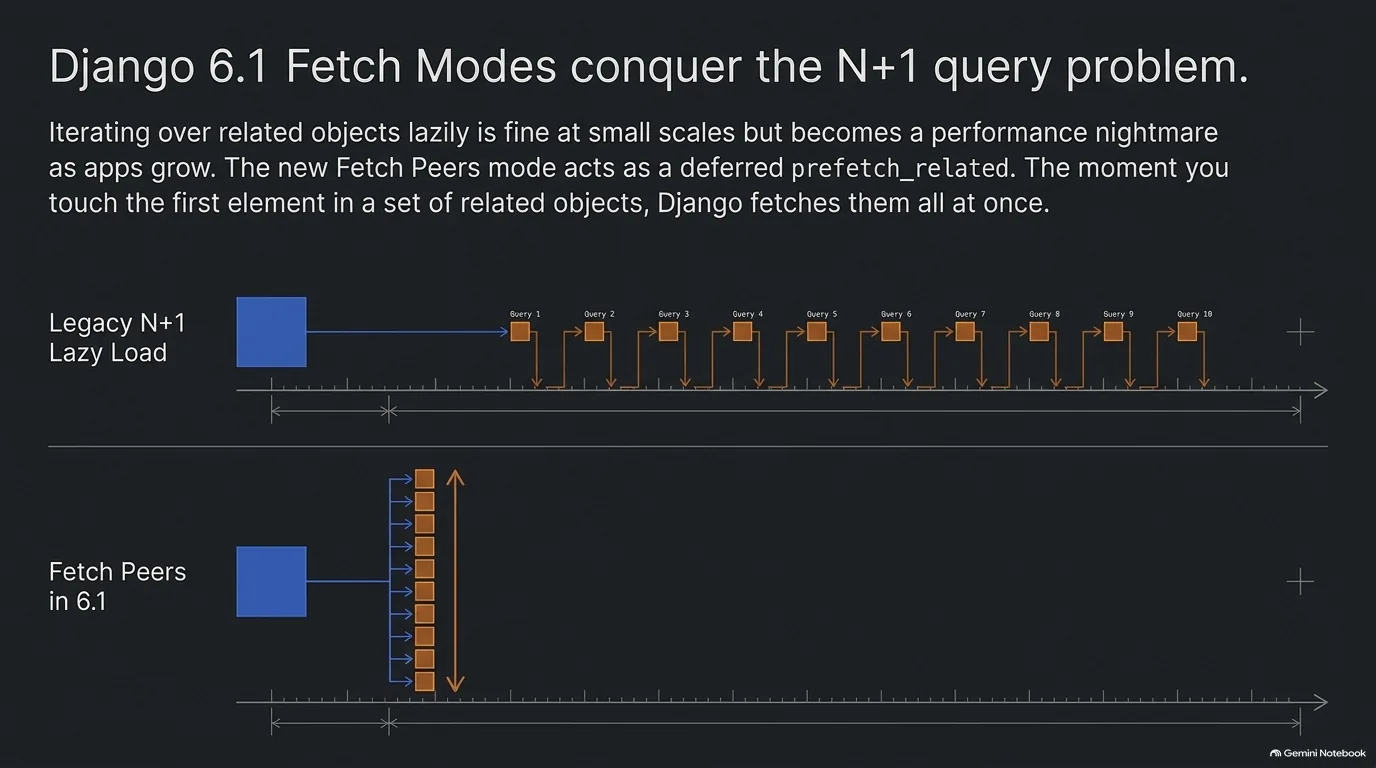
Here's the problem, in Carlton's example. You fetch a user, and that user has a list of bookmarks. You loop over them: for each bookmark in the user's bookmarks, display it. Each time you touch one, Django goes and lazily fetches that related object with its own query. One query for the user, then one more per bookmark. That's the N+1 query problem.
Lazy loading is great at small scale and when you're getting going. It's also, as Carlton put it, a performance nightmare once things grow, and people hit it again and again.
The usual fix is prefetch_related, added by hand wherever you need it. That's all right the first time. The trouble is keeping it up to date. Code changes, and suddenly you're prefetching something you no longer use. Michael pointed out the data-access version of the same headache: a function that gets all the books ends up needing a flag for "and the authors," because some callers want them and some don't.
Django 6.1's answer is fetch modes, set on querysets. The exciting one is fetch peers. It says: if I access the first element in a list of related objects, go and get them all at once. Carlton describes it as a deferred prefetch_related. If your code was going to lazy load anyway, it gets upgraded to one eager load at the moment it's needed.
Is it a magic fix you should switch on everywhere? No, and Carlton was clear about that. Jacob Walls, the new Django Fellow, gave a talk at DjangoCon Europe on how fetch modes work and where their limits are, and it's worth watching once the videos are out. Still, when Carlton asked people what they're excited about in 6.1, most pointed to this.
One smaller 6.1 change shows the same spirit from another angle: you can now customize the multipart parser class on the request object. Who wants to do that? Most people never will. But if you get big multipart requests with lots of parts, Carlton says swapping in a different parser could save maybe 30% of the CPU time spent parsing each request. What excites him more is the direction. It opens a path to swapping out more of the request implementation, comparing alternatives and turning knobs under the hood that used to be fixed. It's also a good reason to do what Carlton recommends with every Django release: read the long release notes and pick out your own favorites.
“When I've spoken to people about what they're excited about in 6.1 most people have pointed to this as their headline feature.”
Carlton Gibson
Database-level cascades in Django 6.1, and the sprint that shipped them
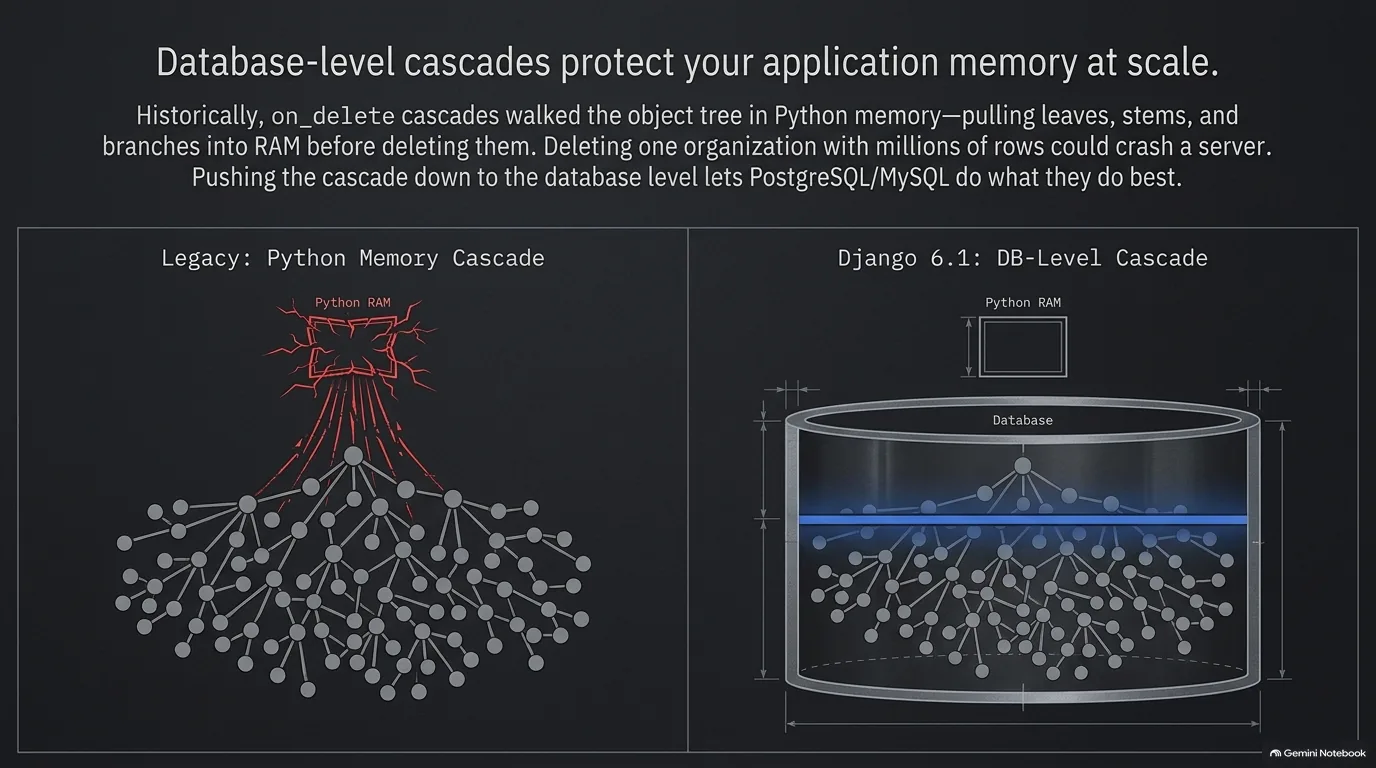
Say you've got a user, and that user has bookmarks. Each bookmark has a foreign key back to the user. What happens to the bookmarks when you delete the user? Normally you cascade the delete, and Django has always offered that through on_delete.
The catch is how it did it. Historically, Django ran the cascade in memory, in Python. It walked the tree, pulled the objects in, deleted the leaves, then the stems, and only finally the branches. That's fine for a user with a handful of bookmarks. Now picture an organization with team members and projects, or, as Michael put it, one record that references several tables with a million entries. Delete the organization and Carlton says it basically brings down your application with out-of-memory errors.
Django 6.1 adds the option to push the cascade down into the database. The database still has to do the work, but it's much, much better at it than Python is. This is Carlton's favorite feature of the release, because there was no way to work around it in Python. He once went as far as a custom database backend to change how it all gets created, which he admits was not a sustainable approach.
Why did it take so long? The ticket had been open for years because it was really hard. It finally got over the line at Django on the Med, a three-day core developer sprint, where Mariusz Felisiak (a former Django Fellow and core ORM contributor), Simon Charette, Lily Foote and Jacob Walls, the new Django Fellow, sat down and worked on it together. Carlton says it would never have happened without the time that event made available.
Django on the Med was Paolo Melchiorre's idea, years ago. The sprints at the end of DjangoCons are some of the best parts of the conference, but people are already exhausted and starting to leave. The first one ran at the start of October 2025 in Carlton's hometown, and the next was set for Paolo's hometown, Pescara, Italy, in September 2026. It's open to everybody, not just core developers. The aim is to team experienced contributors up with new ones, since the learning curve is a big part of what makes contributing to Django feel scary. Carlton also saw in-person time settle disagreements in five minutes that had rolled on for months on Django's new features board. He thinks COVID dealt the community a real knock, and that it has taken about half a decade to recover from it.
Want to help without traveling? Carlton had two asks. Install the beta (Django 6.1 was in beta when this was recorded) and run your test suite against it. If it passes, you're good; if it doesn't, the team wants to know before release day, not after. And take the Django Developer Survey. Five minutes of your time really does help drive Django forward.
“The database is much much much better at doing that work than python is.”
Carlton Gibson
Django Mantle: typed serialization as static islands over a dynamic ORM
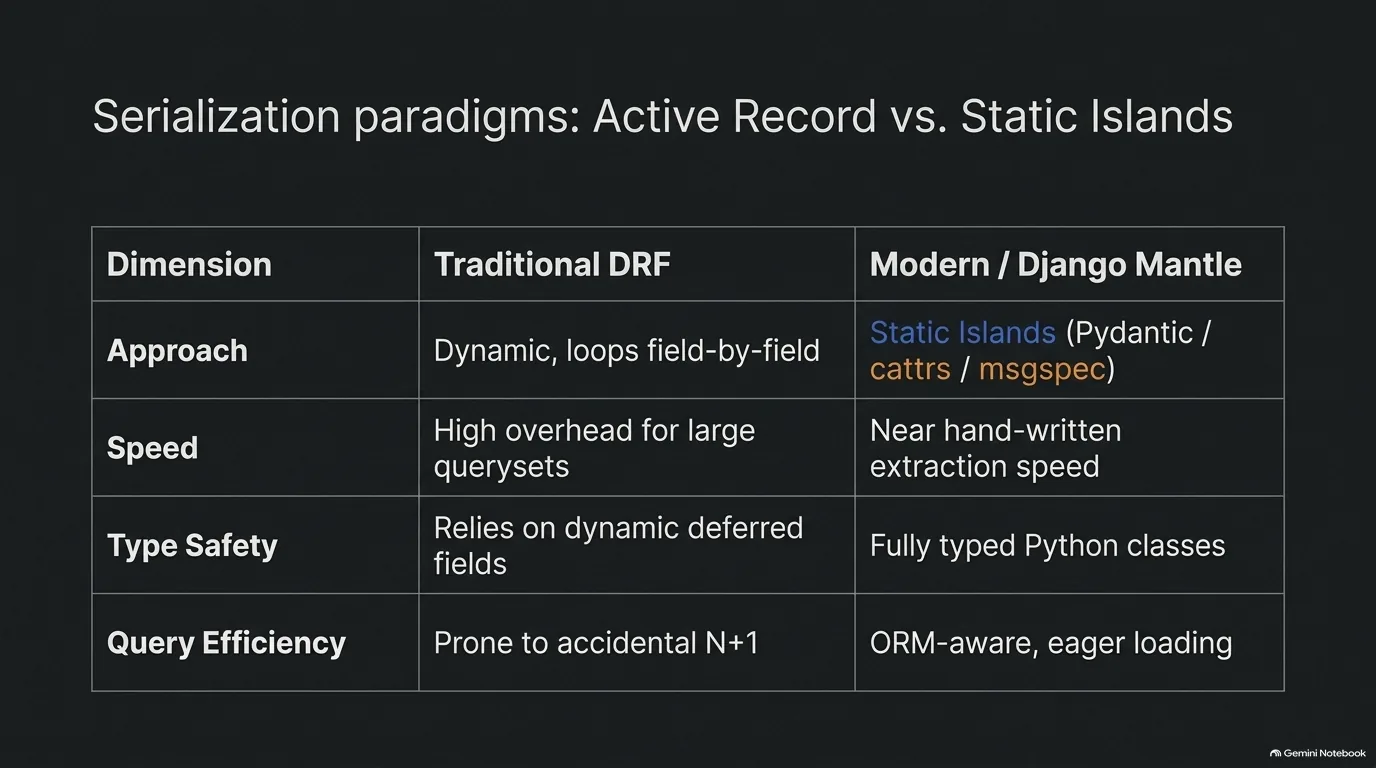
Django REST Framework has been wonderful, and Carlton says so. But it's aging, and its serializers in particular are last generation. They go through the model, get each field object, get the value from it, and loop. Newer libraries such as Pydantic, msgspec, attrs and cattrs (the last two are what Carlton uses) generate code that's almost as quick as if you'd written the attribute-by-attribute extraction by hand. Next to that, all of DRF's looping is very slow.
So why not just use Pydantic? It's fantastic, Carlton says, but it isn't ORM aware. It has no insight into how Django works.
Django Mantle is his take on that gap: a type-safe wrapper around Django's queryset machinery. You write attrs classes that describe the shape you want, instantiate a query and fetch. You get back fully instantiated objects in that shape, with all the data fetched in one go, nested objects included, plus writes with validation. Because it's ORM aware, it selects only the fields it needs and does the prefetch_related calls for you, so you don't get the N+1 query problem. And since the results are attrs classes, your type checker knows its way around them.
Why not just add types to Django models? Because the real type of a model attribute is a deferred field: an object that uses the descriptor protocol to hand you the converted value when you access it. As Carlton put it, "I don't want to type that." Django's ORM is built on powerful dynamic patterns, and retrofitting static typing onto it would be a real problem. So Mantle leaves that dynamic layer alone and puts static islands on top. The shape classes are pure Python, with full type safety, no hidden mutation and none of the active-record behavior of changing a property and saving.
That's also about how apps grow. A Django model is an active record: a database row that's also an object with behavior. Over time its display logic, aggregation logic and validation logic pile up on that one class. Carlton says everybody who's grown a Django app has seen it, and it's perfectly normal. Mantle is a path toward more structure once you need it, not something to start with. Starting there would be over-engineering.
Typing came up beyond Mantle too, and Carlton has mixed feelings about it. He's very into the idea that Python fits your brain, and his grumble is that typing can push code past that point. He passed on a story he was told at PyCon Italia: five typing experts, absolute gurus, sat around a table trying to work out the correct type hint. The original PEP that added type hints said they wouldn't become compulsory, even by convention, yet he sees real cultural pressure to adopt them. AI adds a twist. Michael noted that models often write typed Python without being asked, and Carlton's point is that the big issue with AI output is verifying it, so any type safety you get from a checker helps.
“And so the mantles, the shape classes that you define, they're your static islands.”
Carlton Gibson
Free-threaded Python and Django's long bet on threads
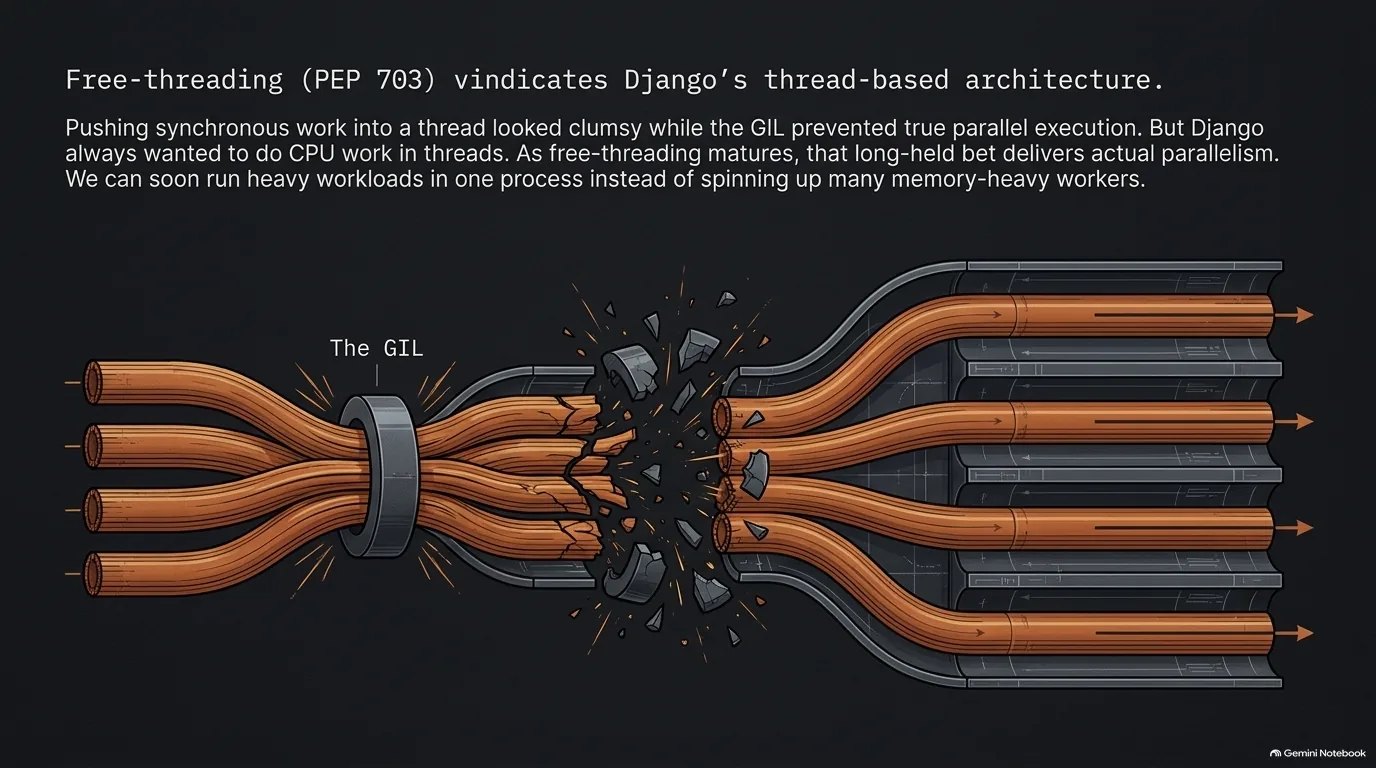
For years, Django's approach to async looked a little clumsy. When in doubt, it pushed synchronous work into a thread. With the GIL in place, those threads couldn't truly run Python in parallel, so what was the point?
Free threading changes the answer. Carlton calls it the big win, the big exciting thing. As free-threaded Python becomes more established and works its way through the ecosystem, Django's choice starts to look like foresight, because CPU work was always meant to go in a thread. Michael sketched what that could look like: a thread pool where each thread keeps a database connection hanging around, ready to go, and you delegate work out and actually get parallelism.
Who needs that? Carlton is honest that a Hello World blog with 10 requests a minute isn't going to hit GIL contention, even on a good day on Hacker News. But a serious application has to use the CPU at some point, otherwise it isn't doing anything. At scale, the GIL has been the impediment, and the usual answer has been to switch to Rust or Go. Do we really want to have to switch language again?
What's left to do? Mostly the ecosystem, not the architecture, which is already in place. People have run threaded Django for a long time, with WSGI servers using threaded workers. At the app level, though, most code has never had to think about threads. You might have some module-level caching or a property at module level. Is that really thread safe? Does it need a lock? The bigger questions are in extensions and libraries. The work is to go through them, run the test suites and make sure they're compatible with free threading. Once that's done, Carlton expects a lot of performance to open up for everybody: instead of running multiple processes to get parallelism, you'll run it all in one.
It's also easy to try now. It used to mean finding or building a special Python. As Michael pointed out, with uv it's one command and a couple of seconds. To check that the GIL really is off:
uv python install 3.14t
uv run --python 3.14t python -c "import sys; print(sys._is_gil_enabled())"
That second line prints False on a free-threaded build.
“It looks as if Django's bet's going to pay off. That bet will have aged very well. Because we always really wanted to do CPU work in the thread.”
Carlton Gibson
WSGI or ASGI: when should a Django app switch?
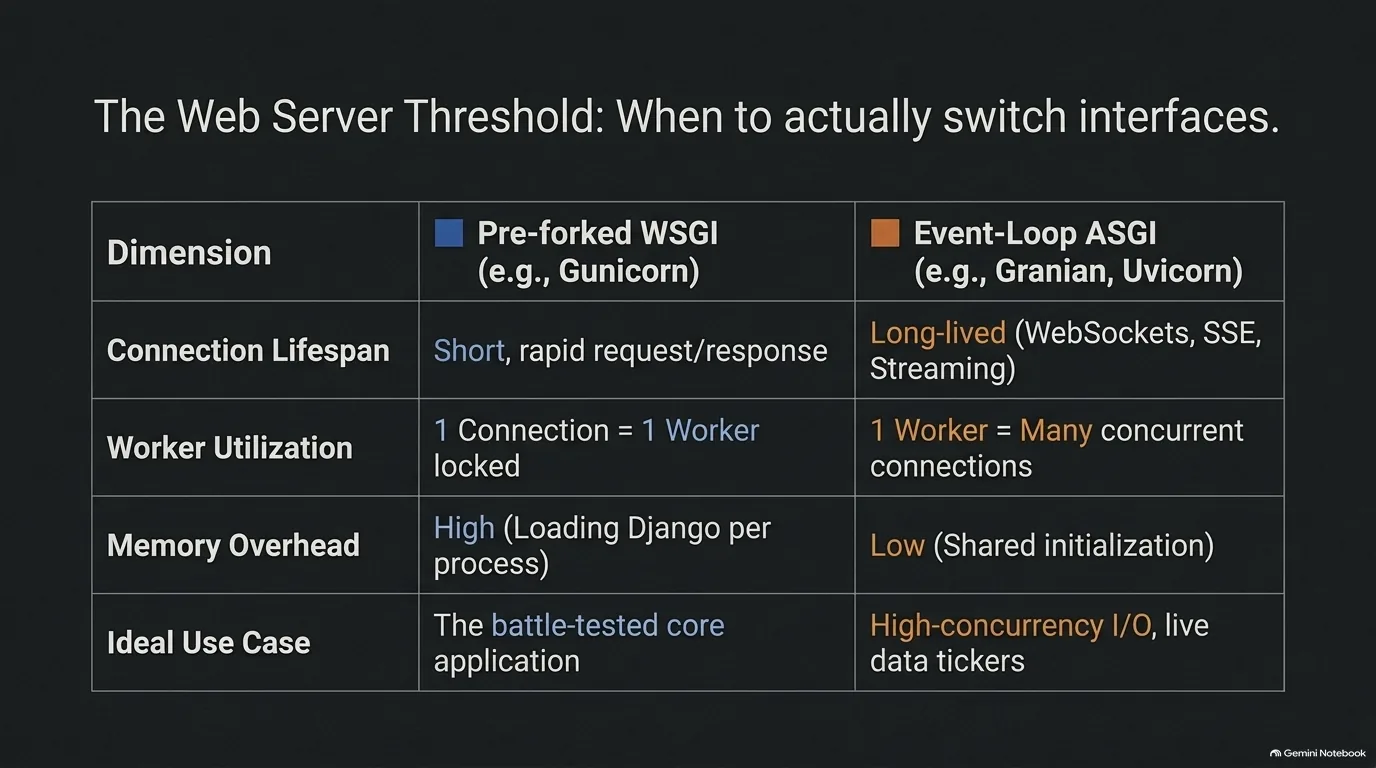
Do you have to switch to an ASGI server the moment you write an async view? No. Michael asked exactly that, and Carlton's answer is that you can run async views under WSGI. So when should a Django developer switch to ASGI?
Carlton's test is simple: do you want long-lived requests? Server-sent events are the classic case, where you hold a connection open and push an update down it every five seconds. A stock ticker is a good example. The latest price keeps coming down the wire at the client. WebSockets and streaming responses are the same kind of thing.
Here's why that's a problem on WSGI. Each connection is a worker. Say you run four workers and three of them are held open by clients watching the ticker. Now you've got one worker left to serve every other request. You could double the workers. But with pre-forked workers, each one is a separate process, so every extra worker means another copy of your Django application loaded into RAM, another cache to prime, another set of database connections to set up. That's a lot of overhead.
An ASGI worker handles it differently. It can hold that connection open and serve it from the event loop, and one worker can carry many connections at once.
So there's a threshold. If you're only polling, even quickly, say once a second, you won't really overload your WSGI workers. It's when you start holding connections open that async and ASGI are really called for.
This matters more as front-end tools lean on server-sent events. Michael mentioned Datastar, and Carlton pointed to HTMX version 4, in beta at the time and inspired partly by Datastar. Carlton has been building an application with HTMX and Alpine since he stepped down as a Fellow in 2023, together with the template partials now in Django.
How should you introduce ASGI when you do need it? Not necessarily all at once. That's the subject of the hybrid deployment section next.
“Well, you don't want to do that on the WSGI model because each connection is a worker on WSGI.”
Carlton Gibson
A hybrid WSGI and ASGI deployment, and the memory it saves
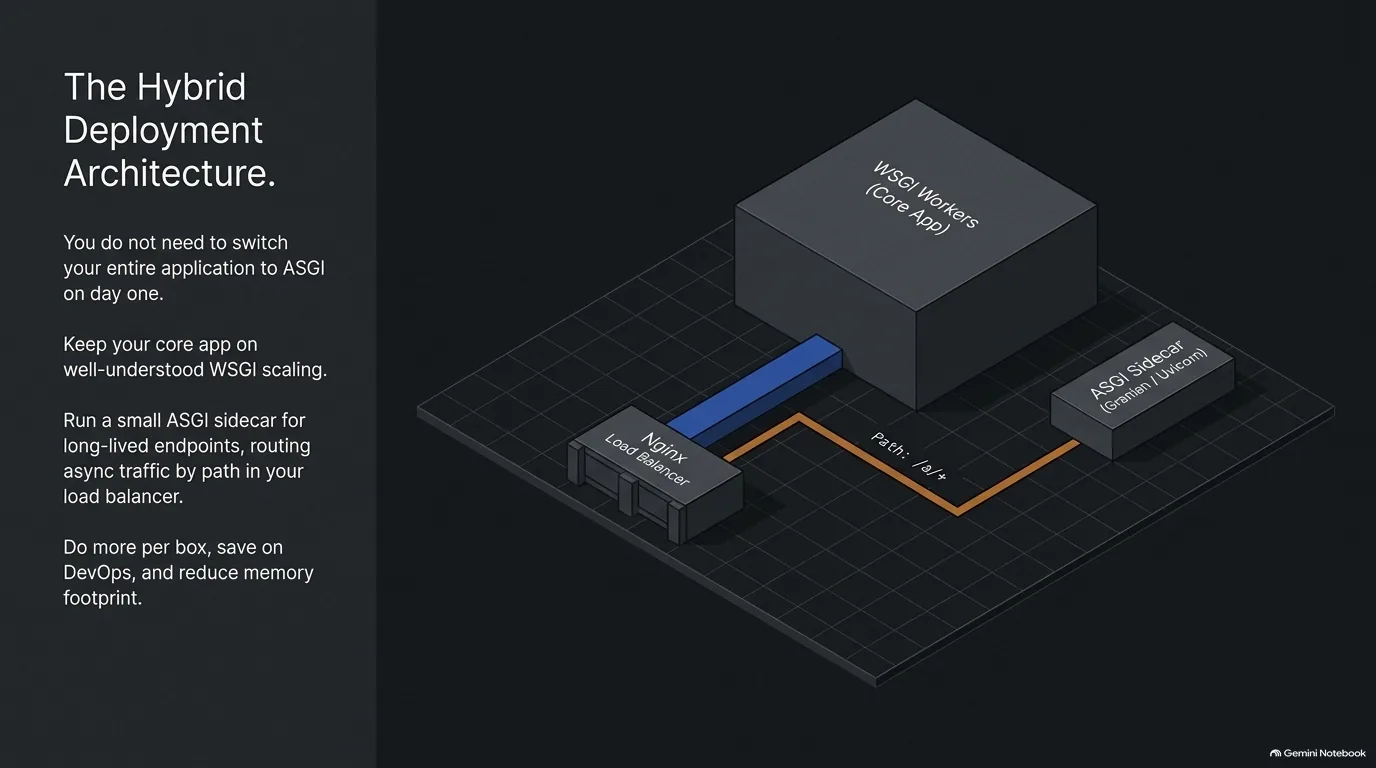
How are people actually deploying async Django? Carlton sees two patterns working well.
Small projects run a single ASGI worker. If you're adding a sprinkle of async to a low-traffic app, like a personal blog, one ASGI worker on its own is probably big enough. You won't hit scaling problems.
Larger apps keep WSGI and add an ASGI sidecar. The core application stays on WSGI, served the standard way, because those scaling patterns are so established that they're almost trivial by comparison. Next to it runs a single ASGI process for the async endpoints. Nginx can route by path: put everything under an /a prefix, send that to the sidecar, and send everything else to WSGI. You can route on other things, like the connection header, but Carlton calls that a little advanced. Part of the reason for the split is CPU-bound work, which causes contention on the event loop.
His advice is to start there and get the hang of it. Move more over to async later, and you'll start to see the complications appear. The danger he sees is people diving into async feet first without understanding that "it is an order of magnitude more complicated to correctly handle async code than to just code synchronously," with blocked event loops and deadlocks waiting for them.
Is any of this worth it below Instagram scale? Michael's own servers say yes. He was trying to cut memory use across about 27 containers that were using around nine gigs of RAM. Some of his web apps ran purely synchronously on WSGI, and some he'd moved to true async on ASGI with Granian. The more requests he moved onto ASGI, with truly async calls down to the database, the fewer workers he needed, because each worker was more capable and didn't get bound up waiting. On one web app alone, cutting workers saved about 500 MB. His broader point: if async and free threading let you shrink from two servers back to one, that saves on DevOps, on complexity and on money.
Carlton added a related option. His default is Gunicorn with multiple processes as workers, which keeps them separate and avoids GIL contention. But a threaded worker runs as one process, with much less memory overhead than four, because the initialization, connection pooling and the rest are shared. Which is right for you depends on how much CPU work you do. As he put it, ask how to deploy a Django app and you'll get a different answer from every developer, for good reasons that trade off against each other.
“I think they're running their core application as WSGI and the standard ways because the scaling patterns there are so established and known.”
Carlton Gibson
Recap: an order of operations for scaling Django
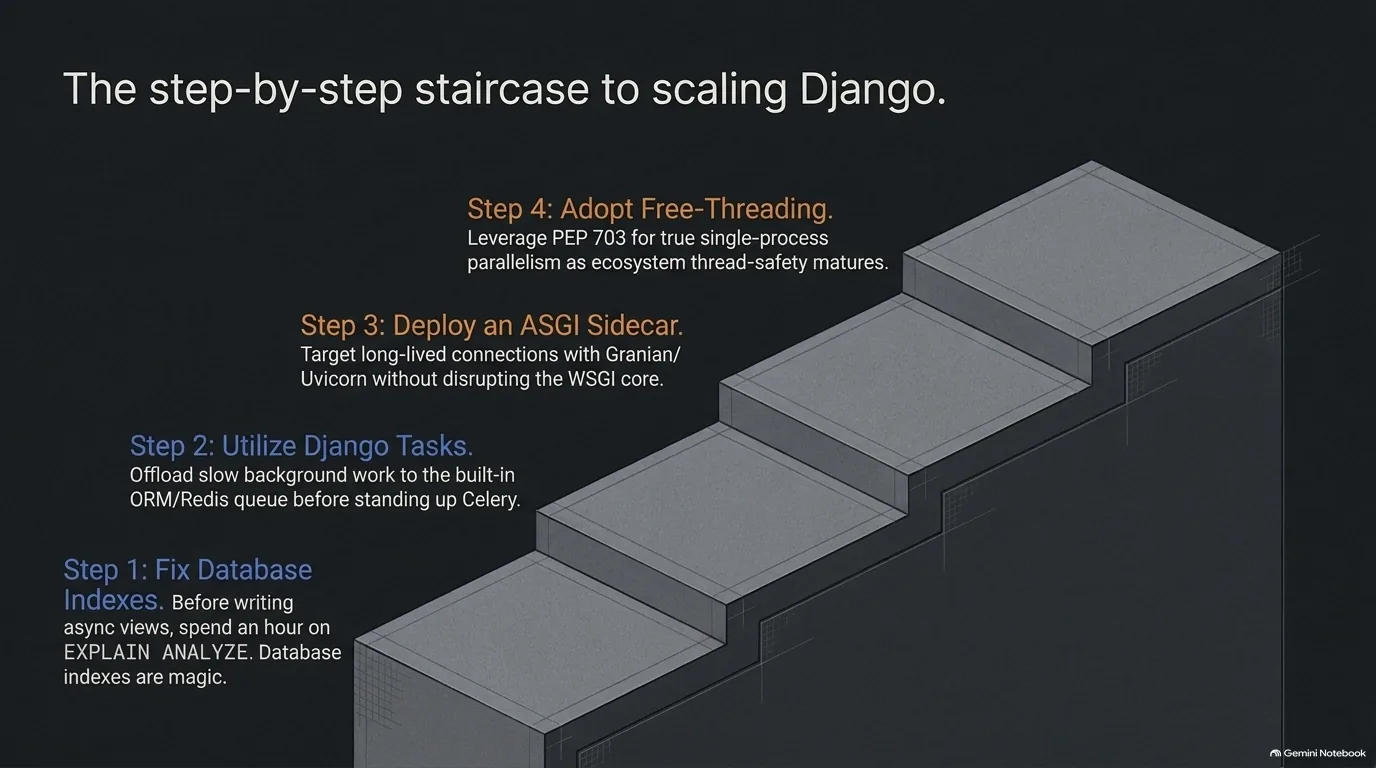
Put the advice from this guide together and a sensible order falls out:
- Check the database first. Look at your query plans and make sure every hot path uses an index. Slow requests are often the database, and psycopg already releases the GIL while it waits. See the real limits of async.
- Move slow work out of the request. Django Tasks with the database backend handles things like emails without a Celery cluster to babysit. See Django 6.0 Tasks.
- Add ASGI only where connections stay open. Server-sent events, WebSockets and streaming responses are the trigger, and a small sidecar next to a WSGI core is enough to start. See WSGI or ASGI and the hybrid deployment.
- Watch free threading. The architecture is in place; the remaining work is thread safety across the ecosystem. See free-threaded Python.
Notice that none of these steps asks you to rewrite your app as async.
Dark matter Django: how many Django projects are there?
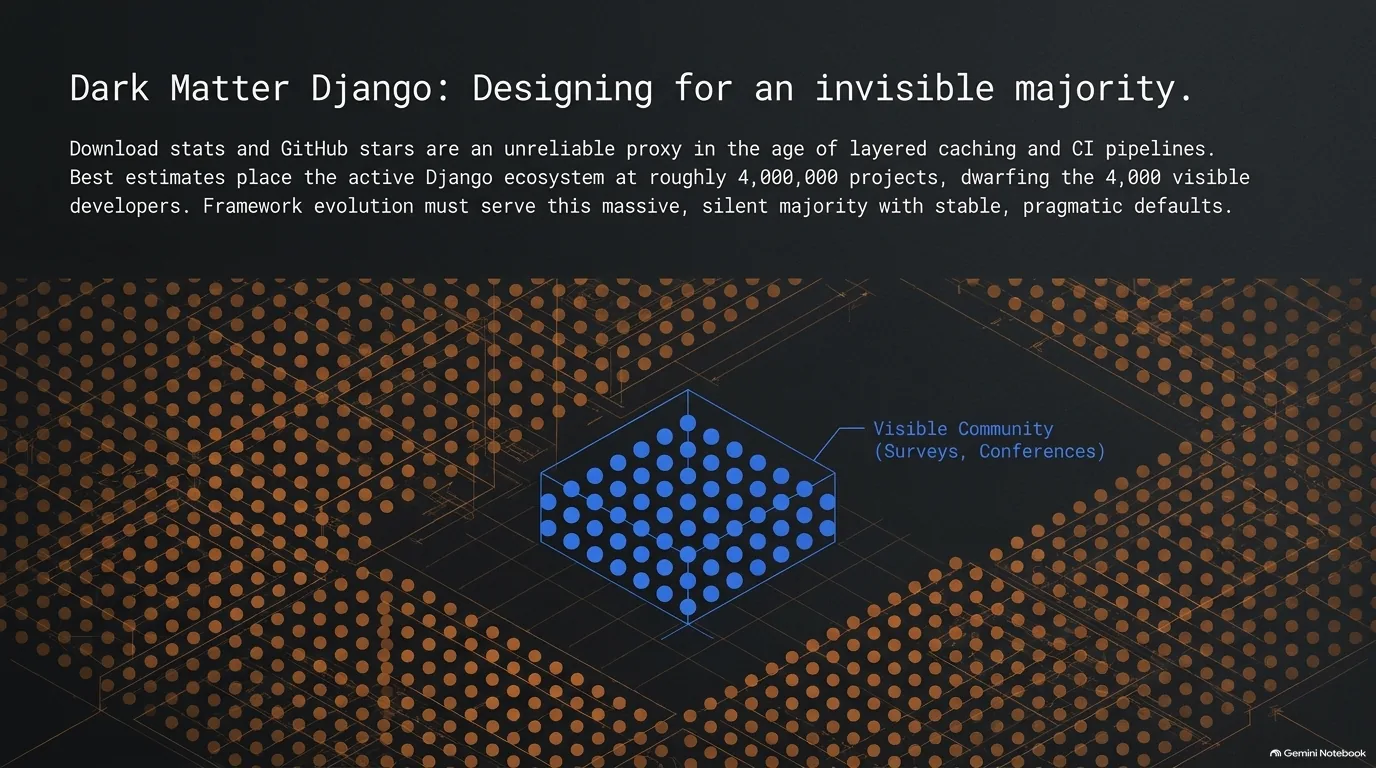
How many people use Django? It sounds like an easy question, but it isn't.
Start with what's public. GitHub's "used by" count for Django shows a couple of million repositories, and that's only public projects on GitHub. Carlton's best reference point is an estimate Jacob Kaplan-Moss gave at DjangoCon US, maybe in 2024: about 4 million active Django projects in the wild. Michael's hunch is that once you count all the internal and private apps people throw up for a little company tool, it's way more than that, though as he admits, he couldn't prove it.
Why not just count downloads? Because, as Michael put it, that data feels kind of broken these days. Ten years ago it was fairly representative. Now it's skewed in both directions. CI pipelines and Docker builds can rack up a hundred downloads in a day without a single new project. Meanwhile caching hides real installs: a Docker image that's built once and reused, uv's cache, or, as Carlton added, a local PyPI or pip cache where one download turns into a hundred installs.
There was once an idea to add some kind of telemetry to Django. It didn't go anywhere, for the obvious reason Carlton gave: no one wants to go anywhere near that. So the project is left estimating.
The part that stands out is how small the visible slice is. The people Django can actually see, the ones who subscribe to the newsletter, answer the survey or come to DjangoCons, number about 4,000 or 5,000. That's roughly a thousandth of Jacob's 4 million. Carlton would love some way of reaching more of the rest.
Michael came up with a name for that unseen majority. He offered "dark matter Django," and Carlton's response was, "Yeah, brilliant. I'm having that. Let me write that down."
It also explains why the earlier calls to action matter. The beta testers and survey takers are a tiny sample of a very large, very quiet user base.
“I have a new term for you, Carlton. Dark matter Django.”
Michael Kennedy
Recap: grow into async, typing and the rest when your app earns it
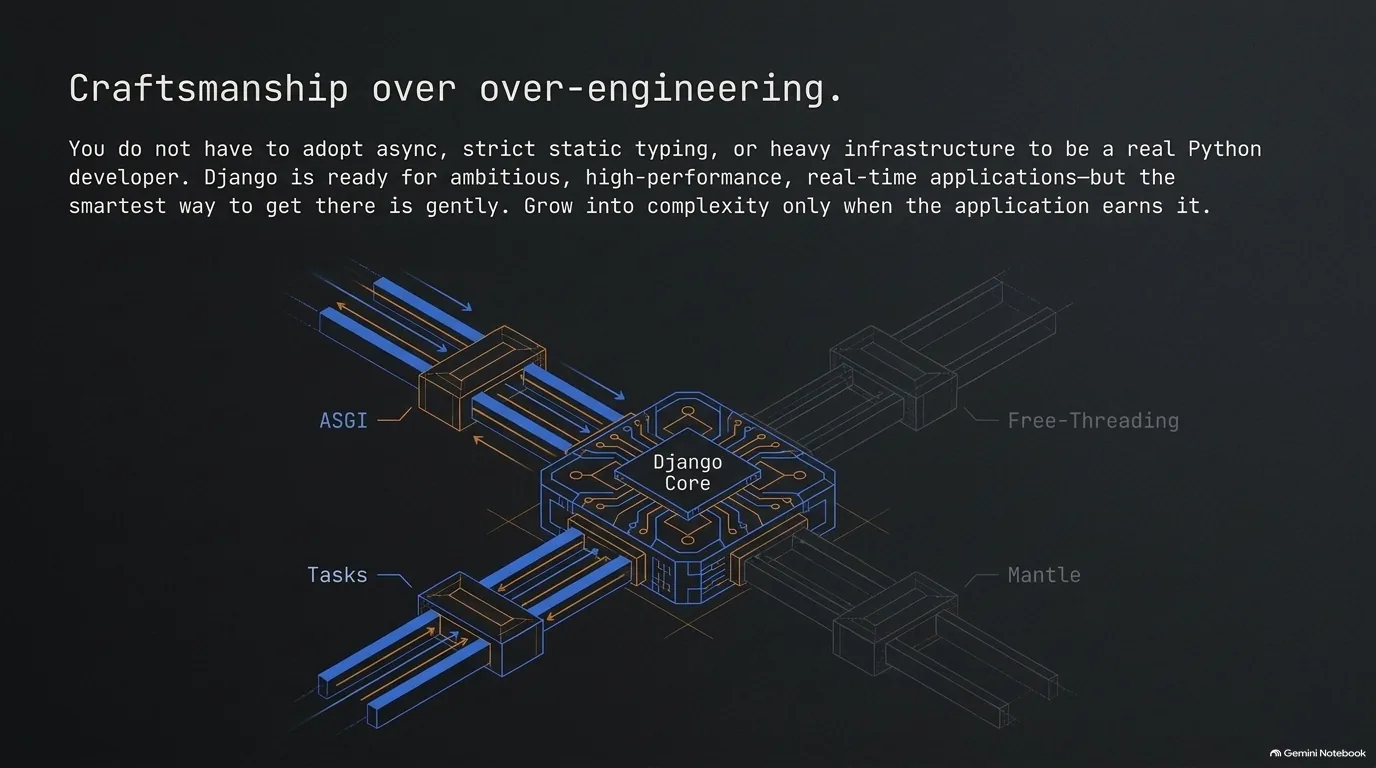
So should you write async views today? Carlton's answer is to do it gently. Django is ready, but async isn't a cure-all, and most of what this guide covers is for the cases that need it. The thread running through the whole conversation is that you grow into complexity rather than start with it:
- Async is there when you need it, with a complete API (why the docs changed), and you can keep it inside one view (capping function coloring).
- Deployment can stay on well-understood WSGI, with ASGI added beside it only for long-lived connections (the hybrid setup).
- Background work can start with Django Tasks and the database you already run (Django Tasks).
- Structure and typing come when the model outgrows active record, not on day one (Django Mantle).
Michael's version of the same idea: you don't have to add typing, and you don't have to write async views, but there's space to grow into them. And the reason that space matters, in Carlton's words, is that you shouldn't have to change language just because your application got more serious.
To go deeper, Talk Python Training's Async Techniques and Examples in Python covers async and await, asyncio, threads, multiprocessing and the GIL trade-offs from this episode. Django: Getting Started teaches the ORM, views and templates underneath all of it, and HTMX + Django: Modern Python Web Apps, Hold the JavaScript fits the HTMX and template partials approach Carlton builds with.