The State of Python in 2026, a Visual Guide
TL;DR: AI coding agents have reopened almost every choice in the Python toolchain. uv won package management, and PEP 723 lets a single Python file carry its own dependencies and run like a Bash script. Type checkers and Pydantic have become guardrails for code an agent writes. Postgres is still the default database, while SQLite and DuckDB keep picking up new jobs. And docs now get written for two readers: people and LLMs.
For a long time the Python toolchain looked settled. You edited in VS Code or PyCharm, installed packages with pip into a virtual environment, and built web apps with Flask, Django or FastAPI. Michael Kennedy, host of Talk Python, used to end every interview by asking guests which editor they used, and he eventually stopped because the answers had narrowed to those same two.
That's not true anymore. When an agent writes a lot of the code, every tool gets judged by a new question: how well can an AI use it? Can the agent drive it from a command line? Is it fast enough to run hundreds of times in a session? Have the models seen enough of it to use it correctly? Will it catch the agent's mistakes before they ship? That one question explains a lot of what changed in 2026, from uv's quick win to type checkers turning into gates and docs sites shipping llms.txt.
This guide walks the stack layer by layer: editors and agent harnesses, terminals, packaging, single-file scripts, validation and types, web frameworks, databases, docs, hosting and keeping an eye on the agents themselves. The experience behind it comes from four developers in very different places - a consultancy, corporate DevOps, an AI company and a training business. Each section explains the tech first and then what the panel actually does with it, so skim the illustrations and stop wherever a tool catches your eye.
Why the Python toolchain is moving again
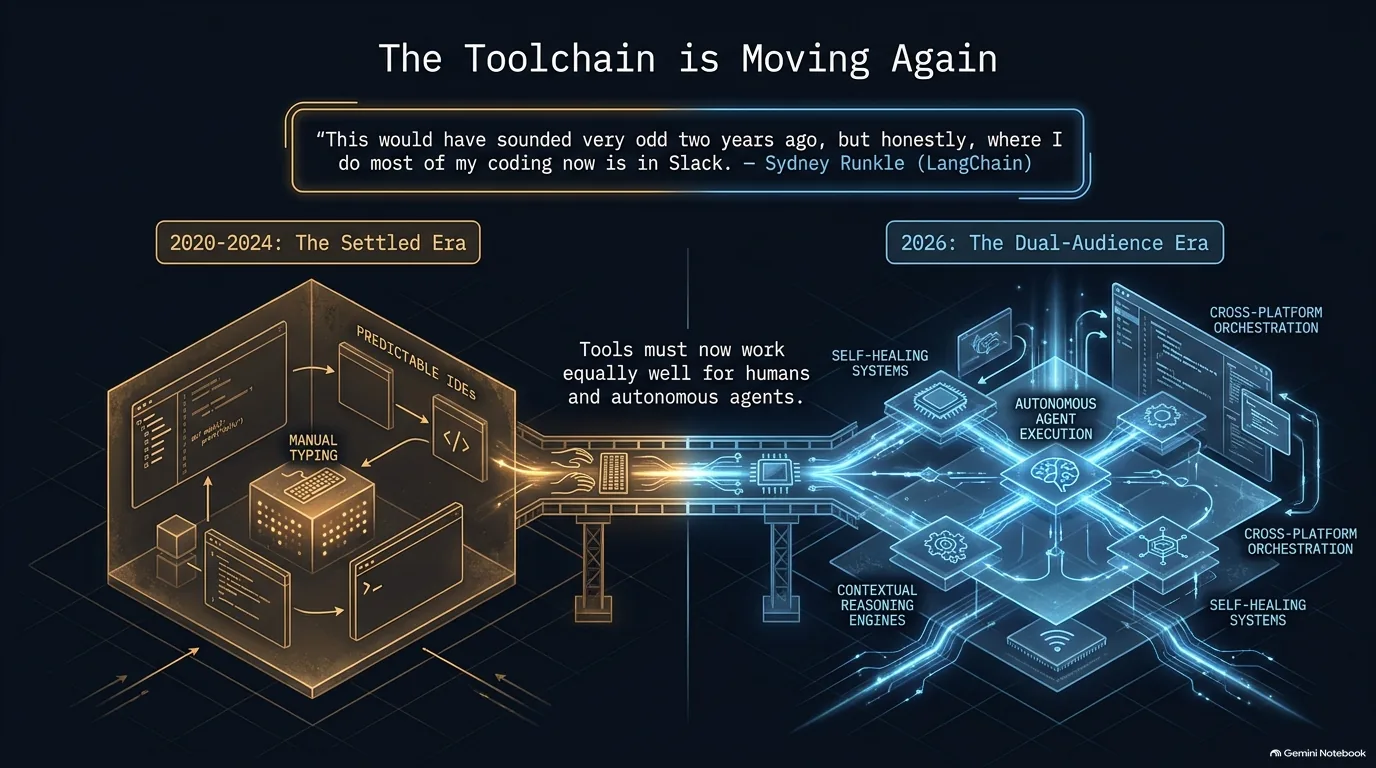
For most of the last decade, the editor was where code got written. In 2026 it's often just where code gets reviewed, and sometimes not even that. The workflow changed first, and the tools are following it.
Here's the most extreme version of the new workflow: coding agents you summon from Slack. LangChain runs it this way, and the loop goes like this:
- The task starts where the conversation already is. A bug or an idea comes up in a Slack thread, and someone tags the agent with what they want done.
- The agent does the work, and the result lands on GitHub. That's where a person looks at what it produced.
- Review comments go back to the same agent. Leave comments on GitHub and the agent picks them up and addresses them.
- Code comes down to a laptop only when a human needs to get into the weeds.
How far has this gone? Sydney Runkle, who does open source product management at LangChain, says about 90% of her work now runs through that loop. The editors got there in steps. AI-first editors like Cursor built agents into the IDE early, and from there it was a short hop to agents that don't need the IDE at all.
It's not just a big-company setup, either. The same pattern works for one person: dictate a feature to an agent from your phone, check in later by chat to see how it's going, and never open an editor. Even VS Code's own homepage now bills it as "the open source AI code editor."
Once an agent does the typing, the requirements on everything around it change too, and that thread runs through the rest of this guide. Package managers need to be fast and predictable for an agent that runs them over and over. Command-line tools matter more, because an agent can call them as easily as a person can. Type checkers and test suites become the gate an agent has to pass before its work counts. Docs need a version an LLM can read. More and more, tools get picked partly for how well an agent can use them.
“This would have sounded very odd like two years ago, but honestly where I do most of my coding now is in Slack.”
Sydney Runkle
From typing code to orchestrating agents: what Python developers edit with now
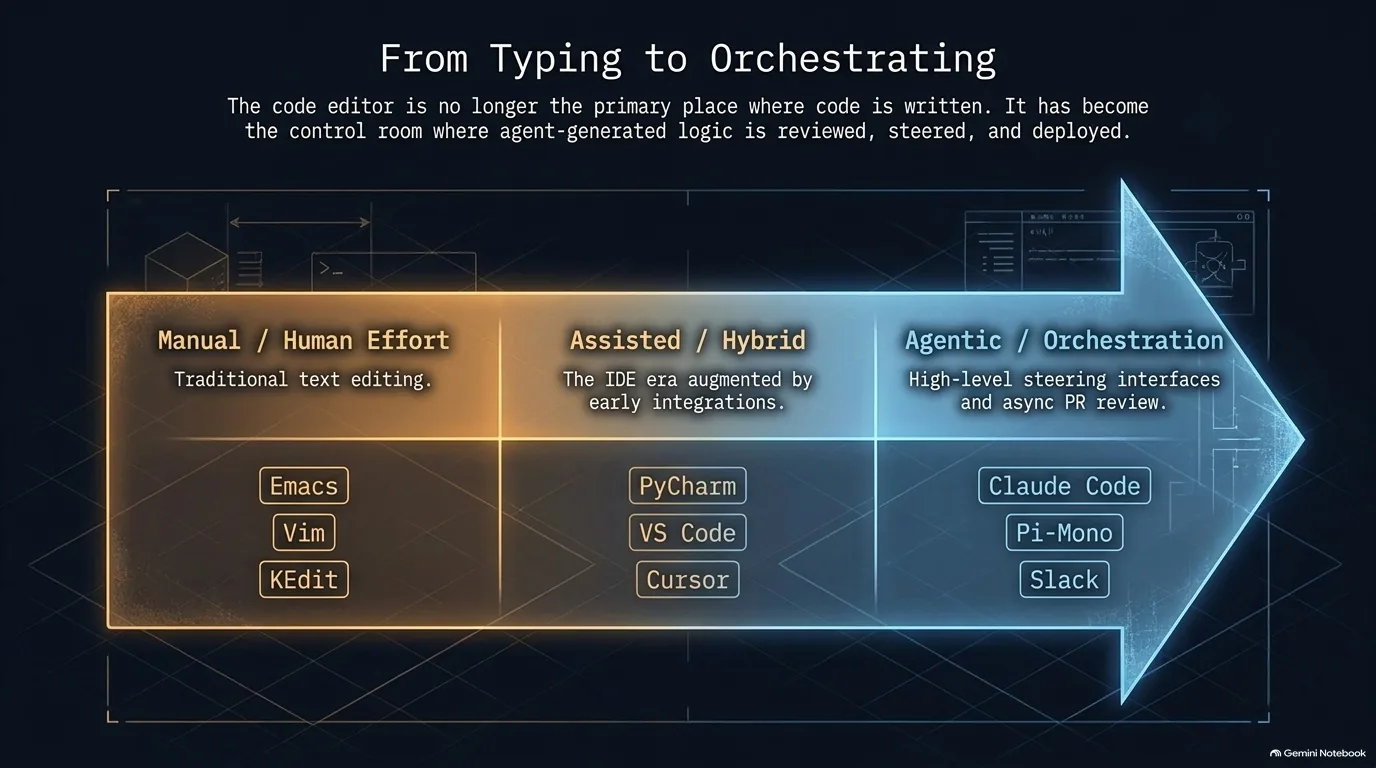
The image above lays the tools out on a line: manual editors like Emacs, Vim and KEdit, then AI-assisted editors like PyCharm, VS Code and Cursor, then agentic tools like Claude Code, Pi and Slack. Few developers live at just one point on it. Which tool wins depends on the job.
At the agentic end sits the agent harness, the program wrapped around a model. It gives the model tools - read a file, edit a file, run a shell command - and a loop that keeps going until the task is done, stopping to ask permission when it needs to. Claude Code and Pi both run in the terminal. You describe the work, and the harness plans it, writes the code and runs things.
When the harness does the typing, the editor's job shrinks to reading. Taken all the way, that means no VS Code installed at all: the coding happens in Pi and Claude Code, files get viewed with bat, a cat clone with syntax highlighting, and a full IDE is the fallback for when you really need to dig in.
So where does the human's time go? Into Markdown. Skill packs like Superpowers have the agent write a spec and a plan before it writes any code, and the person reads those in a Markdown viewer before telling it to build. That's the control room in the image above: the person steers and approves the plan, and the agent writes the code.
The middle of the line is still busy, especially for remote work. VS Code's remote connections let you edit files on a cloud instance or VM as if they were local, which keeps it a common everyday tool for DevOps work across AWS instances and in-house VMware machines. Add an AI assistant like Kiro, AWS's agentic IDE, and you have the assisted middle of the image. For a last-minute fix on a live server, it's still Vim, or Nano when a server's Vim defaults block pasting.
The manual end hasn't disappeared either, and keybindings are the stickiest part of it. A lifelong vi user feels lost in any window without vi keys, whatever the editor around them, and KEdit, the PC version of IBM's mainframe XEDIT editor, still has users today.
If you want something richer than a terminal for driving agents, there are GUI options too: JetBrains' Air agentic client, OpenAI's Codex, and the Claude desktop app, which now includes Cowork and Code.
“That's where I spend a lot of my time actually is probably with the markdown pieces before I say go implement some stuff.”
Calvin Hendryx-Parker
Terminals and CLIs: the interface humans and agents share
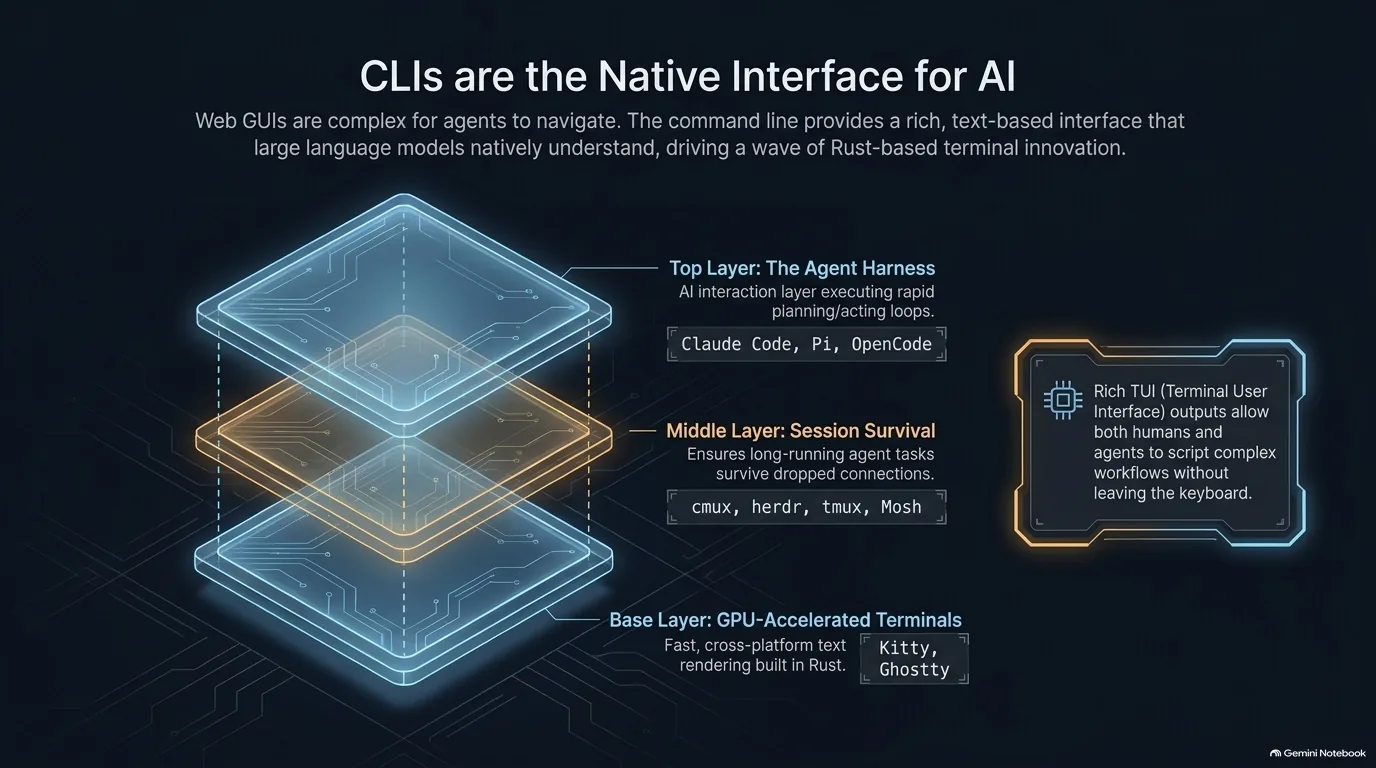
You'd think terminals were a solved problem by now. Yet new ones keep shipping in 2026, and AI seems to be what's driving them. When your main coding tool is a terminal app that runs for hours, the terminal matters again. The image above stacks the pieces in three layers, and each one has moved.
The terminal itself. Kitty and Ghostty are both GPU-accelerated: they draw text on the graphics card, so scrolling a long agent session stays fast. Kitty is written in C and Python and runs on macOS and Linux, and it has its own windows, tabs and splits, enough to replace tmux for local work. Ghostty is written in Zig and is the leaner choice for people who were only using a fraction of what iTerm2 offered. One tip that comes up with these terminals: if Claude Code flickers or misbehaves with scrollback, its full-screen TUI mode fixes that and adds searchable history and a diff pane.
Sessions that survive. A terminal multiplexer like tmux runs your shells inside a server process, so they keep running when your connection drops, and you can reattach later. That's the classic reason to use one: long-running tests keep going when credentials expire and the SSH session dies. The newer multiplexers are built around agents instead:
- herdr is a background runtime where agent CLIs like Claude Code and Codex keep running after you close the laptop. It marks each agent as working, blocked or idle, and it can bring in agents running on remote machines over SSH.
- cmux is a native macOS terminal built on Ghostty's rendering library. It has workspaces and split panes, lights up when an agent needs attention, remembers layouts and reconnects SSH sessions when you reopen it, and has an iOS app in beta.
- Mosh handles the network side: it's a remote shell that stays connected across Wi-Fi changes and sleep. Run it over a VPN and you can reach agents on any server from any of your devices.
The harness on top. Claude Code, Pi and OpenCode run inside all of this.
The bigger shift is what runs in those terminals. A command-line tool works the same for a person and for an agent: the same commands, plain text in and out, easy to script. That's why more apps now ship a CLI. The Spark email client has one, so you can check email without leaving the terminal or tell your agent to do it, and for local tools like that a CLI can be a better fit than an MCP server. The Talk Python CLI follows the same idea: install it with uv tool install, no authentication needed, and your AI can answer questions about past episodes.
“The terminal UI and the CLIs that have now followed are giving a really rich interface for all the LLMs and agentic harness pieces.”
Calvin Hendryx-Parker
How uv won Python package management
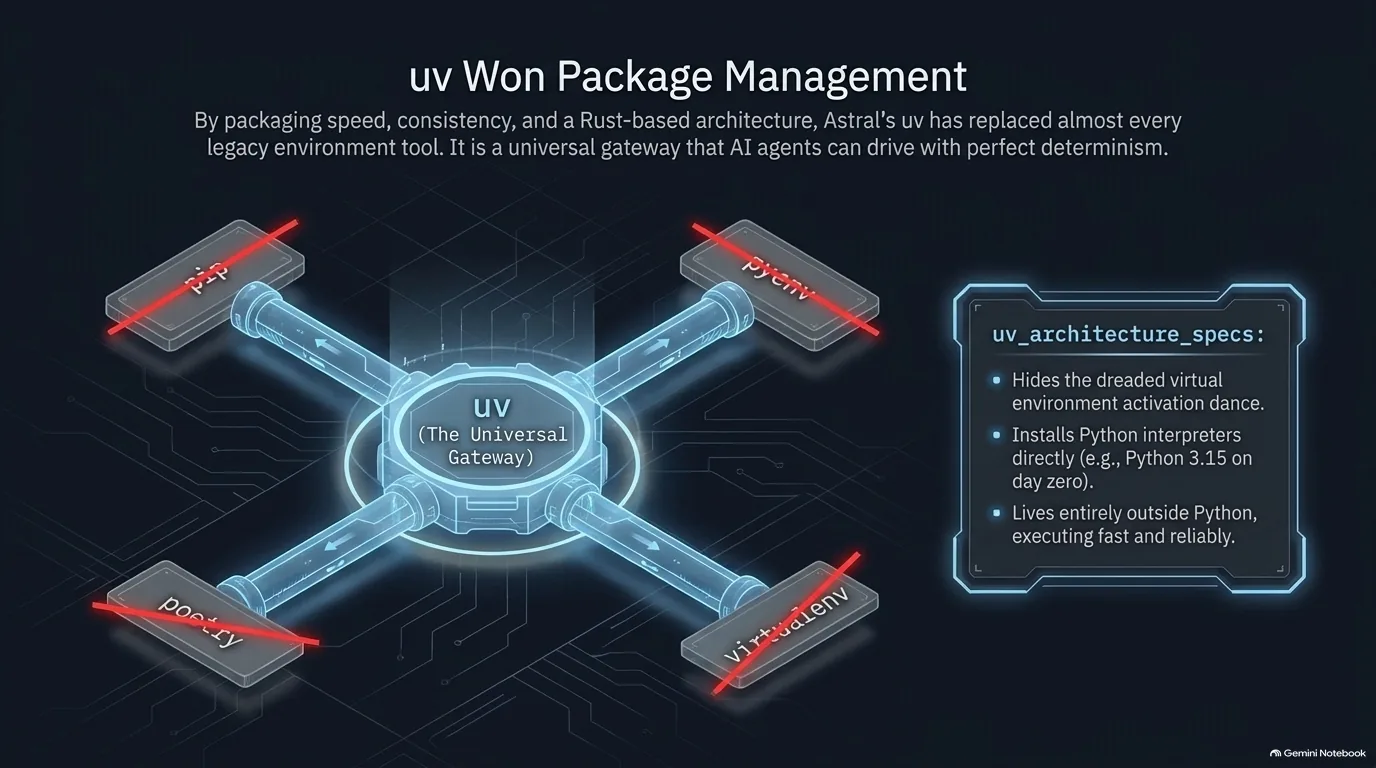
Everyone on the panel uses uv, which could have made this a one-line section. Why it won so completely, and so fast, is the better story.
uv is a single tool, written in Rust by Astral, that replaces a whole stack of older ones. A careful pre-uv setup used pyenv to manage Python versions, pip with lock files and pinning flags for reliable installs, venv to isolate each project, and pipx to install command-line tools. uv didn't throw out those habits. It packaged them into one consistent tool and made every one of them fast.
To make this concrete, here's what each of those jobs looks like now:
uv python install 3.15   # get an interpreter (replaces pyenv)
uv init myproject        # start a project with a pyproject.toml
uv add httpx             # add a dependency and update uv.lock (replaces pip + pinning)
uv run main.py           # run inside the project's environment (replaces activating a venv)
uv tool install ruff     # install a CLI tool in its own environment (replaces pipx)
uvx ruff check           # or run a tool once without installing it
The virtual environment doesn't go away. It stops being your problem. uv run creates and syncs the project's .venv as needed, so there's no more activating and deactivating. Speed gets people to try uv, and that hidden virtual environment is what keeps some of them.
Why did it win so quickly? For years, Python conferences had two, three or four talks explaining the packaging landscape, each ending with some version of "if only we could solve this mess." uv solved most of it in one tool - Python versions, dependencies, building and uploading to PyPI - and did it all fast.
There's a less obvious advantage, too: uv isn't tied to Python's release schedule. The interpreters it installs are standalone builds it downloads itself, so new versions show up there quickly. The episode was recorded on October 1st, Python 3.15's scheduled release day. python.org still listed 3.14.8, but uv had already installed the 3.15 release candidate that week for a Python Bytes demo.
Why do AI agents use uv so well? Models are trained on huge amounts of code, and code is verifiable - it runs or it doesn't, a test passes or it doesn't. uv was the leading package manager before AI took off, so models know it at the level of their weights, and they use it well to control the environment their code runs in. That matters beyond coding agents, because general-purpose agents write code to get things done too.
And OpenAI owning Astral now? So far, things have carried on so normally that the acquisition is easy to forget, and Astral has been a reliable steward of the tool.
“I feel like uv was like the speed up for package management that like rivaled what AI agents did for coding.”
Sydney Runkle
PEP 723 and the uv shebang: Python scripts that run like Bash
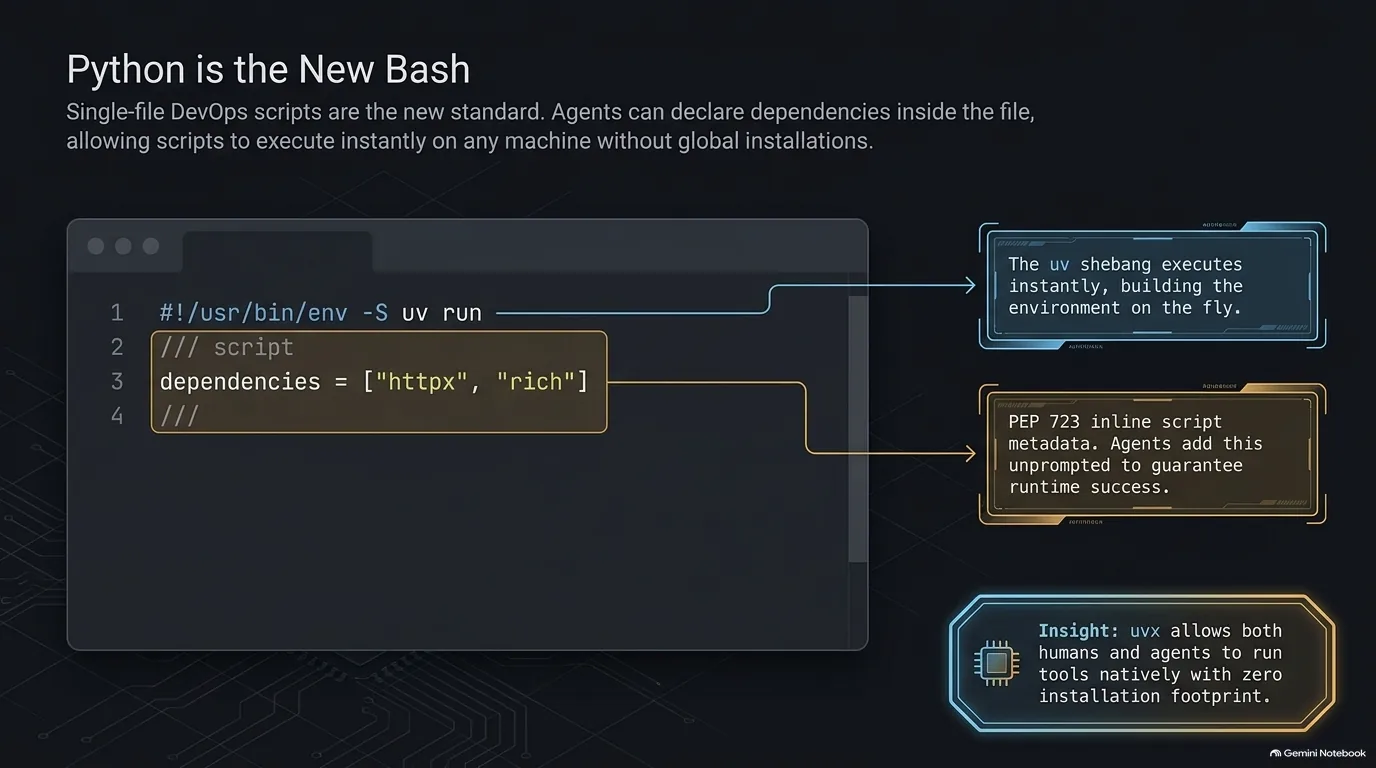
What do you do with a useful Python script that needs a couple of packages? Traditionally you'd write a requirements.txt, make a virtual environment, install into it, and explain all of that to whoever runs the script next. PEP 723, inline script metadata, puts the dependency list inside the file instead.
It's a specially formatted comment block at the top of the script. To Python it's just a comment. To a tool like uv it's a recipe: uv run reads the block, builds a cached environment with those packages and the right Python version, and runs the script in it. You don't even have to write the block by hand:
uv init --script fetch.py --python 3.14   # new script with a metadata block
uv add --script fetch.py httpx rich       # add dependencies to that block
Add one more line and the script doesn't need a command in front of it at all. Put a shebang that calls uv run on the first line, mark the file executable, and it runs like any shell script. Here's a complete version you can copy:
#!/usr/bin/env -S uv run --script
# /// script
# dependencies = ["httpx", "rich"]
# ///
import httpx
from rich import print

print(httpx.get('https://talkpython.fm').status_code)
Save it, chmod +x it, and ./script.py runs with its dependencies in place. The -S tells env to split the rest of the line into separate arguments, and every metadata line starts with # because the whole block is a comment.
This style fits DevOps especially well, where so much of the work is one-file scripts. Pat Decker says 90-some percent of what he writes is a single-file script. He kept prompting his agents to use the metadata block, and one of them added the uv run shebang on its own.
Why is this such a big deal? Because uv lives outside Python. The target machine doesn't need Python installed at all, since uv fetches the interpreter along with the dependencies. None of the older packaging tools could do that: you always had to set up Python first and then install the tool into it. Before uv, going containers-only was a serious option just to get reliable installs. Now a one-liner does the job.
There's a catch, though. Corporate machine policies can block installing Python, and uv runs into the same wall. WSL, where the rules can be looser, is one workaround.
“I think one of its killer features is it lives outside Python, and it can be the way into Python.”
Michael Kennedy
Pydantic as the bridge from LLM text to typed data
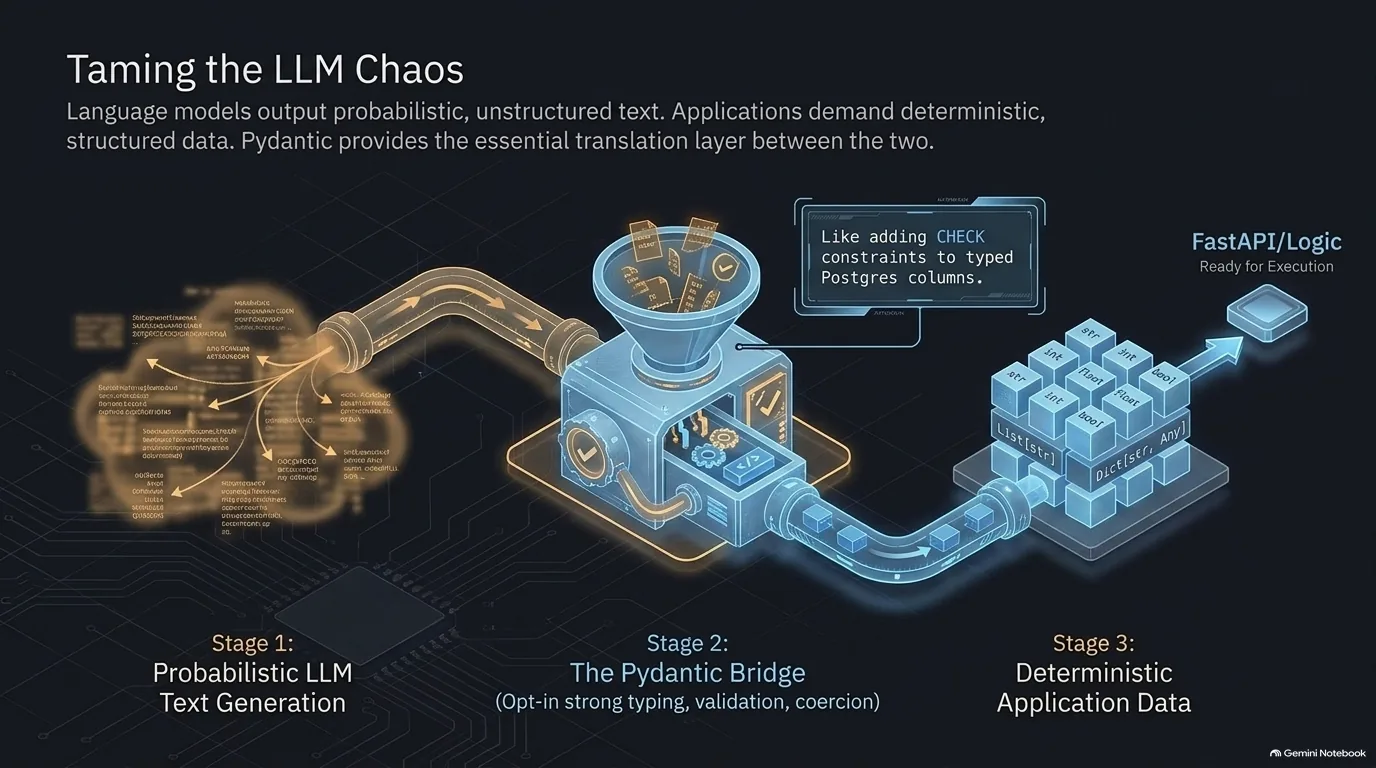
A language model produces text. Your application needs data it can trust: the right fields, the right types, values within the right ranges. Something has to sit in between, and in Python that's usually Pydantic.
Pydantic lets you describe the shape of your data as a class with type hints. When data comes in, Pydantic checks it against that description, converts what it sensibly can, and raises a clear error for anything else. Python itself never enforces type hints at runtime, so this is a way to opt in to strict typing exactly where you need it, at the edges where outside data enters your program. That's why it's the backbone of FastAPI: requests and responses are an API's bread and butter, and they need structure.
LLMs gave Pydantic a second job. FastAPI is probably what first made it popular, and LLMs made it more popular still, because they need a bridge into structured data too. Model output is one more kind of input you can't trust blindly. Here's a quick example of validating a model's JSON reply:
from pydantic import BaseModel, Field, ValidationError

class Ticket(BaseModel):
    title: str
    priority: int = Field(ge=1, le=5)
    tags: list[str] = []

llm_output = '{"title": "Login page times out", "priority": "2", "tags": ["auth"]}'
ticket = Ticket.model_validate_json(llm_output)
print(ticket.priority + 1)  # 3: the string "2" became an int

try:
    Ticket.model_validate_json('{"title": "Fix it", "priority": 9}')
except ValidationError as e:
    print(e.errors()[0]['msg'])  # Input should be less than or equal to 5
The model sent the priority as a string, so Pydantic converted it. When the model invented a priority of 9, Pydantic refused it instead of passing it along to the rest of the code.
That Field(ge=1, le=5) is the part plain type hints can't do. A good way to think about it: type hints are like Postgres columns having types, and Pydantic is like adding CHECK constraints on top, so you can say a value must be greater than zero or below some limit and really tighten what's acceptable.
“LLMs produce text and Pydantic is kind of the bridge back into like, let's validate that data and turn it into a predictable model that we can then use in code driven applications.”
Sydney Runkle
Type hints in 2026: optional for you, required for your agents
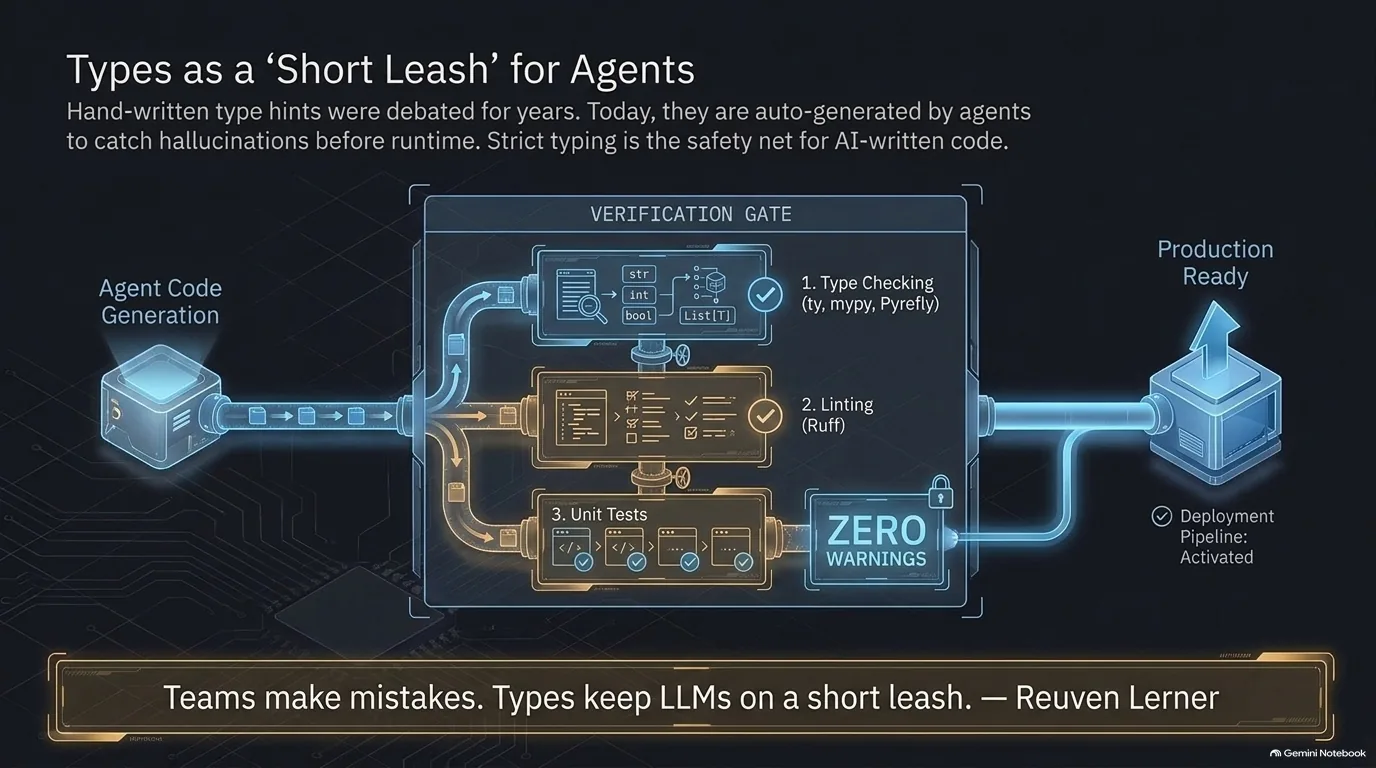
Python's type hints do nothing at runtime on their own. Their value comes from tools that read them: editors that put a squiggle under a wrong call, and type checkers that scan the whole codebase and report every place the types don't line up. For years, whether that was worth the extra typing was mostly a matter of taste. Agents changed the math.
Here's the kind of bug a type checker catches before anything runs:
def average(scores: list[float]) -> float:
    return sum(scores) / len(scores)

average('95, 87, 72')
Run ty check on that and you get invalid-argument-type: it expected list[float] and found a string. You don't need a test for it, and nothing has to run. That's exactly what you want when an agent is writing hundreds of lines you won't read closely.
So the hints become part of a gate. The rule for an agent is strict: run the type checker, run the linter, run the tests, and the work isn't done until all of them pass with zero warnings:
uvx ty check
uvx ruff check
uv run pytest
Types keep LLMs on a short leash, and agents don't complain about rules that would wear down a human team. They also take on most of the boilerplate that used to make typing feel like a chore. And the core team has made types much easier to express over the years. Teams of humans benefit too: people make mistakes, and developers coming from statically typed languages want the safety net.
Hand-written code is where opinions still split. Python's appeal for many developers was duck typing and a clean syntax that stays out of your way, without the "hash rockets" of other languages. Calvin Hendryx-Parker is one of them: he usually skips hints when he writes code himself, but wants them when an AI writes it, to catch whole classes of bugs before the code runs. One middle ground is to type a package's public functions so callers can check their usage, without covering every internal line.
Which checker? There are four serious ones now. mypy is the original, and Pyright from Microsoft powers a lot of editor tooling. The two newest are both written in Rust and are much faster: ty from Astral and Pyrefly from Meta. One practical wrinkle: LLMs tend to reach for mypy on their own, so if you want ty, tell your agent.
“You're going to run ty, you're going to run ruff, you're going to run the tests and you don't call yourself done or you don't consider it correct until all those things pass.”
Michael Kennedy
Picking a web framework when your coworker is an LLM
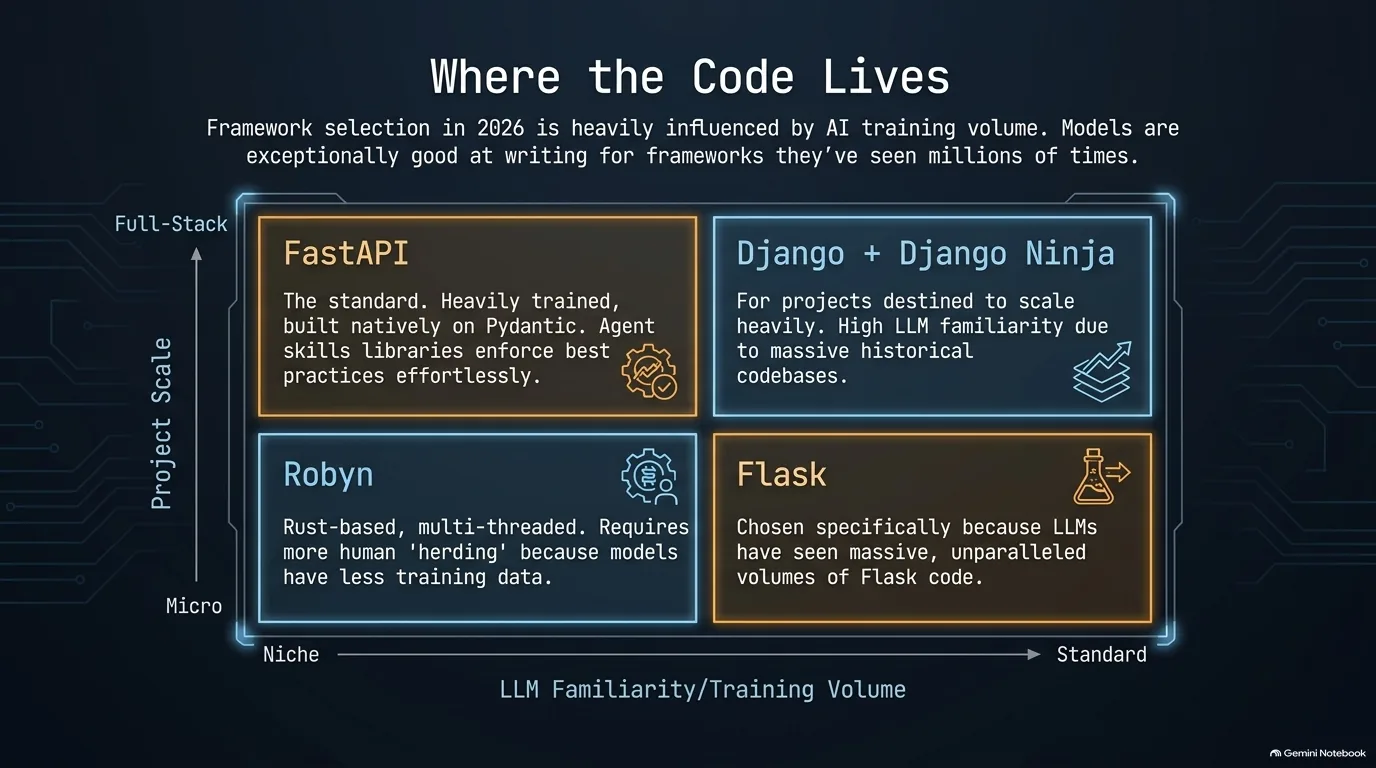
The usual questions for choosing a Python web framework still apply: how big will the project get, and how fast does it need to be? In 2026 there's a third: how much of this framework's code have the models already seen?
Start with the classic matchup, Django against FastAPI. Calvin Hendryx-Parker and Frank Wiles just compared them in a DjangoCon talk, using Django with Django Ninja for the API layer. Their verdict: FastAPI is still faster, but not by a huge amount. The bigger difference is scope. Django brings a lot of built-in features with it: the ORM, the admin, auth. FastAPI brings only what an API needs. So Django may be the better place to start if the project could grow into something bigger, while FastAPI fits when you need good-quality APIs up quickly for a specific job.
FastAPI's "fast" was never mainly about raw performance anyway. It's fast development done right, with Pydantic validation and OpenAPI docs built in. And Django Ninja borrows that style closely, to the point where moving FastAPI-style code over is close to changing an import. Not literally one import, but close. Here's the same endpoint in both:
# FastAPI
from fastapi import FastAPI
from pydantic import BaseModel

app = FastAPI()

class Episode(BaseModel):
    number: int
    title: str

@app.get('/episodes/{number}')
def get_episode(number: int) -> Episode:
    return Episode(number=number, title='State of Python 2026')
# Django Ninja, inside a Django project
from ninja import NinjaAPI, Schema

api = NinjaAPI()

class Episode(Schema):
    number: int
    title: str

@api.get('/episodes/{number}', response=Episode)
def get_episode(request, number: int):
    return Episode(number=number, title='State of Python 2026')
Ninja's Schema is a Pydantic model, the view takes Django's request, and the response type goes in the decorator. Everything else carries over.
Then there's the LLM question. Flask is a safe pick at work precisely because the models have seen so much Flask that they easily produce code that works. Newer frameworks pay for being new. Robyn is Flask-like, with a Rust runtime built to be multi-threaded, but there's far less Robyn code out there for models to learn from, so "you have to herd your agent."
There's a fix for that, and it works for any lesser-known library. Download the library's repo, docs included, have Claude Code read the documentation and quick starts against the actual code, and turn that into a skill for the project you're really building. Sebastián Ramírez has come at the same problem from the library side with his library skills project, which generates agent skills for open source packages, FastAPI included, so coding agents follow best practices.
“To me, FastAPI is not about fast performance. It's like fast development of doing things right and comprehensively with Pydantic and OpenAPI and all those different things that it brings and validation.”
Michael Kennedy
Postgres by default, SQLite and DuckDB on the rise
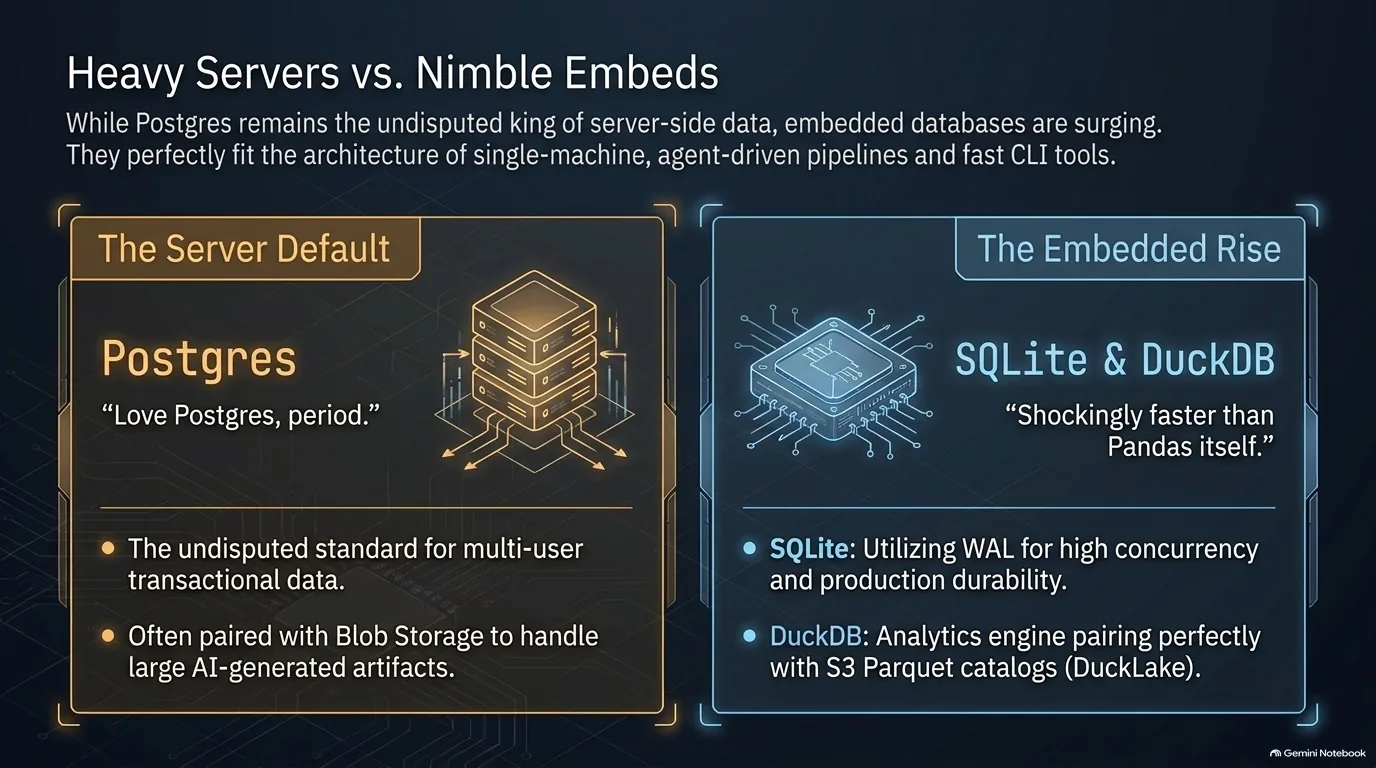
Postgres is still the default for anything that runs on a server. The interesting movement is further down, in databases that live inside your application instead.
AI does change one thing on the server side: the size of what gets stored. Agents tend to produce large artifacts, so pairing Postgres with blob storage often works well, with structured rows in the database and big files beside it. Data models are back in vogue, too. Agents querying your data at scale only work as well as that data is structured.
So what's on the rise? Embedded databases. SQLite is a library, not a server. The whole database is one file, and your app reads and writes it directly. Its write-ahead log, or WAL, is a big part of why it's now taken seriously for production. In SQLite's default rollback-journal mode, readers and a writer block each other. In WAL mode, changes go to a separate log first, so readers don't block the writer and the writer doesn't block readers. It's one line to turn on, and the setting sticks to the database file:
import sqlite3

conn = sqlite3.connect('app.db')
print(conn.execute('PRAGMA journal_mode=WAL').fetchone())  # ('wal',)
There are limits. WAL still allows only one writer at a time, and every process using the database has to be on the same machine. That's the real dividing line: if what you're running lives on a single machine, an embedded database works a lot of the time.
DuckDB is the analytics version of the same idea: embedded, but built for scanning and aggregating large amounts of data rather than lots of small transactions. It can query a pandas DataFrame directly by its variable name:
import duckdb
import pandas as pd

df = pd.DataFrame({'city': ['Portland', 'Seattle', 'Portland'], 'sales': [120, 80, 45]})

print(duckdb.sql('SELECT city, SUM(sales) AS total FROM df GROUP BY city ORDER BY total DESC').df())
You don't have to treat DuckDB as a database at all. Used like this, as a query engine over pandas data, it can be shockingly faster than pandas itself. Its JSON features also make it handy for quick little CLI tools over JSON data.
DuckLake pushes the embedded idea toward scale. The data lives as Parquet files in object storage such as S3, and a small SQL database - DuckDB, SQLite or Postgres - holds the catalog of which files make up which tables.
“I've used it as a query system on pandas where it is shockingly faster than pandas itself on pandas data. I don't know how they pull that trick, but kudos to them.”
Reuven Lerner
Documentation for people and agents: Zensical, Great Docs, Mintlify
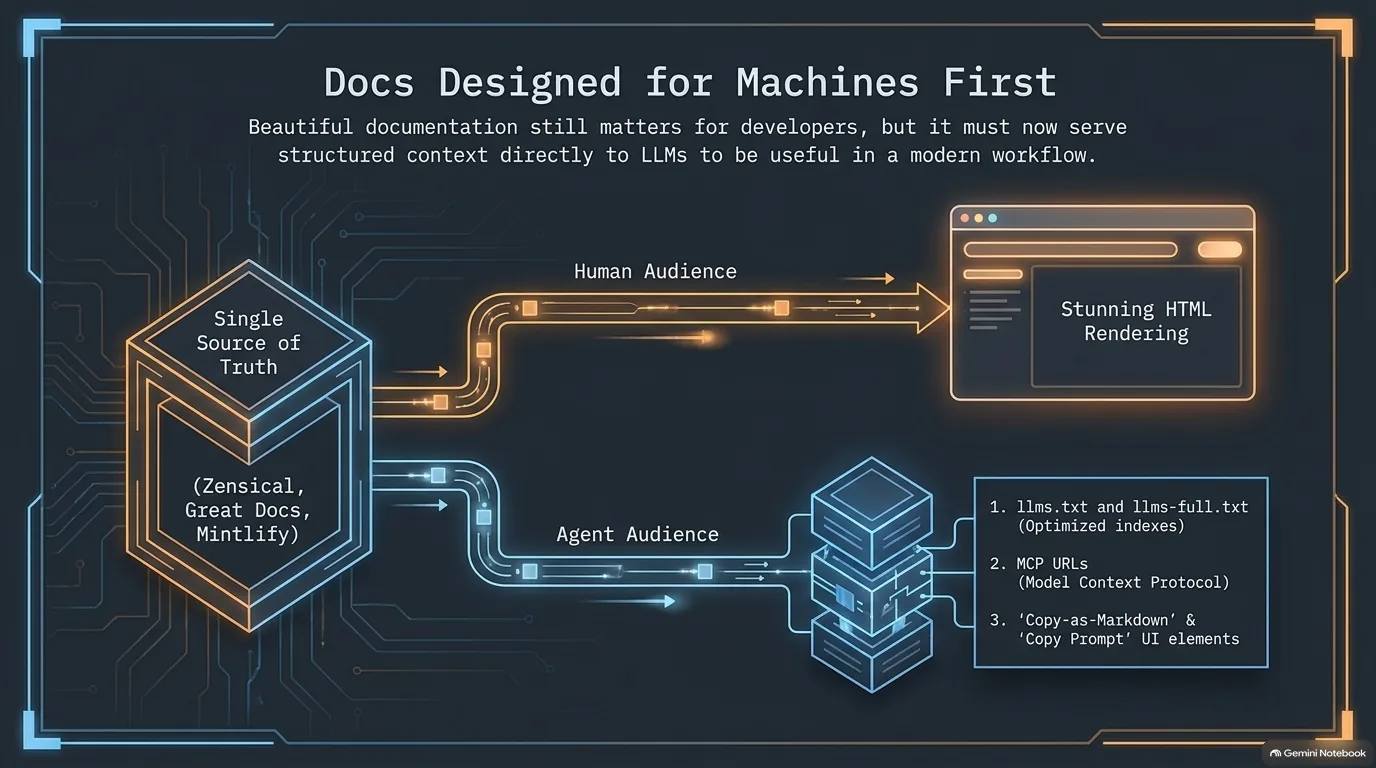
This is about docs for a package, library or framework, the site you land on when you look up how to use something. Those docs now have two readers. People want a polished, searchable website. Agents want plain text they can pull into a context window. The best tools in 2026 build both from the same source.
The people side is crowded and good. MkDocs, with the Material for MkDocs theme, has been the default for a lot of Python projects. Zensical is the next-generation tool from the Material for MkDocs team, and it's what FastAPI's docs run on now. Great Docs, from Posit, the people behind Great Tables, is newer and arguably doesn't get the attention it deserves. Michael moved all of his small libraries to it once they needed more than a README, and they make a good working example.
The agent side is where things got interesting. Here's what agent-friendly docs look like in practice:
llms.txt. A Markdown file at the root of a docs site that tells an LLM what the project is and links to the most important pages. Great Docs generates it, along withllms-full.txt, which carries the full docs in one file.- A Markdown version of every page. On a Great Docs site, swap
.htmlfor.mdin any page's URL and you get the page as Markdown, ready for an agent to read. - Copy buttons for humans working with AI. Mintlify, which LangChain's docs run on, puts buttons on every page to copy the page as Markdown or copy an MCP URL so your agent can query the docs directly, and offers a component for copying a prompt you can hand to your LLM.
- Skills. Great Docs also generates a skills section for each library, with instructions for installing the skill into your agent.
The nice part is that you don't have to write any of this. Great Docs creates it automatically if you don't, and you can still write your own versions if you want.
Is this only worth it for public packages? Not necessarily. Even for a personal project, beautiful rendered docs are worth having.
“I still love these things for my own personal experience. I want beautiful rendered versions of my docs.”
Calvin Hendryx-Parker
Hosting Python in 2026, and why server prices jumped
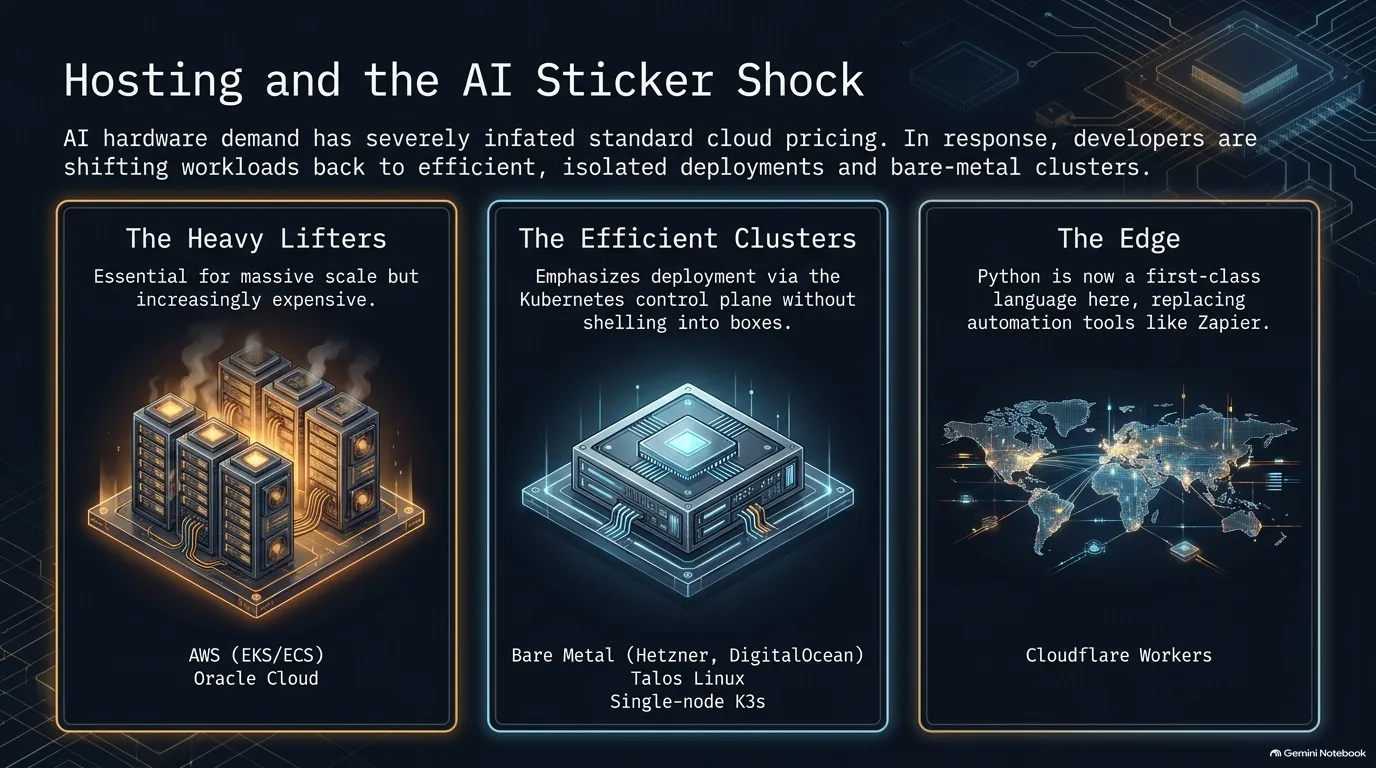
Where do you run a Python app in 2026? The image above sorts the options into three tiers, from hyperscale clouds down to a single function at the edge. But first, a price tag.
AI demand has driven up hardware prices, and it shows on the bill. Michael pays $35 a month for an 8-core, 16 GB server at Hetzner. That same server lists for $130 today. So for all the talk about Hetzner being the cheap option, by his math DigitalOcean is now the better deal dollar for dollar.
The simple end goes a long way. A plain virtual server, like a DigitalOcean droplet, is easy to undersell. Run your app in Docker on a decent-sized server, bring your own stack, and you can go a very long way without tying yourself to a pile of cloud services. DigitalOcean's App Platform goes one step simpler: hand it a container, hook it to a database, and it runs.
Kubernetes, from big to tiny. Containers scale up to full Kubernetes, and Kubernetes now scales down, too. Talos Linux is an operating system built only to run Kubernetes, managed entirely through an API with no SSH, and it's at home in a large cluster. K3s is a lightweight Kubernetes distribution that's happy on a single node. Either way, the killer feature is the control plane: you release new code by sending it to the cluster's API, without shelling into a box to clone or pull anything.
Functions at the edge. Python is now a first-class language on Cloudflare Workers, which run small pieces of code on Cloudflare's network with no server to manage. Python Workers support packages like FastAPI and Pydantic, and you deploy them with pywrangler, Cloudflare's CLI for Python Workers, run through uv. They're a good fit for replacing Zapier automations that have too many oddities: code up exactly what you need and release it.
The hyperscalers. At corporate scale it looks different again. Pat Decker's company runs 90% or more of its workloads on AWS, across multiple EKS (managed Kubernetes) clusters and an ECS cluster, with some workloads and authentication on Azure.
“That's the real killer feature for me for Kubernetes is the control plane URL for releasing code without having to like shell into a box and clone or pull anything.”
Calvin Hendryx-Parker
AgentsView: watching what your coding agents actually do
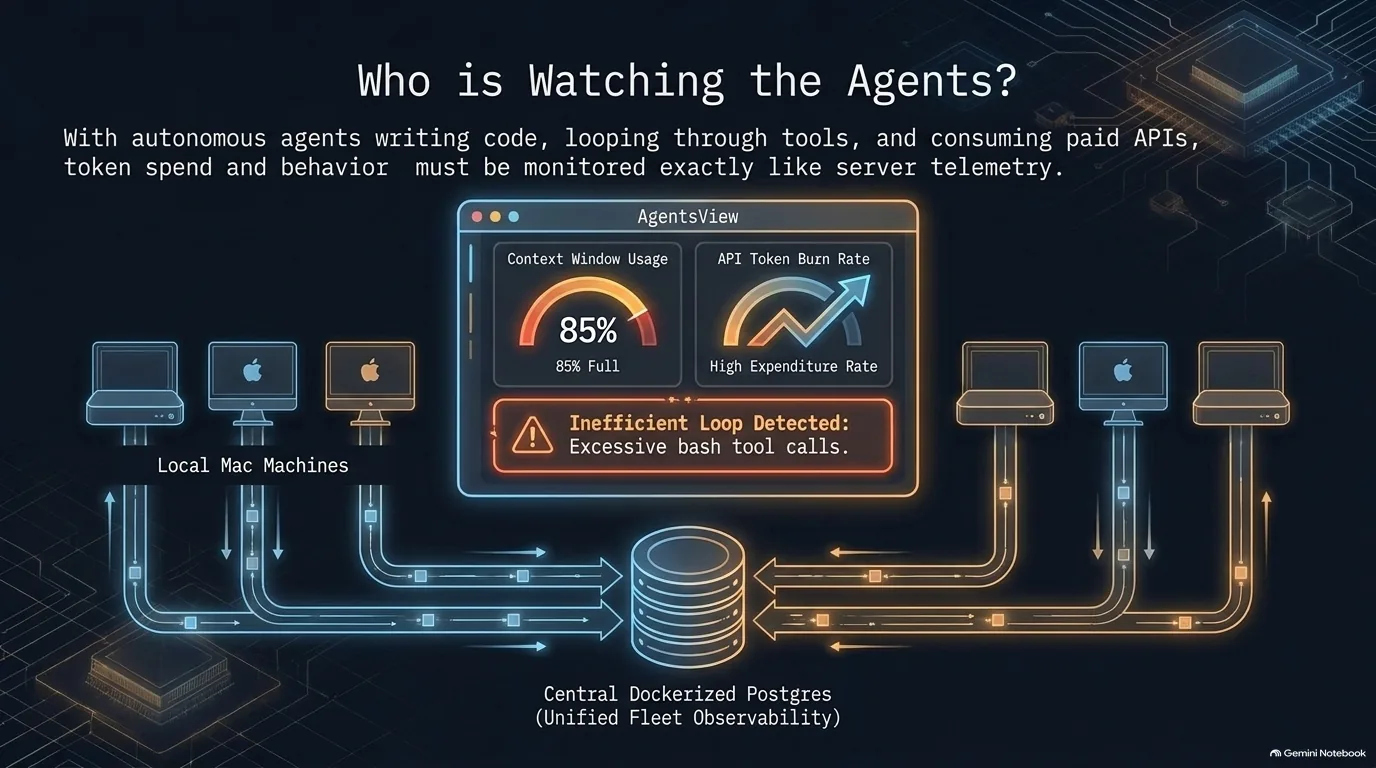
If agents write a lot of your code, how do you know how well they're doing it, or how much it's costing? The image above compares it to server telemetry: you want to see what the agents did, what it cost and where they went wrong.
Start with what agents actually do. The latest models lean hard on writing code to get things done. Watch the tool calls in a Claude Code session and it's no longer read file, write file. It's bash, bash, bash, often a python -c followed by a giant string of code. That works, but it's opaque. Each of those calls can need a human's approval, and a session log that just says "bash" over and over doesn't tell you what happened. More granular, Python-native tools in the harnesses could make sessions easier to read.
AgentsView is a tool for exactly this. It reads the session files coding agents already write, from Claude Code, Codex, Gemini, Cursor and dozens of other formats, and imports them into a local SQLite archive that stays on your machine. On top of that it reports activity, active versus idle time, token and cost breakdowns, and health scores that grade things like context window usage and flag bad behaviors. How bad can it get? Calvin Hendryx-Parker has looked at sessions where 85% of the work was bash tool calls.
Normally AgentsView covers one machine. It can also push each machine's archive into a shared PostgreSQL database and serve a merged view, so a Mac Mini, a Mac Studio and a MacBook can all feed one Postgres container in Docker and give you a single view of all your AI work. Fair warning: the scariest page is the one showing what your tokens would have cost at true API prices.
What should that data tell you? When an agent is inefficient, the cause could be how the agent is structured, a prompt that was a poor fit for the task, or an agent that just isn't equipped to handle it. Those need different fixes, and you can't tell them apart without looking at the sessions.
“When I see 85% of the session was just bash tool calls, I'm like, I wish it kind of knew more granularly what those things were at a glance.”
Calvin Hendryx-Parker
Recap: one stack, two audiences
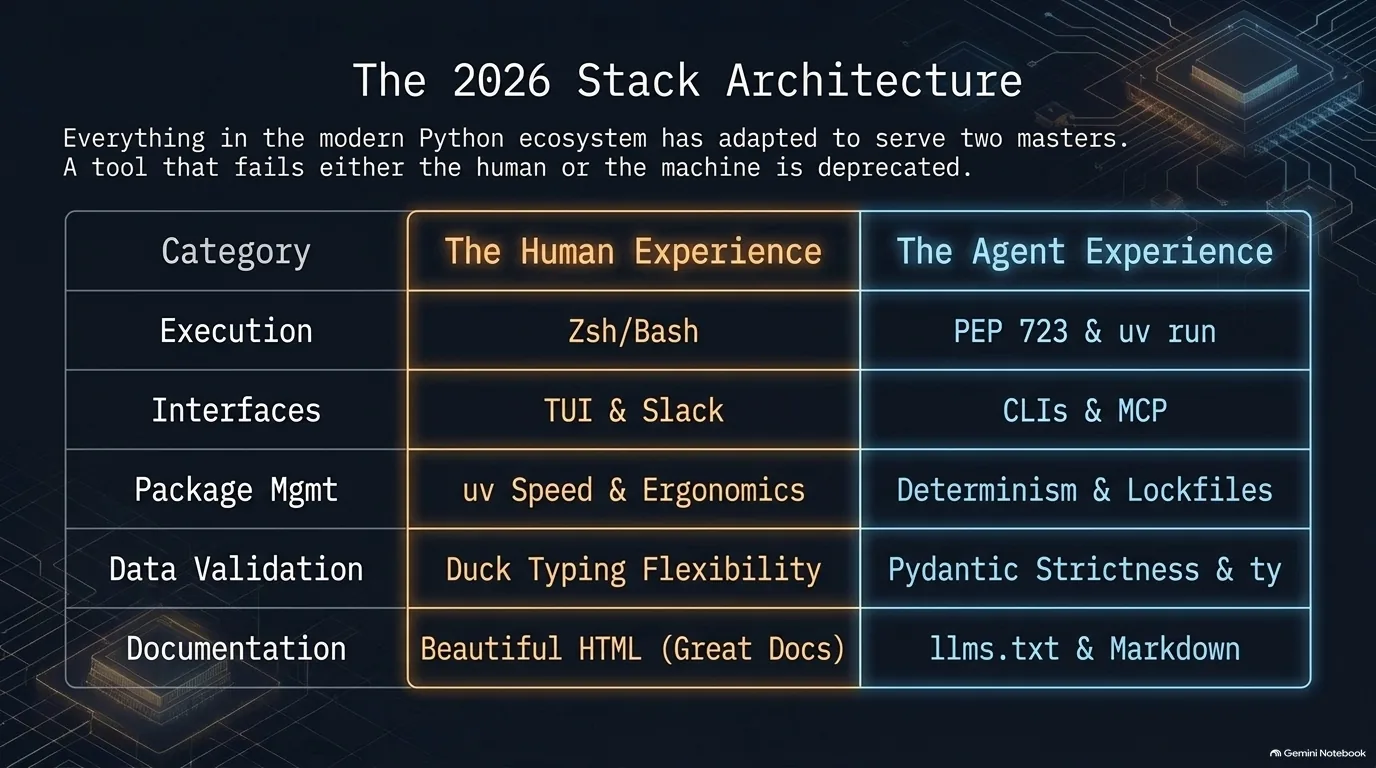
One idea ties the whole stack together: a good tool now has two users, the developer and the agent working alongside them. Here's how that plays out, layer by layer:
- Running code. A PEP 723 script with a
uv runshebang is as easy for a person to run as a Bash script, and just as easy for an agent to write. See PEP 723 and the uv shebang. - Interfaces. CLIs and terminal UIs work for both, and for local tools a good CLI can beat an MCP server. See Terminals and CLIs.
- Packages. uv won on speed for people and on familiarity for models. See How uv won.
- Types and validation. Type checkers gate what agents write, and Pydantic turns LLM text into data you can trust. See Type hints in 2026 and Pydantic as the bridge.
- Docs. Beautiful HTML for people, Markdown and
llms.txtfor agents, built from the same source. See Documentation for people and agents.
It isn't a clean split everywhere. Plenty of developers still write untyped, duck-typed Python by hand and save the strict rules for their agents.
AI tooling in 2026: harnesses, models, MCP and skills
AI ran through nearly every layer above. Here's the AI tooling itself, sorted by what it does.
Harnesses. Claude Code is the most common pick, sometimes run inside VS Code. Pi has a growing following, sometimes paired with the Superpowers skills. OpenCode is the tinkerer's option: more extensible, but it takes more time to configure, and the quote below sums up the difference.
Models, hosted and local. Model choice shows up on the bill. Sonnet 5.5 or OpenAI's latest can cover most work, and a new release that quietly makes the latest Opus the default can eat through tokens before you notice. Some teams let the tooling pick models automatically and keep an eye on token spend instead. Local models are a mixed story. Hosted ones are capable enough that running a model yourself can feel underwhelming, and the biggest open models are out of reach at home: GLM's Flash version needs something like 750 GB of RAM and the full model about 1.5 TB, though inexpensive hosted providers serve the Flash version for five to ten dollars a month. For self-hosting, there are Qwen models that run on most machines with 32 GB of RAM or more.
MCP and skills. These are the two ways to extend an agent. MCP, the Model Context Protocol, is a standard way to connect an agent to tools and data: your documents, your tickets, your database. A skill is packaged know-how, a folder of instructions and examples the agent loads when a task calls for it. Put simply, MCP connects your data and use cases, and skills distill domain knowledge.
Agents in more places. The coding agent is only one of them. There's a case for an agent in Slack and an agent wherever you keep your documents, such as Notion. One of the most exciting frontiers is agents that improve over time through memory: coding agents that remember your preferences, or writing agents that learn from what past human reviewers changed. The LangChain blog is a good place to follow that work.
Almost every part of the Python toolchain is moving at once. You don't need to adopt everything in this guide. But it's worth asking yourself one question: if you were starting fresh today, which of your tools would you still pick?
If you want to go deeper on the two ideas that kept coming back, working with AI agents and using types to keep code (and agents) honest, see Talk Python Training's Agentic AI Programming for Python and Rock Solid Python with Python Typing.
“I feel like Claude Code is like the Mac and OpenCode is like Linux, where it's like instantly extensible, but you have to spend a little more time with it and configuring and so forth.”
Reuven Lerner