DuckLake, the Lakehouse That's Just SQL and Parquet, a Visual Guide
TL;DR: DuckLake is an open table format that keeps a data lake's metadata in an ordinary SQL database and its data in plain Parquet files. That one decision gets you transactions for free, swaps a chain of metadata file reads for a single SQL query, and lets the catalog be anything from a DuckDB file sitting in S3 to Postgres or DuckDB's new Quack server. DuckLake 1.0 is out, and companies are already building on it.
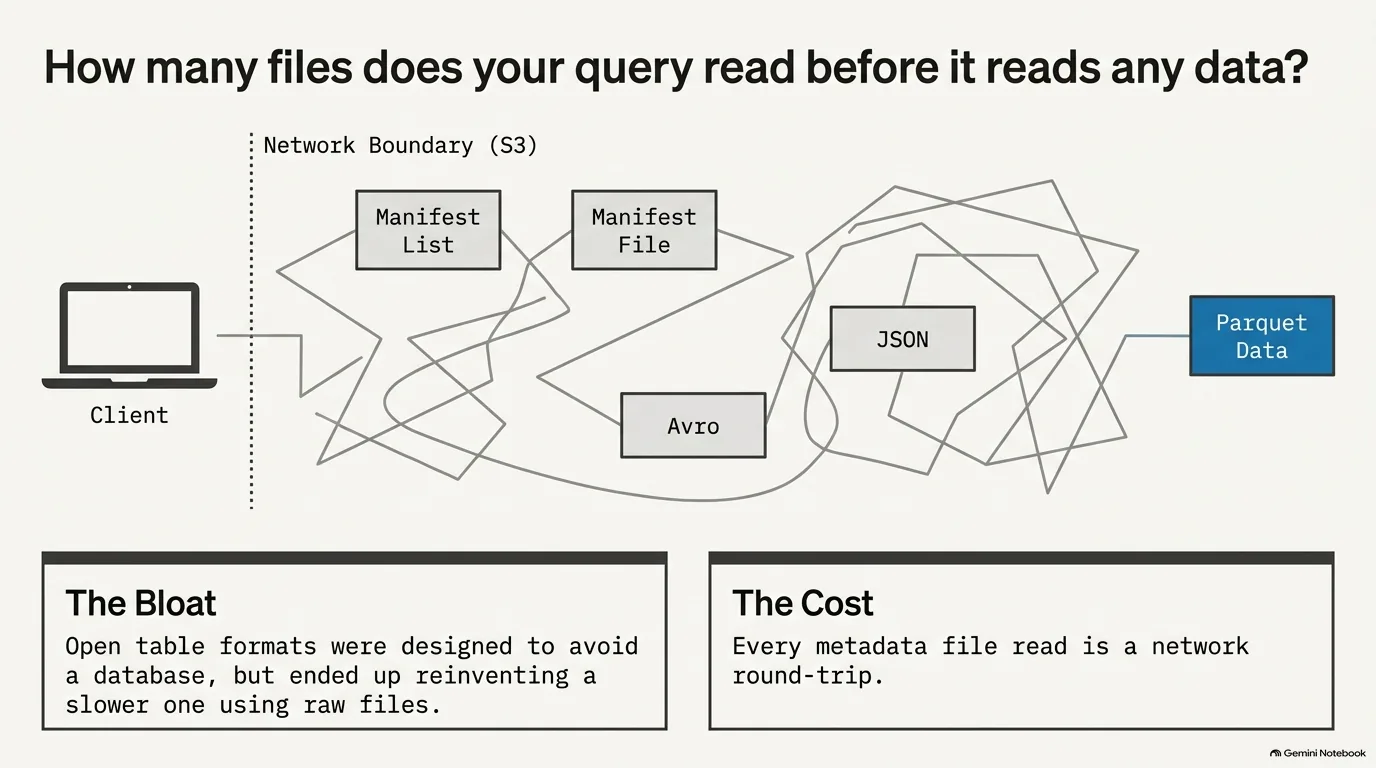
"How many files does your query read before it reads any data?" Michael Kennedy, host of Talk Python, opened the episode with that question, and for most data lakes the honest answer is more than you'd think. Formats like Apache Iceberg keep their metadata in files on object storage, so a query hops through JSON, Avro and manifest files before it ever touches the Parquet that holds the actual data.
DuckLake goes another way. Put the metadata in a real database, keep the data in Parquet, and let SQL do the bookkeeping. The idea came from DuckDB's creators, Hannes Mühleisen and Mark Raasveldt, and Pedro Holanda has spent the past year as DuckLake's main developer at DuckDB Labs.
Guillermo Sanchez came at it from the other side. He spent years as a software and data engineer running heavyweight platforms like BigQuery, Databricks and Snowflake, where the experience is good and the bill is steep. When he heard the podcast announcing DuckLake, it matched what he already felt was a little off about other open table formats, so he emailed Hannes and Mark. In his words, "I literally told them, like, I'm quitting my job. I want to work with you."
This guide goes through DuckLake one topic at a time: why other lakehouse formats read so many files, how a SQL catalog fixes that, the three pieces of the architecture, picking a catalog, Quack, data inlining, the "frozen" DuckLake that costs almost nothing to run, and where 1.0 leaves things today. There's also a detour into what makes DuckDB fast in the first place.
What is an open table format, and why does Iceberg read so many files?
First, the basics. What is an open table format? Guillermo Sanchez keeps his definition short: it's some metadata on top of Parquet files that lets you query and change those files transactionally. In the simplest case, that metadata is a pointer to the list of files that together make up a table. Add a schema so you know what types to expect, plus statistics about which files hold which data, and you've got the core of it. These days people are starting to call them lakehouse formats instead, a name Guillermo suspects caught on mostly because Databricks started using it.
Apache Iceberg is the other main open table format, and in Iceberg everything is a file. The data lives in Parquet, and the metadata lives in files too. Pedro Holanda counts JSON and Avro among Iceberg's metadata formats, so an engine needs three or four different file format readers just to work out which Parquet files to open.
How did it end up like that? Guillermo's explanation is that Iceberg and Delta "grew backwards." They started out as some Parquet files plus a bit of metadata pointing at them. Then people wanted ACID guarantees on that data, and to deliver them, the formats stacked a complex structure of metadata files, manifest lists and manifest files on top.
Now picture a single query on S3. Request the metadata file, parse it, maybe fetch more metadata, and then finally go read the data. Every one of those hops is a network request to object storage, and they happen one after another. The more snapshots a table has, the more there is to hop through, and lots of small inserts make it worse (more on that in the data inlining section).
So how many files does your query read before it reads any data? With a file-based format it depends on the table's history, and it's rarely just one.
“it's basically just some metadata on some parquet files that you can query in a transactional manner.”
Guillermo Sanchez
Why isn't this just a database? Where DuckLake came from
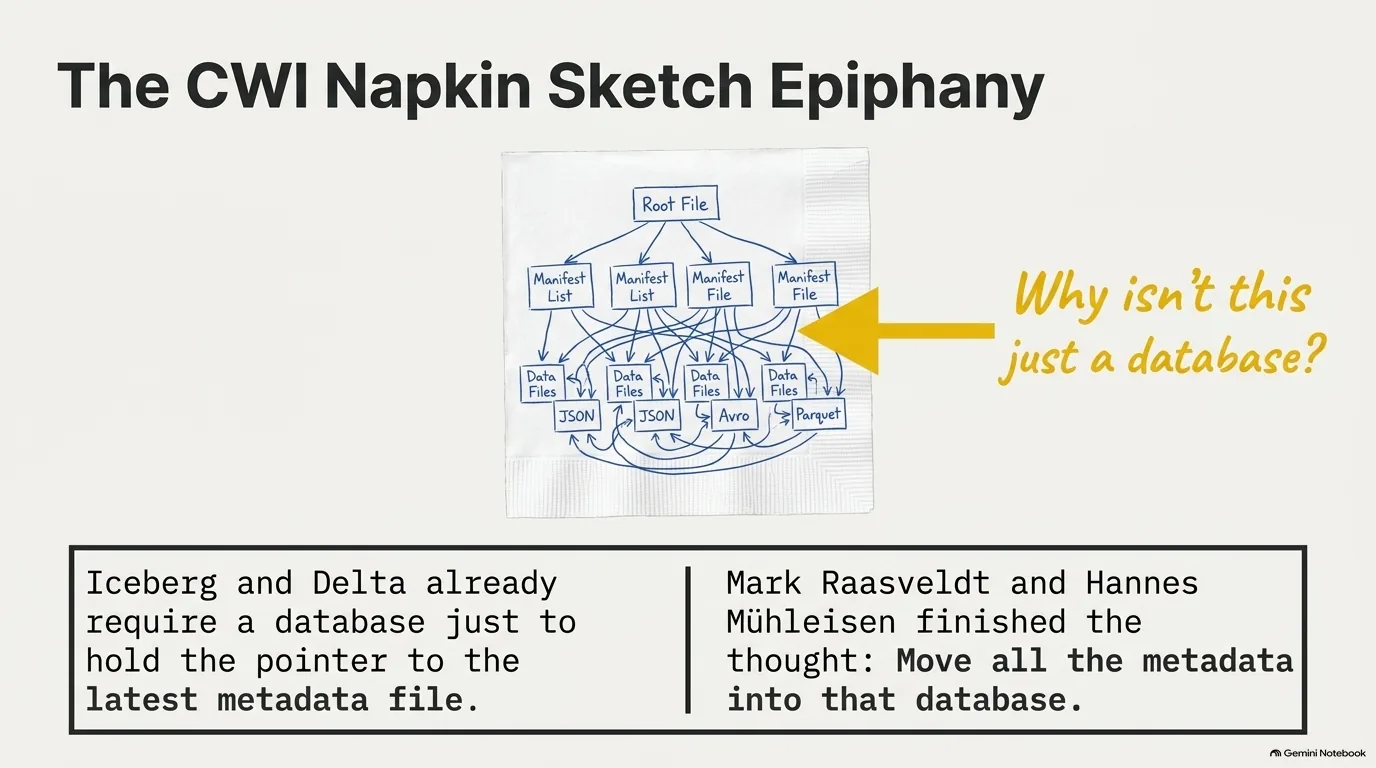
DuckLake started as a drawing. Mark Raasveldt and Hannes Mühleisen, DuckDB's creators, had been looking at data lakes for a while because DuckDB kept getting requests to support Iceberg. The longer they looked, the less efficient metadata in files seemed. As Pedro Holanda tells it, they reacted the way database researchers would: "well, why is this not just a database?"
Pedro held up the original sketch during the episode. It shows all of Iceberg's metadata files, and at the very top there's already a database. A file-based format still needs one somewhere, because something has to hold the pointer to the latest metadata file. If there's a database anyway, why not put all of the metadata in it? Pedro had Mark and Hannes sign the drawing, just in case the idea turned out to be a big success. He says it's for sale, for the right price.
Reaching for a real database before inventing a new file format goes back to how DuckDB itself began. DuckDB came out of CWI, which Pedro is careful to point out is a research center, not a university. During their PhDs, Pedro and Mark worked on data science projects with companies, and one thing was obvious: everyone was running away from database systems. People used dataframe and data wrangling tools, but nobody wanted to run Postgres. Pedro remembers that setting up MonetDB or Postgres from source could take him a full day. Today you can boot DuckDB in half a second and run a query in one line, but nine or ten years ago that wasn't the reality.
Mark and Hannes saw that gap, talked to frustrated data scientists and built a research database for them. Then people started using it in production before it was even released, and that's when the team knew they were onto something. Pedro had a head start on the relationship. He lived with Mark, and Hannes was his co-supervisor. Near the end of his PhD he asked if he could hack on their prototype and became, more or less, the first hire. The team was three people at first, about six within a year, and is around 35 today.
“So what if we just put this all in the database and then I made them sign for me in case this was a very successful idea.”
Pedro Holanda
How DuckLake works: a SQL catalog plus plain Parquet files
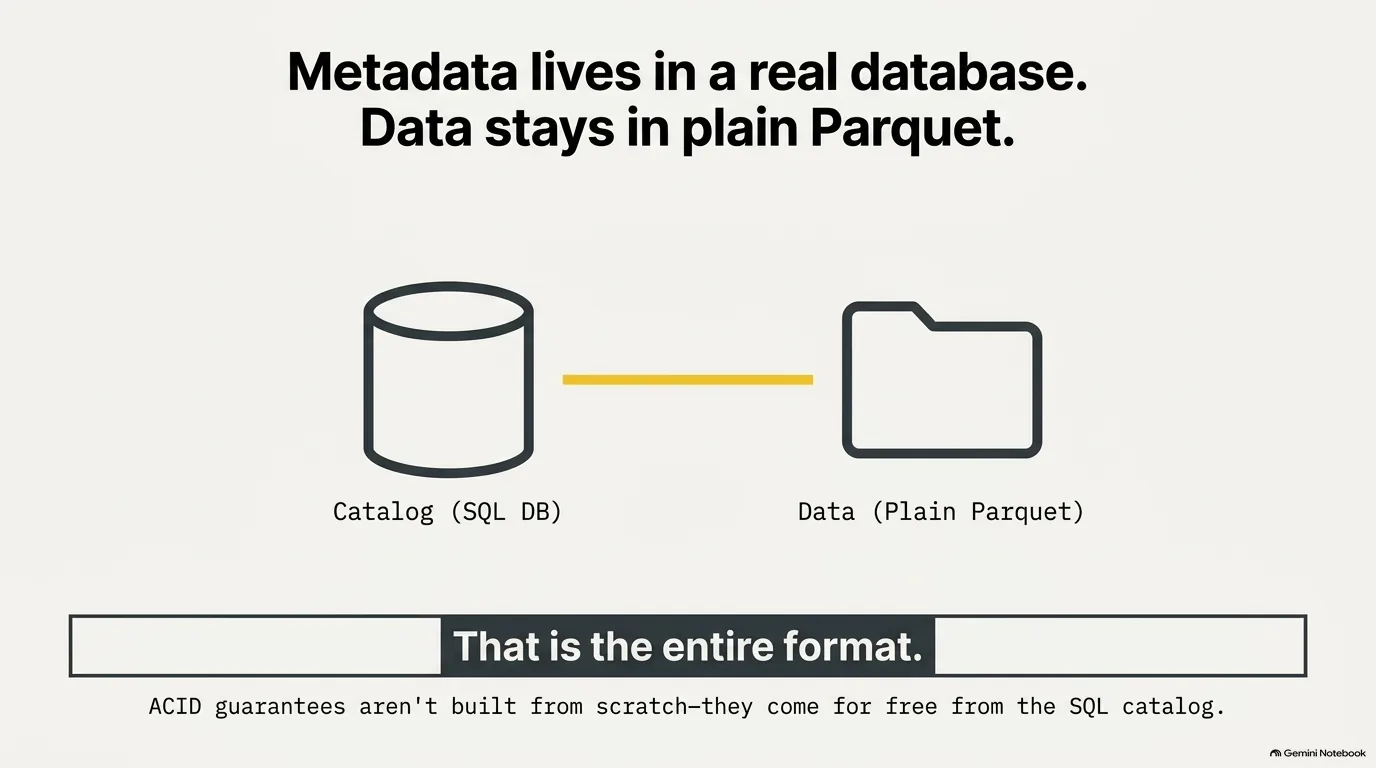
Michael Kennedy's opening summary covers the whole design: "The metadata lives in a real database. The data stays in plain Parquet. That's the entire format."
That's barely an exaggeration. The DuckLake specification is mostly the schema for a handful of tables that hold the metadata: which files belong to which table, at which snapshot, with what schema and statistics. If you can read a schema and write SQL, you can see how it works.
What does a database need to qualify as a DuckLake catalog? Not much. According to Pedro Holanda, it needs timestamp, varchar and integer types, plus primary keys. Any system with those can, in principle, be the catalog, which is why the options run from DuckDB and SQLite to Postgres and MySQL.
The biggest payoff is transactions. Remember the manifest lists and manifest files that file-based formats built to get ACID guarantees? DuckLake skipped all of it. When you write to a table while another transaction is racing you, the catalog database already knows how to tell whether the other one succeeded. Guillermo Sanchez put it simply: they didn't have to build ACID at all, because the catalog is a SQL database and SQL databases already do this.
Plain Parquet is a choice, by the way, not a law. The catalog records what kind of file each data file is, so the DuckLake spec already allows other file types, and Pedro has a soft spot for one in particular. One of the first things he built at DuckDB, in his first month back in 2018, was the CSV reader, and he's still working on readers today. He calls CSV "the Wild West of data formats." He once assumed no line in a CSV file would ever be over 32 megabytes, which made parallel parsing easier. Then a user reported exactly that error. The largest CSV he's parsed himself is close to a terabyte, in benchmarks. His running joke is that CSV files could someday replace Parquet in DuckLake and make a big comeback. Technically, the spec says he's not wrong.
“For us, we didn't have to build any ACID. It was built into the design, basically, because the catalog service is a SQL database that already supports ACID transactions.”
Guillermo Sanchez
One SQL query instead of a chain of metadata files
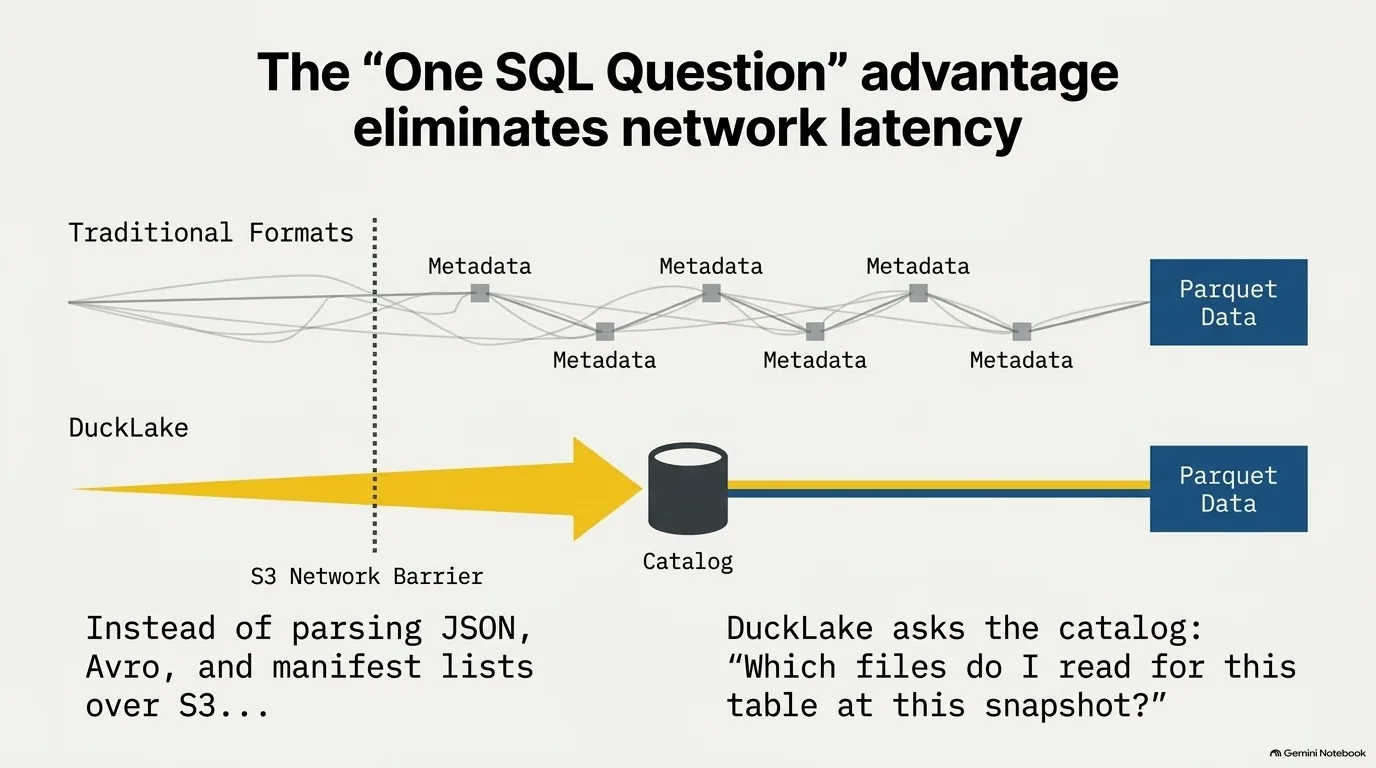
So what does a read look like with a SQL catalog? The engine asks the catalog one question: which files do I need to read for this table at this snapshot? The catalog answers with a list of Parquet files, plus statistics about them so the reader knows what it actually needs. Then the engine reads those files, and that's the whole process.
Guillermo Sanchez says the team "designed it with pretty much Iceberg and Delta in our heads," formats where it usually takes more than one round trip, through more than one file, just to figure out which Parquet files matter. In DuckLake it's one SQL query, and for him that's what collapses the complexity for any engine that wants to read or write the format.
It's worth being precise about what goes away: the metadata hops, not the network. The Parquet files still live on object storage and still have to be fetched, and if your catalog is a Postgres server somewhere, asking it is a network call too. What you lose is the chain of sequential S3 requests before the first byte of real data.
Doesn't the file-based approach at least scale better? Michael Kennedy drew a useful line here: "something that's highly scalable, doesn't mean it's fast." A design can stay consistent as you add a million more users or far more data and still be slow from day one. Twelve back-and-forths across S3 for a single query is slow, even on a small table.
Pedro Holanda agrees that putting files on S3 lets you scale reads more or less indefinitely, but he argues the catalog doesn't have to become the bottleneck. A database like DuckDB gets a lot out of modest hardware, and since the catalog only needs a few basic types and primary keys, a distributed database could take on the job if you ever needed one. Keep in mind what the catalog actually holds, though. For the catalog, it's not the size of your data that matters. It's the size of your metadata.
“you just need one query, actually, in order to retrieve all of the information that you need to query these parquet files.”
Guillermo Sanchez
DuckLake architecture: storage, catalog and compute
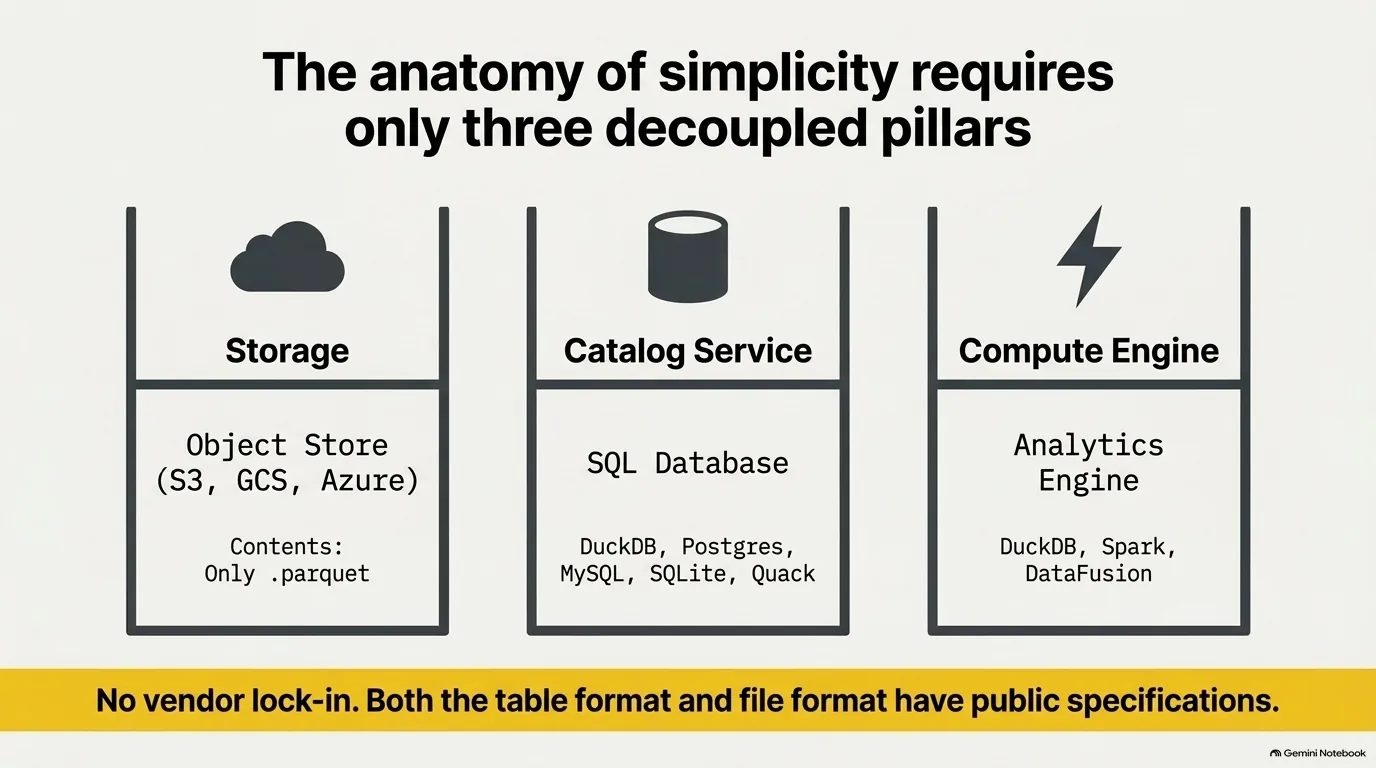
A DuckLake has three parts, and Guillermo Sanchez walked through each of them.
- Storage is any object store, usually something cloud hosted like S3, Google Cloud Storage or Azure Blob Storage. In DuckLake it holds Parquet files and nothing else, since there are no metadata files.
- The catalog service is a SQL database holding all the metadata about those Parquet files. DuckDB's DuckLake extension, the team's own reader and writer, can use DuckDB, SQLite, Postgres, MySQL or a Quack server as the catalog. Some of those run right next to you in-process; others live on a remote server.
- Compute is anything that can read Parquet and send the right queries to the catalog. The catalog says which files to read, and the engine reads them.
Most people use DuckDB for compute, according to Pedro Holanda, and there's a DataFusion implementation that's already fairly mature. Spark has a writer too. Guillermo explained that MotherDuck built it because some of their customers were already using Spark for ETL.
Where does all this run? Pedro described the typical setup as S3 for storage and compute on EC2, with the two kept separate. Michael Kennedy pointed out you're not tied to AWS: DigitalOcean Spaces, or anything else that speaks the S3 protocol, works as well.
Why split things up this way? For Pedro, the interesting part of open table formats is the openness. Both the table format and the file format have public specifications, so anyone who reads them should be able to write a reader and a writer. That's what breaks vendor lock-in. Start your database on Oracle and migrating off it later is famously painful and expensive (Pedro joked you'd be buying Larry Ellison a second island in Hawaii). With an open format you can, at least in theory, move from Databricks to Snowflake to your own DuckDB-based setup without rewriting your data. And because the data is just Parquet files, spreading reads across lots of machines is easy.
“So by just reading the specification, anyone should be able to implement a reader and writer to that format, right?”
Pedro Holanda
Columnar vs row storage: why DuckDB is fast at analytics
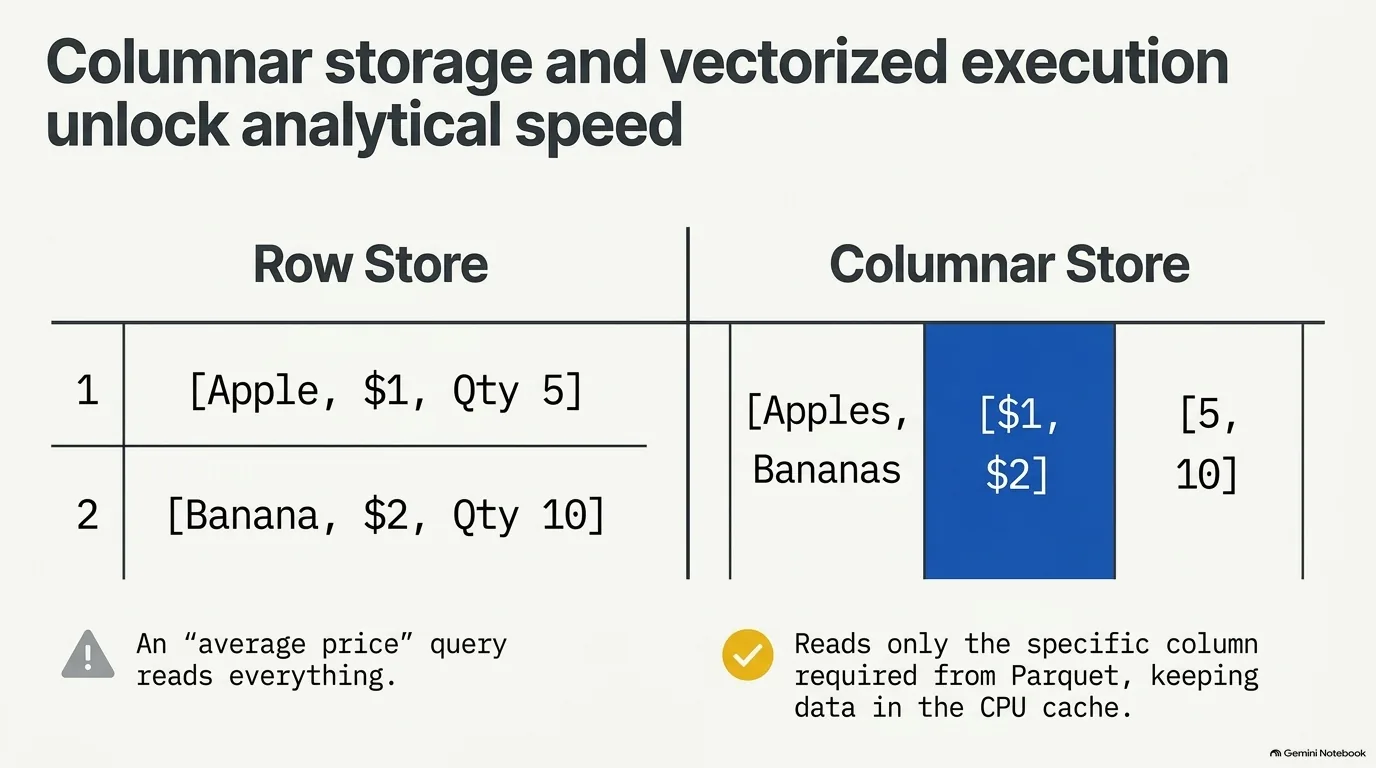
Why is DuckDB so fast at analytics, and SQLite so good at transactions? Pedro Holanda explained it with a shop. Picture a table of products, each with a quantity and a price.
A row store keeps each row together: the first product with its quantity and price, then the second, and so on. But analytical queries tend to look like "give me the average price of all your products." You have three columns and need one. A column store keeps each column together instead, in memory and on disk, so it can read just the prices and skip the rest.
Keeping a column together also makes compression easy, because lightweight compression depends on similar values sitting side by side. A column of dates that barely change from row to row compresses beautifully with delta encoding. In a row store, the value after a date is a price or a string, so there's nothing to work with. Michael Kennedy added another wrinkle: if rows contain variable-length text, a row store can't even skip ahead a fixed number of bytes to find the price.
It isn't free, though. Want to update the price of one product? In a row store that's a single lookup. In a column store you first scan one column to find the row, then jump somewhere else to change the price. That trade-off is the whole reason SQLite suits transactional work and DuckDB suits analytics.
The columnar layout enables a second trick, vectorized execution, and that's where the CPU cache comes in. Batches of values flow through the whole query plan together (unless something like a join forces a break), and because each batch is small, it stays in the CPU cache. SQLite processes one tuple at a time, a design from the 90s when memory was small, and that means constant trips back to memory.
Memory, as Michael noted, has come full circle: scarce in the 90s, cheap for a while, and, with AI, scarce again. Pedro says databases went through that cycle earlier. In the mid-2000s, in-memory databases promised you wouldn't need disk at all. But memory has limits, and you might want to run on a phone or an Arduino. So DuckDB put real effort into buffer managers and operators that spill to disk, and a query under memory pressure keeps working instead of crashing. Guillermo Sanchez's favorite proof is DuckDB's blog series on exotic hardware, which includes an iPhone cooling in a block of ice while it runs a TPC-H benchmark.
“That's why people say that SQLite is good for transactions, and transactions in the sense that it updates one row every now and then. And DuckDB is great for analytics.”
Pedro Holanda
Embedded databases and zero-copy: DuckDB inside your Python process
Postgres seems to be taking over the database world, yet embedded databases are having a moment too, with SQLite as the best-known example. What's the appeal? For Guillermo Sanchez it has always been simple: you don't have to provision a Postgres server, or any other database server, just to run your application. SQLite does that wonderfully for transactional work, and DuckDB set out to do the same for analytics (though DuckDB can run transactions as well).
The use case he calls one of the coolest takes the idea as far as it goes. DuckDB has a WebAssembly build that runs in the browser, so you can serve a database file from S3 and query it from a web page. There's no server anywhere, and S3 storage is very cheap.
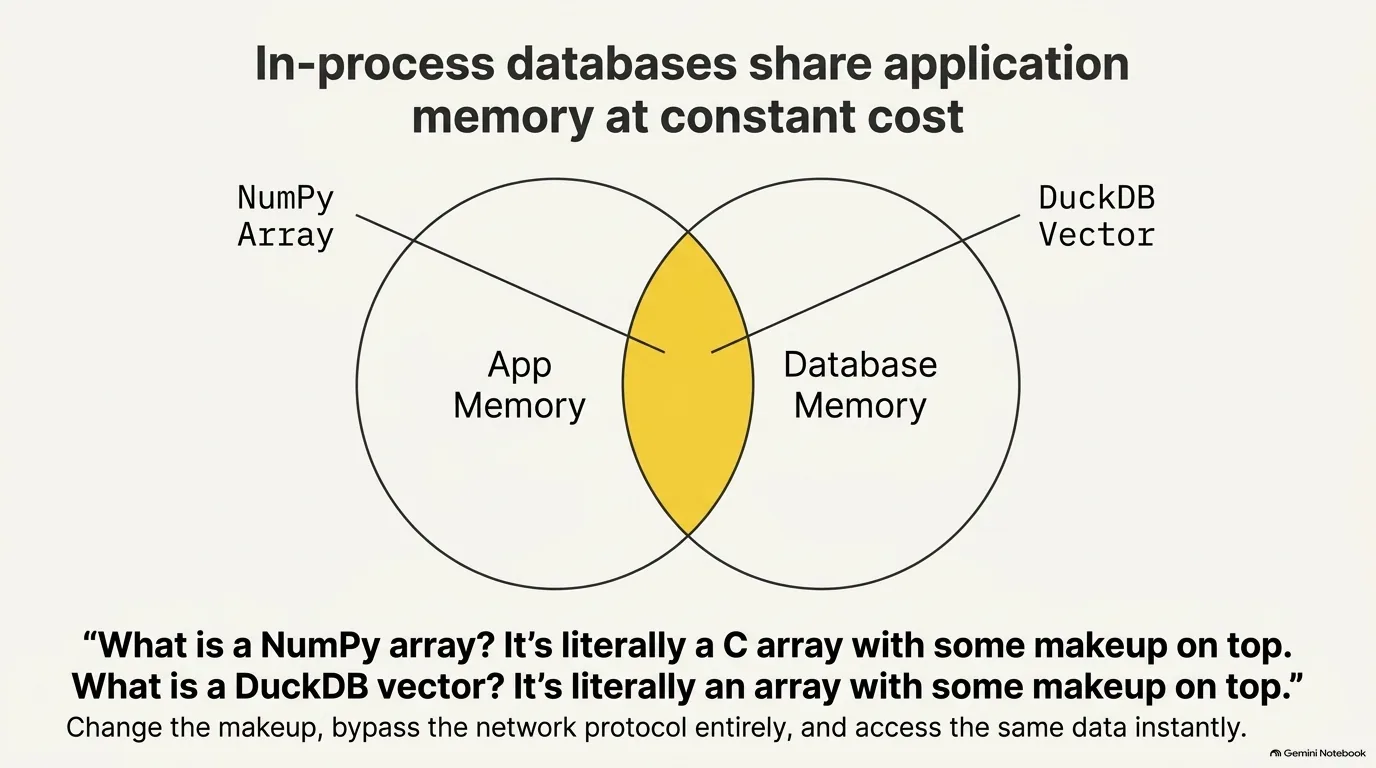
Pedro Holanda points to a deeper reason this matters for data science. A database running inside your process shares your application's memory, so it can avoid copying data around. A NumPy array, he says, is "literally a C array with some makeup on top," and a DuckDB vector is an array with some makeup on top too. Change the makeup and both sides can look at the same data at constant cost, with no transformation.
To make that concrete, Michael Kennedy described the alternative: a query result that has to copy a million floats into a new structure, column by column, before it goes back to you. With an in-process database, the result can point at a chunk of memory that already exists.
That was one of the biggest frustrations the CWI team saw among data scientists. Setting up a server and creating schemas was clumsy, sure. The bigger problem was moving data from NumPy, pandas or TensorFlow into a database and back again, because database protocols (the way a server ships results to clients) are slow. Running in-process removes that boundary entirely. The idea borrows from what SQLite already did, but with a heavy focus on analytics, compression and vectorized execution.
Embedded databases have also grown up as real application backends. Michael pointed to SQLite's write-ahead log, which cuts down on locking, and Litestream, which streams changes to an S3 bucket for replication. DuckDB has its own limit here: one process writing to a database file locks other processes out. That's the problem Quack solves, covered in its own section.
“one of the coolest use cases I think that DuckDB brings to the table is the fact that you can use a Wasm client in the browser and serve your database over S3, and literally there's no server”
Guillermo Sanchez
Data inlining: how DuckLake solves the small file problem
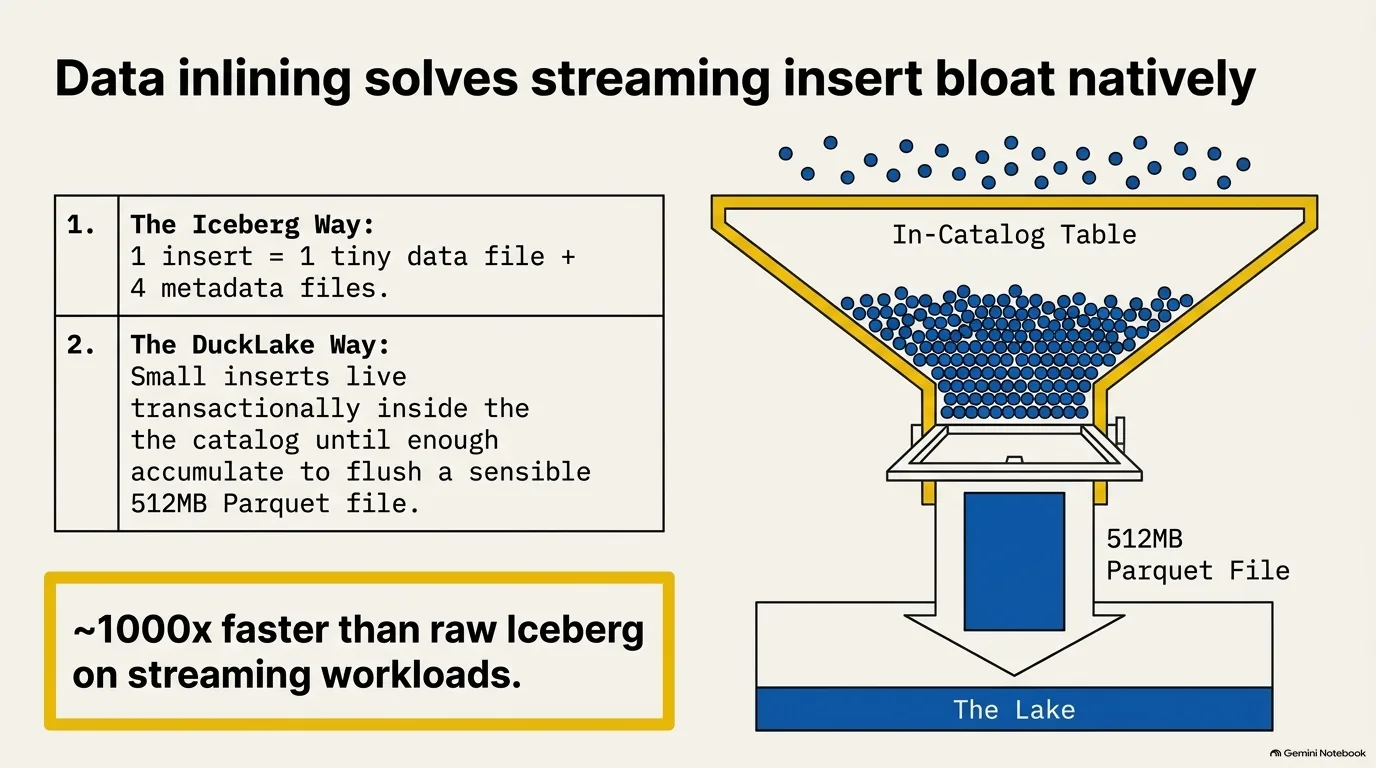
Anyone who has run a data lake for a while knows the small file problem. Lots of small inserts, say from a streaming source, create lots of small data files. In Iceberg, each insert writes its own metadata files on top of that. Pedro Holanda thinks it's four metadata files per insertion, though he was quick to add that he's far from an Iceberg specialist. Reading one snapshot means requesting all of those files, and even though each one is tiny, the latency adds up.
DuckLake already takes care of the metadata half, since its metadata is rows in a database rather than files. On its own, though, it would still leave you with a pile of tiny Parquet files. Data inlining handles that half.
Once you hear the idea, it seems obvious. The catalog is a database, and databases are good at storing tables. So for small inserts of 10, 100 or 1,000 rows, DuckLake writes the rows into an inline table inside the catalog instead of creating a new Parquet file. That table has the same columns as your data plus a few extra ones DuckLake needs, like the snapshot that inserted each row and the snapshot that deleted it. When enough rows pile up, DuckLake flushes them to a real Parquet file and removes them from the inline table. Everything stays transactional and snapshot-aware the whole time.
What does Iceberg do instead? Pedro's understanding is that it leans on separate streaming tools. That's another tool to run, and the batching gets in the way of having a snapshot per write. In his blog post comparing raw Iceberg with raw DuckLake on this workload, DuckLake came out about a thousand times faster. Michael Kennedy compared it to Python's file buffering: when you open a file and write to it, not every byte goes straight to disk, and here the disk is object storage far away.
What about file sizes in general? Those are up to you. Guillermo Sanchez gave 512 megabytes, with sensible row groups, as an example target for batch writes, and DuckLake respects whatever target you set. Do lots of small writes without inlining, though, and you'll get small files anyway. That's why lakehouse engines offer compaction to merge them into bigger ones. Engines don't like reading a thousand 5 KB files; they'd much rather read one half-gigabyte file, which they can still parallelize.
“So the idea here is like, well, we are using a database management system. They can store tables.”
Pedro Holanda
Schema evolution and the ducklake-dataframe experiment
This story starts with Pedro Holanda getting annoyed. To benchmark data inlining he needed an Iceberg setup to compare against, and getting one running was frustrating. He handed the job to his AI coding agent and went off to do something else, and even the agent was taking a while. So he started to wonder: would it be easier to have the agent write a brand new DuckLake implementation than to get Iceberg working?
He let it try. The result is ducklake-dataframe, a standalone DuckLake implementation for dataframe libraries like pandas, Polars and PySpark that doesn't use DuckDB at all. Pedro is upfront that this was a few months ago, when the models weren't as good as they are now, and that he didn't really review the code. But the tests passed and the numbers looked right.
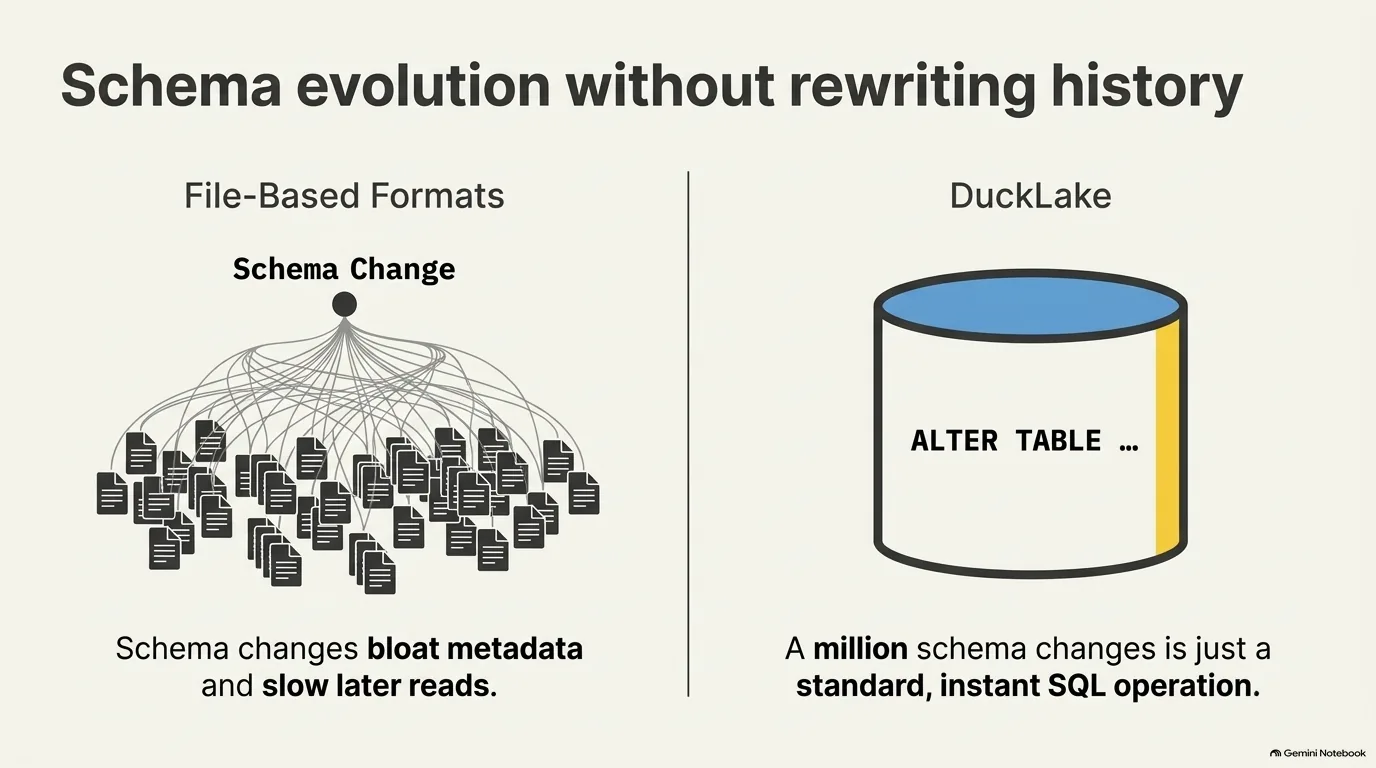
He added some benchmarks just for fun, too. One changes a table's schema a million times and compares DuckLake with Iceberg. Pedro thought it was funny. Guillermo Sanchez says it's also one of the craziest ways DuckLake improves on Iceberg, though on reflection it just makes sense. Every schema change in Iceberg writes files. Commands like ALTER TABLE don't change your data, but they keep growing the metadata, and over time read performance drops because of it. In DuckLake a schema change is just a SQL operation against the catalog. Nobody changes a schema a million times in real life, Guillermo admits, but the difference is real.
So what was the serious point? Pedro wanted to show that DuckLake is much easier to implement than Iceberg and that, despite the name, it isn't tied to DuckDB. Other implementations have appeared since. Firebolt has a closed-source one, Pedro believes, and the folks at Hotdata built one for DataFusion. MotherDuck's Spark connector is another. The team wants people to write their own readers and writers, with DuckDB's extension and the specification on the DuckLake website as the reference.
How easy is easy? Easy enough that an AI coding agent built a working implementation for several dataframe libraries while its owner was busy with something else.
“despite the name, Duck Lake is not only entangled to DuckDB. It's an open table format.”
Pedro Holanda
Choosing a DuckLake catalog: DuckDB, Postgres or Quack
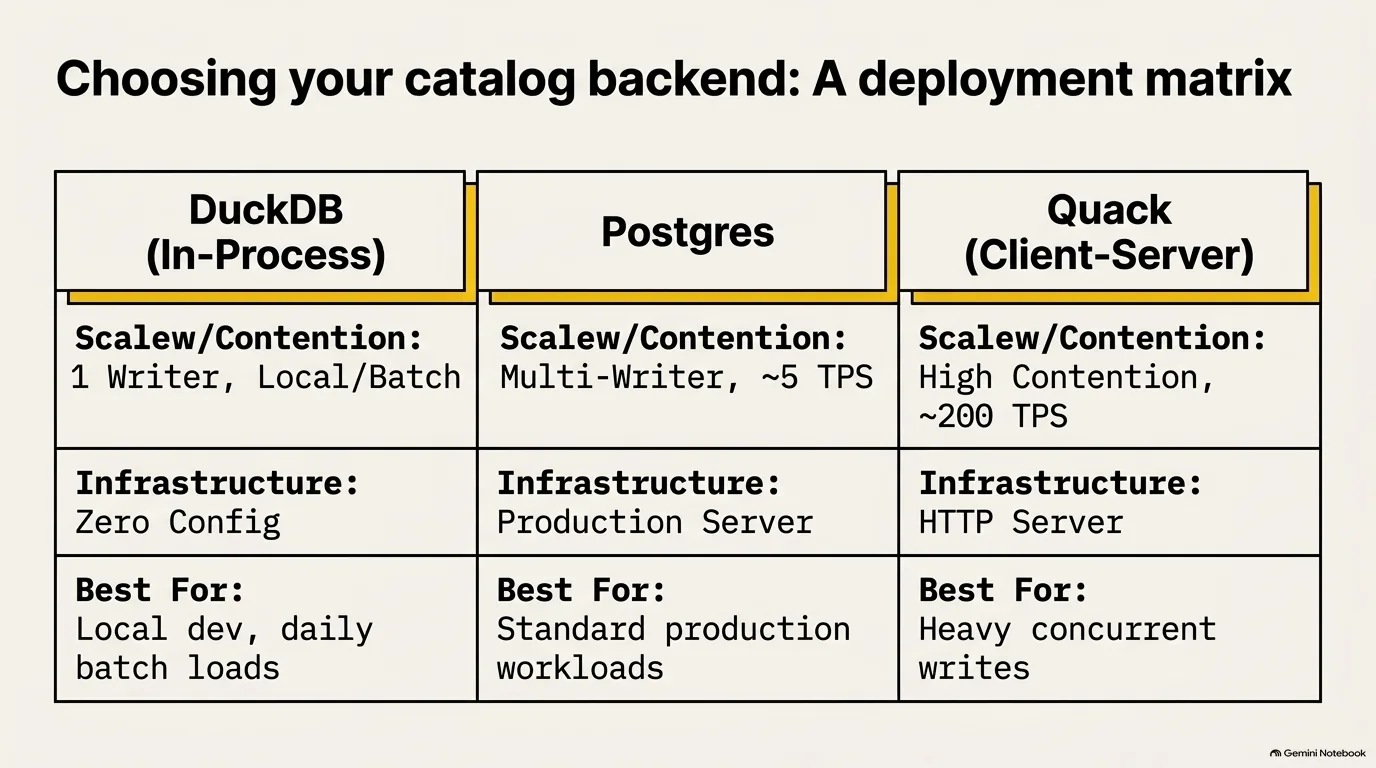
The catalog can be any SQL database that meets a few basic requirements, so which one should you actually use? It comes down to how many writers you have and how much infrastructure you're willing to run.
DuckDB, in-process. Pedro Holanda sees lots of people use DuckDB as the catalog to build a data lake on their own machine, including people who let their AI coding agents keep data in a local lakehouse. The catch is the one DuckDB always has: only one writer can be connected at a time, so with DuckDB as your catalog, several people can't write to the lake at once. For a single developer or a nightly batch job, that's no problem at all. It also makes possible a neat serverless trick, covered in the frozen DuckLake section.
Postgres. In production, Pedro mostly sees Postgres, because it lifts that single-writer limit and works the way people are already used to. The price is a server to run. And when many writers fight over the same table, conflicts get expensive, for reasons covered in the Quack section. Under that kind of heavy contention, Postgres can drop to roughly five transactions per second, which is not a measure of its general speed.
Quack. DuckDB's new client-server protocol already works as a DuckLake catalog, and it handles that contended case far better. Pedro expects it to become the de facto DuckLake catalog over time. Just not yet. Quack is still experimental, and its first stable release ships with DuckDB 2.0, which Pedro expected about a month and a half after the episode was recorded.
SQLite and MySQL work as catalogs too, through DuckDB's DuckLake extension, if they fit your stack better.
So where should a newcomer start? Michael Kennedy asked exactly that at the end of the episode, and the answer was DuckDB in-process. Guillermo Sanchez called it the easiest. Pedro's reasoning is that with Postgres you still have to set up a server first, while DuckDB is a line of code and you're ready to go. Start there, and move to Postgres once you need more than one writer.
“Quack already works with DuckLake as well, but don't run that in production right now, people. Wait a little bit longer.”
Pedro Holanda
Quack: DuckDB's client-server protocol and 200 transactions per second
DuckDB has always been an embedded database, and that's mostly a feature. It's great on a laptop, and great for running an ETL pipeline on a single EC2 machine. The limit shows up when you want to share a DuckDB database more widely. Guillermo Sanchez explained that inside one process you can open several connections to the same database, but once a writer in one process grabs the lock on the file, other processes can't get in.
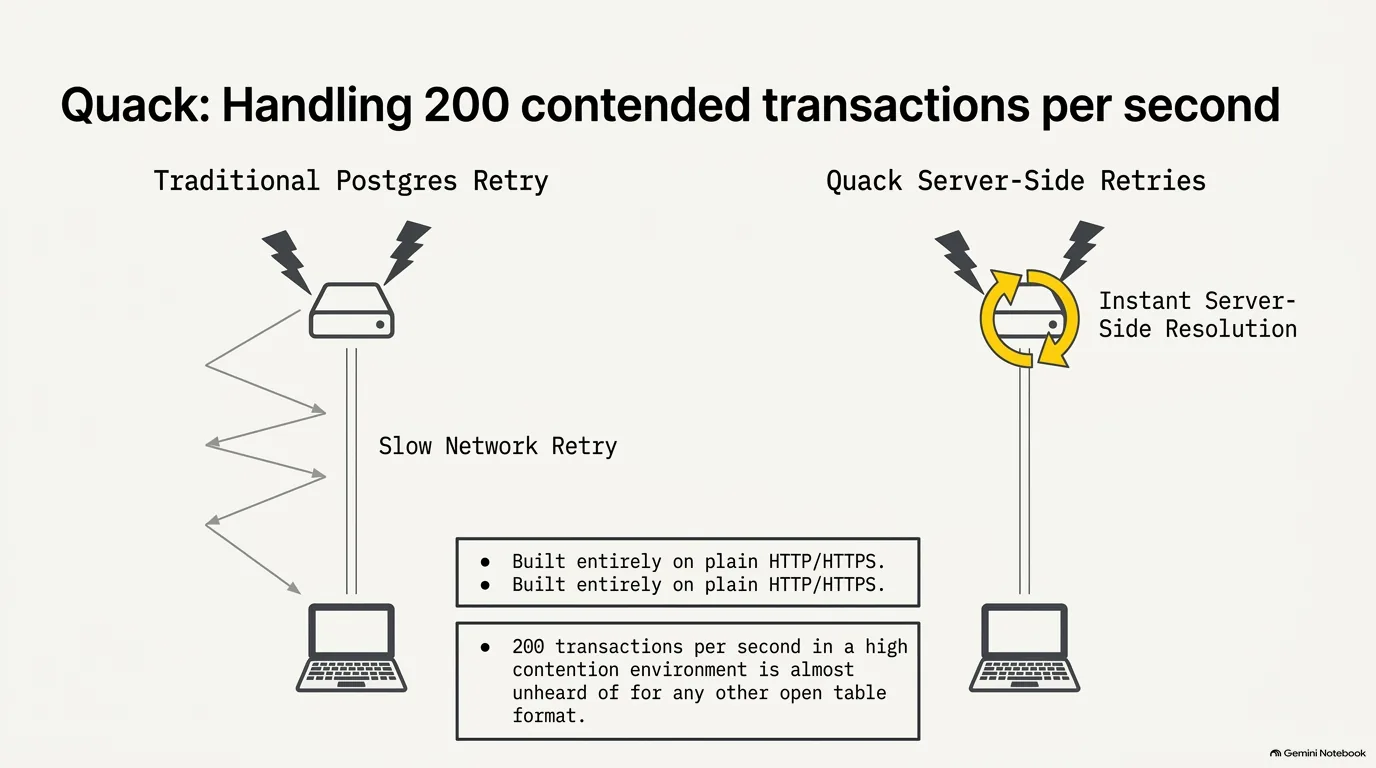
Quack fixes that by giving DuckDB a client-server mode. Trying it takes a terminal and a few steps: install the quack extension, load it, and call a function named quack serve, which spins up a server. Connect to that address on localhost from another terminal, and you've got a working client-server database. In production you'd host it wherever you like, for example on EC2 behind a load balancer. Since Quack runs over plain HTTP (HTTPS in production), there's no custom protocol on top of TCP to deal with. Guillermo is clear-eyed about the trade-off, though. It solves the locking problem by putting you back in the client-server world.
Where Quack really shines is as a DuckLake catalog. Here's the problem it solves. With Postgres as the catalog, when two transactions conflict on a snapshot ID, the database has to go back to the application and tell it to recompute its snapshot ID and send its queries again. All that round tripping makes retries expensive. With Quack, DuckLake itself is loaded on the server, so the retries happen right there. Pedro Holanda's numbers, with about 20 writers under heavy contention: around five transactions per second with Postgres, and around 200 with Quack.
Is that a big deal? Guillermo thinks so. Lakehouse formats were designed for batch processing, writing a big chunk of data to a table once, not for transactional workloads. In his words, "200 transactions per second in a high-contention environment is almost unheard of for any other open table format." Pedro's joke: buying something with Bitcoin used to take about 30 seconds, and Iceberg was even slower than that. In theory, you could build the same server-side retries into Postgres with stored procedures. Pedro just hasn't written a stored procedure since college.
And the name? Quack was Hannes Mühleisen's idea. Someone in the company suggested something more straightforward, like RPC protocol. Guillermo and his colleague Gabor said no way.
“Quack is too good to pass on. We cannot pass on these names so good.”
Guillermo Sanchez
The frozen DuckLake: a read-only data lake almost for free
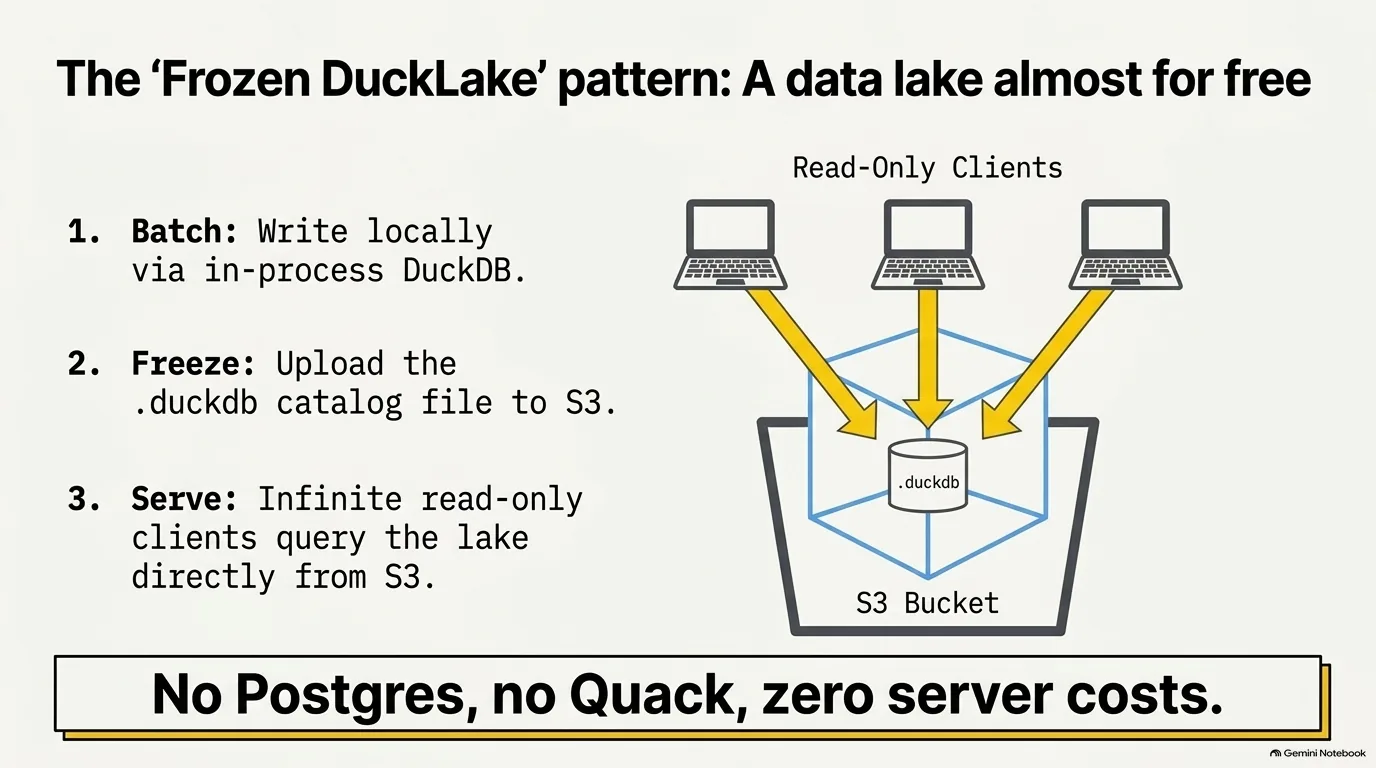
What if you didn't run a catalog server at all? That's the idea behind a use case Guillermo Sanchez calls very cool, which people have started calling the frozen DuckLake. The catalog is an in-process DuckDB file, and nothing needs to run anywhere.
Here's how it works:
- Pull the catalog down. To update a DuckLake whose catalog is a DuckDB file, you need that file on your machine.
- Write the update. Talk to the local catalog file, and write the new Parquet data straight to S3. Only the catalog sits on your machine; the data goes where it always goes.
- Upload the catalog. When the write finishes, upload the DuckDB file back to S3.
From then on, any number of read-only connections can attach to the lake, using that DuckDB file in S3 as the catalog. There's no Postgres and no Quack server to pay for. As Guillermo puts it, you can have a data lake almost for free, because the catalog is just a file in S3, and anyone can read the whole lake from their laptop.
Michael Kennedy summed up the workflow: the job runs overnight, and in the morning you download the DuckDB file and ask all the questions you want. Operationally, there's almost nothing to it.
What's the catch? It's built for batch work. A DuckDB catalog still allows only one writer at a time, and every update means pulling the file down and pushing it back up. Guillermo's examples are workloads like one update per day, or a single bulk load of a lot of data. If you need many writers or frequent small writes, that's a job for Postgres or, eventually, Quack. For a daily batch feeding a team of readers, though, a data lake with no servers in it is hard to beat.
“you can have a data lake almost for free, right? Because your catalog database is just a file in S3, which is very powerful.”
Guillermo Sanchez
Recap: a data lake without a data platform
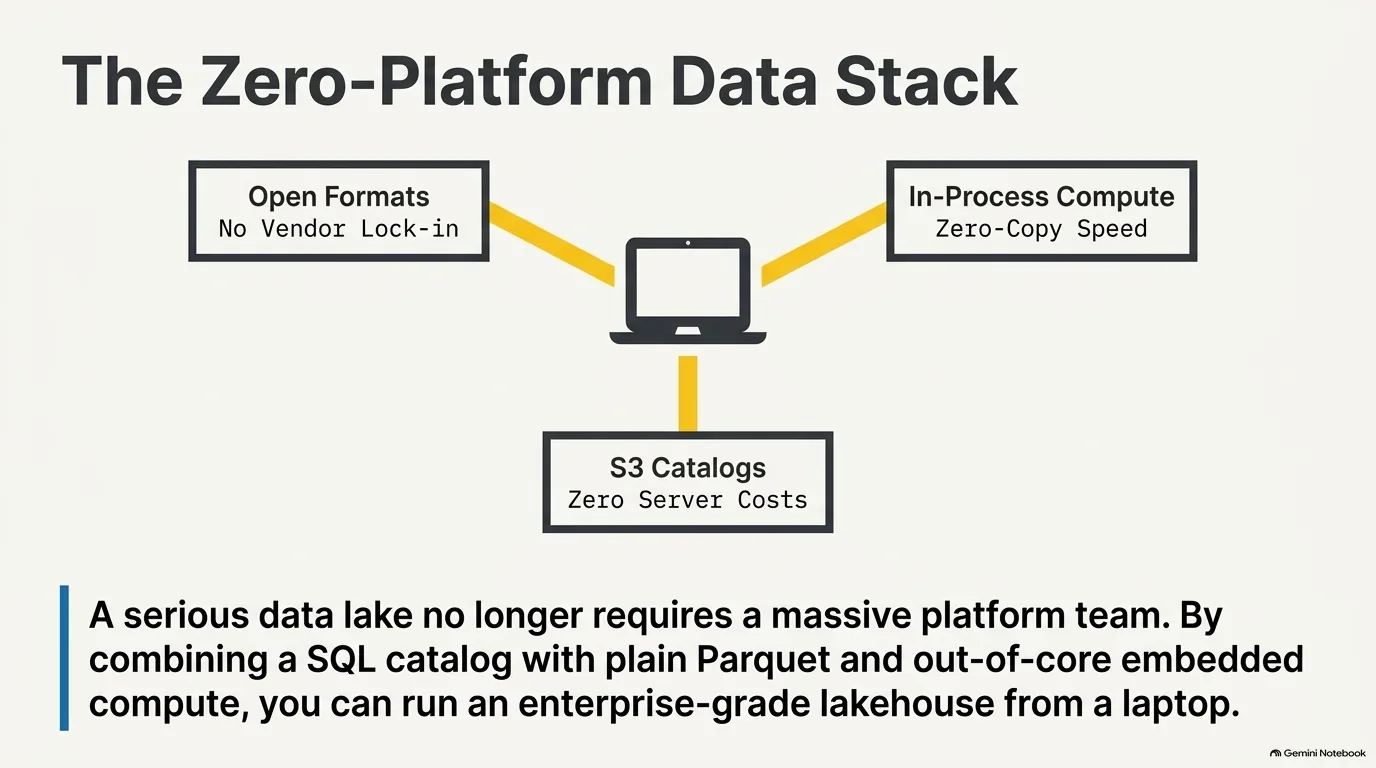
Guillermo Sanchez joined DuckDB Labs after years of running platforms like Databricks and Snowflake. The service is nice, he says. You don't worry about downtime, and replication is handled for you. But you pay a steep premium on top of the cloud infrastructure underneath, and you give up control of your stack. Put together, the pieces covered above offer a different deal:
- Open formats. Public specs for both the table format and the files mean you can change engines and vendors later. See DuckLake architecture.
- In-process compute. DuckDB runs inside your Python process and shares memory with NumPy and pandas instead of copying data through a protocol. See embedded databases and zero-copy.
- A catalog that can be just a file. A DuckDB catalog uploaded to S3 serves any number of readers with no server running. See the frozen DuckLake.
The bigger options aren't obsolete. When many people write at once, Postgres or Quack is still the answer. But you can start with far less than a platform and only grow into one if you need it.
Is DuckLake production-ready? DuckLake 1.0 and how to start
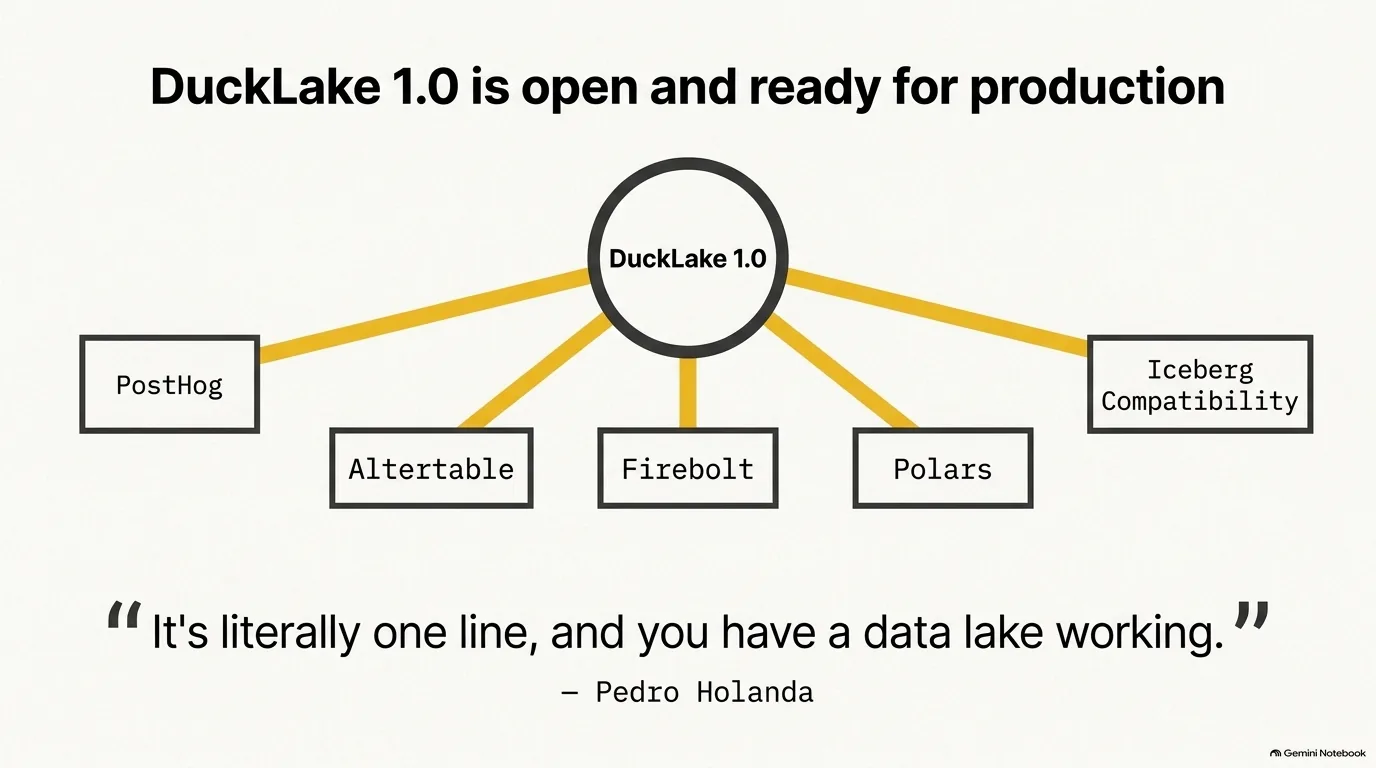
Is DuckLake ready for production? Pedro Holanda says yes, as of April. Getting there took a deliberate pause. From version 0.4 to 1.0, the team stopped adding features and only fixed bugs, and allowed schema changes only when a change fixed a bug. Bug reports still come in, of course, and they're still fixing them.
A big share of the 1.0 work went into keeping a long-running lake healthy. A lake that runs for years keeps growing, so all of the checkpointing functionality had to be ready and easy to use: compacting small files, rewriting data files to apply their deletions, removing orphan files and expiring old ones. The goal is a lake that never grinds to a halt because its own history got too big.
What's next? Pedro expects DuckLake 1.1 alongside DuckDB 2.0, again mostly fixes and smaller optimizations. The bigger direction is Iceberg compatibility, meaning DuckLake can read from and export to Iceberg, so nobody gets locked into DuckLake either. Guillermo Sanchez described a project that moves at two speeds. The specification stays frozen as much as possible and only gets a new release for a real breaking change to the catalog schema. The DuckDB extension keeps improving on its own schedule, with recent work on how it computes statistics.
Some companies are already building on it. Guillermo named PostHog and Altertable as companies basing their software on DuckLake, and he believes Firebolt is moving to it as well. Polars is a different story: it's one of the dataframe libraries Pedro's ducklake-dataframe experiment targets.
Ready to try it? Pedro points people to the DuckLake website, which has examples and tutorials, and his pitch is that it takes one line to get a data lake working. Here's what that looks like from Python, with a local DuckDB file as the catalog. The ATTACH line is the one that creates the lake:
import duckdb

con = duckdb.connect()
con.sql("INSTALL ducklake")
con.sql("ATTACH 'ducklake:my_lake.ducklake' AS my_lake")
con.sql("USE my_lake")

con.sql("CREATE TABLE products (name VARCHAR, price DOUBLE)")
con.sql("INSERT INTO products VALUES ('Apple', 1.0), ('Banana', 2.0)")
print(con.sql("SELECT avg(price) FROM products").fetchall())
Hit a bug? Pedro asks for a GitHub issue with a fully reproducible script that generates the data and shows the problem. The easier it is to reproduce, the faster it gets fixed. Guillermo's advice is to try it at whatever scale suits you, anywhere from a pet project holding your own data to the backbone of a software service. And Pedro has one more reason to start now: DuckDB 2.0 brings asynchronous I/O, which will make reading from S3, and DuckLake along with it, much faster.
To build up the Python data skills around all this, Talk Python Training has Polars for Power Users and Data Science Jumpstart with 10 Projects.
“We had people use it in production before DuckLake 1.0. And I was always like, cool, cool, cool. What could go wrong?”
Pedro Holanda