12 Things You Should (and Shouldn't) Do in AWS: A Visual Guide to Talk Python Episode 559
TL;DR: Most AWS disasters aren't exotic. They're a leaked access key, a wildcard permission, a public S3 bucket or a database the internet can reach, each one a convenient choice somebody made on a quiet afternoon. AWS consultant Matt Lea walks through his dos and don'ts: Docker images instead of hand-tuned servers, infrastructure as code, IAM roles instead of keys, private subnets and tight security groups, CloudFront in front of S3, and keeping an eye on the bill. Then comes the part you can't configure: practicing the incident before it happens.
Your site is down. It's 3 a.m. Is it a bug, a bill, or a breach? You can't tell yet, and everyone is watching you find out. That's how Michael Kennedy, host of Talk Python, opened this episode, and he's been there. He's woken up to outages more than once. He thinks his deployments and applications got better because of them, but in the moment he also "aged faster than normal."
Matt Lea has spent about 15 years as the person companies call when that happens. He runs Schematical, a small consulting agency that specializes in AWS, and the tagline tells you the job: "we help CTOs running on AWS sleep at night." His argument, as Michael summed it up, is that everything you want in that moment gets decided months earlier, on ordinary afternoons, when someone chose the convenient thing.
So which afternoons are we talking about? This guide walks through Matt's list. It starts with servers you can throw away and rebuild, and with infrastructure as code. Identity comes next (IAM roles, and why the asterisk is your enemy), then the network - subnets, security groups and getting in without a bastion. After that it's S3, CloudFront and WAF at the edge, AI agents and your data, and finally logs and the bill. Along the way, Michael pushes on which of these actually matter if you're one person running a small server.
It ends with Cloud War Games, where Matt breaks things on purpose so a team's first real incident isn't their first incident.
Why AWS outages are decided months before 3am
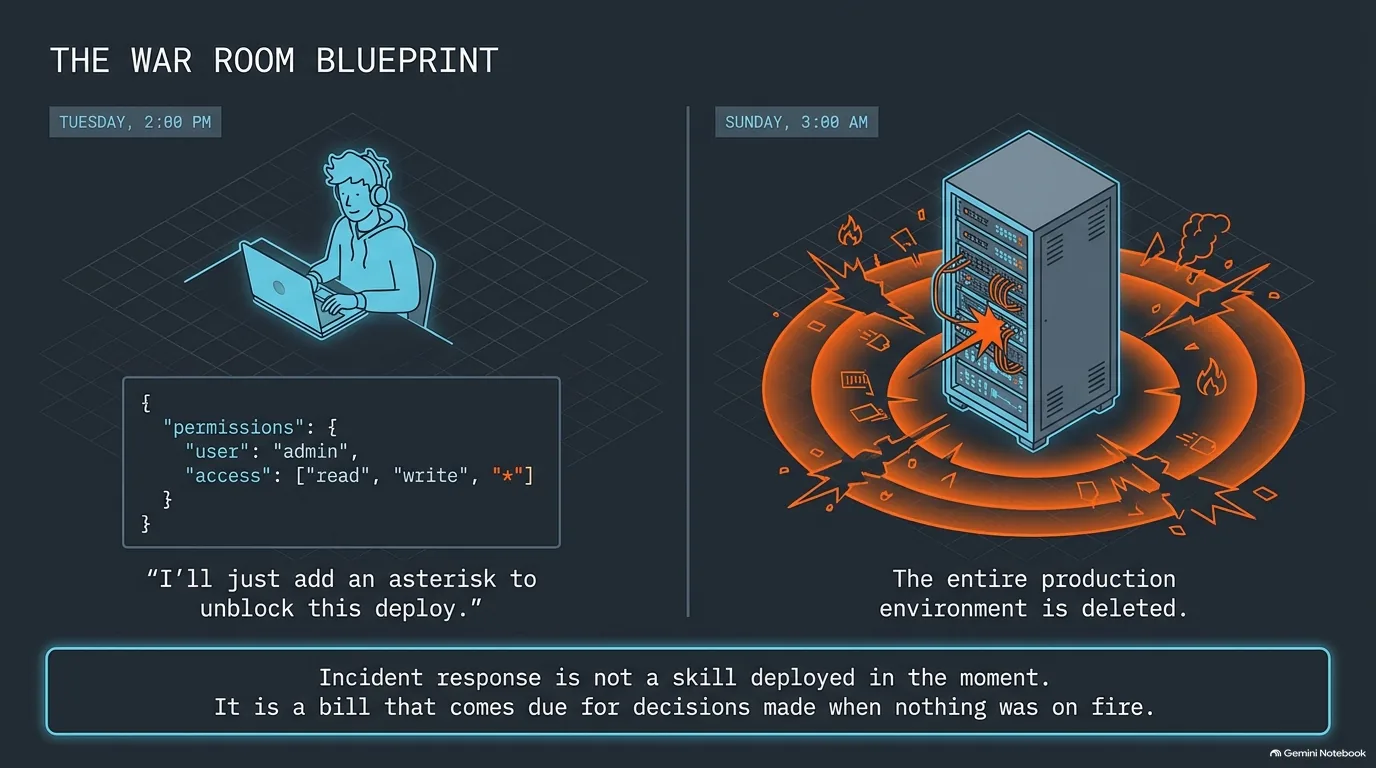
Picture two moments. On a Tuesday afternoon, a developer has been fighting a permissions error for an hour and widens a policy so the deploy goes through. On a Sunday at 3 a.m., production is in trouble and nobody can say why. They look like two separate events, but they're the same decision, just with a few months in between.
That's the thread running through this whole episode. In Michael Kennedy's summary of Matt Lea's argument, everything you want in that moment gets decided months earlier, on ordinary afternoons, when someone chose the convenient thing. Matt's dos and don'ts are, more or less, a list of those afternoons. The wildcard one gets its own section.
Why does the bad night always come as a surprise? Because the weak link is rarely the one you were watching. One of Matt's tech comics has the classic Black Friday setup: this sale will make or break us, are we really ready? Oh, I'm sure we'll be fine. Black Friday is a huge retail day, and Matt's real answer to it is pretty unglamorous: each year he checks in with his e-commerce clients ahead of it, makes sure everything is provisioned, and has a plan if they suddenly need to double in scale.
Michael has never had a site go down on Black Friday, but he's come close, and not for the reason he expected. One time it was an extra large JavaScript file, served and gzipped by Nginx, that almost took the site down. A big JavaScript file isn't on anybody's list of risks, and that's how it caught him off guard.
Is there a way to learn this without the outages? That's the idea behind Matt's Cloud War Games, which he created to simulate that experience and "inoculate people from the stress." It gets its own section at the end of this guide. Everything in between is the other half: the choices you can make on a calm Tuesday so the Sunday never comes, or at least goes better when it does.
“And it's often not for the reason you expect. You're like, really? That's the thing? That was the weakest link?”
Michael Kennedy
Cattle, not puppies: replacing hand-tuned EC2 servers with Docker images
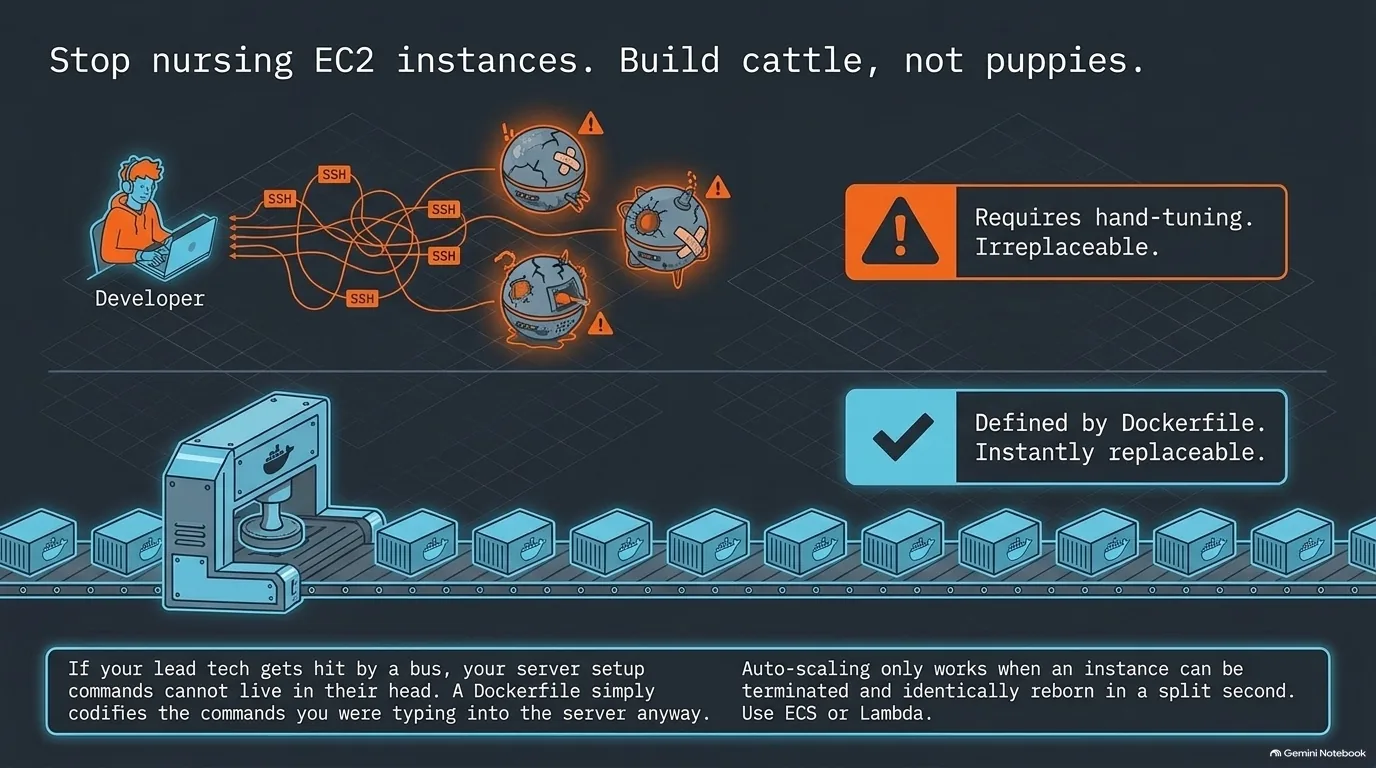
Matt Lea didn't come up with the phrase, but he says it sums it up: servers should be interchangeable cattle, not puppies you nurse.
On AWS the puppy is usually an EC2 instance, a plain virtual server. He sees it a lot. Someone boots a couple of EC2 instances, gets them set up absolutely perfectly, and the attitude becomes "this is my baby." Then one gets sick or dies, and the team is left asking how they set it up before and which scripts they ran. On EC2, SSHing in and customizing things is just way too easy at first.
The cattle version is an image. Matt's analogy reaches back in time: it's like building your OS and saving it to a disk you can pop in any time to boot the exact same machine. If you had to delete your servers 10 times a day, you could bring them back exactly as they were when they first started taking traffic, in a split second. On AWS that means ECS, the Elastic Container Service, or Lambda (which works a lot like Docker but, as Matt found out, isn't actually Docker under the hood). It's also what makes autoscaling work: two containers in the middle of the night, 100 the day after Thanksgiving.
Michael Kennedy resisted Docker for a long time, because it seemed more complex and harder to observe. What changed his mind? The commands in a Dockerfile are basically what you had to type into the server anyway, and you can still observe a container by mapping volumes or going into it. Matt is fair to the other side. If you're a startup moving fast and uptime isn't the issue, he won't push it. But when downtime costs real money, the setup can't live in one person's head.
What about Kubernetes? Matt relays advice from another developer he respects: Kubernetes on anything but GCP isn't a good fit. He's had clients ask him more than once to move them from EKS to ECS, which is more AWS native, though he's clear Kubernetes isn't his expertise. At the small end, Michael's company runs 33 distinct containers, and tools like Coolify manage the Docker side of self-hosted apps on any Linux server. Matt gets the appeal, but the business questions decide it: what if someone kicks the power plug, and how many engineering hours will it take versus a managed service? Michael's own caveat is that even a setup that manages itself is still a bit of a puppy, because a bad upgrade that corrupts the database is still yours. Matt self-hosts n8n and keeps getting told to run another update.
“If you're a company that goes down and loses a hundred thousand dollars an hour and you don't have the setup commands documented or your lead tech gets hit by a bus, quote unquote, you want that Docker file to be clear as day.”
Matt Lea
Infrastructure as code on AWS: Terraform, OpenTofu and reading the plan
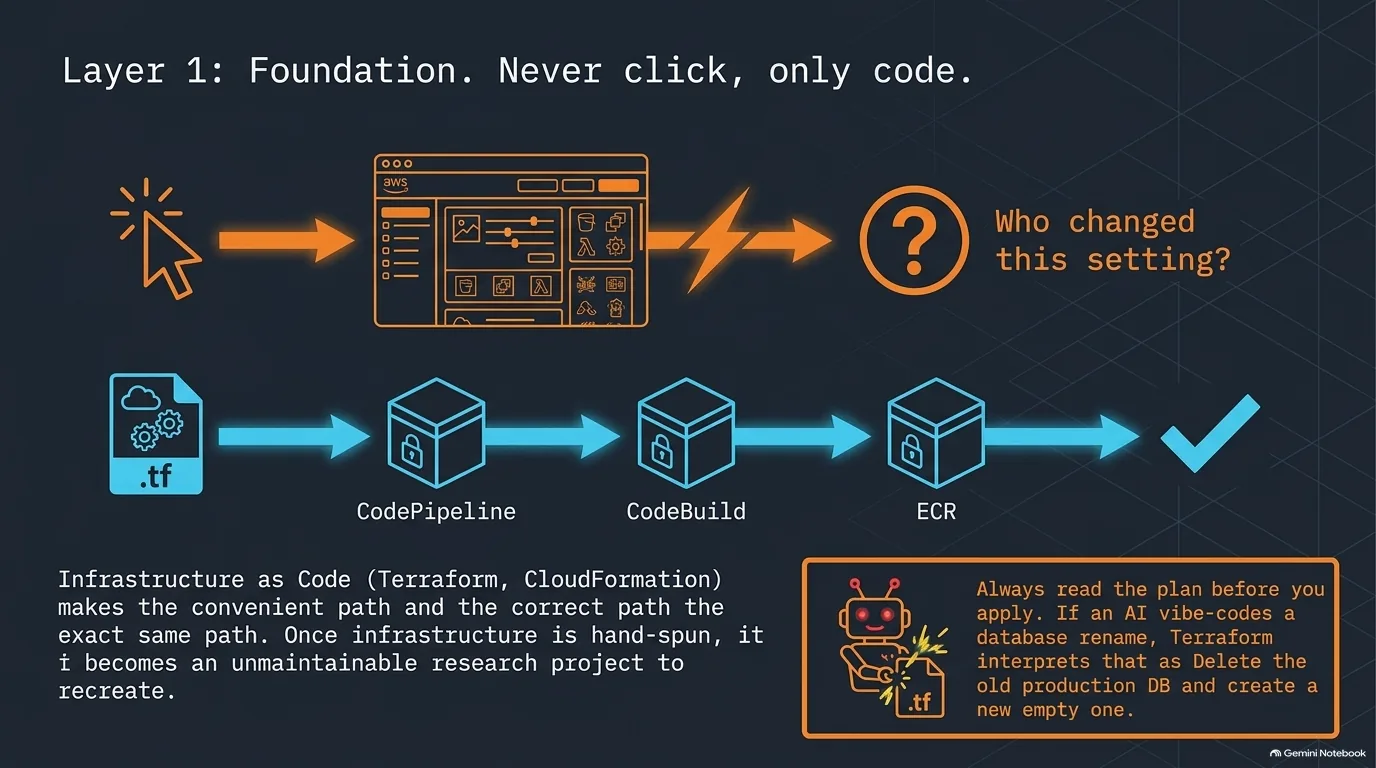
Matt Lea's number one item is don't hand-provision. You already keep application code in version control instead of FTPing it to a server and hoping it doesn't disappear. Why would your servers, databases, roles and firewall rules be any different?
Infrastructure as code (IaC) is the category, and Matt named three tools: Terraform, OpenTofu and CloudFormation, AWS's own proprietary one. You describe what you want in code, say an EC2 instance and a MySQL database at a specific version, put it in version control and hit apply. Matt says it's almost crazy what can be defined, down to every firewall rule and user role. If someone accidentally deletes your application layer, you re-run Terraform apply and it provisions the missing pieces.
Start early, too, because it's very difficult to get into later. Once everything is hand-spun, the questions become: how did I do that again, and what did the person who left the company set up? Matt admits he didn't get on board until a couple of years after CloudFormation launched. At first he thought it could be cool. Then he decided it was essential. Michael Kennedy's version: he used to SSH in and just get it working, until moving from one setup to another turned into a research project.
There's a catch, though. Terraform does exactly what you tell it, and Matt has seen too many teams auto-apply changes without reading them. Recently, someone let an AI vibe code a change that renamed a database (the quote below has how that ended). It wasn't Matt's project, but he wrote it up. His rule: always know what you're about to send, and make sure it's an update, not a delete and replace. Michael has had the AI version of this happen on his own dev machine, where it didn't matter. The pattern he describes: an insert fails because the structure is wrong, so the agent decides to just recreate the database. That technically solves the problem, and it's also not acceptable.
So does the application code go through Terraform too? Matt wouldn't do that. He uses Terraform to spin up a separate build pipeline. On AWS, CodePipeline is the orchestration layer that listens for a commit, CodeBuild runs your Docker build in the cloud and pushes the image to ECR, the Elastic Container Registry, and then CodePipeline handles the deploy. Database migrations and automated tests can run there too, though Matt is looser about that for people just starting. Why AWS's own tools instead of something else? Matt's answer: the same granular IAM roles secure the whole thing, without two different things in the mix.
“Somebody had their AI vibe code this thing, and it wanted to rename the database. Well, then what happens is Terraform deleted the database and then spun up another database right there. That was their production database.”
Matt Lea
IAM roles vs access keys: assume a leaked AWS key is gone immediately
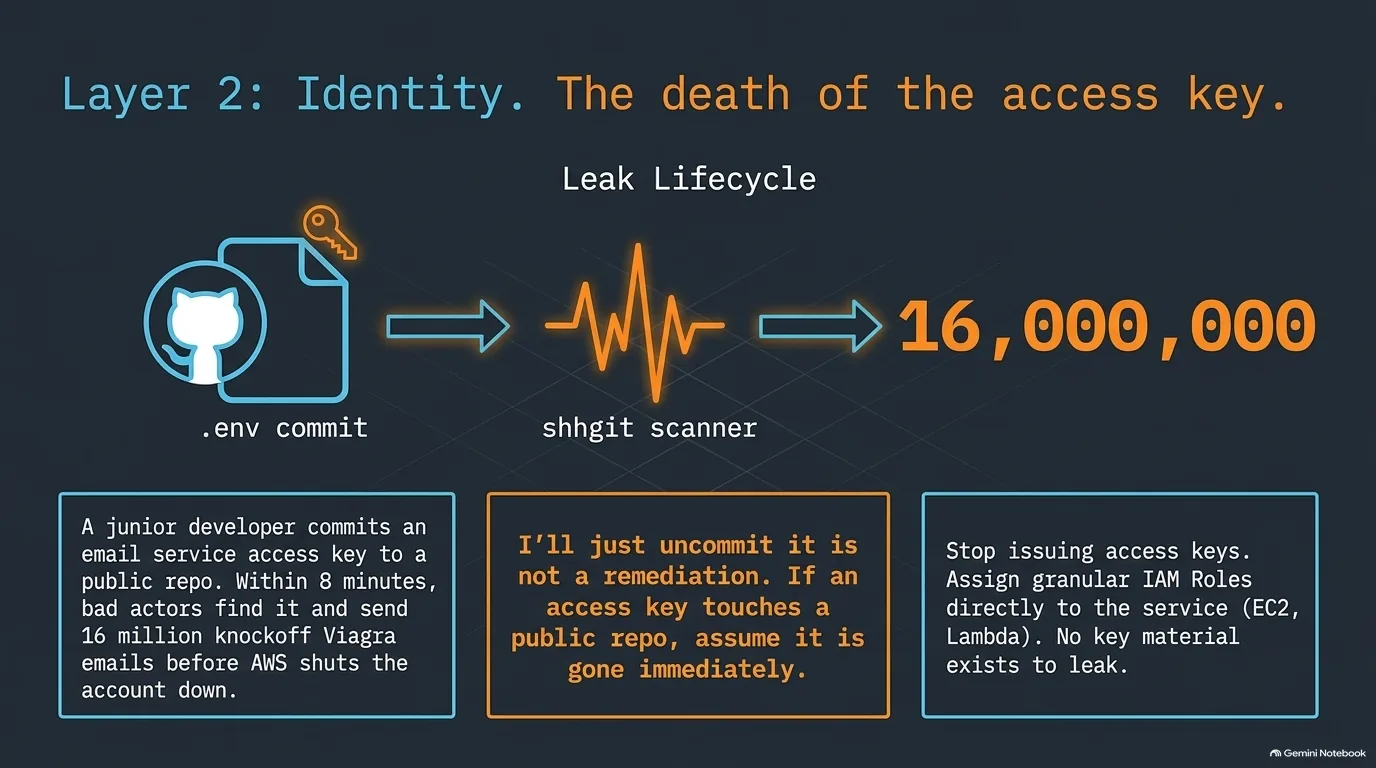
IAM is Identity and Access Management, how you define the way your users, and the services you run, interact with AWS. Most people start the same way: download their first access keys, put them in a nice .env file and hope for the best. Beginners pushing to production sometimes ship that .env file right along with the code.
Here's how that can go, in a story Matt Lea tells. A junior developer pushed access keys for sending email to a public repo on GitHub, and some bad guys got them. Luckily, the keys were only for sending and receiving email. Even so, about 16 million emails for some type of knockoff Viagra went out in about eight minutes before AWS shut down the account and asked what was going on.
How fast does somebody find a key like that? Michael Kennedy showed shhgit, a site (no longer running) that watched the real-time firehose of changes on GitHub, pulled out anything that looked cryptographic, AWS keys and email keys included, and streamed the finds live, updating about once a second or more. He calls it absolutely terrifying. So when a junior says "I can just uncommit it" because it's not a very popular repo anyway, show them that stream.
The fix is roles. IAM has users and groups, and roles are what you assign to the services you boot up: a role for an EC2 instance, a role for a Lambda. When the Lambda runs, it acts with whatever permissions its role has. Want it to access one specific S3 bucket? Put that in the role. There's no key to leak.
Matt is careful about where IAM stops. It's service level, not network level (that's security groups, in the network section). It answers questions like: can this instance boot up other instances? Can this Lambda trigger other Lambdas? It doesn't decide which rows in your database a query can see.
Michael also brought up a PyCon talk by Tristan McKinnon called Zero Trust in 200 Milliseconds. Going by the abstract, the idea is a separate, roughly 200 millisecond key for each API call or transaction, and it comes from FedRAMP, the US government's cloud world. Matt likes it, and immediately asked the practical questions. How long does it take to provision that key? If it costs 200 milliseconds of latency, that's expensive. He wagers the government's latency limits are a lot looser than those of someone trying to compete in e-commerce.
“If it's up there, you should assume it's gone immediately.”
Michael Kennedy
Least privilege in AWS IAM: why the wildcard is your enemy
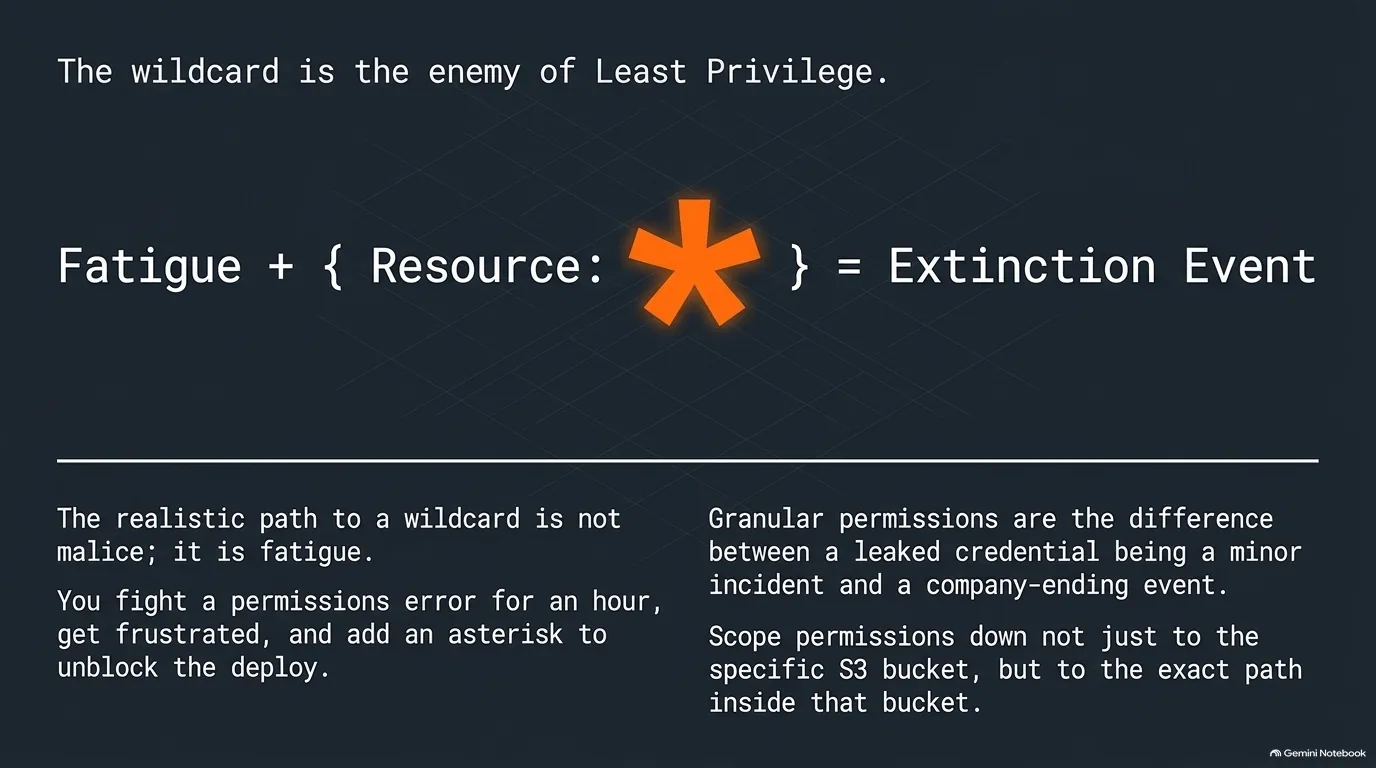
Go back to the leaked email key from the access keys section. What if that key's policy had let it do anything on any service? Matt Lea's answer is blunt: "They could have deleted everything in a second."
Nobody adds a wildcard to be reckless. In Matt's telling it's convenience. You're banging your head against the wall, and all of a sudden you decide to just let it access all the S3 buckets. A couple of months later, someone has your internal reporting.
There are two halves to fixing it. Scope the permissions: S3 colon asterisk gives you every S3 permission, including deleting the bucket. And scope the resources: if you've got 20 S3 buckets, name only the ones you want to write to. You can go all the way down to the path if you want.
What if you need a wildcard for 10 seconds to see whether permissions are even the problem? Then don't commit it. If you poke a hole while experimenting, Matt wants version control and Terraform to wipe it out the second you're done, and he'd probably not do it in production at all.
Doesn't AI make this easier? Michael Kennedy remembers granular permissions five years ago as a wall of allow and disallow boxes. Now you can describe what needs to talk to what, and an agent will probably get it pretty accurate. Matt says it depends. If you're not very technical and tell the agent you just need this to talk to that, it can achieve that by putting the asterisk in. It accomplished the goal, just not the way you'd want.
What helps? Matt has seen people counteract it with multiple agents, and he thinks competing agents could help: one writes the code, and a second does a peer review looking for any possible way to break it. A single agent, in his experience, will sometimes just say yeah, sure, I did it. Michael's version is to tell the agent its primary goal is least privilege, and that it wins the session by getting the least privilege it possibly can. Either way, you have to know what good looks like. Matt says you still have to know what a cross-site scripting attack or an injection attack is, and Michael's takeaway is that an actual expert using these tools is far more powerful than someone trying to vibe their way through.
“The asterisk is your enemy. Basically S3 colon asterisk gives you all S3 permissions.”
Matt Lea
Public vs private subnets and security groups in an AWS VPC
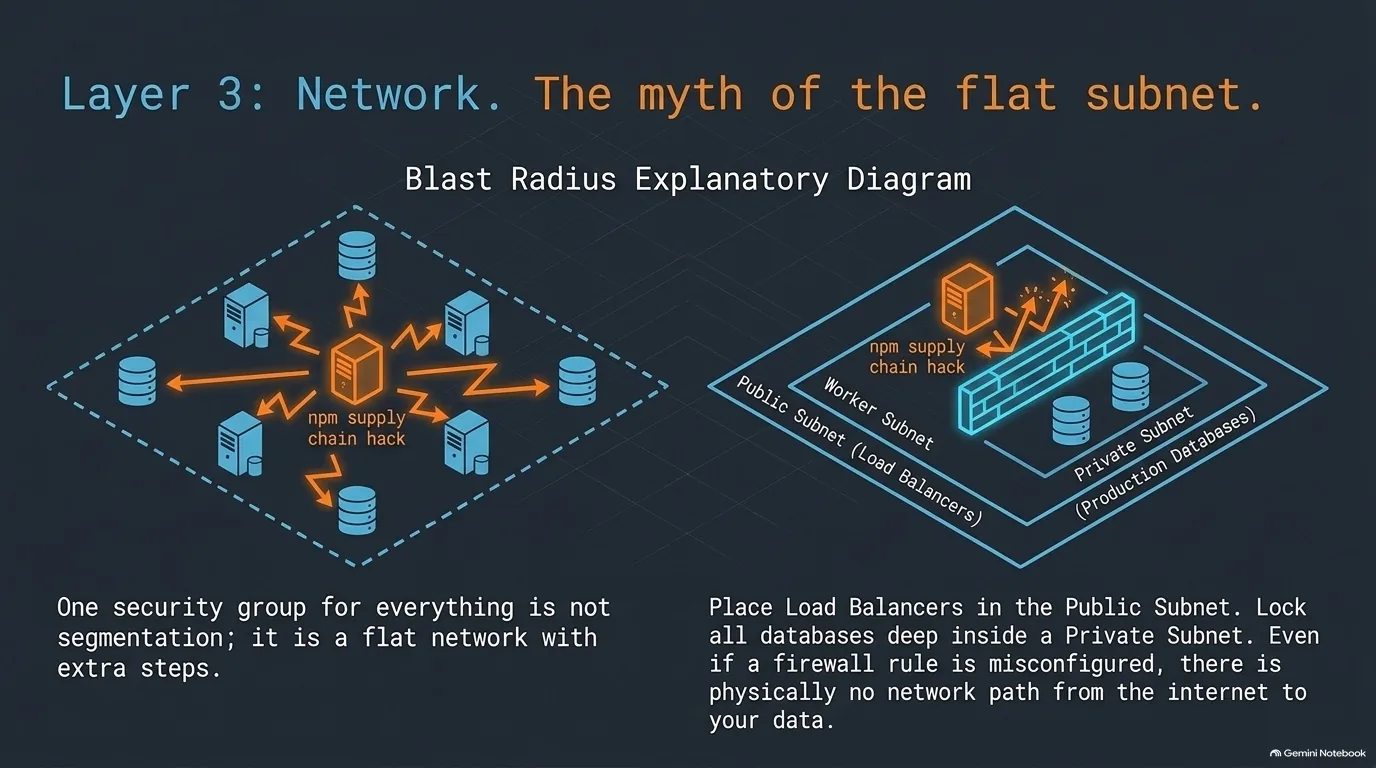
Does your database need to be open on the internet? Probably not. But it's convenient, because people want to hit the database from their local machine. (You still can, through a bastion or something better; see the next section.)
Here's the layout first. A region like US West 1 is, in Matt Lea's description, a giant bunker in the ground. Inside it are about six availability zones, each its own bunker with a completely independent power supply. Inside your AWS account, a virtual private cloud (VPC) sets aside your own slice of network, and inside that you create subnets. Matt likes separate prod, staging and test AWS accounts, though for his own stuff he uses separate VPCs.
Two mistakes come up constantly. The first is everything in one big subnet, in one availability zone, in one region. That's not redundancy. Matt says availability zones independently go down fairly frequently, and you just don't see it when you use several. The second is databases the internet can reach. Matt's layout keeps only what should be public in a public subnet, typically the load balancer, which sends traffic on to instances across the zones. Databases, and anything secure, go in a private subnet.
Can't you just firewall a public database? You can, but it's so easy to poke a hole in a firewall when it's convenient. Matt's audits keep finding things like port 22 open to traffic from anywhere. Say a valid user installs the wrong game, it grabs their SSH keys, and someone opened that port to the whole world. With the database in a private subnet, they still can't get to it.
Then there are security groups, AWS's firewall layer. You assign one to your Lambda and one to your database, and a rule says only those two can talk. The failure is one big group where anything in it can take traffic from anything else on any port. Michael Kennedy's term for what that enables is lateral movement: once an attacker finds a way in, where else can they go? Matt's example is the npm exploits that have been going around. If one lands in your application layer, it can reach your database, and that sucks. But with security groups and subnets set up right, a compromise in test can't reach production, and it can't crawl every IP in your subnet.
Most people skip the other half: outbound rules. Limit where a box can talk out to, say only the IP of one third-party API vendor, and it can't reach somewhere overseas you don't know about. Day one as a beginner? Matt isn't sure he'd bother. As a big company? Oh yeah.
“Well, now they still can't get to it because there's not actually a network path that would go from point A to point B.”
Matt Lea
SSM Session Manager vs a bastion host for private AWS access
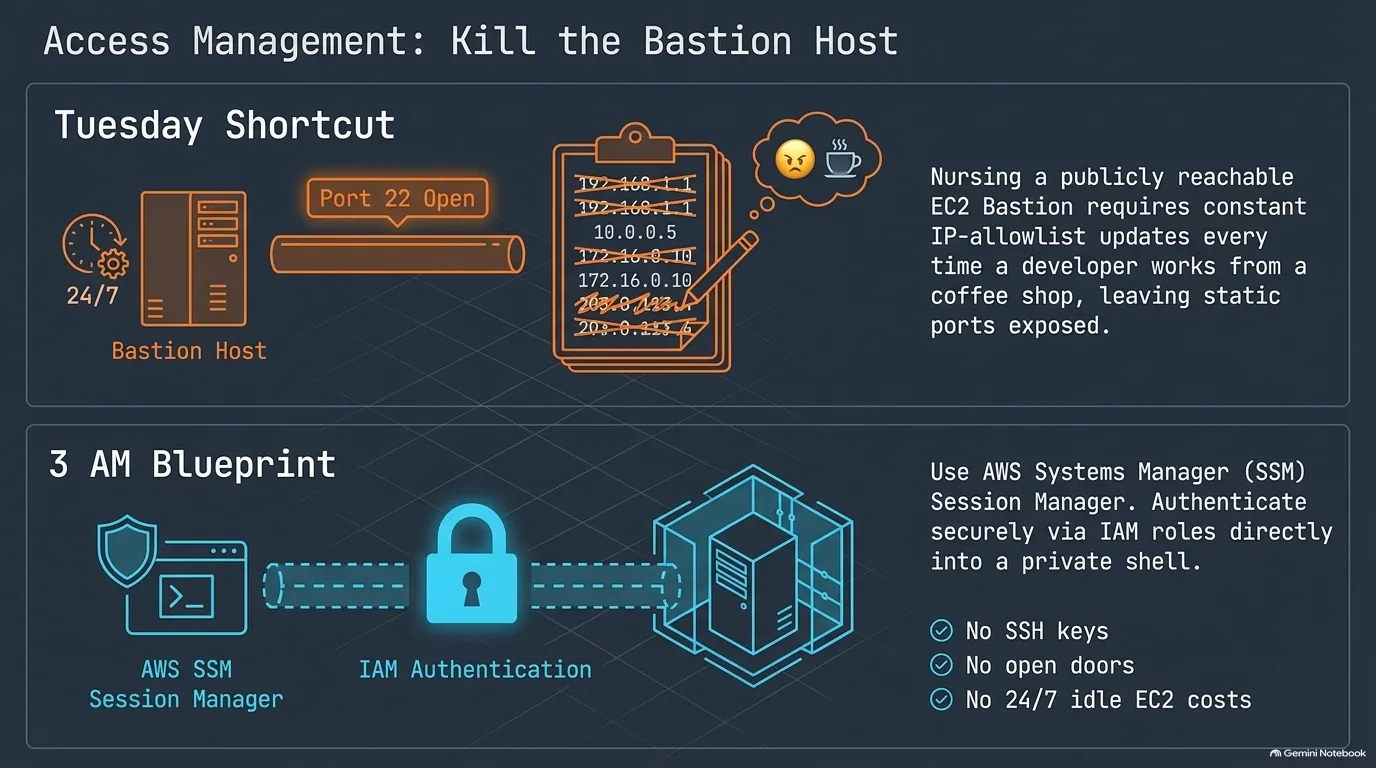
If your database lives in a private subnet, how do you get to it? The classic answer is a bastion. You boot a server in a public subnet, ideally locked down with a security group that only accepts traffic on port 22 from your own IP address. Every time you relocate, you update that IP. You SSH into the bastion, and it becomes your door to everything else, including port forwarding so local development can hit the test database.
Matt Lea still does that quite a bit. But AWS has a newer tool he'd consider instead: Session Manager, part of AWS Systems Manager (SSM). You get in with IAM authentication, which is much more secure, and you don't pay to run an EC2 instance 24/7 just to be your bastion. The alternative on EC2 is putting an SSH key on the box so you can get in and do all that hand-tuning. His advice is short: use Session Manager instead of the bastion, if you can.
Michael Kennedy brought two ideas from outside AWS. One is an overlay network like Tailscale. Instead of opening up a port, you put your employees on a private network that can see the database server and nothing else. The other is KnocKnoc, where the management ports are blocked 100% for every IP. Authenticate in a different place, and the port opens just for your IP address, for the length of that session.
That gave Matt an idea. What if AWS security group rules could expire? Michael ran with it: you'd open a port so you can debug and diagnose something, and it would shut itself back off without anyone having to remember. He thinks it could be a very useful feature, one that fails safe.
“That's actually a good feature request for AWS to have durations on their security group rules. So you say I only want to do this for an hour.”
Matt Lea
Private S3 buckets with CloudFront and signed URLs
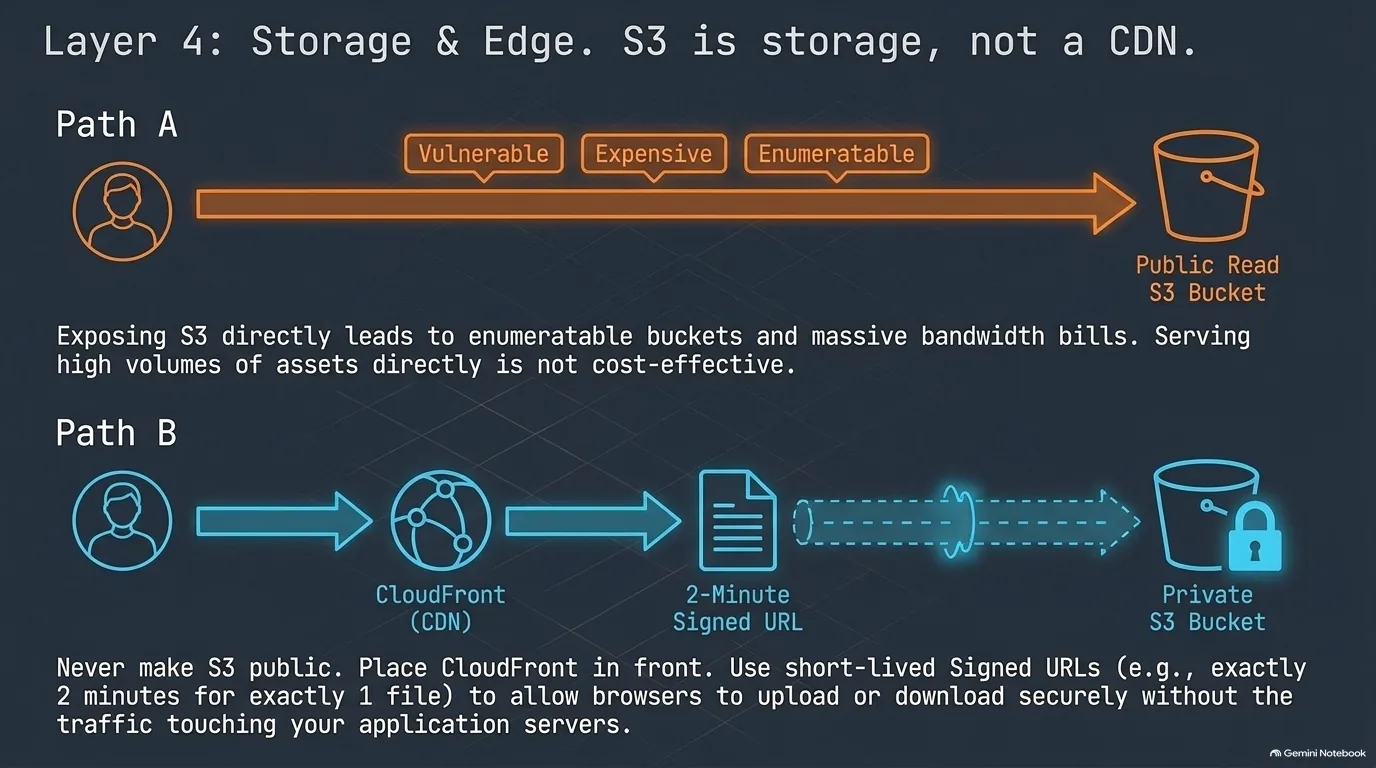
Matt Lea's line on this one is short: "I can't do an audit without finding something in S3 that's not supposed to be public." Often it's something like sales numbers you don't want a competitor to have.
Here's an example of how it happens. Matt's first engagement with a client is often a short assessment where he maps out the whole system. This client told him they really couldn't have certain binary files be public. It would be big trouble if anybody got them, so could he check? Sure enough, the bucket was public to anybody on the planet. Listing wasn't public, so crawling it would have been tough. But the file naming pattern wasn't so random that someone couldn't brute force it and enumerate the files.
Security is one reason to fix this, and cost is the other. S3 is a great place to store binary files, but it is not a CDN, and serving lots of files fast straight from it isn't cost effective (Matt's own words are in the quote below).
So what's the right shape? Make the bucket private and put CloudFront, AWS's CDN, in front of it. CloudFront is far more cost effective for high volumes of binary files or any assets like JavaScript, because it's optimized for it. When you need to lock access down, use signed URLs on the CloudFront side. They can be as granular as the IAM permissions from earlier: this URL is valid for exactly this amount of time and no longer, and it goes to exactly this one file.
Uploads work the same way, with signed upload URLs straight to S3. You decide how long one lasts, five minutes, two minutes, 30 seconds, whatever, and the upload gets done in that window.
“S3 is a wonderful binary storage. It is not a CDN. It is not cost effective to serve up things at mass very fast through that.”
Matt Lea
Stopping DDoS attacks and bots with AWS WAF, cheap rules first
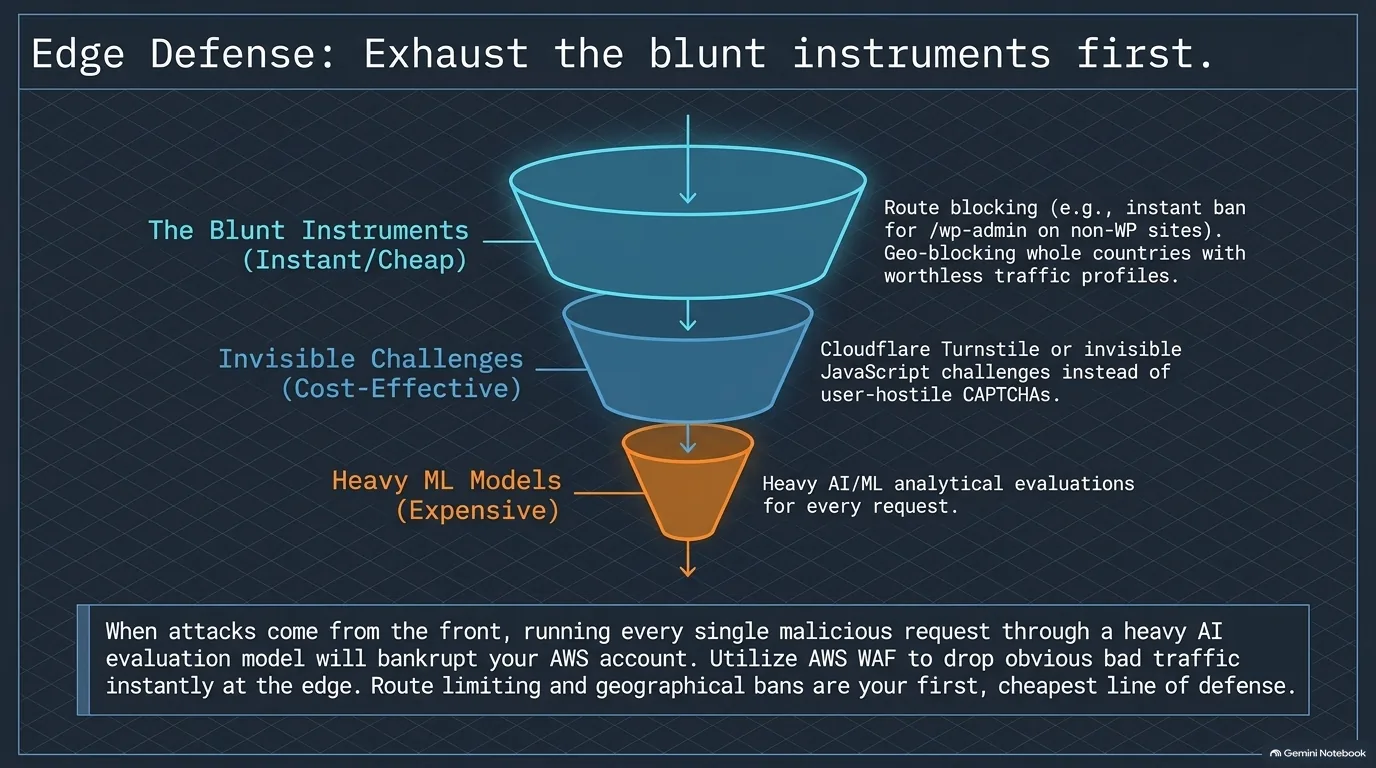
Once you get to the big league, Matt Lea says, they're coming for you from the front, with phishing attacks from the side and the back. DDoS attacks are everywhere. Shortly before this conversation, he'd been chasing one at one of his biggest customers that hit almost three times their normal traffic.
His tool of choice on AWS is usually WAF, the web application firewall. There are tools that do fancy analytical work to decide what to block, and that can work. But at volume it's not the most cost effective, because running every request through a model adds up (quote below).
So start with the obvious stuff first. Is the request looking for the WordPress admin, and you don't run WordPress? Michael Kennedy's verdict on a request for wp-admin.php: insta-ban. You can rate limit, too, including by route, which Matt had just set up for a client. A lot of this comes already packaged, so you don't always need the smartest AI model to decide.
For bots, there are challenges. A JavaScript challenge runs behind the scenes in the browser, and the user won't really notice it. A CAPTCHA is the heavier option and costs more. Both have a time and a place, and Matt's advice is to FinOps your way to how much you want to spend on it. Michael has found that Cloudflare's Turnstile has gone a long way toward keeping the bots away without making him find all the fire hydrants one more time.
You can also block entire countries. Matt has clients who once decided to block France. His reaction: "I'm like, why? We can figure out this traffic."
“Every request that comes through, you're running through some AI model, it's going to add up real quick.”
Matt Lea
Keep AI agents out of your production database with a data lake
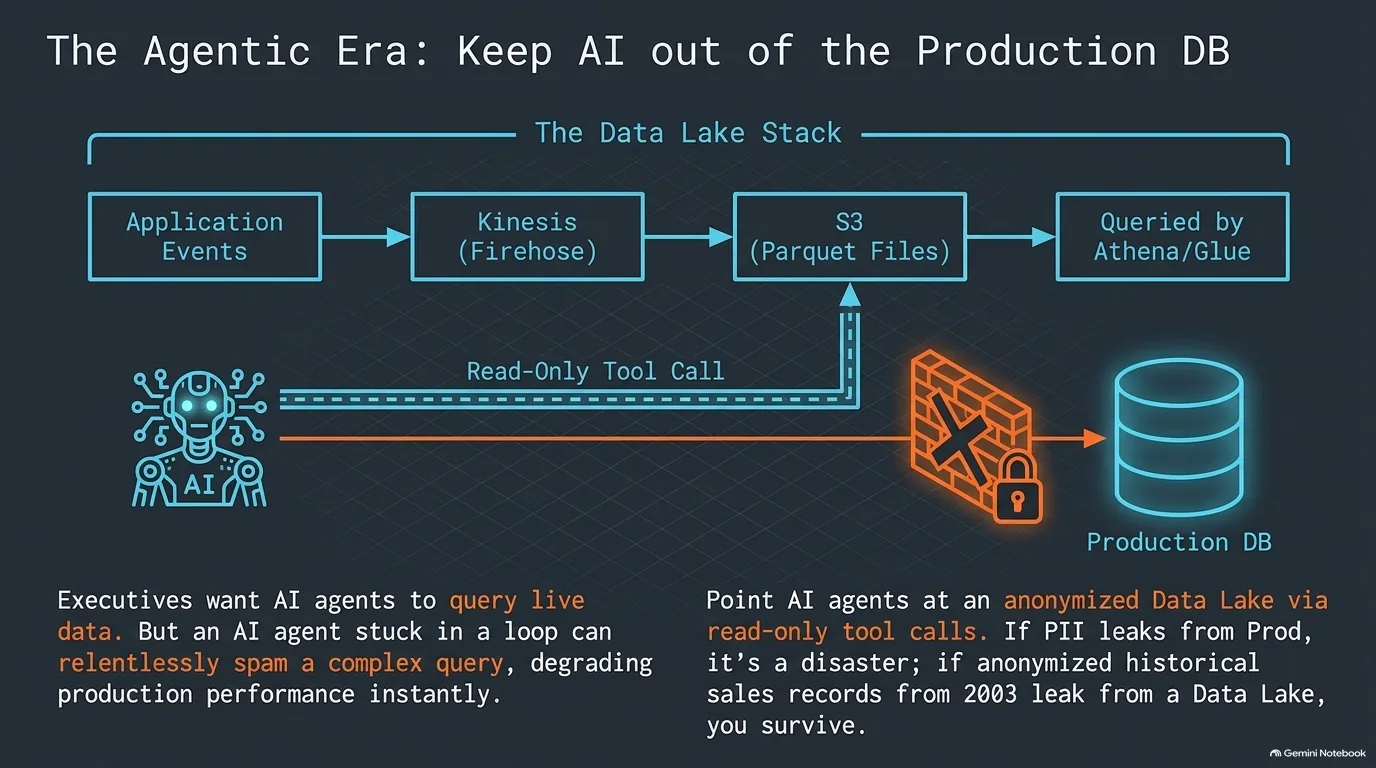
As executives get more comfortable with AI agents, Matt Lea is seeing more requests for direct access to the database so they can pull the latest numbers themselves. His answer: hold on, let me code you up a tool call with read access. If you want writes, a second tool call needs a human's approval, so the agent can suggest a change instead of making it. Michael Kennedy, who isn't giving his AI direct access to his production database, likes the idea of a read-only MCP server or tool that all AI access goes through. You can observe it, and the agent doesn't even have the capability to destroy anything through it.
Matt adds one more layer: point that tool at your data lake, not your production database. Agents can spam like no tomorrow. If an agent writes a very complicated read query and fires it over and over through your tool call, it could slow down a production database that isn't optimized for it. A data lake also usually leaves out personally identifiable information, since the data is anonymized for big data analysis. That changes what a leak costs (quote below).
What does a data lake look like on AWS? Matt held his favorite stack back for the lightning round at the end. Whenever your application layer fires an event (a user was created, a sale was made), pump it into Kinesis. Kinesis is a firehose queue, so lots of different worker services can consume from it. Then Firehose saves the events to S3 as Parquet files, which is extremely cheap. Query them with Glue, which Matt believes has some Python in it, or with Athena if you'd rather just write SQL. Michael points out there are a lot of cool integrations between Python and Parquet, including libraries that mount Parquet files on S3 and query them.
Matt's parting rule for this stack: don't try to keep sales from 2003 in your production database. Move the old stuff off and keep production lean and fast.
That lightning round had two more picks for Python people. For data science, Matt recommends SageMaker: Python first, data science first, and if you want GPUs, more granular control than basically any other service. For more generic AI work, he likes Bedrock, which he calls their Netflix for AI.
“Even if they leaked all your sales data for the last five years, at least you wouldn't have a PII leak, which would cost you even more.”
Matt Lea
CloudWatch, Cost Explorer and the real cost of AWS complexity
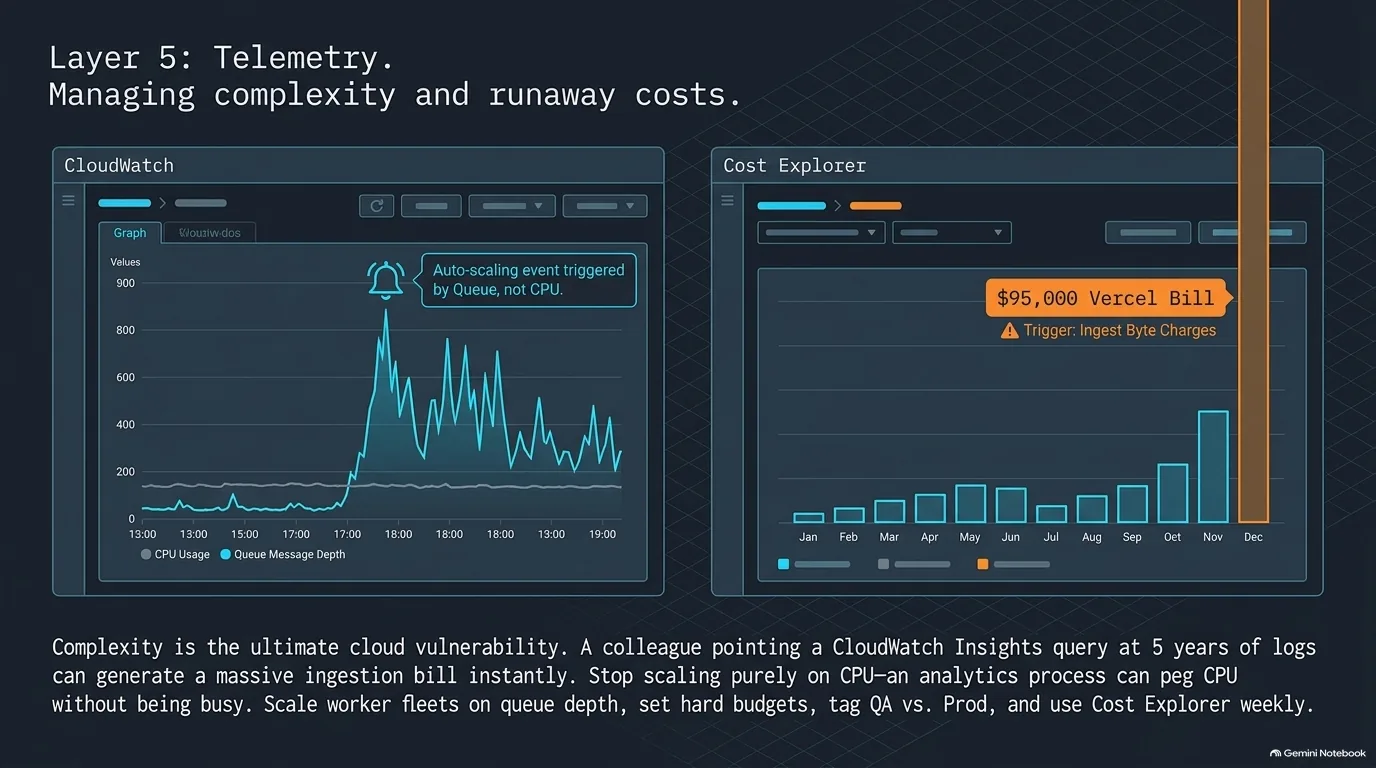
What surprises people when they move to the cloud? Matt Lea's answer is the complexity, and the quote below is his example. His advice is to whittle AWS down to the core services that meet your needs and goals. There are services for robotics, which is great if you're in robotics and not something to worry about if you run an e-commerce platform. Pick your tools and get really good with them. Just starting out, without a crazy amount of traffic? He'd often go serverless, with API Gateway plus Lambda as an extremely cheap application layer. It's not a data layer, but it's a great start, and his Terraform scripts for it are free at Schematical.
Leaving the single server also means your logs aren't one file on one machine anymore. CloudWatch takes some getting used to, but Matt says it can be your best friend. ECS tasks and Lambdas send it everything you'd normally see from Docker. A process writing its own log file to disk is the exception, and needs piping out.
CloudWatch Insights lets you query all of it. Be careful, though: it charges for every byte it ingests. Point a query at five years of logs and you'll have a pretty decent bill, so get your query right over a five minute range first. When a client says latency spiked on some day, metrics let Matt zoom down layer by layer to a database without enough swap or Redis evictions through the roof. Alarms can drive autoscaling, too. One client's worker pulling from a queue scaled on the count of messages in flight instead of CPU. As Michael Kennedy points out, an analytics process can pin the CPU without the service being busy, and more servers wouldn't help.
And then there's the bill. Matt has agents crawling the internet for people complaining, and cost is pretty much the number one thing. Learn Cost Explorer. In March, AWS added a past end of life fee for older database versions, and some of his clients were suddenly paying about $4,000 a month without knowing why. Switching between services, usage types and breakdowns found it. Tag resources (production, staging, microservice X) so you can say QA alone costs $20,000 a month. Set budgets and cost alerts. Matt opens his weekly office hours with clients with the budget sheet right in front of him.
Michael's cautionary tale is from Vercel, not AWS: an artist's app for spotting AI-generated art hit something like number one on the App Store, and she got a $95,000 bill in a couple of days. No upper bound was set, and the warning emails went unanswered for three or four days. Sometimes spikes are amazing. Sometimes they're not.
“AWS has a meeting simulator service now where you can train yourself on how to take meetings. And I'm like, that's too many services.”
Matt Lea
Recap: the Tuesday shortcut and the safer default
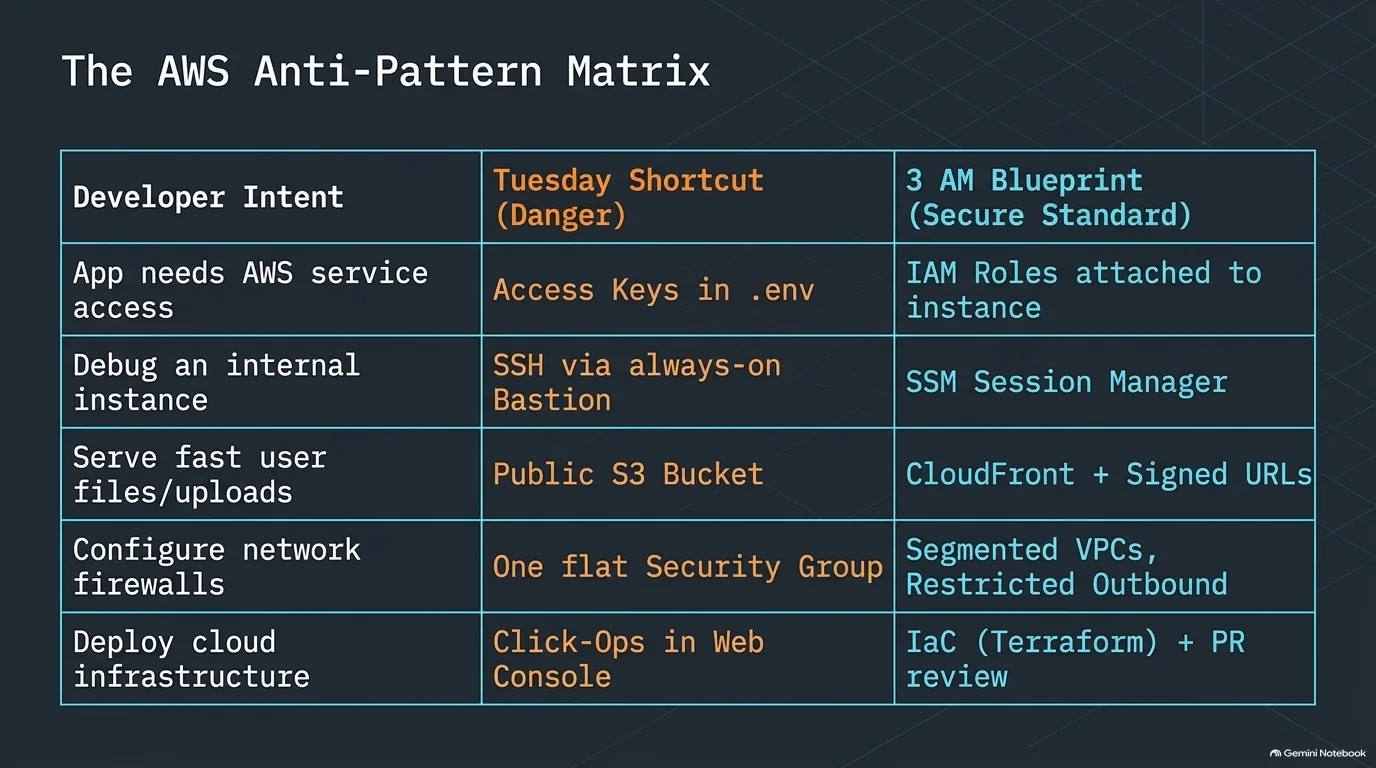
Every row in the table above is the same trade. The shortcut works today. The default takes a little more effort up front and saves you the bad night later.
- Access keys in a .env file. Attach an IAM role to the service instead, so there's no key to leak. See IAM roles vs access keys.
- An always-on bastion. Session Manager gets you in with IAM authentication and no server idling around the clock. See Session Manager.
- A public S3 bucket. Keep it private, put CloudFront in front and sign the URLs. See private S3 with CloudFront.
- One flat security group. Separate groups and private subnets limit lateral movement, and outbound rules limit where a box can talk to. See subnets and security groups.
- Clicking in the console. Keep infrastructure as code in version control, and read the plan before you apply. See infrastructure as code.
You'll notice nothing on this list is exotic. Every row is a choice somebody makes on an ordinary afternoon.
Recap: how the pieces fit into one AWS architecture
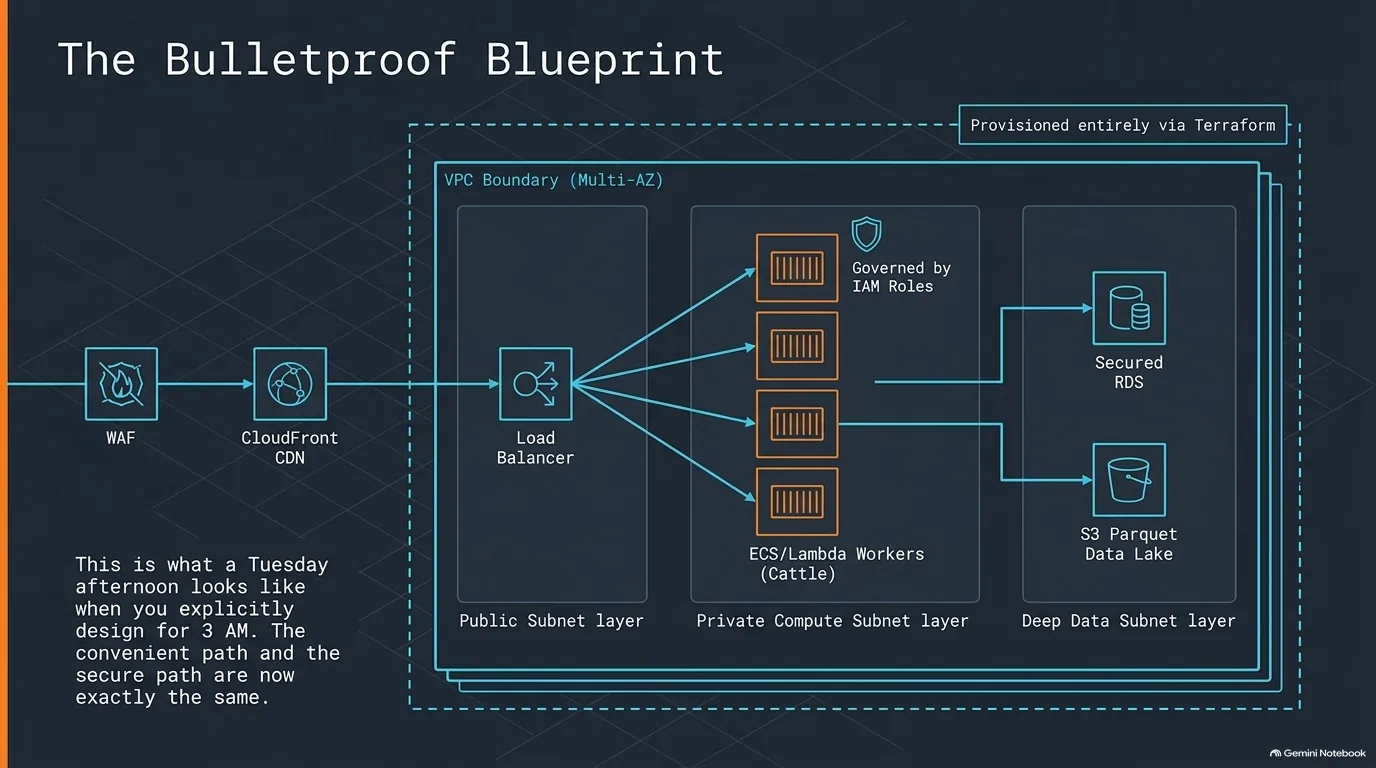
The table in the last section compared choices one at a time. The drawing above puts them together. Follow one request from the left, and most of this guide shows up along the way.
- At the edge, WAF drops the obvious junk with cheap rules before anything expensive runs. See AWS WAF.
- In the public subnet, only the load balancer. See subnets and security groups.
- In private subnets, containers or Lambdas built from images, each acting with its own IAM role. See cattle, not puppies and least privilege.
- Behind them, the database, with a separate data lake for analytics and AI agents. See the data lake.
- Around all of it, multiple availability zones, defined in code. See infrastructure as code.
Is it bulletproof? Nobody on the show claimed that, and Matt Lea's audits keep finding holes someone poked for convenience. What a layout like this does is make the easy path and the safer path line up, so nobody has to be disciplined at 3am.
Cloud War Games: practicing the 3am incident before it happens
You can configure everything in this guide. What you can't configure is how people react when the site is down. Michael Kennedy has been through it multiple times: the website's down, oh no, surely not, and then the scramble to figure out why, and whether he did something wrong. His summary: "nobody's calm at 3 a.m."
Matt Lea has watched it from the other side. In real incidents, he'd hand juniors something to look at, and they'd just freeze up. Ask them later what the problem was, and they'd know. Cloud War Games is his answer: simulated outages, played as roughly a 45-minute game, where Matt is intentionally the junior who accidentally deletes something important. Most of the scenarios come from things he's actually suffered through. Afterward there's always a postmortem, and his advice holds for real outages too: run one every time, especially if people froze up. That's the way you learn.
How do you take part? Right now you can sign up and get asynchronous challenges, one a week, completely free. Matt is working on moving the live games into the Schematical community and a Discord, so people can start a game on the spot. Bigger companies use it for training and for hiring. With AI-written resumes everywhere, putting a few candidates through a game shows who really knows their stuff, and who's a team player shouting out ideas instead of going heads down alone. And his advanced scenario? A ransomware attack specific to AWS that he calls the Kobayashi Maru. With the right privileges, it can be run with one command, and he's keeping the details to himself.
Not every scramble is an attack. Michael once had an internal MongoDB TLS certificate expire after a year and couldn't remember the command he'd run, or where anything was. Matt's gentle answer: a managed service would have fixed that, probably for less than that night cost.
For the application half of security, Talk Python Training's Python Web Security: OWASP Top 10 with Agentic AI pairs well with Matt's infrastructure advice. Python Web Apps that Fly with CDNs goes deeper on putting a CDN in front of your app, the CloudFront idea from the S3 section. And Agentic AI Programming for Python covers working with the coding agents that kept turning up in this conversation.
“You'd rather learn, you know, get the stress inoculation during a simulation, a 45-minute game, than at 3 a.m., you know, or when the entire board of directors is standing behind you because you're the guy that's supposed to fix it.”
Matt Lea