anywidget: Jupyter Widgets made easy


Episode Deep Dive
Guest Introduction
Trevor Manz is a software engineer at Marimo, a next-generation Python notebook platform. Before joining Marimo, Trevor completed his PhD in data visualization at Harvard Medical School, where he built tools for biological scientists to explore large genomics and spatial genomic datasets. His research focused on bridging the gap between sophisticated web-based visualization tools and the Python notebook environments where scientists actually work. This frustration with the complexity of building interactive widgets that work across multiple notebook platforms led him to create anywidget. Trevor's background spans both the web development and Python ecosystems, giving him unique insight into how these two worlds can work together more seamlessly.
What to Know If You're New to Python
This episode explores interactive computing and data visualization in Python notebooks. Here is some background that will help you get the most from this discussion:
- Jupyter Notebooks are interactive documents that let you write Python code, run it, and see results (including visualizations) all in one place - they are widely used in data science and scientific computing
- Widgets in notebooks are interactive UI elements (like sliders, buttons, or charts) that let you manipulate data visually rather than just writing code
- The discussion references data frames frequently - these are table-like data structures (rows and columns) commonly used in pandas and Polars for data analysis
- Understanding the concept of a kernel is helpful - it is the background Python process that executes your notebook code and maintains your variables in memory
Key Points and Takeaways
1. anywidget Simplifies Building Interactive Notebook Widgets
anywidget is a Python library that dramatically simplifies the process of creating custom interactive widgets for computational notebooks. Before anywidget, building a widget that worked across Jupyter, Google Colab, VS Code, and other platforms required publishing to both PyPI and NPM, managing complex JavaScript toolchains, and writing platform-specific adapters. anywidget eliminates this complexity by letting developers define both the Python backend and JavaScript frontend in a single Python class, using standardized ES modules that work everywhere. The result is that widget authors can now focus on their visualization logic rather than wrestling with build systems and platform quirks.
- anywidget.dev - Official documentation and getting started guide
- github.com/manzt/anywidget - Source code and community contributions
2. The "Just Enough JavaScript" Philosophy
Trevor designed anywidget around the principle of "just enough JavaScript" - giving Python developers the minimal amount of frontend code needed to unlock web interactivity without dragging in the entire web ecosystem. The JavaScript you write for anywidget is standardized ECMAScript that runs directly in the browser, not a framework-specific dialect that requires transpilation. This means beginners can start by writing simple DOM manipulation code, while advanced users can optionally bring in React, Vue, or Svelte through dedicated "bridges" that adapt those frameworks to the anywidget specification. The entry point stays simple, but the ceiling for what you can build remains high.
- developer.mozilla.org/en-US/docs/Web/JavaScript/Guide/Modules - ES Modules documentation
3. Widgets Enable Bidirectional Communication Between Visualization and Code
Traditional notebook outputs are one-way: you run code and see a result. Even interactive visualizations like zoomable charts often trap their state in the output - you can see the selection but cannot programmatically access it. Jupyter widgets, and by extension anywidget, enable true bidirectional communication where user interactions (clicking points, drawing regions, adjusting sliders) update Python variables in the kernel. This transforms notebooks from a "write code, view output" loop into a richer environment where gestures and visual interactions become another mode of input alongside typing code.
"I like to think of it as like in a traditional REPL kind of environment, your two modes of input are sort of like writing code and running. So you can write the code and you can run the cell and then you can observe the output but in order to act on something that you see in that output you have to write more code." -- Trevor Manz
4. Marimo Represents Next-Generation Notebook Design
Marimo is a Python notebook platform that takes a different approach from Jupyter by modeling notebooks as directed acyclic graphs (DAGs) rather than arbitrary cell execution orders. When you modify a variable in one cell, Marimo automatically re-executes all dependent cells, eliminating the "hidden state" problem that plagues traditional notebooks. Marimo notebooks are stored as pure Python files (not JSON), making them git-diffable and reproducible. The platform has deep integration with anywidget, recommending it as the standard way for users to extend Marimo with custom UI elements.
- marimo.io - Marimo notebook platform
- github.com/marimo-team/marimo - Marimo source code
5. The Widget Ecosystem Includes Powerful Visualization Tools
Several popular visualization libraries have adopted anywidget as their foundation. Altair, a declarative statistical visualization library, uses anywidget to enable selections that return data frames to the kernel. The draw-data widget by Vincent Warmerdam lets users literally draw data points on a canvas and receive them as a data frame - perfect for teaching machine learning concepts or quickly generating test datasets. Lonboard wraps Uber's deck.gl library for high-performance geospatial visualization, rendering millions of points by leveraging Apache Arrow for efficient data transfer to the GPU.
- altair-viz.github.io - Altair visualization library
- github.com/koaning/drawdata - Draw data widget by Vincent Warmerdam
- github.com/developmentseed/lonboard - Geospatial visualization widget
6. Apache Arrow Enables High-Performance Data Transfer
A growing trend in the anywidget ecosystem is using Apache Arrow for efficient data serialization between Python and the browser. Traditional approaches serialize data to JSON, which becomes painfully slow with millions of rows. Arrow provides a columnar memory format that can be copied directly to the GPU without expensive transformation. Lonboard demonstrates this dramatically: a dataset with 3.5 million rows that previously took minutes to render (or crashed entirely) now displays in one to two seconds by shipping Arrow buffers directly to the frontend.
- arrow.apache.org - Apache Arrow project
- deck.gl - WebGL-powered visualization framework by Uber
7. Building a Widget Requires Just a Python Class and ESM String
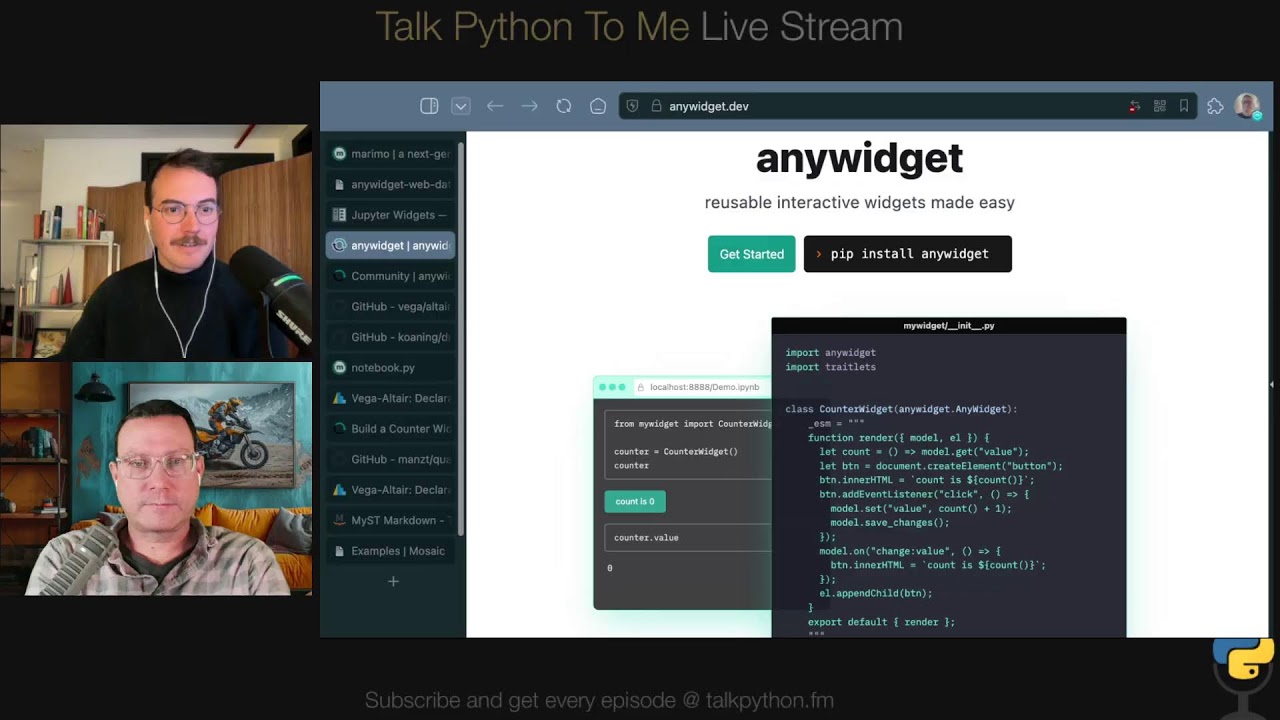
Creating an anywidget is remarkably straightforward: you define a Python class that extends anywidget.AnyWidget and specify your frontend code in an _esm class attribute. The frontend code exports a render function that receives two arguments: a model object for communicating with the kernel (using get, set, and save_changes methods) and an element representing the DOM container for your widget. You can write the JavaScript inline as a string for prototyping, or point to an external .js file for production use. This approach means you can develop and iterate on widgets directly in a notebook before packaging them for distribution.
import anywidget
import traitlets

class CounterWidget(anywidget.AnyWidget):
    _esm = """
    export function render({ model, el }) {
        let count = () => model.get("value");
        let btn = document.createElement("button");
        btn.innerHTML = `count is ${count()}`;
        btn.addEventListener("click", () => {
            model.set("value", count() + 1);
            model.save_changes();
        });
        model.on("change:value", () => {
            btn.innerHTML = `count is ${count()}`;
        });
        el.appendChild(btn);
    }
    """
    value = traitlets.Int(0).tag(sync=True)
8. Host Platforms Implement the anywidget Specification
anywidget separates concerns between widget authors and platform implementers through the concept of "host platforms." Widget authors write standardized Python and JavaScript code without worrying about how different environments load and execute that code. Host platforms (Jupyter, Marimo, VS Code, Google Colab, and potentially Myst) implement the underlying communication layer - typically WebSockets - and handle loading ES modules. This separation means that when a new notebook platform emerges, it only needs to implement the anywidget specification once to gain access to the entire ecosystem of existing widgets.
- mystmd.org - Myst markdown for computational documents
9. Mosaic Demonstrates Advanced Architecture Patterns
Mosaic represents an emerging architectural pattern where visualization clients express all their data needs as SQL queries against a database (typically DuckDB). The database can run either in the Python kernel for high-performance compute scenarios or compiled to WebAssembly to run entirely in the browser. This flexibility means the same visualization code works whether you need HPC resources or want to ship a static website where users can drag-and-drop their own CSV files. anywidget has enabled experimentation with these novel architectures by making it easier to prototype the frontend-backend communication layer.
- uwdata.github.io/mosaic - Mosaic visualization system
- duckdb.org - DuckDB analytical database
10. Publishing Widgets Is as Simple as Publishing Any Python Package
Because anywidget bundles both Python and JavaScript code into a standard Python package, publishing to PyPI works exactly like any other library. You can use modern tools like Hatchling (which anywidget's starter template is configured for) along with uv build and uv publish. The JavaScript can live either inline in the Python file or in a separate .js file that gets included in the package. Trevor provides video tutorials walking through the entire process from prototyping in a notebook to publishing on PyPI.
- github.com/astral-sh/uv - Fast Python package manager
- hatch.pypa.io - Modern Python project manager
11. AI and Vibe Coding Accelerate Widget Development
The combination of anywidget's simple JavaScript API and the power of modern AI coding assistants creates a compelling development experience. Since anywidget uses vanilla JavaScript rather than a custom framework, AI models perform exceptionally well at generating and iterating on widget code. Marimo enhances this further with built-in AI chat that can inspect Python variables and include their schemas in prompts, so when you ask for a widget to visualize a specific data frame, the AI knows the column names and types. Vincent Warmerdam's joke that Trevor created anywidget "so that he could make anywidgets" speaks to how accessible widget development has become.
12. The Web and Python Ecosystems Have Evolved in Parallel
Trevor made the fascinating observation that the web and Python have existed for almost exactly the same amount of time - the first webpage appeared around the same year as Python's first release. Both ecosystems have matured significantly, with the web finally standardizing ES modules in 2018 and Python's tooling ecosystem accelerating with tools like uv and Ruff. anywidget bridges these two mature ecosystems by using web standards (ES modules) and Python packaging (PyPI) without requiring developers to navigate the historical baggage of either. What felt like writing legacy code in 2020 now feels modern and streamlined.
Interesting Quotes and Stories
"I want the feeling of being able to author a widget to be very similar to the way that you can copy and paste code into a notebook, but move it into a file. And then you could publish that to PyPI." -- Trevor Manz
"With great power comes great responsibility, but we want to give that to people that want to build these types of integrations." -- Trevor Manz
"I used to type Python code without type hints. Then I started using type hints, and now I can't imagine not having any autocomplete. And now I think like maybe when you start working with data in long-lived sessions, having some of these guardrails actually help you keep on track." -- Trevor Manz on Marimo's constraints
"The state, I like to think of it as is trapped in the output and you can't get it back in the notebook." -- Trevor Manz on traditional non-widget visualizations
"It's shocking. It's more like, oh, I think we're holding ourselves back at times by maybe some of the standard practices versus like, yeah, hardware has gotten very good." -- Trevor Manz on modern visualization performance
"Vincent's joke that he likes to tell is that I created anywidget so that he could make anywidgets." -- Trevor Manz on accessibility of widget development
Key Definitions and Terms
- Jupyter Widget: An interactive component in a notebook that can render custom UI and communicate bidirectionally with the Python kernel, allowing user interactions to update Python variables
- ES Modules (ESM): The official JavaScript module standard (using
import/exportsyntax) that runs natively in browsers since 2018, as opposed to older formats like CommonJS that required transpilation - Kernel: The Python process running behind a notebook that maintains state (variables, imports) and executes code cells
- Host Platform: In anywidget terminology, the notebook environment (Jupyter, Marimo, VS Code, Colab) that implements the communication layer between frontend and backend
- Apache Arrow: A columnar memory format for efficient data interchange, enabling zero-copy data transfer between Python and GPU-accelerated visualization
- WebAssembly (Wasm): A binary instruction format that allows languages like Python to run in web browsers at near-native speed
- Traitlets: A Python library for typed attributes with validation and change observation, used by anywidget to define synchronized state between frontend and backend
Learning Resources
If you want to go deeper on the topics covered in this episode, here are some recommended courses from Talk Python Training:
Data Science Jumpstart with 10 Projects: Learn hands-on data science with Jupyter notebooks, including visualization with Pandas and Plotly - perfect background for understanding the notebook ecosystem that anywidget extends
Python Data Visualization: Explore the Python plotting landscape including Altair, which was discussed as a major anywidget adopter
Reactive Web Dashboards with Shiny: Learn reactive programming concepts that parallel Marimo's approach to automatic cell re-execution
Visual Studio Code for Python Developers: Master the IDE that now has first-class Marimo support through their new VS Code extension
Python for Absolute Beginners: Start here if you are new to Python and want to build the foundation needed to work with notebooks and widgets
Overall Takeaway
anywidget represents a quiet revolution in how Python developers can extend notebook environments with interactive visualizations. By embracing web standards (ES modules) and Python packaging (PyPI) while abstracting away platform-specific complexity, Trevor Manz has created a framework that turns widget development from a multi-week infrastructure project into something you can prototype in an afternoon. The ripple effects are already visible: established libraries like Altair have adopted it, new creative tools like draw-data have emerged, and high-performance visualization with Apache Arrow has become accessible to non-specialists.
Perhaps most importantly, anywidget embodies a philosophy of meeting developers where they are. Python developers can start with minimal JavaScript and progressively learn more as needed. Frontend developers can leverage their existing skills with React or Vue through bridge libraries. AI coding assistants excel at generating anywidget code precisely because it uses vanilla standards rather than custom abstractions. This accessibility, combined with Marimo's vision of reproducible reactive notebooks, points toward a future where the barrier between exploring data and building polished interactive tools continues to dissolve.
Whether you are a data scientist who wants to build a quick custom visualization, a library author looking to add notebook support, or simply curious about the intersection of Python and the modern web, anywidget offers a compelling and surprisingly approachable entry point. The combination of Trevor's thoughtful API design, the growing widget ecosystem, and integration with next-generation tools like Marimo makes this an exciting space to watch - and to participate in.
Links from the show
anywidget GitHub: github.com
Trevor's SciPy 2024 Talk: www.youtube.com
Marimo GitHub: github.com
Myst (Markdown docs): mystmd.org
Altair: altair-viz.github.io
DuckDB: duckdb.org
Mosaic: uwdata.github.io
ipywidgets: ipywidgets.readthedocs.io
Tension between Web and Data Sci Graphic: blobs.talkpython.fm
Quak: github.com
Walk through building a widget: anywidget.dev
Widget Gallery: anywidget.dev
Video: How do I anywidget?: www.youtube.com
PyCharm + PSF Fundraiser: pycharm-psf-2025 code STRONGER PYTHON
Watch this episode on YouTube: youtube.com
Episode #530 deep-dive: talkpython.fm/530
Episode transcripts: talkpython.fm
Theme Song: Developer Rap
🥁 Served in a Flask 🎸: talkpython.fm/flasksong
---== Don't be a stranger ==---
YouTube: youtube.com/@talkpython
Bluesky: @talkpython.fm
Mastodon: @talkpython@fosstodon.org
X.com: @talkpython
Michael on Bluesky: @mkennedy.codes
Michael on Mastodon: @mkennedy@fosstodon.org
Michael on X.com: @mkennedy
Episode Transcript
Collapse transcript
00:00 For years, building interactive widgets in Python notebooks meant wrestling with toolchains, platform quirks, and a mountain of JavaScript machinery.
00:07 Most developers took one look and backed away slowly.
00:10 Trevor Manz decided that barrier did not need to exist.
00:13 His idea was simple.
00:15 Give Python users just enough JavaScript to unlock the web's interactivity without dragging along the rest of the web ecosystem.
00:22 That idea became anywidget, and it's quickly becoming the quiet, connective tissue of modern interactive computing.
00:29 Today, we dig into how it works, why it's taken off, and how it might change the way we explore data.
00:35 This is Talk Python To Me, episode 530, recorded November 25th, 2025.
00:57 Welcome to Talk Python To Me, the number one Python podcast for developers and data scientists.
01:03 This is your host, Michael Kennedy.
01:04 I'm a PSF fellow who's been coding for over 25 years.
01:08 Let's connect on social media.
01:10 You'll find me and Talk Python on Mastodon, Bluesky, and X.
01:13 The social links are all in your show notes.
01:16 You can find over 10 years of past episodes at talkpython.fm.
01:20 And if you want to be part of the show, you can join our recording live streams.
01:23 That's right.
01:24 We live stream the raw uncut version of each episode on YouTube.
01:27 Just visit talkpython.fm/youtube to see the schedule of upcoming events.
01:32 Be sure to subscribe there and press the bell so you'll get notified anytime we're recording.
01:37 Look into the future and see bugs before they make it to production.
01:40 Sentry's Seer AI Code Review uses historical error and performance information at Sentry
01:46 to find and flag bugs in your PRs before you even start to review them.
01:51 Stop bugs before they enter your code base.
01:53 Get started at talkpython.fm/seer-code-review.
01:57 And this episode is sponsored by JetBrains and the PyCharm team.
02:01 This week only through December 19th, 2025, get 30% off of PyCharm Pro, including renewals,
02:08 and PyCharm will donate all the proceeds to the Python Software Foundation.
02:12 Support the PSF by getting or renewing PyCharm.
02:15 Visit talkpython.fm/pycharm dash PSF dash 2025 and use the code STRONGERPYTHON.
02:22 Both of these are in your podcast player show notes.
02:25 Trevor, welcome to Talk Python To Me. Awesome to have you here. Thanks for coming.
02:29 Yeah, thanks for having me, Michael.
02:30 We're going to talk about building Lego blocks for data scientists. Is that maybe a good way to put it?
02:36 Yeah, definitely.
02:37 Yeah, so we're going to talk about your project, AnyWidget, which is a super cool project that allows people to build more adaptable, more reusable widgets,
02:48 rather than just saying I'm going to build it for Jupyter or Marimo or whatever.
02:52 but I'm going to build something that can be used broadly through your platform and a lot simpler
02:57 deployment as well. So I know a lot of people out there are excited. Not everyone necessarily wants
03:02 to build widgets, but this also makes more widgets available for people, right? So super cool project.
03:07 Yeah. And before we get into that, of course, maybe just tell us a bit about yourself.
03:12 Yeah. So I'm Trevor. I'm a software engineer at Marimo, but prior to being at Marimo, I was
03:18 doing my PhD in data visualization at Harvard Medical School. So I got into this whole like
03:25 Python web world from working on tools for biological scientists to explore like large
03:32 genomics or spatial genomic data sets. That is a super interesting topic. I'm sure
03:38 there were some really niche things you had to build, right? Like, you know, we have this crazy
03:43 research machine. There's three of them in the world and here's the data that comes out of it.
03:48 how do I put that into notebooks or whatever, right?
03:51 Yeah, yeah, exactly.
03:53 And it's funny you mentioned that.
03:55 I think starting off in more like the visualization side,
03:57 we'd build these very bespoke and custom applications for looking at large biological data sets.
04:03 And then I think a motivation for me was realizing a lot of the folks that I was working with
04:07 to build these tools for worked in Python and worked in notebooks specifically.
04:11 And so there was sort of this gap between the research that we were doing to build these specialized tools
04:16 and trying to meet users where they were at to actually use those tools in their research
04:20 and as a part of their data exploration workflows.
04:23 - And this was your PhD work?
04:24 - Yes, yeah, this was my PhD work.
04:26 - Incredible.
04:27 So I'm sure it wasn't just Python.
04:30 - No, so--
04:31 - What was involved with it?
04:32 - So yeah, I'd say the research community, at least in bio, is sort of split between R and Python,
04:39 but specifically some of our closest collaborators were in the Python ecosystem.
04:43 And then my team was building a lot of user interfaces for visual exploration of data sets.
04:49 And I think this notebook sort of became this space and specifically Python notebooks
04:54 where you can really blend those programmatic and user interfaces together.
04:59 That's sort of why I centered on trying to solve some of the rough edges
05:03 about bringing these interactive tools inside of notebooks.
05:07 - That's cool.
05:08 Did you do any other platforms?
05:11 I'm thinking like Unity or Unreal, a real engine for like flying through data or what else did you all do?
05:20 Yeah, there were some folks on my team that ended up or are currently working in more like spatial,
05:25 like AR, VR type scenarios.
05:27 And that I think is based on the Unity engine.
05:30 Most of my work was like web-based and we, and specifically, and we'll probably get into it.
05:34 I think the web is just a really important platform to develop for in the sense that,
05:39 I mean, we're recording right now in a web browser.
05:42 It's a very capable platform that everyone sort of has an entry point to on some sort of device.
05:47 And so developing for the web often means that you can reuse a lot of that application amongst different devices and in different contexts.
05:56 It's unbelievable what the web can do these days.
05:58 I made the comment before we started, like, I can't believe this is a web browser that we're building, that we're doing this live streaming, video sharing, local recording.
06:08 All this stuff is just like, it's so wild.
06:11 And I built an app recently that I'm using to kind of help out with some of the interview
06:14 stuff.
06:15 And it's on the web.
06:15 It just runs on my iPad.
06:17 I mean, it goes underappreciated some of the time, I think, of just how far you can push
06:22 it.
06:22 It's not just documents and Ajax.
06:25 Yeah.
06:25 Yeah.
06:26 The fact that a version of Photoshop runs in the browser is pretty amazing.
06:30 And Figma itself is all running in the web browser.
06:33 So it's definitely a capable platform.
06:35 But one thing it's not very good at is, or doesn't have the ecosystem for, is a lot of
06:40 data work.
06:40 And I think that that's really the big divide.
06:42 So I see the web is really like one of the most accessible platforms
06:46 for building like user interfaces and like applications.
06:50 But then there's this whole other world, which is like tools that you actually do data science stuff in.
06:54 And that is not the web whatsoever, but has like a similar amount of maturity
06:58 in terms of being very ergonomic and good at doing that type of work.
07:02 - Right, and those two worlds meet in, they meet in the web, right?
07:08 But the people doing the Python work, they aren't necessarily web developers.
07:13 You gave a talk a year ago about anywidget that I'll definitely link to.
07:18 And you have this graphic here like, okay, we've got the front end, which often is Jupyter.
07:25 Not always, as we'll see in a minute.
07:27 But often is Jupyter with the way you build for it is with all these web front end tools
07:32 that even me doing web development is a lot of times I'm like, what is this?
07:36 And why is it so complicated?
07:38 I just don't even know.
07:40 And I do web stuff all the time.
07:42 And then you've got the backend stuff where Python people live doing NumPy,
07:46 Polars, Matplotlib, et cetera.
07:48 Do you want to riff on that challenge a little bit?
07:50 Because I know your project is really here to kind of solve some of this disjointedness.
07:54 Yeah, I think one interesting thing, like taking a step back,
07:58 and I mentioned this in the talk that I gave a while back,
08:01 but like the web and Python ecosystems have been around for almost the same exact amount of time.
08:06 Like I think like the first webpage was around the same year that the first release of Python came out.
08:10 And so they sort of have been evolving in their own respective,
08:15 or developing their own respective ecosystems for that period of time.
08:18 And then as the web became really this platform for building user interfaces,
08:22 I think that some pretty visionary folks saw that you could connect
08:28 these backend resources to these very interactive applications
08:31 that could be developed very quickly.
08:34 So over the years, these things that started off very far apart
08:36 have now come very close together.
08:38 And now with WebAssembly, sometimes it's just all the, like turtles all the way down,
08:43 it's all actually running in the browser.
08:44 So it's pretty amazing.
08:46 But I think that there definitely is this friction.
08:49 And one thing I've also noticed from being in both these,
08:51 the web and Python ecosystems for so long is sort of these like ebbs and flows of like maturity
08:56 or like places that need to catch up to one another.
08:59 And so I came from definitely like the website originally.
09:03 And there's a lot that I took for granted, I guess, and that ecosystem of tooling that for a while, I think,
09:09 gave the language a very bad rap because it was sort of the scripting language that was invented,
09:13 I think, famously in two weeks.
09:16 And now people are trying to build applications in it.
09:18 But over the years, there have been standards and things have matured.
09:23 And actually, the web is very backwards compatible and has some of these properties that are kind of amazing
09:28 for something that's been around for that long.
09:30 And then I'd say in the last couple of years, we've seen a bunch of new developer tool work going into the Python ecosystem that in some part
09:39 is also inspired by some of the tooling in the web ecosystem. So I love to see how these things
09:44 go back and forth. And I think if you haven't checked in on the ecosystem for a while,
09:49 you might think it isn't what it was five years ago as it is today. And one of the goals of AnyWidget
09:55 is to try to demystify some of maybe those prior bad experiences folks had developing and just
10:01 you know, get back to like opening up some HTML and writing some JavaScript and getting your Python
10:07 data in the browser. Yeah, absolutely. You know, I wonder, as you describe it being made in two
10:13 weeks, which I also think this is true, when it was made, I think, at Mozilla, right? Yeah. Anyway,
10:21 one of the JavaScript's real issues is it doesn't have a real numerical system, right? Everything is
10:28 afloat. That has a lot of problems for data science when it really, really has to be integers
10:33 or whatever, right? Like you need more control over the numbers. I wonder how much of Python's
10:39 benefit in the data science space originates from people going, JavaScript's super popular,
10:43 but can't do numbers there. I do science, can't do JavaScript. What am I doing now? You know what
10:48 I mean? What do you think about that? It just occurred to me. Yeah, it's interesting. Like that
10:52 is originally like a constraint of the language. And maybe, you know, when you're picking ecosystems
10:58 on. Also, there was no server way to run JavaScript until 2010. So the idea of just running this
11:04 without a browser was also not very good. So yeah, I'm not quite sure, but it's funny because
11:11 JavaScript has sort of reacted to that by adding some big ints as a data type. But also now there's
11:17 sort of like a fourth language for the web, which is WebAssembly, and there are proper data types
11:22 in WebAssembly. So I guess it is sort of reactionary, but I haven't really seen. So now you can run
11:28 Python in the browser. And, but you'd have to have all this like ecosystem grift or migration that I
11:33 just don't think anybody wants. So it's more, maybe these ecosystems can play a lot nicer together.
11:39 Yeah. Yeah. And certainly they are with things like Jupyter and stuff, right? Like most users
11:44 of Jupyter don't write JavaScript. Yes. And I think that everyone's happy about that. So
11:49 exactly. That's true. There's a lot of people are like, you know what, that's not for me.
11:52 So, you know, you were at Harvard doing your work and now you're at Marimo?
11:58 Marimo?
11:59 I always mess up saying this.
12:01 Tell us how to do it.
12:02 It's Marimo.
12:03 Marimo.
12:04 Okay, Marimo.
12:05 Yeah.
12:05 And I'd actually on, and I know we talked a lot about it and he set me straight and then
12:10 I drifted, I'm sure.
12:11 So what's your experiences here?
12:14 Like, how's it coming from academia to this world?
12:17 It's been great.
12:18 I think that having worked with, so part of AnyWidget was trying to address some user needs working inside of Notebooks.
12:25 And there's only so much that you can do as a plugin to get that extra bit to help users.
12:32 And so I think one really exciting thing about working on this team with Marimo is they got very involved,
12:37 or they were aware of AnyWidget a while ago, and they kind of actually legitimized AnyWidget as,
12:43 hey, this is a standard because we were able to implement around this specification.
12:48 And so that got us together.
12:50 And then from there, it's just been super exciting to work with a team that is so passionate about notebooks and thinking about this next generation of notebooks and what that environment needs to look like.
13:00 And so there's much more that we can do inside of Marimo beyond the AnyWidget specification, but also AnyWidget is an important component of that.
13:07 So I like to be able to sort of think about both of these two worlds.
13:11 That's cool.
13:11 So when I use widgets in Marimo, it's often an AnyWidget?
13:17 Yep. Yeah, exactly. So if when folks usually come and they want to like extend Marimo with their own custom UI elements, like our answer is you should make an AnyWidget. So that's pretty exciting. But then if you're using things in like the sidebar or things that like sort of integrate outside of like the notebook view, those aren't more custom elements that we've created at Marimo that aren't necessarily based on AnyWidget.
13:42 This portion of Talk Python To Me is brought to you by Sentry.
13:46 Let me ask you a question.
13:48 What if you could see into the future?
13:50 We're talking about Sentry, of course, so that means seeing potential errors, crashes, and bugs before they happen,
13:56 before you even accept them into your code base.
13:59 That's what Sentry's AI Seer Code Review offers.
14:03 You get error prediction based on real production history.
14:06 AI Seer Code Review flags the most impactful errors your PR is likely to introduce before merge using your app's error and performance context,
14:16 not just generic LLM pattern matching.
14:19 Seer will then jump in on new PRs with feedback and warning if it finds any potential issues.
14:25 Here's a real example.
14:26 On a new PR related to a search feature in a web app,
14:29 we see a comment from Seer by Sentry bot in the PR.
14:34 And it says, potential bug, the process search results function,
14:38 can enter an infinite recursion when a search query finds no matches,
14:43 as the recursive call lacks a return statement and a proper termination condition.
14:48 And Seer AI Code Review also provides additional details
14:51 which you can expand for further information on the issue and suggested fixes.
14:56 And bam, just like that, Seer AI Code Review has stopped a bug in its tracks
15:00 without any devs in the loop.
15:02 A nasty infinite loop bug never made it into production.
15:06 Here's how you set it up.
15:07 You enable the GitHub Sentry integration on your Sentry account.
15:11 Enable Seer AI on your Sentry account.
15:13 And on GitHub, you install the Seer by Sentry app and connect it to your repositories that you want it to validate.
15:19 So jump over to Sentry and set up code review for yourself.
15:23 Just visit talkpython.fm/seer-code-review.
15:27 The link is in your podcast player show notes and on the episode page.
15:30 Thank you to Sentry for supporting Talk Python To Me.
15:34 Why Marimo?
15:35 I know I had Axion people talked about.
15:37 When I look at this, it feels like a super modern UI that is just,
15:41 it's got a lot of polish and a lot of, it feels 2025 and working with it, right?
15:48 And it solves some of the, I consider Jupyter Notebooks like the world's most insane,
15:54 not the world's most insane, the second most insane series of go-to statements
15:58 that have no record of how you got the go-to, you know, it doesn't even say go to 10.
16:02 It's like, well, what did you go and run?
16:04 I don't know, like, look at the numbers, but there's like potentially, you know,
16:08 some lost as you rerun them.
16:10 And it solves that problem as well.
16:11 But like, you know, what's the elevator pitch for Marimo?
16:13 Yeah, my elevator pitch for Marimo is that I think notebooks are incredibly important
16:19 and that it's hard to deny that like they're a tool that many folks use to do their daily work.
16:25 But there are very few like guardrails to help you do that work and work on a team with other folks.
16:30 And so I think one of the big selling points to me with Marimo
16:33 is just that you sort of get to free yourself from thinking about those go-to statements,
16:38 and instead you have this very deterministic execution that sort of just feels natural.
16:44 As you write cells, they will re-execute.
16:47 And then on top of that, I think that Jupyter and Marimo have slightly different goals.
16:51 So Jupyter, when I showed that diagram, we had that diagram before,
16:54 you have this split between these diversity of front ends.
16:58 So that's like you could use it in Colab, you could use a Jupyter kernel inside of VS Code,
17:02 you could use a Jupyter kernel sort of within the Jupyter CLI.
17:06 But then there's all another requirement of that ecosystem
17:08 is to support many different kernels.
17:10 So it's not just Python, it could be an R kernel, it could be a Julia kernel.
17:14 And so I think ultimately attention that ends up happening
17:17 is like a priority of that ecosystem is to support all these languages
17:20 and all these different front ends.
17:21 And instead, by just focusing on Python, we can really try to develop a really integrated
17:27 and rich experience specifically for Python notebooks.
17:30 So the trade-off there being some folks come and they say,
17:33 oh, we'd love Marimo, but for R.
17:34 And we're like, well, we can't really do that.
17:37 It's called JupyterLab.
17:38 Yeah, but we are hyper-focused on Python and that lets us integrate with other trends within the ecosystem too.
17:44 So we're a huge fan of all the work from the astral folks.
17:47 And we have a tight integration with uv, for example, to allow you to sort of use that PEP 723 script metadata.
17:54 And as you're working, we'll like install packages for you
17:57 and write that metadata so that at the end, you can send that document to someone else
18:02 and they can like bootstrap their notebook and get all their dependencies
18:04 and have their environment set up.
18:06 And I think that type of like last mile with these notebooks
18:10 is something that's been hard to get at without really focusing on like an ecosystem.
18:14 That last mile though, that's a lot of polish.
18:16 And that's often what kind of gets lost in projects where, I don't know, it's not exactly the focus, right?
18:25 It's something where you want to take on the most interesting features
18:28 and it's not like it's necessarily a company and there's somebody who's like,
18:32 no, we're polishing every little rough edge, period.
18:35 You know what I mean?
18:36 And I think you mentioned Astral and uv.
18:38 I think that is an example of they got funding and it's like, okay, we're not going to do 95% of the packaging.
18:45 We're going to do 99.9% of the packaging.
18:47 You know what I mean?
18:47 And it's made a tremendous difference.
18:50 Yeah.
18:50 Yeah, I mean, I have plenty to say about Astro.
18:53 We love all their tooling over here too.
18:56 Yeah, so do I.
18:56 I switched all my stuff to Astro and it's to uv and Ruff and yeah, super, super neat.
19:02 Okay, so another thing that you all just released is a new VS Code plugin.
19:08 So I guess one of the aspects of Marimo that is not necessarily apparent from looking at
19:13 it going there is that it's backed by a Python file, not a JSON file that contains both the
19:18 inputs and outputs, which is like one of the big shortcomings of Jupyter. Like how much of Jupyter
19:24 would have benefited if it just had an input in an output file? So you don't check in the output
19:29 file potentially. You know what I mean? Yeah. Yeah. We, I think that was pretty visionary or maybe it
19:34 was just, it's more that we have this ability to observe what's happened in the Jupyter ecosystem
19:40 and make adjustments from there. A little bit of a second mover benefit of like, we saw that,
19:44 That was 80% good.
19:45 Definitely.
19:46 Yeah, it was surprising.
19:48 I mean, I think to rip more on Marimo, just there are all these,
19:52 when people ask that question of like why Marimo, I think there are all these like very small things,
19:55 but like that in net, I think are certainly like a order of magnitude kind of like richer experience
20:02 for our users.
20:04 But it's funny how many times just the fact that like our notebooks are get diffable,
20:08 that's like one of the first things that folks like really latch onto
20:11 and love about Marimo notebooks.
20:13 Yeah, yeah, very cool. And so the VS Code extension, what's the, like, how's this, how's this help us?
20:19 Yeah, so I see this as, I think the best experience with using Marimo will always be sort of our CLI or like our, our web interface that we've like really curated around this experience.
20:31 But we have a broad range of users that want to collaborate or work on Maremo documents.
20:36 And so some of them are like, you know, I live in my VS Code, my cursor, my Windsurf, my IDE, and like I never want to leave this environment.
20:44 And so getting them to come and like collaborate on these documents has been a little bit of a barrier there.
20:49 So they could, of course, edit a Python file on disk, but having like a native notebook view like they do for Jupyter was something that we sort of lacked in those environments.
20:57 And so we made it a priority shortly after I joined the team where we really wanted to address that user base of folks that want to live in that editor environment.
21:06 And sort of from the ground up wrote this new extension where we have a very integrated view with sort of reactive outputs, similarly to what we have in our user interface.
21:16 But it sort of lives inside of the VS Code ecosystem and uses the VS Code APIs.
21:22 Yeah, that makes a lot of sense.
21:24 and it's available on the, what is it?
21:25 VSX open marketplace for like cursor and anti-gravity.
21:30 That's a thing as of like three days ago.
21:32 Yes, all these different skins of VS Code, our extension should work as well.
21:38 And we publish it to both marketplaces.
21:40 So folks should be able to install it and get started.
21:42 It's a weird time for editors.
21:44 Yes.
21:45 It was really kind of straight.
21:47 When I first started Talk Python 11 years ago or whatever it was,
21:50 I would ask people what editor they use at the end of the show
21:53 I didn't know what they were going to say. It could have been anything. And then it just narrowed
21:58 down to VS Code, PyCharm. Those are the answers. And now it's kind of back to a lot of options
22:05 again. But it generally works in the VS Code variants as well. All right. Super cool. Okay.
22:12 Let's talk about just what is a Jupyter widget? Yeah. So like I mentioned before, Jupyter really
22:18 reaches, and Marimo also, reach across this chasm between your Python code that's running in some,
22:23 we call it like a kernel environment that's like a stateful environment that has your variables and
22:26 when you run cells like things update there and then on the front end there's like the cell outputs
22:31 that um are reflection of like whatever is sort of like living in the kernel and a jupiter widget
22:36 is like a very interesting part of that like uh of that uh crossing of that chasm and that
22:42 you can actually author both the front end code and the back end code to talk to one another so
22:46 typically it's like you're if you write a python library you're only writing something that runs
22:50 on the server. And then if you're making a Jupyter extension, for example, that's something that only
22:54 lives in the front end. But a widget allows a library author to connect those two worlds together.
22:59 And so for your small object that lives in the Python kernel, you can define ways that it can
23:05 render itself and also be updated from that front end. And so it's a very powerful mechanism that's
23:11 officially a part of Jupyter that allows you to extend your output cells with, I like to think of
23:17 it as these web-based superpowers to be able to update your code in the kernel.
23:21 You have a really interesting point that you made in your SciPy talk, saying basically,
23:27 we can do lots of UI stuff in notebooks, but often those are kind of like isolated snapshots,
23:35 right? Maybe you have a graph and there's like outliers or something along those lines,
23:40 but you can see them, but you can't like programmatically interact with them in the
23:45 way that you could a widget, whereas you might drag and select to get a zoom area that actually
23:50 becomes a data frame, or you could move some widgets that then redraw the picture, but also
23:56 becomes something you could program against in like a machine learning algorithm or whatever,
24:00 right? Maybe I think that's a pretty powerful distinction that people want to have in mind as
24:05 we dive into anywidget. Yeah, definitely. I like to think of it as like in a traditional like
24:10 REPL kind of environment, like your two modes of input are sort of like writing code and running
24:15 so you can write the code and you can run the cell and then you can observe the output but in order
24:19 to like act on something that you see in that output you have to write more code so um if you
24:24 have a plot for example that you produce from one of those outputs if there's some outliers or
24:29 something a very natural thing to think is what is that point and you want to like circle that point
24:33 and that is much easier to do with a gesture than it is to express as some sort of like
24:38 query in in uh typing out some program and kind of looking at the axes to say like what are those
24:44 points there. And so I think widgets really allow for you to be creative in terms of how you
24:51 might like another mode of input for adjusting things that might be in the kernel. And like
24:56 you're saying, now you can transform a selection into just a data frame that you get out and now,
25:00 and then you're off to the races with running the next part of your program. And so I think it,
25:04 it adds this degree of freedom to like let the algorithms and data, like use code when that's
25:09 useful. And then for those pieces where you want to step in as a human and maybe use a gesture
25:14 and that's easier to express as a gesture, then we have that mechanism now
25:18 to allow you to extend your analyses.
25:21 Right.
25:21 If you don't need pictures and interaction, just do it in Python straight.
25:26 You know what I mean?
25:27 You don't need notebooks.
25:28 And part of the value of notebooks is this mix of like a visual plus code plus visual
25:35 and this sort of iterative back and forth between those.
25:38 And widgets reconnect the visual back to the code, I guess, right?
25:42 Yeah, exactly.
25:43 I like to think of it as the types of workflows in notebooks
25:47 are not typically batch scripts.
25:49 I mean, in Marimo, you can write your notebook and run it as a script because it's just Python.
25:54 But often when people are working and really getting their hands on data,
25:57 these are long-lived sessions where you have a lot of data in memory
26:01 and you really want to get your hands on that data.
26:03 And I think if you only had the ability to write and run cells and not add that extra dimension,
26:10 it would be pretty limited to what you could actually do.
26:12 And so something like widgets allows you to really extend and be creative with how you'd like to explore that data and sort of like debug your data as it's in memory and get your hands on it.
26:22 Yeah.
26:23 Yeah.
26:23 I mean, that's what blew the world open when all that came around, right?
26:27 Yeah.
26:27 So that brings us to anywidget.
26:30 Why a new widget framework?
26:32 Why not just IPy widgets or whatever?
26:36 Yeah, it's a great question.
26:37 And it's something that when I started my PhD, like I was not, I guess I didn't really have a hand on either.
26:42 But AnyWidget was definitely born out of a need of myself to like solve a problem that I was running into during the PhD.
26:49 So as I mentioned before, we had all these visualization tools that we were building sort of in.
26:54 And specifically, one of the tools I was building was a like a web-based genome browser.
26:59 And so this is something that people put their genomes into and you can align different tracks and you can zoom in and try to understand like different types of things.
27:07 types of functional assays in genomics.
27:10 And then we had users that wanted to use these inside of computational notebooks.
27:14 And one thing that immediately happened when we tried to build these integrations for notebooks
27:19 is that you'd spend all this engineering effort trying to build an integration for a specific notebook.
27:24 But then someone would come in and say, oh, I'd actually want this to work in Google Colab,
27:28 or I need this to work in VS Code, or I need this to work in this other environment.
27:34 And all of those environments are very similar on the back end
27:37 but they're very different on the front end in terms of the way that you can register like front end code.
27:41 And so it ended up putting a lot on a library author like myself
27:45 to try to build those adapters for each of those environments.
27:48 And so anywidget was sort of an attempt to standardize maybe how we can write that front end code
27:54 such that it's more, and then we can build those adapters in one place
27:57 that then we can support all those different environments.
27:59 Right, right.
28:00 We talked about building the widgets largely in JavaScript earlier already,
28:03 but I think what people maybe who haven't tried this don't realize is how many variations you would have to build to say, have I also, I wanted to
28:13 work in Jupyter and I wanted to work in Colab and you've got to build and publish the PyPI and NPM
28:19 and right. There's like, so everyone who built one of those had to, and wanted to cross use,
28:25 they had to do all those adaptation, adaptation. So, and your thought was basically, well,
28:30 I could create an adapter that everyone could use and then we don't have to do this ever again.
28:35 Yeah, exactly. And to what you're saying as well, I think that adapter craziness that's in the web ecosystem of like, oh my gosh, I had to transpile my code into all these different formats.
28:49 It's kind of a nightmare in terms of tooling. And it's something that came as a result of the state of the JavaScript ecosystem being pretty immature before 2018.
29:01 And basically because JavaScript didn't have a module system.
29:04 And so everyone had to come up with a way to bundle code.
29:07 And there are all these third-party adapters.
29:08 They're figuring out a way that they could load JavaScript modules.
29:12 And so whatever these tools chose and the way that they chose to load their front-end code
29:17 would affect the way that me as the library author would need to package up the code.
29:21 By modules and loading, you're talking where people might see the word require at the top
29:26 or something like that.
29:27 Kind of like our import.
29:29 Yes, exactly.
29:29 It's very much like import statements in Python.
29:32 And in fact, the official, if you open up your browser, you can just type, you can use a syntax that's called ES modules
29:39 and type in import.
29:41 And you can import a bit of JavaScript code via URL.
29:45 And this just works natively in the browsers like today, but wasn't sort of standardized until late 2015, or late 2018.
29:54 So you mentioned require, that's actually a different module system
29:58 that's not based in browsers.
30:00 And if you were to type require in your browser, that would not work.
30:03 And that is sort of like the tension that was the JavaScript ecosystem.
30:06 So I was aware of some of the trends and things that have happened
30:09 post this new module system because I've been working in the web ecosystem.
30:13 And yet when I came to work on like Jupyter widgets specifically,
30:15 there was like, I felt like I was writing code
30:18 like I had been like a while ago for the browser.
30:20 And so the idea behind anywidget was to like, let's just simplify this so like that my source
30:25 and the code that I publish is more like what the browser understands natively.
30:29 And then we take care of this like transpilation stuff once for everybody and package that up
30:34 inside of anywidget to deal with sort of like the legacy module systems of like JupyterLab,
30:39 VS Code, and a Google Colab.
30:42 This portion of Talk Python To Me is brought to you by JetBrains and the PyCharm team.
30:47 The PSF, the Python Software Foundation, is a nonprofit organization behind Python.
30:53 They run or oversee the conferences, handle all the legal business to do with Python,
30:58 oversee the steering council and other groups, and much more.
31:01 But let's focus in on one key word here, non-profit.
31:05 Unlike some software ecosystems, which grew out of and are supported by a single tech giant,
31:11 think.NET and Microsoft or Swift and Apple, Python is by developers for developers.
31:18 That makes it a truly special place.
31:21 Everyone here is here because they chose to be here.
31:24 It's our garden.
31:25 and we have to tend it. That means supporting the ecosystem, and a big part of that is supporting
31:31 the PSF. That's why I was thrilled when JetBrains and the PyCharm team in particular reached out to
31:36 me to help spread the word about their PSF fundraiser. Here's the deal. You can purchase
31:41 PyCharm Pro for 30% off this week until December 19th, 2025. And when you do, not only do you get
31:48 a deal on PyCharm, but the PyCharm team will donate all the proceeds to the PSF. Let me say
31:54 that again because it's easy to miss. They will donate all the proceeds to the PSF. And a positive
32:00 addition this year is that this also applies to renewals, not just new customers. So if you're
32:05 already a PyCharm fan and customer, renew this week and you get a discount plus you support the PSF.
32:12 To take part in this, you'll need to be sure to use Talk Python's exclusive promo code,
32:17 STRONGERPYTHON, all caps, two words. That's STRONGERPYTHON for the code and the link is
32:22 talkpython.fm/PyCharm dash PSF dash 2025. Both of these are in your podcast player's show
32:29 notes. Thank you to PyCharm for supporting the show. I'm trying to decide if I feel like it's
32:36 in the interest, if the motivation of any of those platforms would have been to create something like
32:41 this, right? Like the Jupyter people are like, I don't know the problem. You just write for Jupyter
32:44 and it works. And the Colab people are like, I don't see a problem. You just write for Colab and
32:49 it works, right? Like what is the platform people's motivation to create integrations and smooth the
32:56 transition to the other ones? That's one tension. On the other though, they might have more stuff
33:00 come to them if they make it more reusable across them, right? So it's interesting that none of them
33:05 actually did that. Yeah, I think, I mean, in hindsight, it makes sense why someone in my
33:09 position, like, I guess, focused on this because it was like, I had two widgets and then times the
33:14 number of platforms. And then if something broke, you'd have to go fix it a bunch of different
33:17 places and it just becomes a maintenance nightmare.
33:22 But one thing that's been really interesting is I think that there is a good pressure to
33:26 support a healthy ecosystem.
33:29 So I'd say before anywidget, it was pretty complicated to create custom widgets.
33:34 And so one of my goals was I want the feeling of being able to author a widget to be very
33:39 similar to the way that you can copy and paste code into a notebook, but move it into a file.
33:44 And then you could publish that to PyPI.
33:46 And that workflow always worked for Python, but there was no way to start prototyping a widget
33:51 inside of a notebook before and then move it out.
33:54 And I really wanted to bring sort of, to lower that barrier to entry.
33:58 And then what I think came out of that is you get a much richer ecosystem of people
34:01 that are willing to try and make things.
34:05 And then when there's a cool widget that comes out, then that's a good positive pressure
34:08 for other ecosystems, because then people are trying to request,
34:11 they go, hey, I want this widget to work in your environment.
34:13 And that puts more pressure on various environments to implement sort of a more standardized approach.
34:19 Or adopt a adapting layer like anywidget.
34:22 Yep. Yeah, exactly.
34:24 Yeah, to sort of back you up here, Kostal says, thank you for building anywidget.
34:28 Having gone through creating an IPy widget, it was a lot of work.
34:32 So yeah, exactly.
34:35 Let's just take a tour through the widget gallery.
34:39 Like what widgets are available here?
34:42 Got some favorites?
34:43 Yeah, we definitely have some favorites.
34:45 I would say that one of the early adopters of AnyWidget is a fairly popular plotting library called Altair.
34:53 And it allows to do exactly what you were talking about earlier
34:56 with selecting points and allowing you to get those back as data frames in the kernel.
35:01 So for a while, the way that Altair worked, and I think it still by default works inside of a Jupyter environment,
35:09 is that it creates sort of an interactive output that isn't connected back to the kernel.
35:14 So you can get your output.
35:15 It feels interactive because you can zoom in and you can select and you can do all the things, but it's just a view.
35:21 Exactly.
35:22 That state, I like to think of it as like is trapped in the output and you can't get it back in the notebook.
35:27 And so what the AnyWidget does behind the scenes is it allows for that output to communicate back with the kernel,
35:34 which then allows you to update an object or a selection and then run your cell again and view some output.
35:40 And just that bi-directional communication between your kernel and your front end
35:45 allows you to do things like create a data frame that is updated when you select.
35:50 Yeah.
35:51 Nice.
35:51 Yeah, it's sort of that example we talked about the outliers before, right?
35:56 Yeah, exactly.
35:58 Altair's super cool.
35:59 You know, I talked to Jake VanderPlas about it when it first came out and it's very beautiful.
36:04 Yeah, Altair was actually, I think, how I got into open source contributions forever ago.
36:09 Like I made like documentation examples and it was very like,
36:13 it was very fun to come full circle to actually have like a dependency
36:17 that somehow like got back into that library many years later.
36:20 Now you build something that makes it more, that supercharges Altair
36:24 because now it has like bidirectional data integration
36:27 sort of thing.
36:27 Yeah, yeah.
36:28 Yeah, that's wild.
36:29 Yeah, maybe just talk to people really quick about that.
36:30 Like you don't have to write a revolutionary feature to be part of open source.
36:35 Yeah, yeah, definitely.
36:36 I think my entry to open source was just I got interested in a plotting library and they had some open tickets for making examples for their documentation.
36:45 And I wanted to learn how to use the plotting library.
36:48 So then I started contributing to them.
36:50 And it was really like those interactions, I think, with maintainers that kind of got a tick in my head where I was like, oh, I think I like this way of working and communicate.
36:58 Like there's a lot of, I don't know, oftentimes the challenges in open source aren't so technical as they are just social and figuring out how to communicate expectations to different users.
37:07 And I think specifically interacting with Jake VanderPlas
37:10 and some of those issues, I think I learned a lot about that
37:15 and I was attracted to trying to find new ways to work on problems in open source.
37:20 Yeah, awesome.
37:21 All right, well, that's number one with 10,000 favorites out of the community.
37:27 What are some others?
37:28 Some of the other, I would say like, so Vincent Warmerdam, who is one of my colleagues
37:32 and you've had it on the podcast any times before.
37:34 A couple times, yeah.
37:35 Yeah, it's created this draw data widget.
37:38 And I would say when this widget came out, this was very much,
37:41 there are many different, it demos very well.
37:44 So the idea is that you have like a canvas that you can draw some points
37:48 and you get those points back out as a data frame.
37:51 And yes, so Vincent has a nice Marimo notebook that's running in the browser.
37:57 Yeah, that's right.
37:57 There we go.
37:59 And I believe if you draw some points.
38:01 I don't like the brush.
38:02 I'm going to change the brush.
38:03 We've got precise data.
38:04 So you could have one kind of data set here and then you could go like, okay, we're going to do,
38:10 you know, this is super interesting because maybe you say like the data kind of looks like this and
38:14 I want to run an algorithm against it, but there's a ton of work to get the data in the right format.
38:18 You could just start, you know, kind of just visually doing these things. And then you can
38:24 go on and analyze it and do all sorts of stuff by just literally by drawing.
38:30 Yeah. We found this is like educators are quite excited about like this kind of widget.
38:34 because it's like, hey, here's this, how does a random forest algorithm work?
38:38 It's like, okay, we can just draw a data set and then we can actually view
38:41 how a classification would work over a specific type of data set.
38:44 And I think it's really that type of interplay between something that you can play with
38:49 to create something with the data and then maybe you take scikit-learn or something
38:53 and apply an algorithm and you can help build intuition
38:56 for how these algorithms work just by plugging in with the actual workhorse
39:00 of doing the operations and like computing, like your classifier.
39:04 But instead you have this new input, which is like allowing for a bit more play
39:09 with like learning how those algorithms work.
39:11 Yeah, you have an algorithm and you say, I want to see how, if the data looked like this,
39:17 what would happen?
39:18 If the data looked like that, what would happen?
39:20 And a lot of times people will result to generating that data with code,
39:24 either by writing it themselves, using a library like Faker or something like that,
39:29 you know, like, how am I going to get it?
39:30 What if it looks like this?
39:31 And here you just say, whatever looks like this, and you draw it.
39:34 And then you run your algorithm based on the output of it because it's a widget, an AnyWidget widget.
39:39 And then you just keep going.
39:40 It's super neat, actually.
39:42 Yeah.
39:42 Yeah.
39:43 So to go back to, I think, something you mentioned before as well,
39:48 AnyWidget sort of serves two communities.
39:50 So I think for one, there are folks that never will ever need to touch or learn any JavaScript,
39:55 but can just use these libraries like they would Python packages.
39:58 So the idea is, hey, I can pip install draw data, and now I get to use a scatter widget.
40:02 And I don't care at all how it works, but now I get to understand how this algorithm works.
40:07 But for those that are interested, they can go and learn maybe a little bit of JavaScript
40:12 or progressively a little bit more JavaScript to create something and package it up
40:16 for many different platforms.
40:18 So you sort of have people that want to make libraries and then you have library consumers.
40:22 And depending on how much front-end stuff you want to learn,
40:25 that's how deep you can go into either of those sides.
40:27 But I'd say probably many more people are just widget users and happily wire them together and don't worry about it and move on
40:34 with their day. And then there's some folks that maybe go a little bit deeper on the JS side and
40:39 learn how to create these interactive experiences. When you say wire them together, do you mean like
40:43 put one in a notebook in one cell and then another in another cell, but then say the input of it is
40:48 the output of the other, that kind of wire together? Exactly. Yeah. So you can really think of these as
40:53 like building blocks that you can like compose inside of a notebook environment. And I think
40:57 specifically in marimo a really cool thing is that when you update that value that lives in the
41:02 kernel that cell below will rerun so now it's not just like you do the thing and then you have to
41:07 manually rerun the cell you actually start to build up based of our reactivity graph like a little bit
41:12 of an application of like i select some cells and now that reruns this python code and and if i have
41:18 more cells that run after that it all is sort of wired up from this new input which is your widget
41:23 Yeah, I kind of riffed on this a little bit when I said like the world's craziest go-to.
41:27 And I said the second craziest because the most crazy is Excel.
41:31 But that's because the way Marimo solves that is it actually understands the way these variables
41:38 used across cells.
41:38 So when I move a widget in one, it redraws.
41:41 It's like, oh, the thing that depended upon it also now has to change.
41:44 And then like you can, it cascades that execution across the widgets, right?
41:48 Exactly.
41:49 And that would normally just happen if you use our built-in UI elements or if you rerun cells.
41:54 And because it's just this reactive model where we trace the dependency, we just track what the dependencies are statically between your cells.
42:02 We know that when you update this property on a widget, we know it sells that you have to update that depend on that widget.
42:08 And so, yeah, it just sort of all falls out of this simple idea of your notebooks are a graph.
42:13 They're not just like this manual.
42:16 I think of it as like a lot of like running cells is like manual callbacks.
42:20 Like you, you like do something and you're like, oh, I have to click a callback and run it.
42:24 And by modeling it as a graph, we can run those for you.
42:28 And so that we know exactly what needs to update when this dependency of that part of the graph is invalidated.
42:35 I've talked to some data scientists who are like, that is both a feature and a problem that you can just be so freeform in Jupyter Notebooks, right?
42:42 Like I can just iterate and play.
42:44 And I think while you're iterating and playing, that freedom is great.
42:48 But as soon as you want to start making decisions, then it becomes like a real danger point, right?
42:53 Yeah, I think there's kind of a nice balance.
42:56 So specifically in Marimo, there are some requirements for how you have to write your Python code that are slightly more limiting than within a Jupyter environment.
43:05 And one that often trips folks up is that you can't redeclare variables across cells or else it would be ambiguous.
43:11 Like, is this the cell that defines X or is this the cell that defines X?
43:15 But I like to think of it as-
43:16 Which order did you run it in?
43:18 That's the one.
43:19 Yeah, exactly.
43:20 That's tricky.
43:21 So we're fairly strict on that.
43:23 But what we believe is if you buy into this constraint, then we can give you all these
43:27 properties, which are deterministic execution order and the ability to turn these scripts
43:34 into reproducible, or turn these sort of open-ended workflows into more reproducible artifacts
43:39 that have a deterministic execution order.
43:43 And so I like to think of it a little bit as like, I used to type Python code without type hints.
43:47 Then I started using type hints, and now I can't imagine not having any autocomplete.
43:51 And now I think like maybe our type, like when you start working with data in long-lived sessions,
43:56 having some of these guardrails actually help you keep on track
43:59 such that if you accidentally delete a variable, we'll let you know that you deleted it,
44:03 and it's not something that the next time you boot up the notebook,
44:05 you're just missing that variable.
44:06 So it's something that you buy into, but then I think has all these nice consequences
44:10 that come out that--
44:12 - As a newbie, you'll see like, these things are not defined,
44:15 or this library doesn't exist.
44:16 And you know what it does exist, you just skipped running the top import cell,
44:20 or you know, that stuff's a little frustrating.
44:23 So during this talk you talked about, during your talk previously,
44:26 you talked about like how anywidget allows you to write
44:30 just enough JavaScript.
44:32 What do you mean by that?
44:33 - What do I mean by just enough JavaScript?
44:35 - Yeah, like, so one person's just enough JavaScript,
44:38 another person's like, whoa, way too much JavaScript.
44:41 Sure.
44:41 So when I first started learning any front-end code, my experience was I opened up an HTML file
44:47 and I just wrote some JavaScript on the page.
44:49 And I completely love this workflow for playing and learning how to write code
44:54 for the first time in the browser.
44:57 But I think over the years, as people have started to build things
45:01 like Figma and Adobe in the browser, there's a ton of tooling that has come up
45:07 to help build those types of applications.
45:09 So many people's first experience with writing JavaScript
45:13 is someone telling them that they need to learn React or learn a specific framework.
45:18 And then it's a bit like, well, this isn't technically JavaScript.
45:21 This is a flavor of JavaScript that we transform.
45:24 And so the experience that I wanted for anywidget was to write this standardized JavaScript code
45:31 as sort of the entry point to your widgets.
45:34 So it should feel as simple as you could just open up browser console and start typing in code.
45:39 And the code that you write is exactly what the browser understands.
45:43 And so it should be dead simple from the beginning.
45:46 Just learning some APIs and probably pattern matching between, okay, this is some syntax.
45:51 But it should feel pretty familiar.
45:53 Should you want to learn those frameworks or use those frameworks, those all have the
45:57 ability to be transformed into this standardized JavaScript.
46:01 And in fact, they have to be in order to run in the browser.
46:03 That's how that all works.
46:05 So I wanted that initial experience to be, if you want to learn and you've never tried it out before, send a variable and you can console log that variable and it just works.
46:15 But should you want to build something very ambitious and a lot of our most popular complicated widgets do use some of these frameworks, that's something that you can learn.
46:23 So I could do a view or an AlpineJS or I could do a React and all of that kind of stuff if I want.
46:30 Yeah, so in our documentation, there is like a, I think it's, I call it, we call it, we have like a little CLI to bootstrap a project that's like ready to be used with React.
46:41 And I think we had a contributor contribute one for Vue and Svelte as well.
46:47 And the whole idea there is like, yes, in order to, like, the tradeoff is that now you are introducing like some JavaScript build tooling into your, like into this process.
46:56 But hopefully if you're familiar with those frameworks, that isn't like a big overhead to trying out some of those things.
47:02 Versus like for the Python beginner that wants to learn something in the front end and they're just trying to get their data into the front end.
47:10 I just don't want them to have to worry about TypeScript or React or any of these things that they might hear about.
47:15 And instead they can just get started with trying to paint some pixels on the screen and then progressively learn outside of that ecosystem.
47:22 So the entry point will always be sort of this simple front end standard.
47:27 And then how far you want to go into that ecosystem, then you can experience more of
47:32 like the tooling there to help with reactivity and things in the front end.
47:37 Yeah, that's super interesting to think of injecting little miniature view applications
47:42 and stuff to allow that work.
47:44 But they are super powerful if you're willing to go through the build steps and all the
47:48 hoops that those different frameworks ask you to do to get it to run.
47:52 And once you get it set up, it's like, okay, these things all bi-directionally data bind to each other internally.
47:57 And so I can see how that plays just like perfectly naturally with the already binding of the dynamic interaction here.
48:04 Yeah, exactly.
48:05 So we model this as like we have the standard, which is like this ECMAScript standard, which is the JavaScript code that you write.
48:14 And then all of the libraries are modeled as like adapters on top of that standard.
48:18 I think we call them bridges.
48:19 So in React, you get hooks that you can call, and then you're writing code that looks like idiomatic React,
48:25 but behind the scenes, it's calling anywidget APIs.
48:29 And our Vue bridge does the same thing, but with Vue APIs.
48:32 So you get to write front-end code that feels like it's Vue-like or React-like,
48:36 but behind the scenes, you have these custom bridges that are written by folks that are familiar with those frameworks
48:41 for how they should interface with our standard specification.
48:44 Yeah, wild.
48:45 Let's talk about not using one of those, but instead talking through building a simple widget.
48:50 Now, just to be clear, I know we can't read all of the code audio version
48:55 because most people just listen to the show, but maybe just give us a sense going through this.
48:59 You have a build a counter widget.
49:02 Yeah.
49:02 Or I can click a button and it counts or something.
49:04 Yeah, just walk us through, just to give people a sense of what does it mean
49:07 to build one of these AnyWidget widgets.
49:09 Yeah, so the idea within AnyWidget is that you create a class that extends from a single class
49:15 that's in anywidget called anywidget.
49:17 And that is what you define both your view, so the front end part of that code,
49:22 and then also the back end code for that.
49:25 So it fully encapsulates the idea of a widget that has both a back end and a front end component.
49:30 Yeah, and just to be clear for people, let's say when you say a class,
49:33 it's not one of those weird prototype JavaScript type things.
49:36 It's the more modern class keyword, but in ECMAScript, is that right?
49:41 Oh, sorry.
49:42 So right, what we're looking at here is just a Python class that's extending.
49:46 Oh, this is a Python class.
49:47 Okay.
49:47 Yeah.
49:48 A Python class.
49:48 Great.
49:49 And so you create a Python class, but then it has the JavaScript.
49:52 Exactly.
49:53 So ESM is like a private field that defines a front end module.
49:58 And the whole idea there is that you define a function that's called render that takes
50:02 in two arguments, a model and an element.
50:05 So the model is like this object that talks back to the kernel.
50:09 And an element is whatever the front end, like Jupyter or VS Code gives you as like the output on the screen.
50:15 And so those two things combined, you can call methods on that model to set a value or get a value.
50:21 And then you can update some part of the UI.
50:24 I see.
50:25 So you're past like a DOM element, which might be a div or whatever.
50:29 And then you can just inject JavaScript, like a pen child and other stuff and set a class and whatever.
50:34 And that builds out the little, the part of the DOM that you control or it's given to you?
50:38 Exactly. And then you can style that however way that you want.
50:42 And then the key thing is that as a part of this adapter,
50:46 when you call methods on this model object that you get, I think there's only a few methods that are on it,
50:51 like get, set, and save changes.
50:53 And that just synchronizes values back and forth between the front end and the back end.
50:58 And that same sort of API is on the Python side as well.
51:02 And so you can react to those values as they update or set them as well on the Python side.
51:07 And then we'll deal for the most part, like with serialization of simple data types to one.
51:12 So if you have a float or an int in Python, we'll just map that to a number data type.
51:16 We have that mapping in our documentation.
51:18 If you want to serialize to something like JSON, that's totally fine too.
51:22 And then you just send that over the wire.
51:24 Yeah, that's wild.
51:25 So how does it actually, so we've got a Python class,
51:28 which I guess probably lives in the kernel.
51:31 And then it's got HTML JavaScript stuff it's doing that it's setting values.
51:37 What's this exchange?
51:39 Where do different pieces run?
51:41 How do they communicate?
51:43 Sure.
51:43 So that is up to the implementation.
51:45 So whoever builds an adapter for anywidget.
51:48 But the idea is that the front-end code that you write is in the standardized form.
51:52 So you can just call import and import this JavaScript module that you have.
51:57 And then the front-end is responsible for when these different methods get called on model
52:03 for sending that data back and communicating over some sort of mechanism to the backend.
52:09 Jupyter already has defined something like that.
52:11 Yeah, so Jupyter has a notion of something called a com,
52:14 and that is implemented over a web socket to communicate back and forth.
52:18 And similar in Marimo, we're not based on Jupyter at all,
52:21 but our any-witted adapter just talks over a web socket with some different messages.
52:26 But basically, we call this a host platform that takes care of that implementation
52:31 and wires up those two ends.
52:32 But then as the widget author, you just care about like, here's my JavaScript module, here's my Python code.
52:37 And they use these APIs.
52:39 And then it's someone else's problem to figure out how to wire those up together.
52:42 Yeah, super neat.
52:43 Kasaasa, interesting thought here.
52:45 I'd be super interested to see this working purely in Python.
52:48 Front end running in Wasm.
52:49 No need for JavaScript streams in Python.
52:51 What do you think here?
52:52 Yeah, yeah.
52:53 I haven't played around with some of the Pyodide or the PyScript APIs.
53:00 I think that that would probably be possible.
53:02 the example that you had of draw data before for the Marimo notebook that Vincent had
53:09 that is entirely running in the browser so that is like the Marimo Python kernel is running in Wasm
53:15 and then we're also loading the JavaScript code so we do have folks that just create a Marimo notebook
53:21 and then compile it to WebAssembly and then they have a static website that has both of these bits together
53:27 Okay, that's actually pretty wild, isn't it?
53:31 So I've seen that there's some other places that I can, anywidget, like Myst.
53:36 Yeah.
53:37 And also Mosaic.
53:38 Tell us about these.
53:39 Yeah, yeah, definitely.
53:40 So Myst, I think on our community page, we have a notion of widgets, and then we have a notion of host platforms.
53:50 And so the two primary host platforms right now are things that are Jupyter-based, so like VS Code, Notebooks, Google Colab.
54:01 binder, like all these things that are based off of a Jupyter kernel and run Python behind the scenes.
54:07 Then Marimo is another host platform and Mist is currently working on an integration
54:12 around that specification for the front-end code. And so the idea is like as long as they have a way
54:17 to, and I'm not sure how far along that is at the moment, but as long as there is a way to run Python
54:23 code and sort of maintain that relationship between that front-end code and back-end code, then
54:27 And you could drop anywidgets within your MyST markdown, for example, as well.
54:31 Yeah.
54:32 MIST is wild.
54:33 I had that team on the podcast a while ago.
54:35 It's like, you want to create an e-book based on notebooks or whatever, LaTeX paper, or
54:42 you name it, right?
54:42 Yeah.
54:43 And yeah.
54:45 I haven't done anything with Mosaic.
54:46 Yeah, Mosaic.
54:47 I think this is a really cool project.
54:50 So at its core, Mosaic is a bit more of like an architecture.
54:54 And this is probably one of the things that I'm most excited about,
54:56 like the ability that anywidget is bringing to folks to experiment with new types of architectures
55:02 for building high-performance visualizations.
55:05 So inside a Mosaic, you have a notion of some database source
55:10 that I believe is typically DuckDB.
55:13 And then you write a bunch of front-end code that basically expresses all of the data that it needs
55:17 as queries to that database.
55:18 And then there's a lot of optimizations that can happen between those individual views and the database
55:24 that can all be coordinated and allow for very scalable data visualizations.
55:29 One cool thing about Mosaic is that this architecture lends itself very well to notebooks
55:34 because you can keep that database, that DuckDB running completely in the kernel,
55:39 and then you just have your front-end client. But then there's also an option where you just
55:42 completely compile everything into WebAssembly, and then that DuckDB is running in the browser as
55:48 well. And so you get to reuse a lot of this architecture and allows just a lot of code
55:53 reuse and you're just kind of moving that lever of like okay do i need like high performance compute
55:58 okay let me put my database in my hpc and then i'll just have a thin client on top of it versus
56:03 okay actually i want to look at everything in the browser like maybe we can just compile to web
56:07 assembly and let someone drop in a csv and then we can use reuse the same visualization so yeah
56:12 this is super yeah that's super flexible duckdb has a very interesting WebAssembly story as well so
56:18 yeah definitely it's definitely catching a lot of attention and people you know it's
56:23 It's the data science SQLite, right?
56:26 Yeah.
56:27 And I'd say like a growing trend that I've seen by being able to,
56:31 like one thing I didn't, that didn't fully, I wasn't fully aware of when I started on anywidget,
56:35 but it has been fun to see is because it became easier to sort of start playing
56:39 with like both front end code and Python code in the same environment.
56:42 Like there've been a lot more, I think, like experimentations around,
56:46 like trying out new types of architectures for building like visualizations.
56:50 And so one trend that I've noticed in our community gallery
56:53 is that a lot of our most popular widgets are taking advantage of new data formats like Apache Arrow
57:00 to be able to send lots of data to the browser to put on the GPU and render very quickly.
57:05 And so basically, there's a really cool example of a widget called Lawnboard,
57:10 which is a geospatial visualization widget, which is a wrapper around a front-end library called deck.gl
57:16 that was made by Uber to do geospatial visualization.
57:20 And the previous Jupyter integration, like serialized data to JSON to be able to like render inside of deck.gl.
57:27 So the moment that you had to render maybe a few million points,
57:29 it's like you're spending a ton of time serializing that data
57:31 to be able to put it in the browser.
57:33 Right.
57:34 It's like using an ORM.
57:35 They're great until you try to do a query with 100,000 records.
57:38 You're like, why is this so slow?
57:39 Exactly.
57:40 And so I think there's an example with Lawnboard where some data set with like 3.5 million rows just like crashed in the previous,
57:48 or never rendered, maybe it took a few seconds to render,
57:51 or a minute to render.
57:53 But Lawnboard uses Apache Arrow and grabs that data from either Arrow, Parquet,
57:59 or all these different file formats.
58:00 And that's very fast to do, because you just copy that buffer and ship it to the front end
58:04 and put it on the GPU.
58:06 And so it can do that same example in, I think, one or two seconds on modern machines.
58:11 And so it really is this, get your data into a data frame
58:13 and dump it on the GPU and visualize it.
58:16 And that whole idea of, oh, what format do I need to convert to to be able to use this tool, this visualization tool
58:23 that I've heard? It's like, no, no, no, just load it as a data frame. And then as long as you get
58:27 your data as a data frame, we can throw it into the web browser. Yeah, super neat. That's the kind
58:33 of stuff that normal web people don't think about, right? You're like, well, how much is it to
58:37 serialize a little JSON response? Or, you know, we're talking about a million of them. Oh.
58:42 Yeah, yeah, exactly. And I guess one thing I've been impressed with is just at times where my
58:48 understanding of how good computers have gotten is like, it's just shocking. It's more like, oh,
58:54 I think we're holding ourselves back at times by maybe some of the standard practices versus like,
59:00 yeah, hardware has gotten very good. And if you can make use of that hardware efficiently,
59:04 there's quite a bit that you can do on very low powered devices and visualize a ton of data.
59:10 Yeah. Quite a while ago, like really long time ago, I did some OpenGL programming and you see,
59:15 you know, like here, we gave this, the scene a hundred thousand triangles and it's rendering
59:19 at 200 frames a second. You're like, how, how many operations is that? Like, that is insane. You know,
59:25 this is like 30 years ago. You were just like, that just blows my mind. Yeah. I think people
59:29 underestimate what computers can do sometimes, especially if you work with them, right? You're
59:32 not doing three levels of serialization and deserialization and, and so on. Yeah. Yeah,
59:37 exactly. That's wild. So what about publishing one of these things? If we go and write,
59:42 I've created an AnyWidget and it's amazing for me to use, but I want to put it on PyPI so people can UVPIP install it or whatever in their notebook.
59:51 Yeah.
59:52 So I have a couple.
59:53 One, I would recommend if folks are really interested in it, there's a couple of videos I have on my YouTube of just like publishing some widgets and they're linked in the AnyWidget documentation.
01:00:03 But that file that you see there, that's open in the current view that we have.
01:00:09 If you know how to publish a Python file, you can just publish that to PyPI.
01:00:12 and it should just work.
01:00:13 So yeah, the one caveat I'd have is like, you're looking at an inline string here,
01:00:18 and that's not always the nicest way to write your front end code.
01:00:22 So you can also just import, like you can require that as a file instead.
01:00:26 And so you can put that code into a separate file, type check that or like lint it or like format it
01:00:31 as JavaScript.
01:00:32 - So write a JavaScript file, and then somehow set just,
01:00:36 would I just read that in Python?
01:00:39 And then just set the text result, like use path and say read text and then jam it in there?
01:00:43 Yeah, we support if you just pass a path, lib path to ESM, we'll read it for you.
01:00:49 Oh, okay, perfect, yeah.
01:00:51 So as long as I have a package and the package points out that these JavaScript files
01:00:56 are to be included at build, then you're good to go?
01:00:59 Yep, and our starter kit template is all configured with Hatchling to do that for you.
01:01:04 Yeah, very nice.
01:01:05 Okay, and I've been using uv build, uv publish these days,
01:01:10 and it's pretty seamless.
01:01:12 Yeah, yeah.
01:01:12 I think maybe we might need to update the build script to have uv build as the backend.
01:01:17 So, yeah.
01:01:17 Yeah, even if you do uv build against something with a different backend,
01:01:20 I think uv just runs that backend instead.
01:01:22 So not a big deal.
01:01:24 Not a big deal.
01:01:25 So what are maybe some of the rough edges that people need to look out for these days?
01:01:30 It's got a lot of stuff that makes things easy, but what should they be maybe on the lookout for?
01:01:35 I think the thing that if folks are getting, Hopefully if you want to try out a widget, it should be as simple as installing any other Python package.
01:01:44 And that is really a goal that we've had for the project, is that if you want to use this like you would some algorithm library that just does computation,
01:01:52 we want that to be as simple as pip installing and getting started.
01:01:57 I would say probably the highest barrier to entry is that it is just this idea of just enough JavaScript.
01:02:04 And so one thing that I try to emphasize in the docs is that I'd really start with a very
01:02:10 simple example if you've never played around in the browser and get used to opening up
01:02:15 your developer tools and logging things and just understanding how to develop maybe a
01:02:20 little bit in the front end.
01:02:22 If you're coming from the front end side, then it would be learning a little bit more
01:02:25 of how does Python work and how do I debug things on the Python side.
01:02:29 And what is PyPI and how do I even work with that thing?
01:02:32 Exactly. So it's really, I'd say, most of the rough edges are just these problems of working
01:02:37 with two language ecosystems. But that's also been a very important part of AnyWidget because we don't
01:02:41 want people that are ambitious to build things that sort of bridge this gap to feel restricted
01:02:46 from either using things in the Python ecosystem or the web ecosystem. Because we could always write
01:02:51 wrappers to make things easier for authors, but then we'll probably get a bunch of issues that
01:02:56 then say, hey, I want to use this API and you haven't exposed it. And they're like, hey, we'd like to use
01:03:00 view, you're like, well, you use our Python thing that defines the DOM.
01:03:03 Like, oh, okay.
01:03:04 Yeah, exactly.
01:03:05 So with great power comes great responsibility, but we want to give that to people that want
01:03:11 to build these types of integrations.
01:03:12 Yeah.
01:03:13 So what about agentic AI for this kind of stuff?
01:03:16 I know five years ago, you have to learn every step of the JavaScript.
01:03:20 How much can I say, take my inline JavaScript, put it into a JS file, and then point it at,
01:03:26 you know, ask Claude Sonnet, hey, this is an AnyWidget widget, and this is the JavaScript.
01:03:30 and here's what I'm trying to accomplish.
01:03:31 I bet you could go pretty far with a marginal understanding of JavaScript
01:03:36 as a Python person, plus some kind of AI.
01:03:39 What do you think?
01:03:39 Oh, yeah, absolutely.
01:03:41 I think, like I mentioned earlier, Vincent works and I work very closely together.
01:03:46 And his joke that he likes to tell is that I created anywidgets
01:03:49 so that he could make anywidgets.
01:03:53 And the ability to vibe code sort of the front end for an object
01:03:58 really is eye-opening if you've never tried it.
01:04:00 before if you're working with your data.
01:04:02 And I think one of the barriers maybe of trying out or of thinking about how to use anywidget
01:04:09 is knowing when it might be useful.
01:04:11 And really, it's like anytime you have an object that you might want to visualize in a particular way
01:04:16 or maybe extend with some extra capabilities in your notebook environment,
01:04:21 that's a perfect time to open up some agentic tool and start trying to explain what you're thinking about.
01:04:29 because it's just JavaScript and not like a custom framework that we wrote or, and it's not like,
01:04:35 they're very good at like writing this type of code. And so sometimes you might need to,
01:04:39 we have a set of rules to try to like help it, make sure it doesn't like try to do React or
01:04:43 something, but it can go very far. And because it's just like a view on top of like your data,
01:04:48 it's like, it's kind of the perfect thing to play around with vibe coding, I think is.
01:04:52 It's incredible how far you can go with this stuff. You can, you can give it your data source
01:04:56 and say, here's the data source, here's what I'm trying to do.
01:04:58 And because the data sources often can be really foundational like CSV or whatever.
01:05:02 And then importantly, because it's just pure JavaScript,
01:05:06 AI goes crazy on pure JavaScript and pure Python, right?
01:05:10 It's unleashed.
01:05:11 Yeah, it's crazy.
01:05:12 So to plug it back to Marimo for a second, I think because it's just Python and just JavaScript,
01:05:19 it's a really fun environment to actually create anywidgets in.
01:05:22 And we have some integrations with like AI chat within our editor where we actually will inspect some of your Python variables and include that
01:05:32 in the prompts as you're trying to work on things.
01:05:34 So if you're saying, "Hey, I want to make a widget and I want to visualize this data
01:05:38 frame," you can actually tag the object that you want to start programming around.
01:05:43 And that will include things like the schema and stuff as it gives it to the model, such
01:05:46 that then you get that sort of grounds it at least when it's writing that JavaScript code
01:05:50 to grab the right columns and things off the data set and get to the ground running without
01:05:54 you having to procure those things as well.
01:05:56 So it's a pretty fun environment to create these things.
01:05:59 It's a weird time, isn't it, that we live in?
01:06:01 Kind of magical and also scary, but just weird.
01:06:04 Yeah, definitely.
01:06:05 But very much fun as well.
01:06:08 I would throw out there, if people are interested, check out the Matt Makai episode I did on HHC programming
01:06:14 three or four episodes ago.
01:06:15 And choose a good model.
01:06:16 I find people are like, I tried this.
01:06:18 It did a bunch of junk.
01:06:19 It's like, yeah, but use the free tier, right?
01:06:20 I see.
01:06:22 There's a big difference between the top tier models and the cheaper ones.
01:06:26 So, all right. Where are we going? What's the roadmap look like for anywidget?
01:06:31 Yeah. So the roadmap for anywidget, I think looks a lot like trying to iron, like trying to get users to, or authors to understand some of these patterns that are like emerging in the ecosystem for like building some of these, maybe more like high performance, like visualization tools.
01:06:46 In terms of the library itself, there may be a few features that we want to add for users.
01:06:51 But I think one of the most important things is that we just ensure that we stay backwards compatible now that we have something that people are building around.
01:07:01 And so my call to action is just to try to get more folks, if they are curious, to try out building new widgets and let's keep this ecosystem pretty healthy.
01:07:12 And then on top of that, if there are places where folks are like running into limitations of like the specification as is, then getting like invested parties either from, you know, the implementers to try to understand like what APIs we need to add to support things in the future.
01:07:26 So, yeah.
01:07:27 Amazing.
01:07:28 It was up my mind, but I forgot to ask it when we were talking about this, where things run.
01:07:33 If this is running in the kernel and you're doing HPC type stuff, I could potentially use Rust or C++ as part of building my widget.
01:07:40 Is that right?
01:07:41 Yeah, definitely. So one pattern we've seen is like, you know, you just try to do as little as you like just the interactive bits that you want in the front end. And then you have the full resources of anything that you can do in Python on the on the back end side, right. And because Python is such a language that has sort of grown to be able to be extended with all these like systems level programming languages, there's like a lot that you can tap into there in terms of like, yeah, high performance compute or like.
01:08:07 So my hope is that really we push user or push anywidget authors of creating like interesting interactive elements that then allow us to really like have that extra input into these like really scalable like ecosystem, data ecosystem that we have on the Python side.
01:08:23 Awesome.
01:08:24 PR is accepted?
01:08:25 Absolutely.
01:08:26 Yeah.
01:08:26 Yeah.
01:08:27 Yeah.
01:08:27 Okay.
01:08:28 So yeah, people can check it out here on GitHub.
01:08:30 Of course, we'll link to that.
01:08:31 And yeah, you got ideas.
01:08:33 All right.
01:08:33 Get in there and add it.
01:08:35 Yeah.
01:08:35 And we also have a Discord.
01:08:36 So folks, like you open up a notebook and you run into something or you just, you have an idea,
01:08:42 like there's plenty of folks or I'm in there.
01:08:45 And I love to try to get people for their first bit of JavaScript ever.
01:08:50 I think it's pretty fun when someone has an idea and you just, we help them get there.
01:08:54 So like, but it's JavaScript.
01:08:56 Like, no, no, you're going to be okay.
01:08:57 It's not that much.
01:08:57 It's just enough JavaScript, right?
01:08:59 Exactly.
01:09:00 Whatever that means to you.
01:09:02 Exactly.
01:09:03 Just enough is so that my thing works.
01:09:05 All right.
01:09:05 Trevor, thank you so much for being on the show.
01:09:07 I really appreciate it.
01:09:08 And congrats on anywidget.
01:09:10 Looks super cool.
01:09:12 It definitely looks like it's all of any need and easy to work with.
01:09:14 Yeah, thanks so much for having me.
01:09:16 Yeah, you bet.
01:09:17 See you later.
01:09:17 See ya.
01:09:19 This has been another episode of Talk Python To Me.
01:09:22 Thank you to our sponsors.
01:09:23 Be sure to check out what they're offering.
01:09:24 It really helps support the show.
01:09:26 Look into the future and see bugs before they make it to production.
01:09:30 Sentry's Seer AI code review uses historical error and performance information
01:09:34 at Sentry to find and flag bugs in your PRs before you even start to review them. Stop bugs before
01:09:41 they enter your code base. Get started at talkpython.fm/seer-code-review. And this
01:09:47 episode is sponsored by JetBrains and the PyCharm team. This week only through December 19th, 2025,
01:09:54 get 30% off of PyCharm Pro, including renewals, and PyCharm will donate all the proceeds to the
01:10:00 Python Software Foundation. Support the PSF by getting or renewing PyCharm. Visit talkpython.fm
01:10:06 slash PyCharm dash PSF dash 2025 and use the code strongerpython. Both of these are in your podcast
01:10:13 player show notes. If you or your team needs to learn Python, we have over 270 hours of beginner
01:10:18 and advanced courses on topics ranging from complete beginners to async code, Flask, Django,
01:10:24 HTML, HTML, HTML, HTML, HTML, HTML, HTML, HTML, HTML, HTML, HTML, HTML, HTML, HTML, HTML, HTML.
01:10:31 And if you're not already subscribed to the show on your favorite podcast player,
01:10:35 what are you waiting for?
01:11:02 I'm out.