Announcing Talk Python AI Integrations
, 6 min readTL;DR: Talk Python now offers two AI integration features: an MCP server for real-time podcast data access in Claude, Cursor, and similar tools, plus an llms.txt file for AI assistants without MCP support. Search episodes, transcripts, guests, and courses directly from your AI.
We’ve just added two new and exciting features to the Talk Python To Me website to allow deeper and richer integration with AI and LLMs.
- A full MCP server at talkpython.fm/api/mcp/docs
- A LLMs summary to guide non-MCP use-cases: talkpython.fm/llms.txt
What is the Talk Python MCP server?
New to the idea of an MCP server? MCP (Model Context Protocol) servers are lightweight services that expose data and functionality to AI assistants through a standardized interface, allowing models like Claude to query external systems and access real-time information beyond their training data. The Talk Python To Me MCP server acts as a bridge between AI conversations and the podcast’s extensive catalog. This enables you to search episodes, look up guest appearances, retrieve transcripts, and explore course content directly within your AI workflow, making research and content discovery seamless.
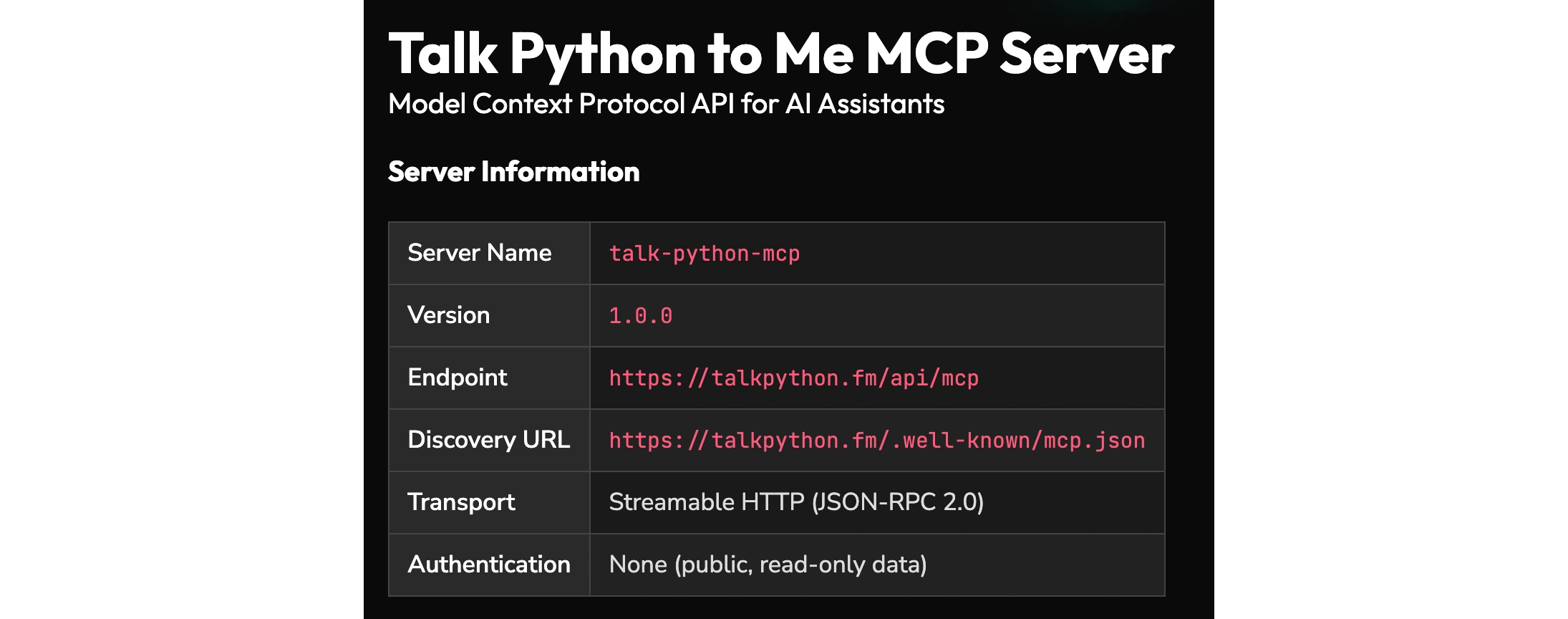
Have you ever asked AI a question about anything recent and gotten an answer along the lines of “My training data only goes back to August 2025, and here is the data up until then…” At Talk Python, with a proper MCP server, your AI has direct access to the live data from Talk Python to Me. If we publish an episode and you ask Claude one minute later what the latest episode is, you will get that exact, correct information. This is even better than what Google Search can do.
Now, in order to make full use of the MCP, you may need to install it. Unfortunately, ChatGPT does not seem to allow you to do so. Claude and Claude Code, Cursor, and other tools do. There are so many different variations these days. Just ask your AI of choice how to install a custom MCP server.
You can also visit our full developer docs for our MCP server at talkpython.fm/api/mcp/docs. If you have an idea for a tool that you think would be amazing to make this interaction better, please email Michael.
What can you do with the Talk Python MCP server?
At the time of writing, here are the capabilities our MCP server has. Your AI can combine these tools in clever ways to answer complex questions. You don’t really need to know about them to use the MCP, but I’ll list them here so you have a sense of what is possible.
- Search episodes: Search Talk Python to Me podcast episodes by keyword.
- Search guests: Search podcast guests by name.
- Get episode: Get full details for a specific podcast episode by its show ID.
- Get episodes: Retrieve a list of all podcast episodes, including their show IDs and titles. Useful for browsing available episodes before looking up specific details.
- Get guests: Get a list of all podcast guests with their names, IDs, and episode appearances. Useful for browsing available guests and seeing which episodes they appeared on.
- Get transcript: Get the full transcript text for a podcast episode.
- Get transcript WebVTT format: Get the transcript for a podcast episode in WebVTT format. WebVTT includes timestamps for each segment, useful for creating subtitles or syncing with audio.
- Get recent episodes: Get the most recently published podcast episodes.
- Search courses: Search Talk Python Training courses, chapters, and lectures by keyword. Optionally search within a specific course.
- Get courses: Get a list of all available Talk Python Training courses. Use this to browse available courses before searching for specific content.
- Get course details: Get full details for a Talk Python Training course. Returns comprehensive course information with chapter structure, lecture titles, and durations.
What is llms.txt and how does Talk Python use it?
LLMs.txt is a new web format proposed by Jeremy Howard (of fast.ai fame). The llms.txt standard was created to solve a fundamental problem: websites are designed for humans, not AI. Complex HTML pages cluttered with navigation, ads, and JavaScript don’t translate well into the concise, structured information that language models need. By adding an /llms.txt file to talkpython.fm, along with the MCP server, we’re making the podcast’s extensive archive of episodes, transcripts, and courses natively accessible to AI assistants, allowing developers to seamlessly search, reference, and build on Talk Python content directly within their AI-powered workflows without the guesswork of parsing web pages. You can read more about the motivation at llmstxt.org.
If you want to get the richest experience possible and you have a question you want to ask your AI about Talk Python to me, and it does not support MCP servers, I recommend a prompt such as this:
I would like to know the history and motivations for the changes of Pydantic over time in the Python ecosystem. Please look at the conversations on Talk Python to Me, the podcast, to learn more about why Samuel Colvin and others evolved Pydantic the way that they have.
Talk Python to Me provides an LLM AI guide at https://talkpython.fm/llms.txt Make sure you read this and use the contained information to answer my questions during this conversation.
How LLMs use Talk Python’s llms.txt
The results of how well this works varies by AI. Google’s Gemini and Claude both worked great. You can read their responses here:
ChatGPT’s Fail: I don’t know what’s up with ChatGPT lately. It seems to be fading pretty hard. My theory is that they are changing the model / inference to try to save money and resources. ChatGPT 5.2 Thinking couldn’t use that file. It said this in its thinking “log”:
Since fetching llms.txt failed, I’ll rely on the AI integration page and use it as a proxy.
Yet, at that very moment, our log file shows 200 SUCCESS in response to the OpenAI bot.
35ms HTTP 200 => "GET /llms.txt" 2.99 KB at 2026-01-19 10:26:47 from 20.169.73.33 as ai_training via Mozilla/5.0 AppleWebKit/537.36 (KHTML, like Gecko); compatible; ChatGPT-User/1.0; +https://openai.com/bot
Definitely looks like that URL is inaccessible Chat. ;) I imagine this will come back and start working again at some point. But I wanted to give you a heads up since ChatGPT is so popular.
I hope you find these AI-enhancing features useful. They are certainly not meant to replace our podcast feeds, all the features of our websites, and more. But many people are using AI to learn about Python and ask questions of the podcast. This is our attempt to get you the most accurate and most up-to-date information.
If you find the podcast useful, please share and recommend it with your friends. :)
Cheers, Michael.